
Pomodoro
A small pomodoro GUI for Windows/Linux created with PyQt5.
Features
The "Timer" tab allows you to set your desired work and rest times aswell as other settings. Starting, pausing and reseting the timer can also be done in this tab. Settings made in this tab, except repetitions and mode, are saved across multiple instances.
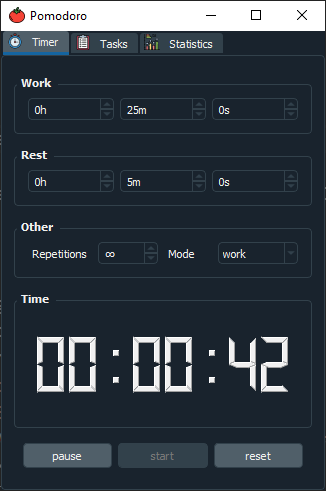
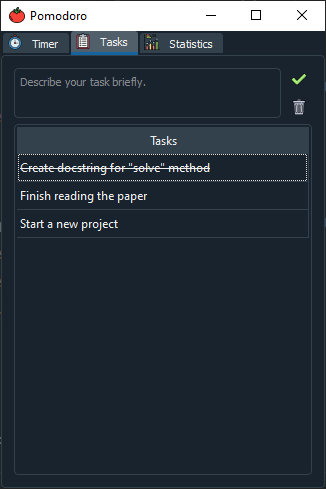
The "Tasks" tab allows you to write down your tasks that you want to accomplish in that pomodoro session. Its a good practice to break down big tasks into smaller tasks. Don't worry if you can't finish all your tasks in a session, since the tasks are also saved across multiple instances. You can mark a task as "finished" by double clicking it. Finished tasks are not saved.
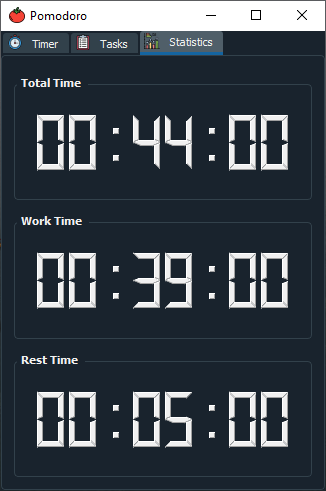
The "Statistics" tab helps you keep track of how much you have worked, rested and the total amount (rest time + work time) you have spend.
The application currently uses your systems own notification system. Make sure to turn on notifications in your system settings while using this application.

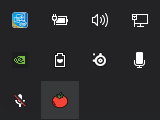
The program lives inside your systems traysystem, so "X"-ing out of the GUI will not quit the programm, it will rather hide itself so that it doesnt occupy any space in your taskbar. To quit it, right click the tomato icon in your traysystem and press the quit button.
Install/Usage
This section gives an overview on how to use the program.
General
-
Install dependencies
pip3 install -r requirements.txt
-
Run
python3 src/main.py
OR
-
Install via setup.py
pip3 install .
-
Run the program
pomodoro
Executable (Windows only)
-
Install pyinstaller
pip3 install pyinstaller
-
Create executable file
pyinstaller pomodoro.spec
This will create a "build" and a "dist" folder. The "dist" folder will contain a pomodoro folder where the executable is located. Now you're able to run the application by executing "pomodoro.exe" Alternatively install the application from the releases tab. The installer is created with InstallForge which just bundles up the folder created with pyinstaller and lets you choose an installation path. It also comes with an uninstaller.
1 maintainer

Release files for pomodoro-gui 0.0.7
For a detailed explanation of source distributions (sdists) and built distributions (wheels), please see the package formats documentation.
Source distribution (sdist)
| File | Size | Uploaded | |
|---|---|---|---|
| pomodoro-gui-0.0.7.tar.gz | 87.8 kB | Details |
Built distribution (wheel)
| File | Interpreter | ABI | Platform | Reset |
|---|---|---|---|---|
| pomodoro_gui-0.0.7-py3-none-any.whl | Python 3 | none | any | Details |
Total release size: 166.4 kB
Release files / pomodoro-gui-0.0.7.tar.gz
| Download URL | pomodoro-gui-0.0.7.tar.gz |
|---|---|
| Size | 87.8 kB |
| Tags | Source |
|
SHA-256 checksum How to use checksums |
9504dd160a4d548c4cd211771110b83ce845d3d49ccbac716925a04e317fd81e
|
|
BLAKE2b-256 checksum How to use checksums |
4573842268c9281f9b5957c4b42c112b86afa85b3d2bc1e1c4b76b5f984f091c
|
| Upload date | |
|
Uploaded using Trusted Publishing? What is trusted publishing? |
No |
| Uploaded via |
twine/3.3.0 pkginfo/1.7.0 requests/2.22.0 setuptools/45.2.0 requests-toolbelt/0.9.1 tqdm/4.56.0 CPython/3.8.5
|
Release files / pomodoro_gui-0.0.7-py3-none-any.whl
| Download URL | pomodoro_gui-0.0.7-py3-none-any.whl |
|---|---|
| Size | 78.6 kB |
| Tags | Python 3 |
|
SHA-256 checksum How to use checksums |
623f17a174f13114dd3d3fa8a9655f6949eb0e0e66a95286b805d6d9b49c8c07
|
|
BLAKE2b-256 checksum How to use checksums |
0cb40308779da6303ac512f39a0868ee6fa6b0a74d906bed82df8d816dd28cce
|
| Upload date | |
|
Uploaded using Trusted Publishing? What is trusted publishing? |
No |
| Uploaded via |
twine/3.3.0 pkginfo/1.7.0 requests/2.22.0 setuptools/45.2.0 requests-toolbelt/0.9.1 tqdm/4.56.0 CPython/3.8.5
|














