
postgresql-orm



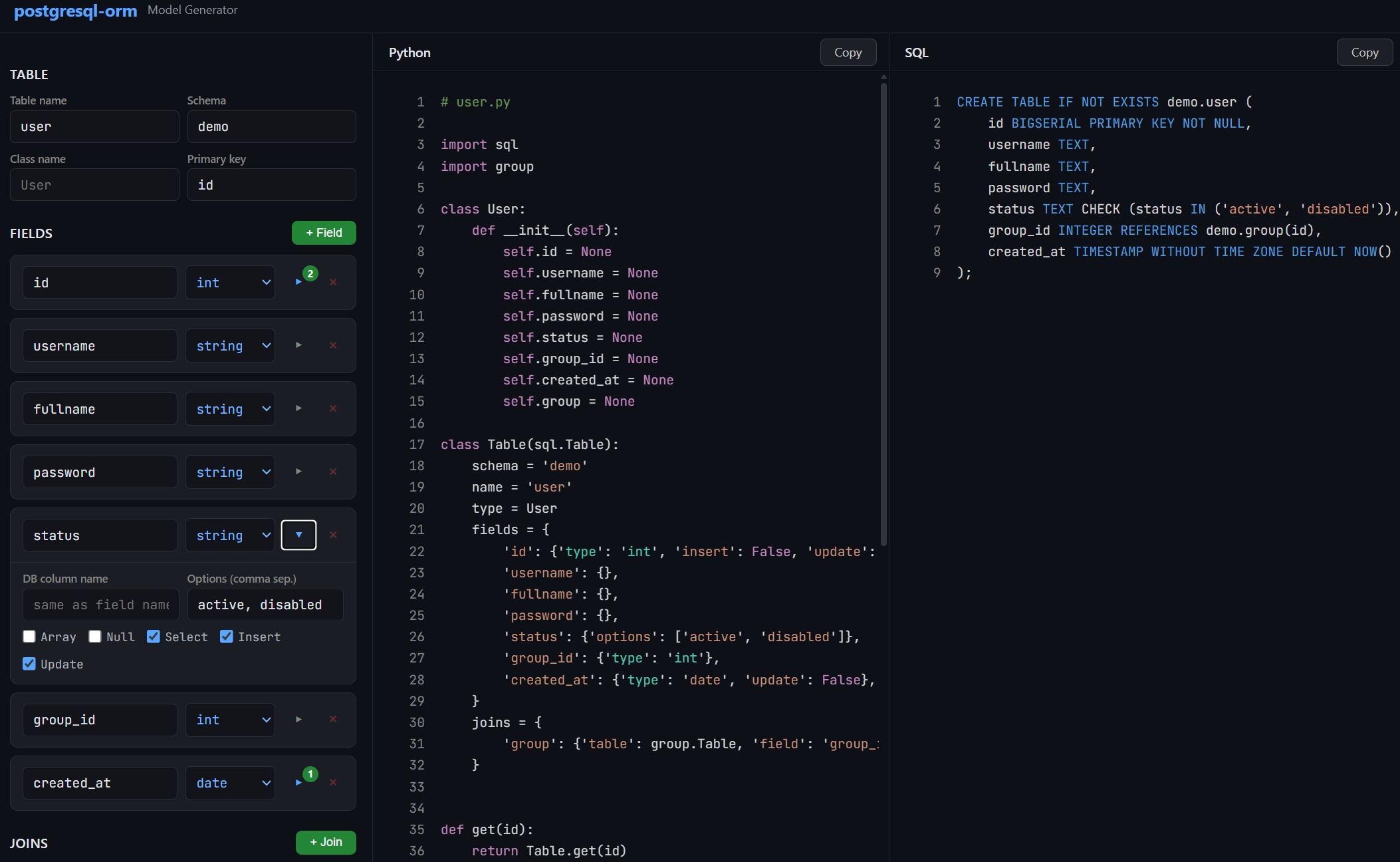
Open Interactive Model Builder — build your data class, Table model, CRUD functions, and CREATE TABLE script from an interactive configurator. No coding required to get started.
A lightweight Python ORM for PostgreSQL built on top of psycopg2. Define your tables as Python classes, and the library handles query generation, type casting, filtering, pagination, joins, and object mapping — all through clean, minimal configuration.
pip install psycopg2-binary
pip install postgresql-orm
Table of Contents
- Quick Start
- Design Philosophy
- Database Connection
- Defining Models
- Fields
- CRUD Operations
- Querying Multiple Rows
- Joins
- Custom Queries
- Debug Logging
- Complete Example
Quick Start
import sql
import logging as log

# Enable debug logging to see generated SQL
log.basicConfig(level=log.DEBUG)

# Connect to PostgreSQL
sql.db = sql.Db('dbname=mydb user=postgres password=secret host=127.0.0.1 port=5432')

# Define a data class
class User:
    def __init__(self):
        self.id = None
        self.username = None
        self.email = None

# Define the model
class Users(sql.Table):
    name = 'users'
    type = User
    fields = {
        'id': {'type': 'int'},
        'username': {},
        'email': {},
    }

# Insert
user = Users.add({'username': 'john', 'email': 'john@example.com'})
print(user.id, user.username)  # 1 john

# Get by ID
user = Users.get(1)

# Update
user = Users.save(1, {'email': 'newemail@example.com'})

# Delete
Users.delete(1)

# List with filtering and pagination
result = Users.filter(page=1, limit=20, filter={'username': 'john'})
print(result.total)  # Total matching rows
for user in result.items:
    print(user.username)
Design Philosophy
This ORM was written with a single principle: generate the most optimal SQL possible and minimize round trips to the database.
Most ORMs treat insert, select, and join as separate operations. You insert a row, then query it back, then query its relations — that's 2-3 round trips for one logical operation. This library does it all in one query.
One Query per Operation
Every CRUD method — add, get, save, filter — produces exactly one SQL query that does everything: the write, the read-back, and all joins.
For example, when you insert a user that belongs to a group:
user = Users.add({'username': 'john', 'group_id': 1})
print(user.group.name)  # 'Manager' — already loaded, no extra query
The generated SQL uses a CTE (Common Table Expression) with RETURNING to insert the row, immediately select it back with all fields, and LEFT JOIN the related group table — all in a single statement:
WITH "users" AS (
    INSERT INTO "users" ("username", "group_id")
    VALUES ('john', '1')
    RETURNING users."id", users."username", users."group_id", users."created_at"
)
SELECT users."id", users."username", users."group_id", users."created_at",
       groups."id", groups."name"
FROM "users"
LEFT JOIN "groups" ON "groups"."id" = "users"."group_id"
The same pattern applies to save (update). You update fields and get back the full object with all its relations in one round trip:
WITH "users" AS (
    UPDATE "users" SET "status" = 'disabled'
    WHERE "users"."id" = 1
    RETURNING users."id", users."username", ...
)
SELECT users.*, groups."id", groups."name"
FROM "users"
LEFT JOIN "groups" ON "groups"."id" = "users"."group_id"
Automatic Relation Loading via LEFT JOIN
When you define a join on a model, every query that touches that model automatically includes the LEFT JOIN. There is no lazy loading, no N+1 problem, and no need to remember to "include" or "eager load" relations. If the model says it has a join, the join is always there:
user = Users.get(1)       # LEFT JOIN included
user = Users.save(1, {})  # LEFT JOIN included
users = Users.all()       # LEFT JOIN included
result = Users.filter()   # LEFT JOIN included
The joined data becomes a nested object on the result. If a user has a group join, then user.group is a full Group object with all its own fields populated.
Pagination Without a Count Query
The filter method returns paginated results with a total count. Many ORMs run two queries for this — one for the rows and one for SELECT COUNT(*). This library uses PostgreSQL's window function instead:
SELECT ..., COUNT(*) OVER()
FROM "users"
WHERE ...
LIMIT 25 OFFSET 0
COUNT(*) OVER() computes the total matching rows as part of the same query that fetches the page, so pagination costs exactly one round trip.
Parameterized Queries
All user-provided values go through psycopg2's parameter binding (%s placeholders). The ORM never interpolates values into SQL strings. This is handled automatically — you pass Python dicts and get safe, parameterized queries.
Configure the default database connection by assigning an sql.Db instance to sql.db:
import sql

sql.db = sql.Db('dbname=mydb user=postgres password=secret host=127.0.0.1 port=5432')
The connection string is a standard psycopg2 DSN (data source name).
By default, a pool of 20 thread-safe connections is created. You can change this:
sql.db = sql.Db('...', size=50)
The connection pool is initialized lazily — the first actual query triggers pool creation. To initialize it manually, call:
sql.db.init()
Under the hood, sql.db.get() acquires a connection from the pool and sql.db.put(conn) returns it. You normally don't call these directly unless you're writing custom queries.
Per-Model Connections
Each model can have its own database connection. This is useful when tables live on different servers or databases:
class Users(sql.Table):
    db = sql.Db('host=10.0.0.1 dbname=core')
    name = 'users'
    fields = {}

class Logs(sql.Table):
    db = sql.Db('host=10.0.0.2 dbname=analytics')
    name = 'logs'
    fields = {}
Defining Models
A model is made of two parts: a data class (a plain Python class representing a row) and a Table subclass (the model definition that maps to the database table).
The Data Class
The data class is a simple Python object. Its properties correspond to the columns you want to work with:
class User:
    def __init__(self):
        self.id = None
        self.username = None
        self.email = None
        self.created_at = None
Defining properties explicitly is optional — the ORM sets attributes dynamically on the object. But having them written out makes your code much more readable and IDE-friendly.
If your __init__ accepts keyword arguments, the ORM will pass matching field values as constructor arguments. Any remaining fields are set as attributes after construction:
class User:
    def __init__(self, id=None, username=None):
        self.id = id
        self.username = username
        # 'email' will be set as an attribute after __init__
The Table Model
The model is a class that extends sql.Table:
class Users(sql.Table):
    name = 'users'
    type = User
    fields = {
        'id': {'type': 'int'},
        'username': {},
        'email': {},
        'created_at': {'type': 'date'},
    }
A common naming convention: the data class is singular (User) and the model is plural (Users), since the model represents the table (a collection of users).
Schema and Table Name
class Users(sql.Table):
    schema = 'public'   # Schema name, default is None (which means the database default, usually 'public')
    name = 'users'      # Actual table name in the database (required)
You can set a default schema for all models:
sql.Table.schema = 'myapp'
Primary Key
The default primary key field is 'id'. Override it if your table uses a different column:
class Profiles(sql.Table):
    id = 'user_id'  # Primary key column
    name = 'profiles'
    fields = {}
Fields
The fields dictionary is the core of every model. Each key is a field name, and the value is a dictionary of options describing how that field behaves.
Field Types
Specify the type with the 'type' key. The default is 'string'.
| Type | Python Cast | Notes |
|---|---|---|
'string' |
str(value) |
Default type when 'type' is omitted |
'int' |
int(value) |
|
'float' |
float(value) |
|
'bool' |
bool(value) |
|
'date' |
dateutil.parser.parse(value) |
Parses date strings via python-dateutil |
'json' |
json.dumps(value) on write, json.loads(value) on read |
Stored as JSON/JSONB in PostgreSQL |
Example:
fields = {
    'id': {'type': 'int'},
    'username': {},                 # Defaults to 'string'
    'score': {'type': 'float'},
    'is_active': {'type': 'bool'},
    'created_at': {'type': 'date'},
    'metadata': {'type': 'json'},
}
Field Options
Here is the full list of options you can set on a field:
fields = {
    'name': {
        'type': 'string',           # Type casting (see table above)
        'field': 'actual_column',    # Map to a different database column name
        'array': True,               # PostgreSQL array column
        'options': ['a', 'b', 'c'],  # Restrict allowed values
        'encoder': some_function,    # Transform value before writing to DB
        'decoder': some_function,    # Transform value after reading from DB
        'select': True,              # Include in SELECT queries (default: True)
        'insert': True,              # Include in INSERT queries (default: True)
        'update': True,              # Include in UPDATE queries (default: True)
        'null': False,               # Allow None values (default: False)
        'keys': ['en', 'ka'],        # For JSON fields: allowed keys for ordering
    }
}
The null Option
By default, if a field's value is None, it is silently skipped during insert and update. If you set 'null': True, then None values are explicitly written as SQL NULL:
fields = {
    'deleted_at': {'type': 'date', 'null': True},
}

# With null: True, this sets deleted_at = NULL in the database
Users.save(1, {'deleted_at': None})

# With null: False (default), the field is ignored entirely
The options Option
Restrict a field to a set of allowed values. Any value not in the list raises an InvalidValue error:
fields = {
    'status': {'options': ['active', 'disabled', 'pending']},
    'priority': {'type': 'int', 'options': [1, 2, 3, 4, 5]},
}

Users.add({'status': 'active'})    # OK
Users.add({'status': 'banned'})    # Raises InvalidValue
Encoders and Decoders
An encoder transforms the value before it's written to the database. A decoder transforms it after reading:
import hashlib

def md5(plain):
    return hashlib.md5(plain.encode()).hexdigest()

fields = {
    'password': {'encoder': md5},   # '123' is stored as '202cb962ac59075b964b07152d234b70'
}
The encoder runs after type casting and option validation, so the value is guaranteed to be the right type and a valid option before encoding.
A decoder example:
fields = {
    'config': {'decoder': lambda x: json.loads(x) if x else {}},
}
Array Fields
For PostgreSQL array columns (e.g., TEXT[], INTEGER[]), set 'array': True:
fields = {
    'tags': {'array': True},               # String array
    'scores': {'type': 'int', 'array': True},  # Integer array
}

Users.add({'tags': ['python', 'postgresql']})
When inserting or updating, you must pass a Python list or tuple. The ORM converts it to PostgreSQL array syntax ({val1,val2,...}).
When filtering with where, array fields use the ANY() operator:
# Generates: %s = ANY(users."tags")
Users.all(filter={'tags': ['python']})
JSON Fields
For PostgreSQL JSON/JSONB columns:
fields = {
    'title': {
        'type': 'json',
        'keys': ['en', 'ka', 'ru'],  # Allowed keys (used for ordering)
    }
}
Values are automatically serialized with json.dumps() on write and deserialized with json.loads() on read.
The keys option is used when ordering by a JSON field — see Ordering.
When used in a where filter, JSON fields are searched with ILIKE on their text representation:
# Generates: users."title"::TEXT ILIKE '%hello%'
Users.all(filter={'title': 'hello'})
Controlling Select, Insert, and Update
You can exclude a field from specific operations:
fields = {
    'id': {'type': 'int', 'insert': False},          # Auto-generated, don't include in INSERT
    'created_at': {'type': 'date', 'update': False},  # Set once, never updated
    'internal': {'select': False},                     # Never included in SELECT results
}
Mapping to a Different Column Name
When your Python field name doesn't match the database column name:
fields = {
    'group_id': {'type': 'int', 'field': 'grp_id'},  # Python uses 'group_id', DB column is 'grp_id'
}
CRUD Operations
All CRUD methods are class methods on your Table subclass. They handle connection management, query generation, execution, and object creation automatically.
Add (Insert)
user = Users.add({
    'username': 'john',
    'fullname': 'John Doe',
    'password': '123',
    'status': 'active',
    'group_id': 1,
})
Returns the newly created object with all fields populated — including auto-generated ones like id and created_at, and including all joined relations. After this single call, user.group.name is already available without any extra query.
The query uses a CTE with RETURNING to insert, select back, and join all related tables in one round trip:
WITH "users" AS (
    INSERT INTO "demo"."users" ("username", "fullname", "password", "status", "group_id")
    VALUES ('john', 'John Doe', '202cb962ac59075b964b07152d234b70', 'active', '1')
    RETURNING users."id", users."username", users."fullname", users."password",
              users."status", users."group_id", users."created_at"
)
SELECT users."id", users."username", ..., groups."id", groups."name"
FROM "users"
LEFT JOIN "demo"."groups" ON "groups"."id" = "users"."group_id"
Without this pattern, you would need to insert, then select, then join — three operations. Here it's one.
Unique constraint handling: If the insert violates a unique index named {table}_unique_{field}_index, the ORM raises a UniqueError with the field name, so you can handle duplicates gracefully.
Get (Select One)
user = Users.get(1)
print(user.username)     # 'john'
print(user.group.name)   # 'Manager' — loaded via LEFT JOIN in the same query
Retrieves a single row by primary key. Returns an object of the model's type class, or None if not found. All defined joins are loaded automatically — user.group is a full Group object, not just a foreign key.
The generated query:
SELECT users."id", users."username", ..., groups."id", groups."name"
FROM "demo"."users"
LEFT JOIN "demo"."groups" ON "groups"."id" = "users"."group_id"
WHERE "users"."id" = 1 AND 1=1
You can pass an additional filter:
# Get user 1, but only if status is 'active'
user = Users.get(1, filter={'status': 'active'})
Save (Update)
user = Users.save(1, {'status': 'disabled', 'password': 'newpassword'})
print(user.status)       # 'disabled'
print(user.group.name)   # 'Manager' — still loaded, same single query
Updates the row with the given primary key. You only pass the fields you want to change — at least one is required. Returns the updated object with all joins populated, or None if no row matched.
Like add, this uses a CTE to update, select back, and join in a single query:
WITH "users" AS (
    UPDATE "demo"."users" SET "password" = '...', "status" = 'disabled'
    WHERE "users"."id" = 1 AND 1=1
    RETURNING users."id", users."username", users."fullname", ...
)
SELECT users."id", users."username", ..., groups."id", groups."name"
FROM "users"
LEFT JOIN "demo"."groups" ON "groups"."id" = "users"."group_id"
You update, get the full refreshed object, and load all relations — one round trip.
You can pass an additional filter to restrict which rows can be updated:
# Only update if the user's current status is 'active'
user = Users.save(1, {'status': 'disabled'}, filter={'status': 'active'})
Delete
success = Users.delete(1) # Returns True if a row was deleted, False otherwise
With a filter:
# Only delete if user belongs to a specific group
Users.delete(1, filter={'group_id': 2})
Querying Multiple Rows
All
Returns all matching rows as a list of objects:
users = Users.all(
    filter={'status': 'active'},
    search={'username': 'john', 'fullname': 'john'},
    order={'field': 'username', 'method': 'asc'},
    limit=50,
)
All parameters are optional. Without any arguments, Users.all() returns all rows ordered by id DESC.
Filter (Paginated)
Like all, but with pagination. Returns an sql.Result object instead of a plain list:
result = Users.filter(
    page=2,
    limit=25,
    filter={'status': 'active'},
    search={'username': 'j'},
    order={'field': 'username', 'method': 'asc'},
)

print(result.total)   # Total number of matching rows (across all pages)
for user in result.items:
    print(user.username)
The maximum limit is capped at 100. Pagination is done with LIMIT and OFFSET, and the total count is computed using COUNT(*) OVER() as a window function in the same query — no separate count query needed:
SELECT users."id", users."username", ..., groups."id", groups."name",
       COUNT(*) OVER()
FROM "demo"."users"
LEFT JOIN "demo"."groups" ON "groups"."id" = "users"."group_id"
WHERE (users."username" ILIKE '%j%') AND (users."status" = 'active')
ORDER BY users."username" ASC
LIMIT 25 OFFSET 25
This means listing a page of results with a total count, full text search, filtering, ordering, and joined relations all happens in a single query.
Filtering
The filter parameter uses AND logic — all conditions must match:
# status = 'active' AND group_id = 1
Users.all(filter={'status': 'active', 'group_id': 1})
How filtering works depends on the field type:
| Field Type | Filter Behavior | Example SQL |
|---|---|---|
string |
ILIKE (case-insensitive partial match) |
users."username"::TEXT ILIKE '%john%' |
int, float, date |
Exact match | users."age" = 25 |
bool |
Exact match | users."is_active" = true |
options (any type) |
Exact match | users."status" = 'active' |
json |
ILIKE on text cast |
users."data"::TEXT ILIKE '%search%' |
array |
ANY() |
%s = ANY(users."tags") |
Searching
The search parameter uses OR logic — any condition matching is enough:
# username ILIKE '%j%' OR fullname ILIKE '%j%'
Users.all(search={'username': 'j', 'fullname': 'j'})
When both filter and search are used, they combine as:
WHERE (search_condition_1 OR search_condition_2) AND (filter_condition_1 AND filter_condition_2)
Ordering
Users.all(order={'field': 'username', 'method': 'asc'})
The method must be 'asc' or 'desc' (case-insensitive). If omitted, PostgreSQL's default ordering applies.
For JSON fields, use dot notation to order by a specific key:
# ORDER BY users."title"->'en'
Products.all(order={'field': 'title.en', 'method': 'asc'})
The key must be listed in the field's 'keys' option.
Range Filters (from / to)
For int, float, and date fields, pass a dict with 'from' and/or 'to' keys:
# id >= 10 AND id <= 100
Users.all(filter={'id': {'from': 10, 'to': 100}})

# created_at >= '2024-01-01'
Users.all(filter={'created_at': {'from': '2024-01-01'}})

# score <= 50.0
Users.all(filter={'score': {'to': 50.0}})
IN Filters (Lists)
For int, float, and date fields, pass a list to generate an IN clause:
# id IN (1, 2, 3, 5, 8)
Users.all(filter={'id': [1, 2, 3, 5, 8]})
For options fields, pass a list/tuple/set to get IN:
# status IN ('active', 'pending')
Users.all(filter={'status': ('active', 'pending')})
Joins
Joins are the heart of this ORM's efficiency. When a model defines a join, every operation on that model — get, add, save, all, filter — automatically includes a LEFT JOIN to load the related data. There is no lazy loading, no separate query, and no N+1 problem. You always get the full object graph in one round trip.
Defining Joins
Define joins on the model using the joins dictionary. Each entry maps a name to a joined table and the local foreign key field that references it:
class Groups(sql.Table):
    name = 'groups'
    type = Group
    fields = {
        'id': {'type': 'int'},
        'name': {},
    }

class Users(sql.Table):
    name = 'users'
    type = User
    fields = {
        'id': {'type': 'int'},
        'username': {},
        'group_id': {'type': 'int'},
    }
    joins = {
        'group': {'table': Groups, 'field': 'group_id'},
    }
This tells the ORM: "users has a foreign key group_id that references the groups table. Load it as group on the result object."
Every query now includes:
LEFT JOIN "groups" ON "groups"."id" = "users"."group_id"
The join name ('group') becomes an attribute on the returned object. The attribute is a full instance of the joined model's type class:
user = Users.get(1)
print(user.group_id)     # 1 — the raw foreign key
print(user.group)        # <Group object>
print(user.group.id)     # 1
print(user.group.name)   # 'Manager'
This works the same way across all operations:
# add — the returned user already has user.group loaded
user = Users.add({'username': 'jane', 'group_id': 2})
print(user.group.name)  # 'Customer'

# save — the returned user has the refreshed group
user = Users.save(1, {'group_id': 2})
print(user.group.name)  # 'Customer'

# all / filter — every user in the list has their group loaded
users = Users.all()
for u in users:
    print(u.username, u.group.name)
A model can have multiple joins. For example, if a product has both a company and a category:
class Products(sql.Table):
    name = 'products'
    type = Product
    fields = {
        'id': {'type': 'int'},
        'title': {},
        'company_id': {'type': 'int'},
        'category_id': {'type': 'int'},
    }
    joins = {
        'company': {'table': Companies, 'field': 'company_id'},
        'category': {'table': Categories, 'field': 'category_id'},
    }

product = Products.get(1)
print(product.company.name)   # 'Acme Corp'
print(product.category.name)  # 'Electronics'
Both LEFT JOINs are included in every query. One round trip, full object graph.
Filtering on Joined Tables
Pass a nested dict using the join name as the key:
# Filter: groups.id = 1
Users.all(filter={'status': 'active', 'group': {'id': 1}})
This works for both filter and search:
Users.all(
    filter={'group': {'id': 1}},
    search={'username': 'j', 'group': {'name': 'man'}},
)
Ordering on Joined Tables
Use the join name as a prefix with dot notation:
# ORDER BY groups."name" ASC
Users.filter(order={'field': 'group.name', 'method': 'asc'})
Custom Queries
For queries that go beyond the built-in CRUD, use the model's utilities for query building and object creation:
import sql

db = None
try:
    db = Users.db.get()
    cursor = db.cursor()
    cursor.execute(*sql.debug(f"""
        SELECT {Users.select()}
        FROM {Users}
        WHERE {Users('username')} = %s
        AND {Users('password')} = %s
    """, ('john', md5('123'))))

    if cursor.rowcount > 0:
        user = Users.create(cursor.fetchone())
        print(user.username)
finally:
    if db:
        db.commit()
        Users.db.put(db)
What each helper does:
| Expression | Output | Description |
|---|---|---|
Users.select() |
users."id", users."username", ... |
All selectable columns, fully qualified |
str(Users) or using it in an f-string |
"demo"."users" |
Quoted schema.table reference |
Users('username') |
"users"."username" |
Quoted table.column reference |
Users.create(row) |
User object |
Converts a raw tuple from cursor.fetchone() into an object |
sql.debug(query, params) |
(query, params) |
Logs the query with colored formatting and returns the pair for cursor.execute() |
You can also run fully raw queries with sql.query():
sql.db = sql.Db('...')

result = sql.query('SELECT COUNT(*) FROM users WHERE status = %s', ['active'])
# Returns a list of tuples, or None if no rows
Debug Logging
Set the log level to DEBUG to see every generated SQL query with colored terminal output:
import logging as log
log.basicConfig(level=log.DEBUG)
Queries are logged with syntax highlighting — keywords like SELECT, WHERE, JOIN are color-coded for readability.
To temporarily suppress query logging (useful when inserting many rows in a loop):
log.getLogger().setLevel(log.INFO)
# ... bulk operations ...
log.getLogger().setLevel(log.DEBUG)
Complete Example
This example creates a schema with two tables, defines models, and demonstrates all major operations.
import sql
import hashlib
import json
import logging as log

log.basicConfig(level=log.DEBUG)

# --- Setup ---

sql.db = sql.Db('dbname=postgres user=postgres password=1234 host=127.0.0.1 port=5432')
sql.Table.schema = 'demo'

sql.query('CREATE SCHEMA IF NOT EXISTS demo')

sql.query("""
    CREATE TABLE IF NOT EXISTS demo.groups (
        id SMALLSERIAL PRIMARY KEY NOT NULL,
        name VARCHAR(32)
    )
""")

sql.query("""
    CREATE TABLE IF NOT EXISTS demo.users (
        id BIGSERIAL PRIMARY KEY NOT NULL,
        username VARCHAR(64) NOT NULL,
        fullname VARCHAR(64) NOT NULL,
        password CHAR(32) NOT NULL,
        status VARCHAR(8) NOT NULL,
        group_id SMALLINT REFERENCES demo.groups(id),
        created_at TIMESTAMP WITHOUT TIME ZONE DEFAULT NOW()
    )
""")

# --- Helpers ---

def md5(plain):
    return hashlib.md5(plain.encode()).hexdigest()

def pprint(obj):
    print(json.dumps(obj, indent=4, default=lambda x: x.__dict__ if hasattr(x, '__dict__') else str(x)))

# --- Data Classes ---

class Group:
    def __init__(self):
        self.id = None
        self.name = None

class User:
    def __init__(self):
        self.id = None
        self.username = None
        self.fullname = None
        self.password = None
        self.status = None
        self.group_id = None
        self.created_at = None
        self.group = None

# --- Models ---

class Groups(sql.Table):
    name = 'groups'
    type = Group
    fields = {
        'id': {'type': 'int'},
        'name': {},
    }

class Users(sql.Table):
    name = 'users'
    type = User
    fields = {
        'id': {'type': 'int'},
        'username': {},
        'fullname': {},
        'password': {'encoder': md5},
        'status': {'options': ['active', 'disabled']},
        'group_id': {'type': 'int'},
        'created_at': {'type': 'date'},
    }
    joins = {
        'group': {'table': Groups, 'field': 'group_id'},
    }

# --- Operations ---

# Create groups
manager = Groups.add({'name': 'Manager'})
customer = Groups.add({'name': 'Customer'})

# Create a user
user = Users.add({
    'username': 'john',
    'fullname': 'John Doe',
    'password': '123',
    'status': 'active',
    'group_id': manager.id,
})
pprint(user)
# user.group.name == 'Manager'

# Retrieve by ID
user = Users.get(1)

# Update
user = Users.save(1, {'status': 'disabled', 'password': 'newpass'})

# List with filters
users = Users.all(
    filter={'status': 'active', 'group': {'id': customer.id}},
    search={'username': 'j', 'fullname': 'j'},
    order={'field': 'username', 'method': 'asc'},
    limit=10,
)

# Paginated results
result = Users.filter(
    page=1,
    limit=25,
    filter={'status': 'active'},
    order={'field': 'id', 'method': 'desc'},
)
print(f"Page 1 of {result.total} total results")
for u in result.items:
    print(u.username, u.group.name)

# Delete
Users.delete(1)

# Custom query
db = None
try:
    db = Users.db.get()
    cursor = db.cursor()
    cursor.execute(*sql.debug(f"""
        SELECT {Users.select()}
        FROM {Users}
        WHERE {Users('username')} = %s
    """, ['john']))
    if cursor.rowcount > 0:
        user = Users.create(cursor.fetchone())
        pprint(user)
finally:
    if db:
        db.commit()
        Users.db.put(db)
Why PostgreSQL Only
This ORM generates PostgreSQL-specific SQL by design. Every core feature relies on capabilities that other databases either lack or implement differently. This is an intentional trade-off: by targeting one database, every query is optimal.
Here's what breaks if you try to use the same patterns with MySQL or SQLite:
| Feature | Used In | PostgreSQL | MySQL | SQLite |
|---|---|---|---|---|
RETURNING |
add, save (CTE single-query pattern) | ✓ | ✗ | ✓ (3.35+) |
CTE (WITH ... AS) |
add, save | ✓ | ✓ (8.0+) | ✓ (3.8.3+) |
COUNT(*) OVER() |
filter (pagination without count query) | ✓ | ✓ (8.0+) | ✓ (3.25+) |
ILIKE |
where (case-insensitive string search) | ✓ | ✗ | ✗ |
ANY() |
where (array field filtering) | ✓ | ✗ | ✗ |
Array types (TEXT[], INT[]) |
array fields | ✓ | ✗ | ✗ |
JSONB + ::TEXT cast |
where (JSON search), order (JSON keys) | ✓ | ✗ | ✗ |
psycopg2 connection driver |
all database access | ✓ | ✗ | ✗ |
MySQL is missing RETURNING, which kills the core single-query architecture. Without it, insert and update would require separate SELECT queries — exactly the multi-query pattern this ORM was built to eliminate. MariaDB (10.5+) does support RETURNING, making it theoretically closer to compatibility.
SQLite has RETURNING and CTEs, but lacks ILIKE, ANY(), array types, and JSONB — so filtering, searching, and array/JSON fields would all break. It also uses a completely different connection library.
The psycopg2 driver dependency means neither MySQL nor SQLite can even connect without rewriting the Db class. This is PostgreSQL-native by design, not by accident.
Error Reference
| Exception | When |
|---|---|
sql.MissingInput |
No data passed to insert/update, or None passed to where |
sql.MissingField |
Order field is empty or missing |
sql.MissingConfig |
JSON field missing keys when ordering by a JSON key |
sql.UnknownField |
Field name not found in the model's fields dict |
sql.UniqueError |
Insert or update violates a unique constraint |
sql.InvalidValue |
Value not in options, or invalid order method |
sql.InvalidDate |
Date string couldn't be parsed |
sql.InvalidInt |
Value couldn't be cast to int |
sql.InvalidFloat |
Value couldn't be cast to float |
1 maintainer

Release files for postgresql-orm 0.5.9
For a detailed explanation of source distributions (sdists) and built distributions (wheels), please see the package formats documentation.
Source distribution (sdist)
| File | Size | Uploaded | |
|---|---|---|---|
| postgresql_orm-0.5.9.tar.gz | 37.1 kB | Details |
Built distribution (wheel)
| File | Interpreter | ABI | Platform | Reset |
|---|---|---|---|---|
| postgresql_orm-0.5.9-py2.py3-none-any.whl | Python 3, Python 2 | none | any | Details |
Total release size: 55.5 kB
Release files / postgresql_orm-0.5.9.tar.gz
| Download URL | postgresql_orm-0.5.9.tar.gz |
|---|---|
| Size | 37.1 kB |
| Tags | Source |
|
SHA-256 checksum How to use checksums |
f94724e5d552efc5d17a7fd977234bc0b2231feb0bbf13331c0bfd21befcaff2
|
|
BLAKE2b-256 checksum How to use checksums |
3cf1ec935283e5bb56557e7f0b5d508bdf0adf17eaaeab0fbd57da07d2a7a745
|
| Upload date | |
|
Uploaded using Trusted Publishing? What is trusted publishing? |
No |
| Uploaded via |
twine/6.2.0 CPython/3.10.11
|
Release files / postgresql_orm-0.5.9-py2.py3-none-any.whl
| Download URL | postgresql_orm-0.5.9-py2.py3-none-any.whl |
|---|---|
| Size | 18.4 kB |
| Tags | Python 2 Python 3 |
|
SHA-256 checksum How to use checksums |
7ad964d99d3a25a05ea034fafdc17552f9bdd663b53c03aabccac69a22992380
|
|
BLAKE2b-256 checksum How to use checksums |
01a448f1424e94c0fa21098c54560d402748d204b0b027b3875568598417c3b0
|
| Upload date | |
|
Uploaded using Trusted Publishing? What is trusted publishing? |
No |
| Uploaded via |
twine/6.2.0 CPython/3.10.11
|














