
PowerText
| English | 简体中文 |
📖 Introduction
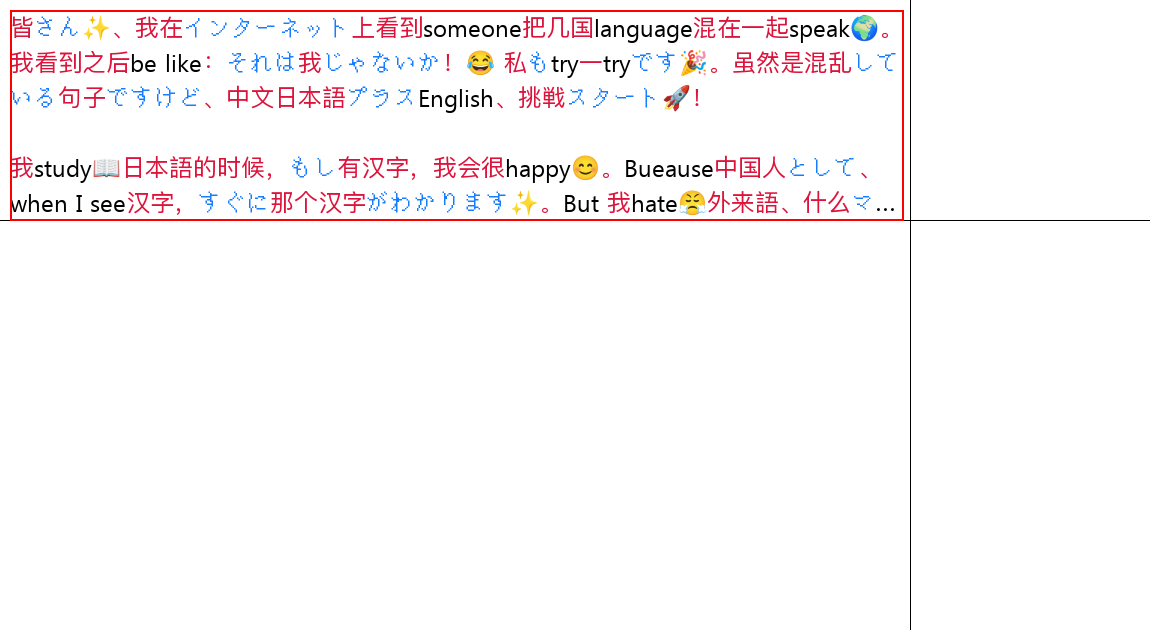
PowerText is a text renderer for Pillow that supports emojis, multi-font matching, automatic word wrapping, and text truncation (auto-ellipsis).
⬇️ Installation
python -m pip install PowerText
Alternatively, you can install from source:
git clone https://github.com/xiaosuyyds/PowerText.git
python -m pip install .
🧑💻 Usage
Example Code
import power_text
import re
from PIL import Image, ImageFont
import emoji

# Regex for Japanese Kana
jap = re.compile(r'[\u3040-\u309F\u30A0-\u30FF]')

img = Image.new("RGB", (1150, 630), (255, 255, 255))
# Note: Please ensure you have these font files or replace them with your local font paths
font1 = ImageFont.truetype(r'PINGFANG MEDIUM.TTF', 24)
font2 = ImageFont.truetype(r'unifont-16.0.02.otf', 24)
font3 = ImageFont.truetype(r'Segoe UI.ttf', 24)
# Note: For fonts like Noto Color Emoji, pay attention to the font size (e.g., 109),
# otherwise they may fail to load correctly.
font_emoji = ImageFont.truetype("NotoColorEmoji.ttf", 109)


power_text.draw_text(
    img,
    (10, 10),  # Starting xy coordinates

    """
皆さん✨、我在インターネット上看到someone把几国language混在一起speak🌍。我看到之后be like:それは我じゃないか!😂 私もtry一tryです🎉。虽然是混乱している句子ですけど、中文日本語プラスEnglish、挑戦スタート🚀!

我study📖日本語的时候,もし有汉字,我会很happy😊。Bueause中国人として、when I see汉字,すぐに那个汉字がわかります✨。But 我hate😤外来語、什么マクドナルド🍔、スターバックス☕、グーグル🔍、ディズニーランド🏰、根本记不住カタカナhow to写、太難しい😭。

以上です✌️,byebye👋!

awa
    """.strip(),
    [
        # Match Latin characters and numbers using font3 (Segoe UI), default color
        power_text.Font(font3, lambda data: data['text'].lower() in "abcdefghijklmnopqrstuvwxyz0123456789"),
        # Match Japanese Kana using font2 (unifont), colored blue
        power_text.Font(font2, lambda data: jap.match(data['text']) is not None, (22, 125, 255)),
        # Match emojis using font_emoji (Noto Color Emoji), set 'size' for automatic scaling to match text
        power_text.Font(font_emoji, lambda data: emoji.is_emoji(data['text']), size=24),
        # Fallback for other characters (e.g., CJK ideographs) using font1 (PingFang), colored red
        power_text.Font(font1, lambda _: True, (220, 20, 60))
    ],
    (0, 0, 0),  # Default font color (black)
    max_x=886,  # Maximum width (auto line wrap if exceeded)
    max_y=200,  # Maximum height (auto truncation if exceeded)
    end_text="..."  # Truncation symbol
)
img.show()
The output of the above code is as follows (Source Code):
Showcases
- murainbot-plugin-codeshare: Uses PowerText for multi-color code rendering.
License
Copyright 2025-2026 Xiaosu.
Distributed under the terms of the MPL 2.0 License.
1 maintainer

Metadata
1 maintainer
Release files for PowerText 0.7.1
For a detailed explanation of source distributions (sdists) and built distributions (wheels), please see the package formats documentation.
Source distribution (sdist)
| File | Size | Uploaded | |
|---|---|---|---|
| powertext-0.7.1.tar.gz | 16.2 kB | Details |
Built distribution (wheel)
| File | Interpreter | ABI | Platform | Reset |
|---|---|---|---|---|
| powertext-0.7.1-py3-none-any.whl | Python 3 | none | any | Details |
Total release size: 32.8 kB
Release files / powertext-0.7.1.tar.gz
| Download URL | powertext-0.7.1.tar.gz |
|---|---|
| Size | 16.2 kB |
| Tags | Source |
|
SHA-256 checksum How to use checksums |
5afc271721856239e5dfe1fd03d2d0103e04474a8430883ac5c410bc558ce21e
|
|
BLAKE2b-256 checksum How to use checksums |
b3eca13c7678101a5fa86d40c4f19b721b0024660a423dd4c22f48910a35e04a
|
| Upload date | |
|
Uploaded using Trusted Publishing? What is trusted publishing? |
Yes |
| Uploaded via |
twine/6.1.0 CPython/3.13.7
|
Provenance
Provenance describes where a file came from. On PyPI, provenance is shared via attestations, which provide a verifiable record of the build or publishing details. View details, limitations and caveats.


PyPI Publish Attestation
PyPI verified that this artifact, at this checksum, originated from the publisher listed below.
Signed by GitHub Actions, verified by PyPI on Mar 29, 2026.
Transparency logRelease files / powertext-0.7.1-py3-none-any.whl
| Download URL | powertext-0.7.1-py3-none-any.whl |
|---|---|
| Size | 16.6 kB |
| Tags | Python 3 |
|
SHA-256 checksum How to use checksums |
854d01e34f20ef5702370a54ad957ba7d9c23ad8d9fa207a237e7779a718a761
|
|
BLAKE2b-256 checksum How to use checksums |
6cac64c3e3e13a3a6e388b7fabc37ac6d47646a26c976596a454b578b5d2a443
|
| Upload date | |
|
Uploaded using Trusted Publishing? What is trusted publishing? |
Yes |
| Uploaded via |
twine/6.1.0 CPython/3.13.7
|
Provenance
Provenance describes where a file came from. On PyPI, provenance is shared via attestations, which provide a verifiable record of the build or publishing details. View details, limitations and caveats.
PyPI Publish Attestation
PyPI verified that this artifact, at this checksum, originated from the publisher listed below.
Signed by GitHub Actions, verified by PyPI on Mar 29, 2026.
Transparency log













