
PPDyn (Plasma Particle Dynamics)





A python code to simulate plasma particles using Molecular Dynamics Algorithm. Numba JIT compiler for Python has been implemented for faster performance.
A detailed documentation can be found at https://ppdyn.readthedocs.io/.
Example:
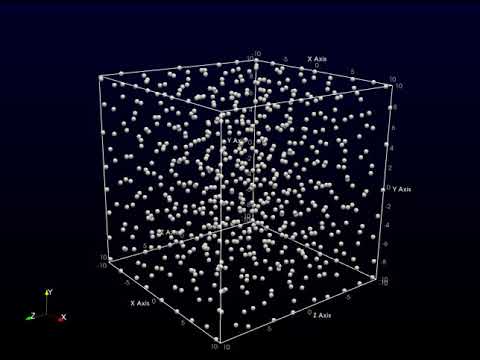
Problem
Contributors
- Sayan Adhikari, UiO, Norway. @sayanadhikari
- Rupak Mukherjee, PPPL, USA.
Installation
Prerequisites
Procedure
Using PyPI
pip install PPDyn
Usage
Download the input template to your working directory
wget https://raw.githubusercontent.com/sayanadhikari/PPDyn/main/input.ini
Now, either create a python script in your working directory or use your python console
from PPDyn import ppdyn
from PPDyn.ppdplot import animate
import time

start = time.time()
ppdyn(input)
end = time.time()
print("Elapsed (after compilation) = %s"%(end - start)+" seconds")
animate()
Using GNU Make
First make a clone of the master branch using the following command
git clone https://github.com/sayanadhikari/PPDyn.git
Then enter inside the PPDyn directory
cd PPDyn
Now complile and built the PPDyn code
make all
Usage
Upon successful compilation, run the code using following command
ppdyn -i input.ini
Parameter Setup
Edit the input.ini and run the code again. The basic structure of input.ini is provided below,
;
; @file		input.ini
; @brief	PPDyn inputfile.
;
scope = default

[simbox]
Lx  = 10.0    ; System length in X
Ly  = 10.0    ; System length in Y
Lz  = 10.0    ; System length in Z

[particles]
N     = 700     ; Number of particles
Vxmax = 1.0     ; Maximum velocity in X
Vymax = 1.0     ; Maximum velocity in Y
Vzmax = 1.0     ; Maximum velocity in Z
Temp  = 0.01   ;

[screening]
k = 1.0

[boundary]
btype = reflecting ; Type of boundary Options: periodic, reflecting

[time]
tmax  = 1000.0    ; Final time
dt    = 0.010   ; time step size

[diagnostics]
dumpPeriod  = 50    ; Data dump period
dumpData    = True
vtkData     = False

[options]
parallelMode  = True  ;set to false to disable parallel
Visualization
For visualization, user either can use the python scripts available inside scripts directory or can write their own. After successful run the data will be available under data directory. Two different data formats are available at present. The complete dataset will available under the name particle.hdf5. For vtk visualization users can use .vtu files inside data/vtkdata. Paraview can be used to animate particle dynamics very easily. A sample video can be found here.
Contributing
We welcome contributions to this project.
- Fork it.
- Create your feature branch (
git checkout -b my-new-feature). - Commit your changes (
git commit -am 'Add some feature'). - Push to the branch (
git push origin my-new-feature). - Create new Pull Request.
License
Released under the MIT license.
2 maintainers


Metadata
2 maintainers
Release files for PPDyn 1.0.8
For a detailed explanation of source distributions (sdists) and built distributions (wheels), please see the package formats documentation.
Source distribution (sdist)
| File | Size | Uploaded | |
|---|---|---|---|
| PPDyn-1.0.8.tar.gz | 11.8 kB | Details |
Built distribution (wheel)
| File | Interpreter | ABI | Platform | Reset |
|---|---|---|---|---|
| PPDyn-1.0.8-py3-none-any.whl | Python 3 | none | any | Details |
Total release size: 27.9 kB
Release files / PPDyn-1.0.8.tar.gz
| Download URL | PPDyn-1.0.8.tar.gz |
|---|---|
| Size | 11.8 kB |
| Tags | Source |
|
SHA-256 checksum How to use checksums |
1be815a83679f4451708f23e391dfa7f762031285e5f7fbc1500d4732a7123b1
|
|
BLAKE2b-256 checksum How to use checksums |
4732888222ac9d0fb72b0dfb47a9cec03b33ba39c6b062a456edf1af85be62c2
|
| Upload date | |
|
Uploaded using Trusted Publishing? What is trusted publishing? |
No |
| Uploaded via |
twine/3.4.1 importlib_metadata/3.7.3 pkginfo/1.7.0 requests/2.25.1 requests-toolbelt/0.9.1 tqdm/4.59.0 CPython/3.8.8
|
Release files / PPDyn-1.0.8-py3-none-any.whl
| Download URL | PPDyn-1.0.8-py3-none-any.whl |
|---|---|
| Size | 16.2 kB |
| Tags | Python 3 |
|
SHA-256 checksum How to use checksums |
08f771d51f5466ecd334a6c280ed73ef92f6659ff21bd1ccd291801ea7ac4671
|
|
BLAKE2b-256 checksum How to use checksums |
81d86fe871c0441a6bfd8bfb80e4bf4171f4f54c2e1afaee5cd91b3b9f647870
|
| Upload date | |
|
Uploaded using Trusted Publishing? What is trusted publishing? |
No |
| Uploaded via |
twine/3.4.1 importlib_metadata/3.7.3 pkginfo/1.7.0 requests/2.25.1 requests-toolbelt/0.9.1 tqdm/4.59.0 CPython/3.8.8
|














