
mpl-probscale
Real probability scales for matplotlib
| CI | Badge |
|---|---|
| Tests |  |
| Formatting and Types |  |
| Linting |  |
| Docs |  |
Installation
Official releases
Official releases are available through the conda-forge channel or pip
conda install mpl-probscale --channel=conda-forge
pip install probscale
Development builds
This is a pure-python package, so building from source is easy on all platforms:
git clone git@github.com:matplotlib/mpl-probscale.git
cd mpl-probscale
pip install -e .
Quick start
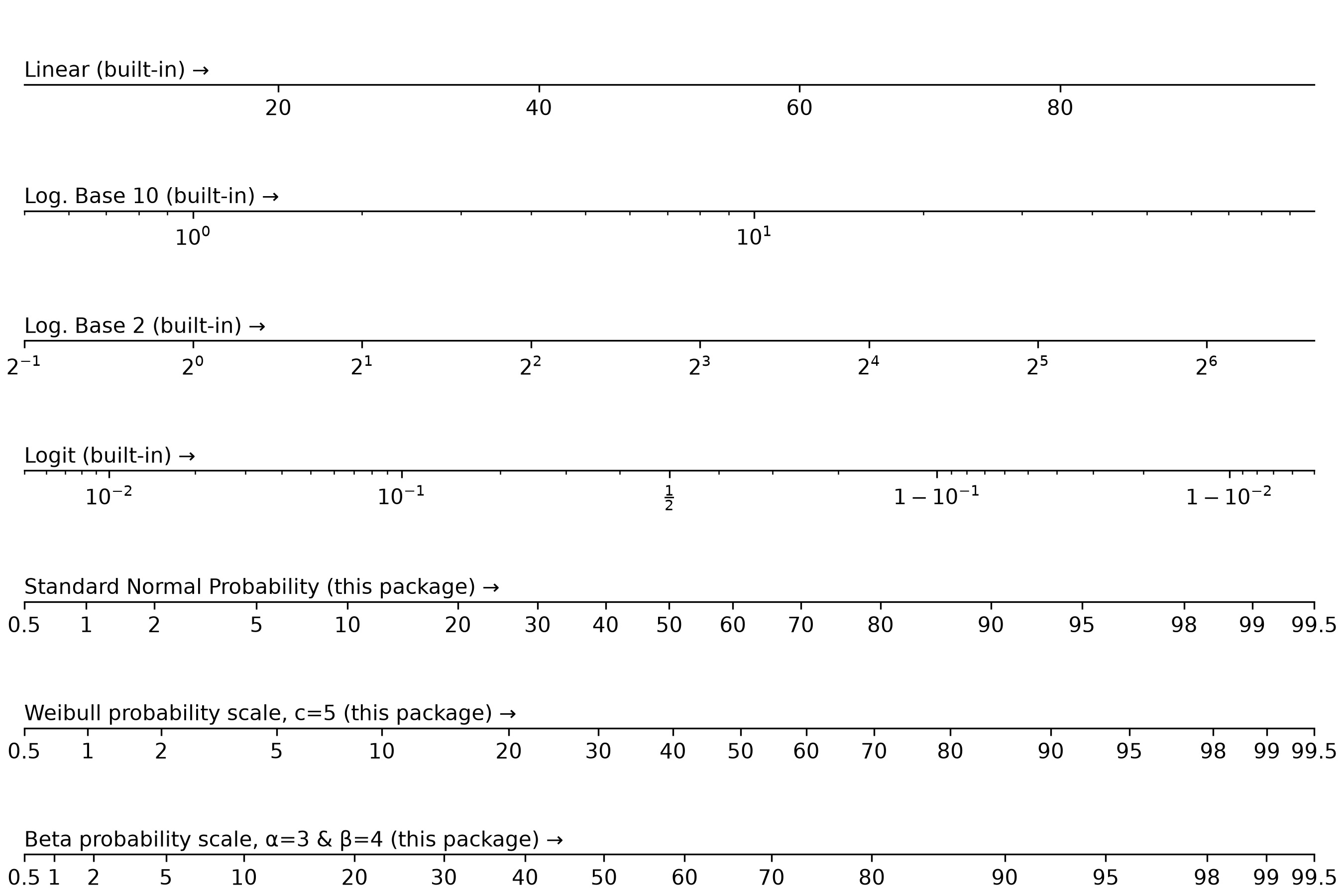
Simply importing probscale lets you use probability scales in your matplotlib figures:
from matplotlib import pyplot
from scipy import stats
import probscale  # nothing else needed

beta = stats.beta(a=3, b=4)
weibull = stats.weibull_min(c=5)
scales = [
    {"scale": {"value": "linear"}, "label": "Linear (built-in)"},
    {"scale": {"value": "log", "base": 10}, "label": "Log. Base 10 (built-in)"},
    {"scale": {"value": "log", "base": 2}, "label": "Log. Base 2 (built-in)"},
    {"scale": {"value": "logit"}, "label": "Logit (built-in)"},
    {"scale": {"value": "prob"}, "label": "Standard Normal Probability (this package)"},
    {
        "scale": {"value": "prob", "dist": weibull},
        "label": "Weibull probability scale, c=5 (this package)",
    },
    {
        "scale": {"value": "prob", "dist": beta},
        "label": "Beta probability scale, α=3 & β=4 (this package)",
    },
]

N = len(scales)
fig, axes = pyplot.subplots(nrows=N, figsize=(9, N - 1), constrained_layout=True)
for scale, ax in zip(scales, axes.flat):
    ax.set_xscale(**scale["scale"])
    ax.text(0.0, 0.1, scale["label"] + " →", transform=ax.transAxes)
    ax.set_xlim(left=0.5, right=99.5)
    ax.set_yticks([])
    ax.spines.left.set_visible(False)
    ax.spines.right.set_visible(False)
    ax.spines.top.set_visible(False)

outpath = Path(__file__).parent.joinpath("../img/example.png").resolve()
fig.savefig(outpath, dpi=300)
Testing
Testing is generally done via pytest.
python -m pytest --mpl --doctest-glob="probscale/*.py"
Image comparison tests
Run the image comparison tests with:
uv run pytest --mpl --mpl-generate-summary=html --mpl-results-path=figcomp
That will generate a figcomp folder with the results and an HTML file you can open up to view all of the failures.
If the failures are all reasonable, general new baseline images for those tests with:
uv run pytest --mpl-generate-path=baseline
...and copy everything over to the right directory.
1 maintainer

Metadata
1 maintainer
Release files for probscale 0.3.0
For a detailed explanation of source distributions (sdists) and built distributions (wheels), please see the package formats documentation.
Source distribution (sdist)
| File | Size | Uploaded | Provenance | Actions |
|---|---|---|---|---|
| probscale-0.3.0.tar.gz | 430.4 kB | Without provenance | Details for probscale-0.3.0.tar.gz |
Built distribution (wheel)
| File | Interpreter | ABI | Platform | Actions Reset |
|---|---|---|---|---|
| probscale-0.3.0-py3-none-any.whl | Python 3 | none | any | Details for probscale-0.3.0-py3-none-any.whl |
Total release size: 869.7 kB
Release files / probscale-0.3.0.tar.gz
| Download URL | probscale-0.3.0.tar.gz |
|---|---|
| Size | 430.4 kB |
| Tags | Source |
|
SHA-256 checksum How to use checksums |
5ab87c2df47919577f87c828f9a73127e3b45854f8d0fb04242d154db0b59175
|
|
BLAKE2b-256 checksum How to use checksums |
de0f68e57faac4930d7f67e7bf5aecb0e2766aab10e5e9a6bdca92931a218279
|
| Upload date | |
|
Uploaded using Trusted Publishing? What is trusted publishing? |
Yes |
| Uploaded via |
uv/0.13.4 {"installer":{"name":"uv","version":"0.13.4","subcommand":["publish"]},"python":null,"implementation":{"name":null,"version":null},"distro":{"name":"Ubuntu","version":"26.04","id":"resolute","libc":null},"system":{"name":null,"release":null},"cpu":null,"openssl_version":null,"setuptools_version":null,"rustc_version":null,"ci":true}
|
Release files / probscale-0.3.0-py3-none-any.whl
| Download URL | probscale-0.3.0-py3-none-any.whl |
|---|---|
| Size | 439.3 kB |
| Tags | Python 3 |
|
SHA-256 checksum How to use checksums |
1051cdaf314256c9610f201210d071d438e115bc30d7eb0031c2efd7d0fc58b1
|
|
BLAKE2b-256 checksum How to use checksums |
6e1ee9b20db57c77aa0d3fc52acf9f434d1bca4a5588b0b8daf37a881329a6b7
|
| Upload date | |
|
Uploaded using Trusted Publishing? What is trusted publishing? |
Yes |
| Uploaded via |
uv/0.13.4 {"installer":{"name":"uv","version":"0.13.4","subcommand":["publish"]},"python":null,"implementation":{"name":null,"version":null},"distro":{"name":"Ubuntu","version":"26.04","id":"resolute","libc":null},"system":{"name":null,"release":null},"cpu":null,"openssl_version":null,"setuptools_version":null,"rustc_version":null,"ci":true}
|
Security for probscale 0.3.0
Provenance
Provenance describes where a file came from. On PyPI, provenance is shared via attestations, which provide a verifiable record of the build or publishing details. View details, limitations and caveats.
No provenance found
None of the files in this release were uploaded with provenance metadata.
A note on package security
PyPI is a repository for distributing packages, not a service for auditing them. While third-party security researchers and our staff do their best to detect and remove malicious packages, PyPI cannot guarantee the quality, security or suitability of any given package.
To learn more about protecting yourself from malicious actors, visit our package security documentation.














