
ProcessedPiRecorder
A multiprocessed wrapper of PiCamera for simplified deployment of high framerate computer vision on raspberry pi.
Installation
pip install ProcessedPiRecorder
Requires
| Library | Version |
|---|---|
| tifffile | 2019.7.26 |
| picamera | 1.13 |
| opencv-contrib-python | 3.4.4.19 |
| numpy | 1.17.0 |
| imageio | 2.6.1 |
I'm sure it would work with other versions, but these are the ones used during dev.
Basic Usage
You have to initialize the recorder and then tell it when to start recording.
Initialize:
  from ProcessedPiRecorder import ProcessedPiRecorder as ppr

  myRecorder = ppr(tif_path=None, x_resolution=0, y_resolution=0, scale_factor=1, framerate=0,
                   rec_length=0, display_proc='camera_reader', stereo=False,
                   timestamp=False, report_Hz=False, monitor_qs= False, Hz_buffer=10,
                   callback=None, blocking=True,  tif_compression=6,
                   latency_log=None, aquisition_log=None,  cb_log=None)
| Arg | Description |
|---|---|
| tif_path | file to the output big tif file |
| (x_resolution, y_resolution) | pixel dimensions acquired by the sensor(s), is autmatically rounded to nearest multiple of 16, or nearest multiple of 32 for StereoPi x_resolution. |
| scale_factor | sets the resize parameter at resolultion*scale_factor, neede for StereoPi |
| framerate | desired framerate in Hz |
| rec_length | number of seconds to record |
| stereo | if True, sets up for the stereopi hflip=True, stereo_mode='side-by-side', stereo_decimate=False |
| display_proc | specifies which process should be used to display. Either 'camera_reader' or 'file_writer'. |
| timestamp | if True, all frames are timestapmed at aquisition |
| report_Hz | if True, all frames have the current frame rate stamped at aquisition |
| monitor_qs | if True, all frames have all queue lengths stamped at aquisition |
| callback | if True, execute a callback function |
| blocking | if True, block the main thread after spawning processes |
| tif_compression | specifies the degress of image compression used by tifffile |
| Hz_buffer | number of frames to average over when displaying framerate (report_Hz=True) |
| latency_log | if specified, write the latency log to path |
| acquisition_log | if specified, writes the acquisition log to path |
| cb_log | if specified, writes the callback log to path |
Start recording
myRecorder.recordVid()
Queues and Callbacks
ProcessedPiRecorder works by separating the acquisition, computer vision, and file encoding tasks across multiple python processes using the standard python multiprocessing library. These processes pass frames using multiprocessing.Queue objects which are managed by QueueHandler objects so you don't muck them up.
Queue Structure
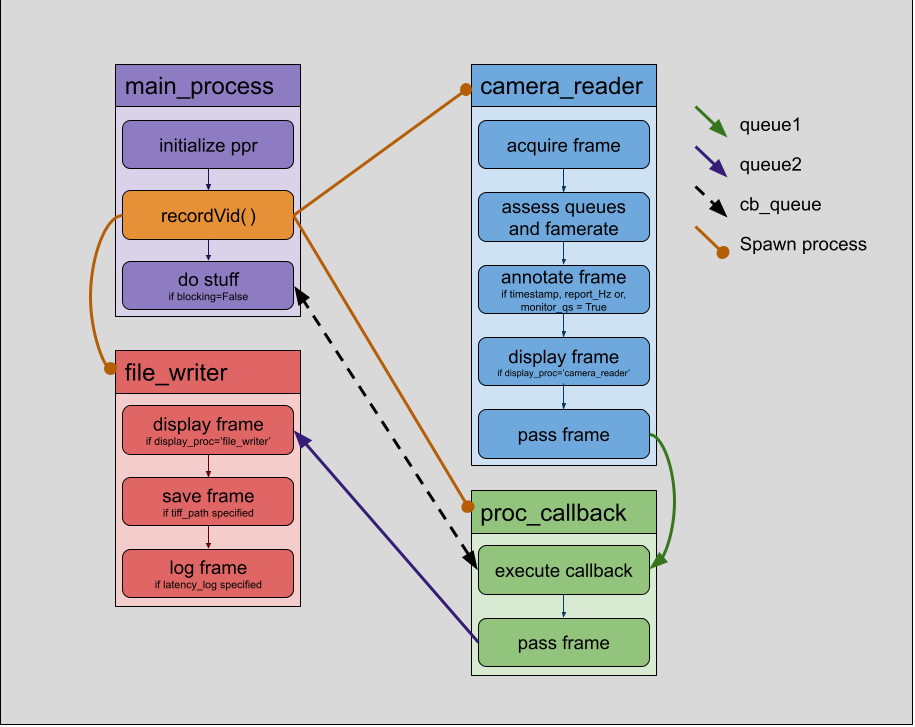
Callback structure
Computer vision can be easily added by means of a callback function. Frames are recieved from and placed into the queues using a ppr.QueueHandler object which also provides a buffer of frames for applications that require a series of frames.
   import ProcessedPiRecorder as ppr

   callback_fucntion(queue1, queue2, cb_queue, cb_logger):
        #inits
        handler = ppr.QueueHandler(queue1, queue2, 2)

        #infinite loop
        while True:
              #get frame
              frame = handler.get()

                    #make sure the handler has a new frame and the buffer has filled
                    if not handler.empty and handler.full_buffer:

                          #Do something
                          do_something_to(frame)

                          #Save the frame
                          handler.put()
| Arg | Description |
|---|---|
| queue1 | recieves frames. Let a QueueHandler deal with it |
| queue2 | sends frames to be saved. Let a QueueHandler deal with it |
| cb_queue | multiprocessing.Queue object attached to the ppr object (myRecorder.cb_queue), enables comunication between the callback and the main_process |
StereoPi support
The StereoPi is cool, but using standard PiCamera you can't save a highframerate video to file without dropping frames, ProcessedPiRecorder fixes that. Be aware that the scale_factor parameter must be used to down sample the frames. I use the following parameters as a starting point for high framerate acquisition (~28Hz) on stereopi:
x_resolution=1280, y_resolution=480, scale_factor=0.3, framerate=25
Contributors
This code was written and is maintained by Matt Davenport (mdavenport@rockefeller.edu).
1 maintainer

Metadata
1 maintainer
Release files for ProcessedPiRecorder 0.3.1
For a detailed explanation of source distributions (sdists) and built distributions (wheels), please see the package formats documentation.
Source distribution (sdist)
| File | Size | Uploaded | |
|---|---|---|---|
| ProcessedPiRecorder-0.3.1.tar.gz | 6.8 kB | Details |
Built distribution (wheel)
| File | Interpreter | ABI | Platform | Reset |
|---|---|---|---|---|
| ProcessedPiRecorder-0.3.1-py3-none-any.whl | Python 3 | none | any | Details |
Total release size: 27.2 kB
Release files / ProcessedPiRecorder-0.3.1.tar.gz
| Download URL | ProcessedPiRecorder-0.3.1.tar.gz |
|---|---|
| Size | 6.8 kB |
| Tags | Source |
|
SHA-256 checksum How to use checksums |
9548fafd516797da1a820f8d02c959e874d144c36cf51129c6cc0d950c0debbb
|
|
BLAKE2b-256 checksum How to use checksums |
13adeb5401acc7aebf2caffda3681142566658b4be2b049ebb7f5daaaf154f1f
|
| Upload date | |
|
Uploaded using Trusted Publishing? What is trusted publishing? |
No |
| Uploaded via |
twine/3.1.1 pkginfo/1.5.0.1 requests/2.23.0 setuptools/45.2.0 requests-toolbelt/0.9.1 tqdm/4.43.0 CPython/3.7.3
|
Release files / ProcessedPiRecorder-0.3.1-py3-none-any.whl
| Download URL | ProcessedPiRecorder-0.3.1-py3-none-any.whl |
|---|---|
| Size | 20.4 kB |
| Tags | Python 3 |
|
SHA-256 checksum How to use checksums |
83253f483e1b693a24afec200c66b1b0547b8898abc37a0ee13d4de835dc3a8d
|
|
BLAKE2b-256 checksum How to use checksums |
0359d60bde0c05fb07d9e7edc8728f7c84cba97cc99ca37949e31a8824b8672d
|
| Upload date | |
|
Uploaded using Trusted Publishing? What is trusted publishing? |
No |
| Uploaded via |
twine/3.1.1 pkginfo/1.5.0.1 requests/2.23.0 setuptools/45.2.0 requests-toolbelt/0.9.1 tqdm/4.43.0 CPython/3.7.3
|














