
Pro Generative Tensorial Reinforcement Learning (proGENTRL)
This is a Pytorch Lightning implementation of GENTRL. Recently Pytorch Lightning has gained much popularity due to its lightweight framework and flexibility with handling multiple devices from a single GPU to a HPC cluster. So in order to maximize the efficiency of using GENTRL on multi-GPU environment I have implemented this pytorch lightning code.
What is GENTRL?
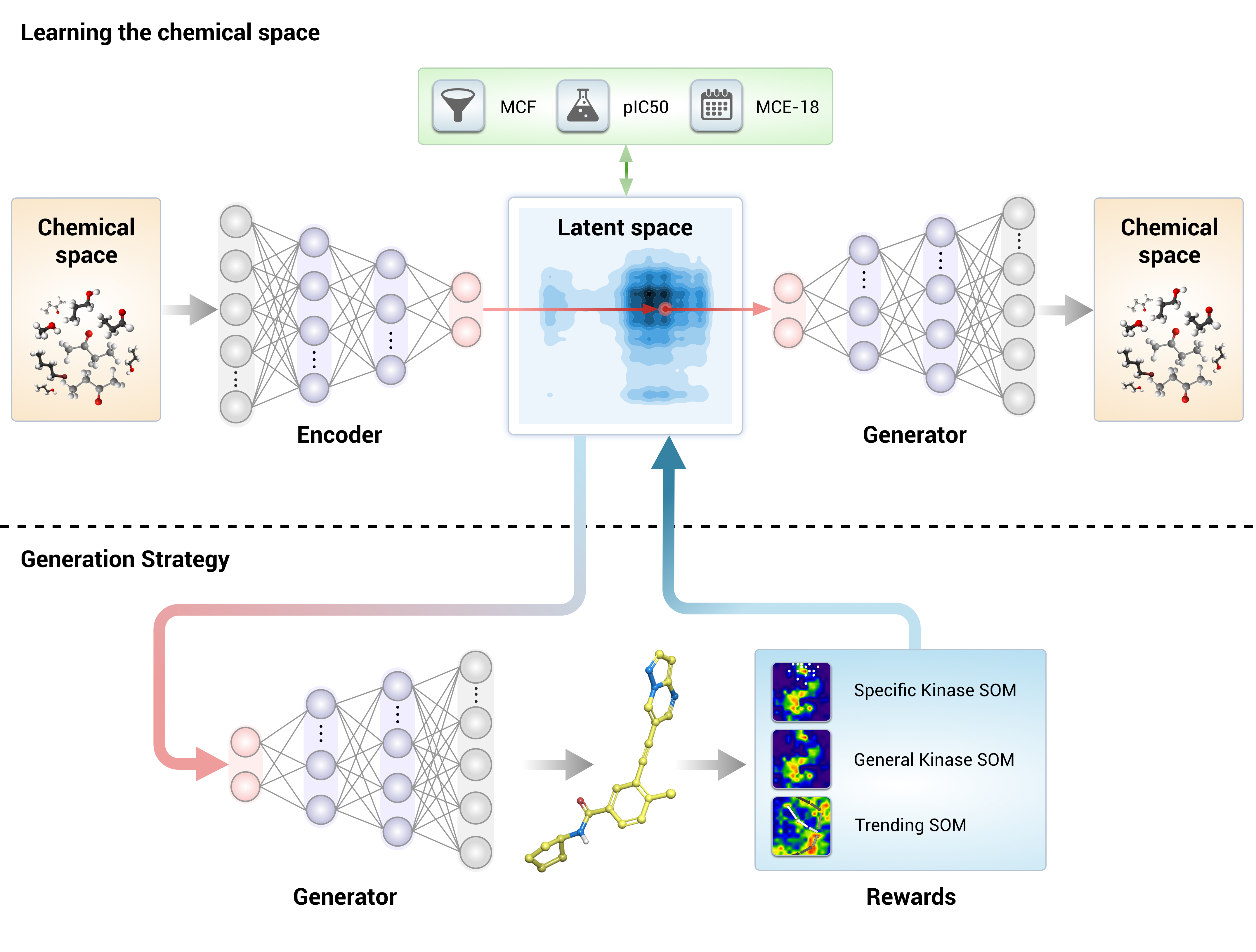
The GENTRL model is a variational autoencoder with a rich prior distribution of the latent space. We used tensor decompositions to encode the relations between molecular structures and their properties and to learn on data with missing values. We train the model in two steps. First, we learn a mapping of a chemical space on the latent manifold by maximizing the evidence lower bound. We then freeze all the parameters except for the learnable prior and explore the chemical space to find molecules with a high reward.
Installation
Step 1 :
Make a new conda environment and install RDKit.
conda create -c rdkit -n my-rdkit-env rdkit
Then activate this new environment.
conda activate my-rdkit-env
Note : Make sure that the python3 version is 3.5 or higher and pip3 is installed
Step 2 :
Inside this environment install proGENTRL.
Using pip (Recommended)
pip install progentrl
Using source
git clone https://github.com/Bibyutatsu/proGENTRL.git
cd proGENTRL
python3 setup.py install
Step 3 :
Then I will suggest you install pytorch's latest version according to your cuda version (For e.g. 10.2)
python3 -m pip uninstall torch torchvision
conda install pytorch torchvision cudatoolkit=10.2 -c pytorch
Step 4 : (Optional)
Making a new Kernel for jupyter notebook is recommended. For making a new kernel please follow these steps.
python3 -m pip install ipykernel
python3 -m ipykernel install --user --name rdkit_kernel
Now when you open jupyter notebook. Go to Change Kernel > rdkit_kernel
With these the installation is over and now we are ready to run the Example.ipynb notebook provided in the Repo.
Example.ipynb
This notebook is a good starting point to look at how proGENTRL works. It incorporates all the steps from VAE Training to Reinforcement Learning and finally Sampling or generation of new molecules in the form of SMILES strings.
The basic flow of the model is: VAE Train :arrow_right: Reinforcement Learning :arrow_right: Sampling
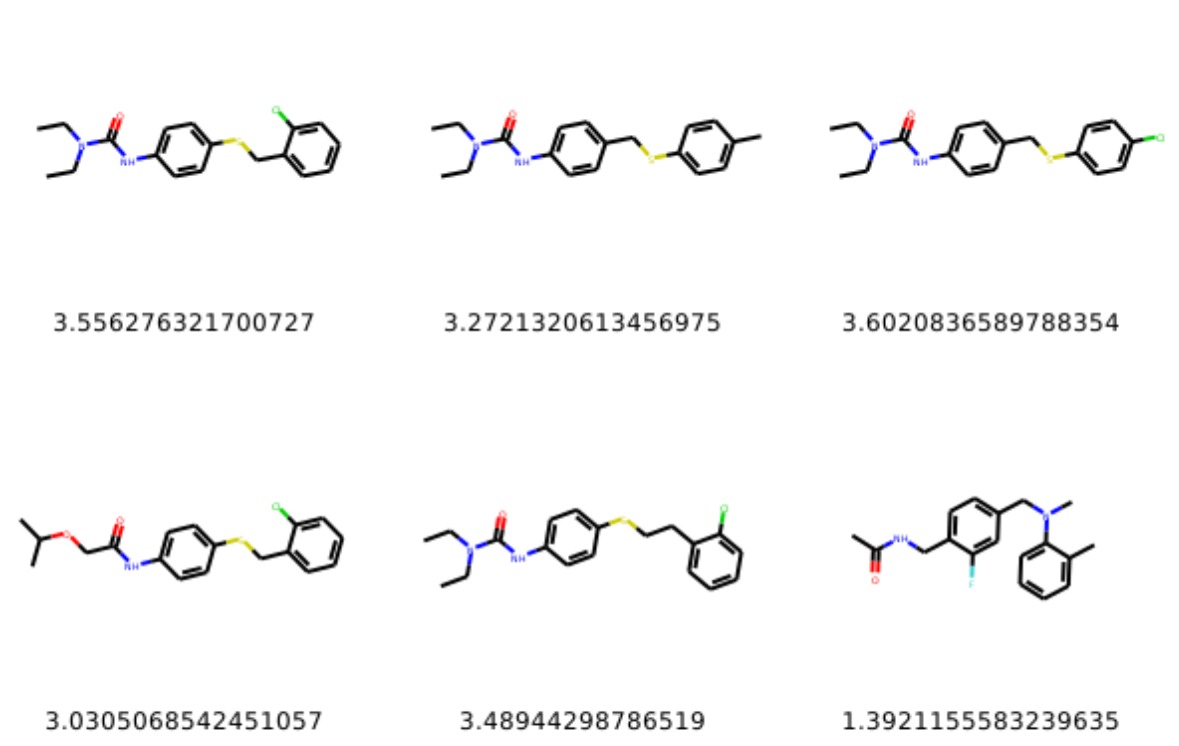
Below we show examples of generated molecules (more samples here). You can find more explanations in my originarlly forked Repo of GENTRL please visit here
For reading more visit my blog
Supporting Information for the paper "Deep learning enables rapid identification of potent DDR1 kinase inhibitors". Original Repo
1 maintainer

Metadata
1 maintainer
Release files for progentrl 1.0.0
For a detailed explanation of source distributions (sdists) and built distributions (wheels), please see the package formats documentation.
Source distribution (sdist)
| File | Size | Uploaded | Provenance | Actions |
|---|---|---|---|---|
| progentrl-1.0.0.tar.gz | 16.6 kB | Without provenance | Details for progentrl-1.0.0.tar.gz |
Built distribution (wheel)
| File | Interpreter | ABI | Platform | Actions Reset |
|---|---|---|---|---|
| progentrl-1.0.0-py3-none-any.whl | Python 3 | none | any | Details for progentrl-1.0.0-py3-none-any.whl |
Total release size: 36.3 kB
Release files / progentrl-1.0.0.tar.gz
| Download URL | progentrl-1.0.0.tar.gz |
|---|---|
| Size | 16.6 kB |
| Tags | Source |
|
SHA-256 checksum How to use checksums |
d90429fa11e2a42759a80dfeac6a06c54938a2dd1045991804e91c4c431da7ca
|
|
BLAKE2b-256 checksum How to use checksums |
0f52d93e47a8d40a3c6914741bbc454d4de8e3437fdc894d145c1530f8eb0530
|
| Upload date | |
|
Uploaded using Trusted Publishing? What is trusted publishing? |
No |
| Uploaded via |
twine/3.2.0 pkginfo/1.5.0.1 requests/2.22.0 setuptools/45.2.0.post20200210 requests-toolbelt/0.9.1 tqdm/4.42.1 CPython/3.7.6
|
Release files / progentrl-1.0.0-py3-none-any.whl
| Download URL | progentrl-1.0.0-py3-none-any.whl |
|---|---|
| Size | 19.7 kB |
| Tags | Python 3 |
|
SHA-256 checksum How to use checksums |
48d4b18d644afa160c1d15e99dca64ae284d01196f5c59f1f985f61662ee86f8
|
|
BLAKE2b-256 checksum How to use checksums |
eab32f4bfc61ac0b8c74dc258df98dc89bdd1018565ef20d9b3a6b92dc712f3f
|
| Upload date | |
|
Uploaded using Trusted Publishing? What is trusted publishing? |
No |
| Uploaded via |
twine/3.2.0 pkginfo/1.5.0.1 requests/2.22.0 setuptools/45.2.0.post20200210 requests-toolbelt/0.9.1 tqdm/4.42.1 CPython/3.7.6
|
Security for progentrl 1.0.0
Provenance
Provenance describes where a file came from. On PyPI, provenance is shared via attestations, which provide a verifiable record of the build or publishing details. View details, limitations and caveats.
No provenance found
None of the files in this release were uploaded with provenance metadata.
A note on package security
PyPI is a repository for distributing packages, not a service for auditing them. While third-party security researchers and our staff do their best to detect and remove malicious packages, PyPI cannot guarantee the quality, security or suitability of any given package.
To learn more about protecting yourself from malicious actors, visit our package security documentation.














