
Prompt History
Find the prompt worth keeping. See the work behind it.
A local prompt library for Claude Code and Codex. Search your saved history, understand your writing habits, and take your best prompts with you.




Get started · Analytics · Share an activity card · Privacy · Documentation
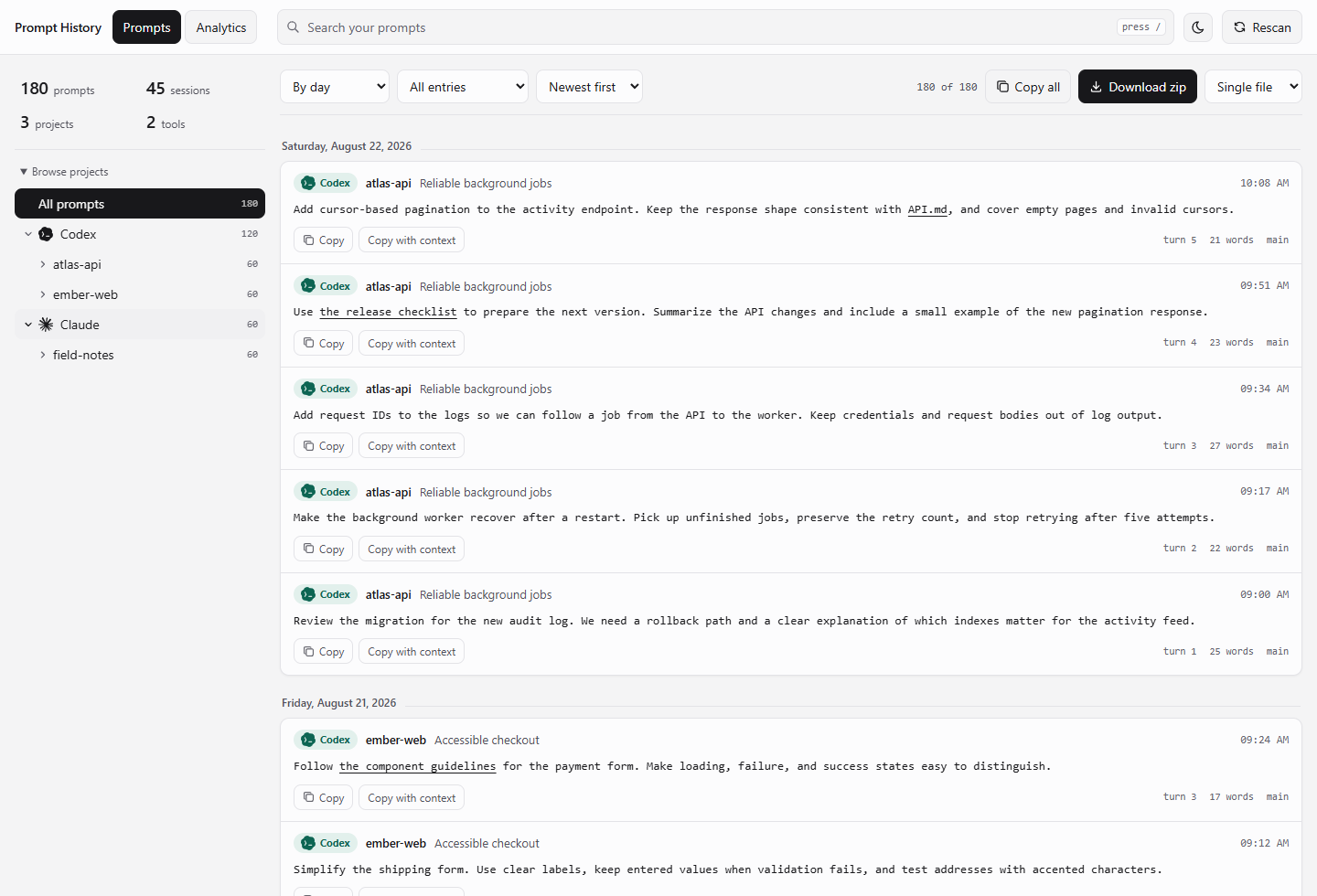
The real interface, with fictional projects and prompts. All screenshots below use synthetic data.
pipx install prompt-history && prompt-history
Your browser opens to the prompts available in your local session files. Search, browse by project, and copy a useful prompt back into your next conversation.
Zero runtime dependencies. No account. Works offline. Your session files are always read-only.
| Find it again | Understand your habits | Keep it yours |
|---|---|---|
| Search across Claude Code and Codex, with project and session context. | Compare projects, explore activity patterns, and estimate typing time. | Copy prompts, export Markdown or ZIP, sync a folder, or share an activity image. |
Why you want this
The migration plan that worked. The refactor instructions you keep rewriting. The question that finally made the bug obvious.
Your local session files mix those prompts with model replies and tool output. Prompt History brings your side of the conversation into one searchable view, while preserving project context and links to referenced files.
- The prompt you wrote at 2am that finally fixed the build
- That one perfect refactor instruction you want to reuse
- Six months of how you actually talk to these tools, as a file you own
Get it
pipx install prompt-history     # recommended
uv tool install prompt-history  # or this
pip install prompt-history      # or the classic
Python 3.9 or newer. That is the entire dependency list.
For a regular pip installation, both commands are installed into your Python environment's scripts directory and work from any folder:
python -m pip install --upgrade prompt-history
prompt-history --port 8080
phist --port 8080
If your scripts directory is not on PATH, use python -m prompthistory --port 8080. For a user-wide isolated command, pipx install prompt-history is also supported.
Set the port with --port 8080, PROMPT_HISTORY_PORT=8080, or port = 8080 under [server] in your config. CLI flags take priority. The default is 7777; if busy, the app tries up to 19 following ports and prints the actual URL. Use --port 0 to let the OS select an available port, and --no-browser to start without opening a tab.
Use it
The browser UI
prompt-history
Search across everything, browse by tool then project then session, copy any prompt with one click, download the lot as a zip.
It binds to 127.0.0.1 and serves the interface and its bundled scripts locally. No account or remote service is needed.
Local analytics
Open Analytics beside Prompts to explore your activity. Everything is calculated in your browser from the local scan, with no telemetry, external services, or additional dependencies.
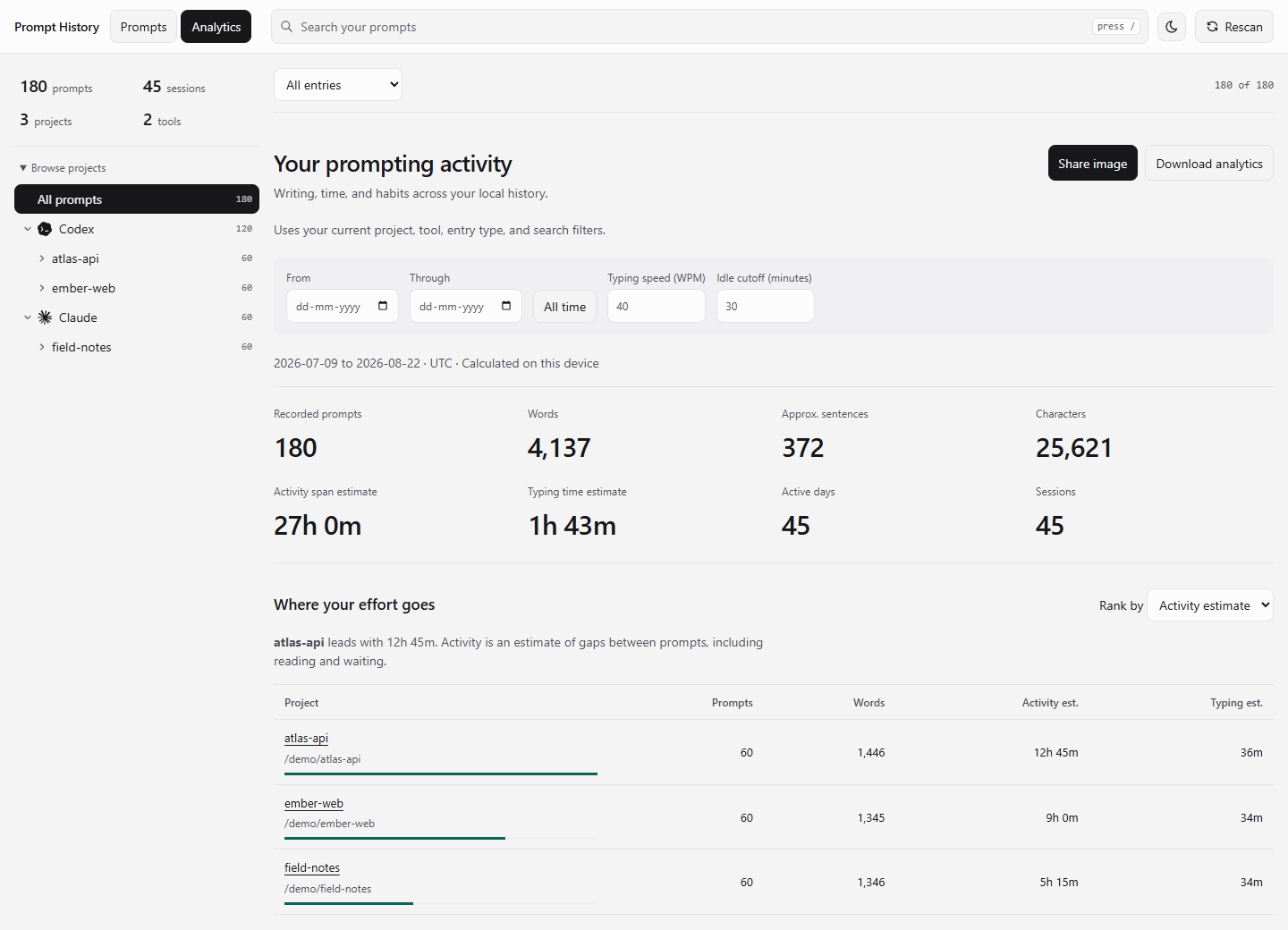
Compare projects by activity, words, prompts, or estimated typing time. The figures shown are illustrative.
- Rank projects by estimated activity time, typing time, words, or prompts. Full paths keep projects with the same name separate. Click a project to focus it.
- Count words, Unicode characters, approximate prose sentences, sessions, and active days.
- Explore daily volume, weekday/hour patterns, current and longest streaks, project switches, and sessions with the most writing.
- Compare tools, prompt lengths, median and 90th-percentile word counts, repeated submissions, slash commands, and attachment references.
- Apply the current search, tool, project, session, and entry-type filters, then narrow analytics with inclusive local-calendar dates. All time clears just the analytics date range. Server scan filters still apply.
- Download a JSON report with aggregates, project/session labels, filters, and calculation settings. Original prompt text is omitted.
Time is estimated, not tracked. Activity uses nearby prompt timestamps; typing time uses word count and your chosen WPM. Neither measures time at the keyboard, and the two estimates should not be added together. Read how the estimates and counts work.
Share an activity card
A snapshot of your prompting habits, ready to paste into a message or save for your own records. Choose Analytics → Share image, preview it in light or dark mode, then download the PNG or copy the image.
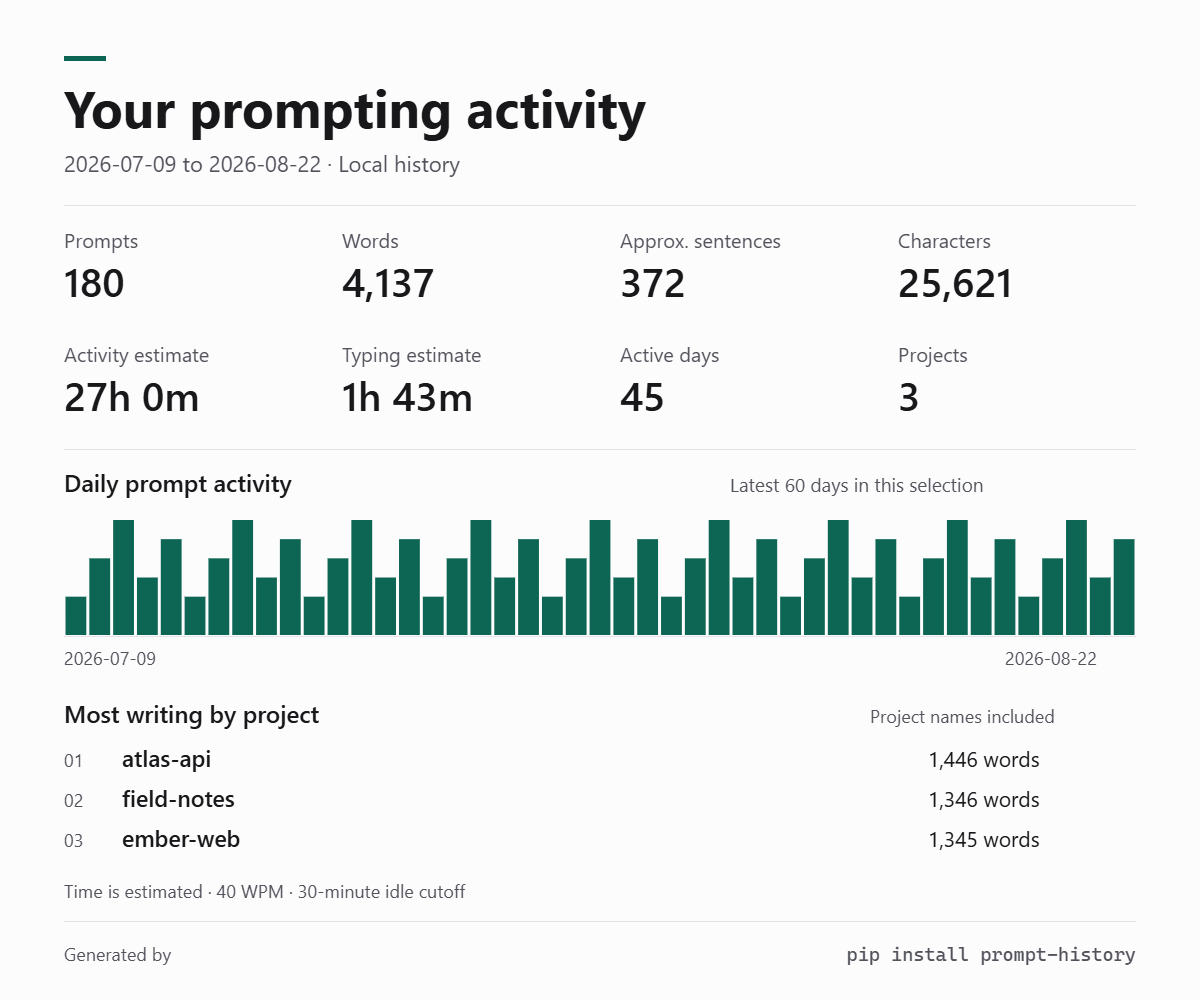
A real 1200 × 1000 PNG export. Project names are enabled for this fictional example; they are hidden by default.
The card follows your current selection and leaves out prompt text, file paths,
session titles, and search terms. Native sharing is available where the browser
supports it. Everything is rendered on your device, with a small
Generated by / pip install prompt-history footer. No image service or upload.
The terminal, if you live there
prompt-history list                         # everything, newest first
prompt-history search postgres migration    # both words, anywhere
prompt-history stats                        # what you have, at a glance
prompt-history sessions                     # every session, newest first
prompt-history sources                      # where it looked and what it found
Some real ones:
# Your long prompts from this quarter, as Markdown
prompt-history export -f md --since 2026-07-01 --min-words 60 -o good-prompts.md

# Everything you ever said to Codex about auth
prompt-history search auth --tool codex --full

# One project, one archive
prompt-history export -f zip --project checkout-api -o checkout-prompts.zip

# Pipe it anywhere
prompt-history list --json | jq -r '.[] | select(.words > 100) | .text'
--tool, --since, --until, --min-words, --max-words, --project, --exclude-project, --search and --no-slash-commands work on every command, including serve. Filter once, and the UI, the exports and the zip all agree.
The zip, organised
prompt-history export -f zip
prompt-history-2026-09-21/
├── README.txt                  what is in here, and the counts
├── index.json                  the full machine readable snapshot
├── prompts.csv                 one row per prompt, opens in any spreadsheet
├── prompts.md                  everything, one document
├── prompts.txt                 everything, no markup
├── by-session/
│   └── claude/checkout-api/
│       └── 2026-09-14-fix-the-stripe-webhook.md
└── by-date/
    └── 2026-09-14.md
by-session is the folder you actually read. Each file is one conversation, your prompts in the order you typed them, with the project, model and branch at the top.
Sync to a folder
Keep a plain folder of Markdown on disk, updated as you work. Obsidian vault, notes repo, wherever.
prompt-history sync ~/prompts --save
~/prompts/
├── claude/
│   ├── checkout-api/prompts.md
│   └── prompt-history/prompts.md
└── codex/
    └── infra/prompts.md
One file per project, every session inside it in the order you typed them. --save means it re-syncs automatically every time you scan, so the folder stays current without you thinking about it.
Change the shape however you like:
prompt-history sync ~/prompts --layout session    # a file per conversation
prompt-history sync ~/prompts --layout single     # everything in one file
prompt-history sync ~/notes --no-tool             # drop the tool folder
prompt-history sync ~/data --format json          # or txt, or csv
prompt-history sync ~/prompts --dry-run           # show me first
In the UI there is a Folder sync panel: pick a folder with a real system dialog, choose the structure, and watch the example path update as you change it.
Two things make it safe to point at a folder you care about:
- A file is only rewritten when its content actually changed, and generated files carry no "synced at" stamp. Nothing churns, so it is fine to keep in git.
- Sync keeps a manifest of exactly what it wrote. When cleaning up stale files, it will only delete things on that list. Your own notes in the same folder are never touched, and a folder with no manifest is never cleaned at all.
As a library
from prompthistory import PromptHistory

ph = PromptHistory(since="2026-01-01", tool="claude")

print(len(ph.prompts()))

for hit in ph.search("rate limit"):
    print(hit.timestamp, hit.project, hit.text[:80])

ph.write("q3.zip")                 # format inferred from the suffix
markdown = ph.render("md")         # or get it as a string

report = ph.sync("~/prompts")      # mirror to a folder
print(report.summary())            # "Wrote 3 new, 1 updated."
Scan and filter settings are available as keyword arguments, and an unknown setting raises instead of silently returning everything.
Prompt carries text, timestamp, project, session_id, model, git_branch, turn, words and kind. Session carries the prompts plus where they came from.
Configure it
prompt-history config --init     # writes a commented template
prompt-history config --show     # prints the values actually in effect
Lives at ~/.config/prompt-history/config.toml, or config.json if your Python is older than 3.11.
[sources]
claude_code = true
codex = true
include_subagents = false   # sub-agent prompts are written by the model, not you

[filter]
min_words = 5               # stop "yes", "continue" and "go on" from filling the UI
skip_slash_commands = true

[server]
port = 7777
open_browser = true

[sync]
sync_enabled = true         # mirror on every scan
sync_folder = "~/prompts"
sync_layout = "project"     # project | session | single
sync_include_tool = true    # tool/project/prompts.md, or project/prompts.md
sync_format = "md"
The UI writes its own sync choices to sync.json beside your config, so it never rewrites a file you hand edited.
Config file, then PROMPT_HISTORY_* environment variables, then CLI flags. Last one wins.
Where the prompts come from
| Source | Path | What it gives |
|---|---|---|
| Claude Code transcripts | ~/.claude/projects/<project>/<session>.jsonl |
Full text, timestamps, project, model, branch |
| Claude Code recent history | ~/.claude.json |
Prompts whose transcript is gone |
| Codex rollouts | ~/.codex/sessions/**/rollout-*.jsonl |
Full text and metadata |
| Codex composer history | ~/.codex/history.jsonl |
Everything typed at the composer |
| Codex thread index | ~/.codex/state*.sqlite |
Opening prompt of threads with no rollout file |
CLAUDE_CONFIG_DIR and CODEX_HOME are respected, lists included. Windows %APPDATA% too.
Three Codex rollout formats are supported, current and legacy, because the on-disk shape has changed a few times.
Codex thread titles, projects, and sidebar sections are read from the local thread index when available. Internal approval-review and sub-agent sessions are excluded by default. A prompt you deliberately submit again is kept; duplicate transcript/event representations of the same submission are folded together.
Goal prompts stored as a goal-objective.md attachment are expanded back into their objective text. If only saved goal context survives, its objective is recovered once and labeled. Missing or unreadable files are reported alongside the original reference; they are never silently replaced with guessed text. Recovery reads local files only.
The browser renders Markdown links to files, tools, apps, and skills inline, and keeps attachment references below the prompt. Copy preserves the underlying Markdown. Local file and app links depend on your browser and installed application handlers; their targets remain visible on hover. No linked content is fetched automatically.
Thrown away: tool results, tool calls, assistant turns, compaction summaries, [Request interrupted] markers, sub-agent prompts, and injected context like <system-reminder>, <environment_context> and <user_instructions>. What is left is what you typed.
When a history log repeats a prompt a transcript already has, you see it once. stats tells you how many were folded together.
What it cannot do
Claude Desktop and ChatGPT Desktop chat databases are outside the supported sources. This app reads the local CLI and Codex session formats listed above.
Some Codex tasks have locally cached titles but no readable prompt history. Prompt History reports those tasks as unavailable; it cannot recover text that is not present in a supported local source.
Privacy
Your prompts contain your API keys, your client names and your worst code. So:
- Session files are opened read only and never modified
- The server binds to loopback, and the running application makes no outbound requests
- No telemetry, no external analytics, no update check
- Zero third-party runtime dependencies; development tools are separate
It uses stdlib Python, HTML, and bundled JavaScript. The source is available to read and audit. Copying, downloading, or sharing an export is always an explicit action.
Contributing
Adding a source is one file.
prompthistory/
├── api.py             PromptHistory: scan, filter, snapshot
├── config.py          file, env and flags, layered
├── model.py           Prompt, Session, text cleaning, timestamps
├── export.py          md, json, csv, txt, zip
├── server.py          loopback HTTP
├── cli.py             the commands
├── sources/
│   ├── claude_code.py
│   └── codex.py       <- copy this one
└── web/
    ├── index.html    interface and interaction
    ├── analytics.js  local activity calculations
    └── share-card.js local PNG rendering
Write a module in sources/ that returns list[Session], call it from PromptHistory.refresh(), add a fixture to tests/conftest.py. Done.
git clone https://github.com/alshell7/prompt-history
cd prompt-history
pip install -e ".[dev]"
pytest
node --test tests/web.test.cjs tests/analytics.test.cjs tests/share-card.test.cjs
An optional browser smoke test lives in tests/browser_smoke.cjs. With Playwright and Chrome installed, run node tests/browser_smoke.cjs to check desktop/mobile rendering, copying, search, project isolation, and offline assets against synthetic data.
Documentation screenshots are reproducible with node scripts/readme_screenshots.cjs
(Playwright and Chrome required only for this development task). The generator
serves an isolated, fictional dataset and never scans local session files.
Cursor, Aider, Gemini CLI and Zed all keep local transcripts. Pull requests very welcome.
MIT. Interface icons from Tabler; Codex and Claude icons from Lobe Icons, bundled offline under MIT. See third-party notices.
1 maintainer

Metadata
1 maintainer
Release files for prompt-history 1.3.0
For a detailed explanation of source distributions (sdists) and built distributions (wheels), please see the package formats documentation.
Source distribution (sdist)
| File | Size | Uploaded | |
|---|---|---|---|
| prompt_history-1.3.0.tar.gz | 395.5 kB | Details |
Built distribution (wheel)
| File | Interpreter | ABI | Platform | Reset |
|---|---|---|---|---|
| prompt_history-1.3.0-py3-none-any.whl | Python 3 | none | any | Details |
Total release size: 474.5 kB
Release files / prompt_history-1.3.0.tar.gz
| Download URL | prompt_history-1.3.0.tar.gz |
|---|---|
| Size | 395.5 kB |
| Tags | Source |
|
SHA-256 checksum How to use checksums |
32bffca515ba7be6907aa7dab5c4bf875140fc7cc4afeb3e09432ed7f7e5baeb
|
|
BLAKE2b-256 checksum How to use checksums |
a85b907591672d6ab74522267124dedafb1eb0ebeb072ede2c4f237460d5396b
|
| Upload date | |
|
Uploaded using Trusted Publishing? What is trusted publishing? |
Yes |
| Uploaded via |
twine/7.0.0 CPython/3.13.14
|
Provenance
Provenance describes where a file came from. On PyPI, provenance is shared via attestations, which provide a verifiable record of the build or publishing details. View details, limitations and caveats.


PyPI Publish Attestation
PyPI verified that this artifact, at this checksum, originated from the publisher listed below.
Signed by GitHub Actions, verified by PyPI on Sep 21, 2026.
Transparency logRelease files / prompt_history-1.3.0-py3-none-any.whl
| Download URL | prompt_history-1.3.0-py3-none-any.whl |
|---|---|
| Size | 79.0 kB |
| Tags | Python 3 |
|
SHA-256 checksum How to use checksums |
5ff8de909b78a1f22f68d46fc31767f900c1932f9d8fb0bd46211190a42c8fb3
|
|
BLAKE2b-256 checksum How to use checksums |
44c90113cdb0ee87e61a82accca81eda739d893bbd1447288b76356ae3ba00df
|
| Upload date | |
|
Uploaded using Trusted Publishing? What is trusted publishing? |
Yes |
| Uploaded via |
twine/7.0.0 CPython/3.13.14
|
Provenance
Provenance describes where a file came from. On PyPI, provenance is shared via attestations, which provide a verifiable record of the build or publishing details. View details, limitations and caveats.
PyPI Publish Attestation
PyPI verified that this artifact, at this checksum, originated from the publisher listed below.
Signed by GitHub Actions, verified by PyPI on Sep 21, 2026.
Transparency log













