
Proxy Relay - local proxy conversion for browser automation




English | 简体中文
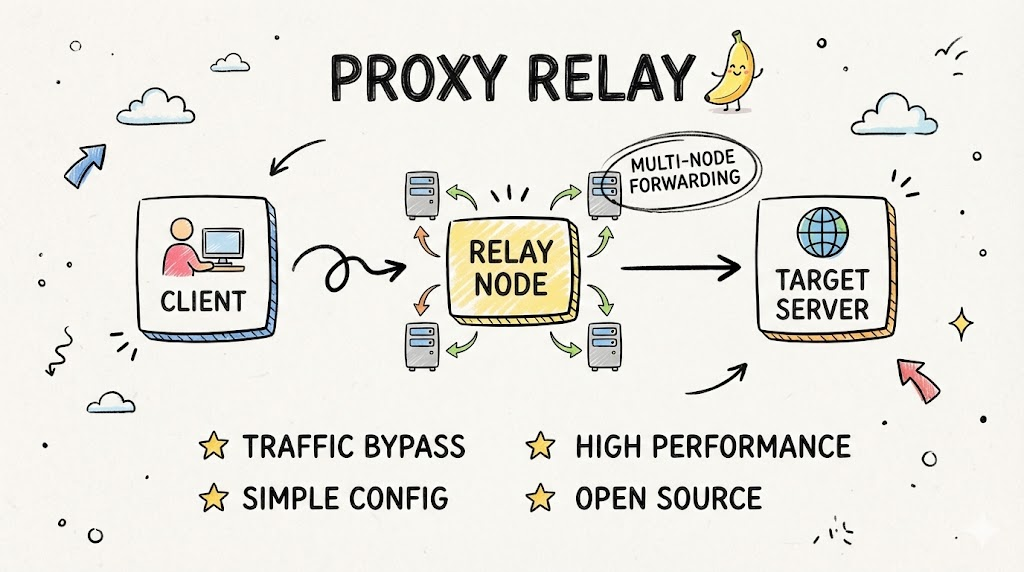
Proxy Relay turns authenticated upstream HTTP/HTTPS/SOCKS5/SOCKS5H proxies into local unauthenticated HTTP or SOCKS5 proxies.
This is useful when browser automation tools such as Playwright, Selenium, or DrissionPage need a local proxy URL but your upstream proxy requires credentials or a different protocol.
Features
- Protocol conversion between upstream HTTP/HTTPS/SOCKS5/SOCKS5H and local HTTP/SOCKS5
- Sync and async Python interfaces
- Local proxy binds to
127.0.0.1and requires no local authentication - Automatic cleanup on process exit, with explicit cleanup for long-running processes
- Zero runtime dependencies
- Local test coverage for the protocol matrix and key relay behavior
Installation
pip install proxy-relay
For the requests based Quick Start below:
pip install "proxy-relay[requests]"
For browser/example dependencies on Python 3.8+:
pip install "proxy-relay[examples]"
The examples_*.py scripts live in this repository. Clone the repo before running those files directly.
Quick Start
Set your real upstream proxy first. Do not include the local proxy created by this package here.
export UPSTREAM_PROXY="socks5://user:pass@proxy.example:1080"
import os
import requests

from proxy_relay import cleanup, create_proxy

upstream = os.environ["UPSTREAM_PROXY"]
local_url = create_proxy(upstream, local_type="http")

try:
    resp = requests.get(
        "https://api.ipify.org/",
        proxies={"http": local_url, "https": local_url},
        timeout=30,
    )
    print(resp.text)
finally:
    cleanup()
Expected result: the printed IP should be the upstream proxy exit IP, not your direct IP.
Common Integrations
Playwright
import asyncio
import os

from playwright.async_api import async_playwright
from proxy_relay import create_proxy_async

UPSTREAM_PROXY = os.environ["UPSTREAM_PROXY"]

async def main():
    local_url = await create_proxy_async(UPSTREAM_PROXY, local_type="http")

    async with async_playwright() as p:
        browser = await p.chromium.launch(proxy={"server": local_url}, headless=False)
        page = await browser.new_page()
        await page.goto("https://api.ipify.org/")
        print(await page.text_content("body"))
        await browser.close()

asyncio.run(main())
Selenium
import os

from proxy_relay import create_proxy
from selenium import webdriver
from selenium.webdriver.chrome.options import Options

local_url = create_proxy(os.environ["UPSTREAM_PROXY"], local_type="http")

options = Options()
options.add_argument(f"--proxy-server={local_url}")

driver = webdriver.Chrome(options=options)
try:
    driver.get("https://api.ipify.org/")
    print(driver.page_source)
finally:
    driver.quit()
More complete examples are in docs/integration-examples.md.
Interface
Sync
create_proxy(upstream_url, local_type="http", connect_timeout=30.0, idle_timeout=300.0, timeout=30.0)
create_http_proxy(upstream_url, ...)
create_socks5_proxy(upstream_url, ...)
cleanup()
Async
await create_proxy_async(upstream_url, local_type="http", connect_timeout=30.0, idle_timeout=300.0)
await create_http_proxy_async(upstream_url, ...)
await create_socks5_proxy_async(upstream_url, ...)
Context managers are available when you want explicit lifetime control:
from proxy_relay import HttpProxy, Socks5Proxy

async with HttpProxy(upstream_url) as proxy:
    local_http_url = proxy.get_local_url()

async with Socks5Proxy(upstream_url) as proxy:
    local_socks5_url = proxy.get_local_url()
For multiple proxies:
from proxy_relay import ProxyManager

async with ProxyManager() as manager:
    url = await manager.create(upstream_url, local_type="http")
    await manager.stop(url)
Supported Protocols
| Upstream | Local | Example |
|---|---|---|
| HTTP | HTTP / SOCKS5 | http://proxy.example:8080 |
| HTTPS | HTTP / SOCKS5 | https://proxy.example:8443 |
| SOCKS5 | HTTP / SOCKS5 | socks5://user:pass@proxy.example:1080 |
| SOCKS5H | HTTP / SOCKS5 | socks5h://user:pass@proxy.example:1080 |
Notes:
https://upstream proxies are contacted over TLS.socks5h://sends domain names to the upstream SOCKS5 proxy for remote DNS resolution.- The local proxy listens on
127.0.0.1with an ephemeral port.
Testing
pip install -e ".[test]"
python -m pytest -q
The test suite uses local fake upstream proxies and target servers. It does not require external network access or real proxy credentials.
Multi-process / Multi-thread
- Sync helpers use a background asyncio loop and a guarded registry.
- Each process owns its own local proxy runtime.
- On Linux
forkmode, create proxies after forking.
Troubleshooting
UPSTREAM_PROXYis missing: set it to the real upstream proxy, for examplesocks5://user:pass@host:1080.- Browser launches but traffic is direct: pass the returned local URL to the browser proxy setting, not the upstream URL.
502 Bad Gateway: the local proxy could not connect through the upstream proxy to the requested target.- Long-running processes: use
ProxyManageror callcleanup()when a proxy is no longer needed.
License
MIT License
1 maintainer

Release files for proxy-relay 1.4.0
For a detailed explanation of source distributions (sdists) and built distributions (wheels), please see the package formats documentation.
Source distribution (sdist)
| File | Size | Uploaded | |
|---|---|---|---|
| proxy_relay-1.4.0.tar.gz | 27.0 kB | Details |
Built distribution (wheel)
| File | Interpreter | ABI | Platform | Reset |
|---|---|---|---|---|
| proxy_relay-1.4.0-py3-none-any.whl | Python 3 | none | any | Details |
Total release size: 49.2 kB
Release files / proxy_relay-1.4.0.tar.gz
| Download URL | proxy_relay-1.4.0.tar.gz |
|---|---|
| Size | 27.0 kB |
| Tags | Source |
|
SHA-256 checksum How to use checksums |
b2282793897d10a62fa7e2c2aa932447cc44d6ef2f9f41298bc4c2f0e70af8b6
|
|
BLAKE2b-256 checksum How to use checksums |
4db665ee7540234ecef3d63036b34b0f99776125c4520e52447d5f83b10719a8
|
| Upload date | |
|
Uploaded using Trusted Publishing? What is trusted publishing? |
Yes |
| Uploaded via |
twine/6.1.0 CPython/3.13.14
|
Provenance
Provenance describes where a file came from. On PyPI, provenance is shared via attestations, which provide a verifiable record of the build or publishing details. View details, limitations and caveats.


PyPI Publish Attestation
PyPI verified that this artifact, at this checksum, originated from the publisher listed below.
Signed by GitHub Actions, verified by PyPI on Jul 23, 2026.
Transparency logRelease files / proxy_relay-1.4.0-py3-none-any.whl
| Download URL | proxy_relay-1.4.0-py3-none-any.whl |
|---|---|
| Size | 22.3 kB |
| Tags | Python 3 |
|
SHA-256 checksum How to use checksums |
be102fe58172aebbb74713b6ee37b77389d28b809f2cddc18266d77095190a1f
|
|
BLAKE2b-256 checksum How to use checksums |
070a6f2001950c4d28db4fd9c3788bbf2ee04ba4bdd8dc4a36ba9c89421a1d37
|
| Upload date | |
|
Uploaded using Trusted Publishing? What is trusted publishing? |
Yes |
| Uploaded via |
twine/6.1.0 CPython/3.13.14
|
Provenance
Provenance describes where a file came from. On PyPI, provenance is shared via attestations, which provide a verifiable record of the build or publishing details. View details, limitations and caveats.
PyPI Publish Attestation
PyPI verified that this artifact, at this checksum, originated from the publisher listed below.
Signed by GitHub Actions, verified by PyPI on Jul 23, 2026.
Transparency log













