
Proxy Scraper and Checker


Scrape more than 1K HTTP - HTTPS - SOCKS4 - SOCKS5 proxies in less than 2 seconds.
Scraping fresh public proxies from different sources:
- sslproxies.org (HTTP, HTTPS)
- free-proxy-list.net (HTTP, HTTPS)
- us-proxy.org (HTTP, HTTPS)
- socks-proxy.net (Socks4, Socks5)
- proxyscrape.com (HTTP, Socks4, Socks5)
- proxy-list.download (HTTP, HTTPS, Socks4, Socks5)
- geonode.com (HTTP, HTTPS, Socks4, Socks5)
Installation
You can install the package directly from PyPI using pip:
pip install proxyz
Alternatively, you can install dependencies manually if you're working from the source code:
pip3 install -r requirements.txt
Usage
Using the Command-Line Interface
Once installed via pip, you can use the command-line tools proxy_scraper and proxy_checker directly.
For Scraping Proxies:
proxy_scraper -p http
- With
-por--proxy, you can choose your proxy type. Supported proxy types are: HTTP - HTTPS - Socks (Both 4 and 5) - Socks4 - Socks5. - With
-oor--output, specify the output file name where the proxies will be saved. (Default is output.txt). - With
-vor--verbose, increase output verbosity. - With
-hor--help, show the help message.
For Checking Proxies:
proxy_checker -p http -t 20 -s https://google.com -l output.txt
- With
-tor--timeout, set the timeout in seconds after which the proxy is considered dead. (Default is 20). - With
-por--proxy, check HTTPS, HTTP, SOCKS4, or SOCKS5 proxies. (Default is HTTP). - With
-lor--list, specify the path to your proxy list file. (Default is output.txt). - With
-sor--site, check proxies against a specific website like google.com. (Default is https://google.com). - With
-ror--random_agent, use a random user agent per proxy. - With
-vor--verbose, increase output verbosity. - With
-hor--help, show the help message.
Running Directly from Source
If you prefer running the scripts directly from the source code, you can use the following commands:
For Scraping:
python3 proxyScraper.py -p http
For Checking:
python3 proxyChecker.py -p http -t 20 -s https://google.com -l output.txt
Good to Know
- Dead proxies will be removed, and only alive proxies will remain in the output file.
- This script is capable of scraping SOCKS proxies, but
proxyCheckercurrently only checks HTTP(S) proxies.
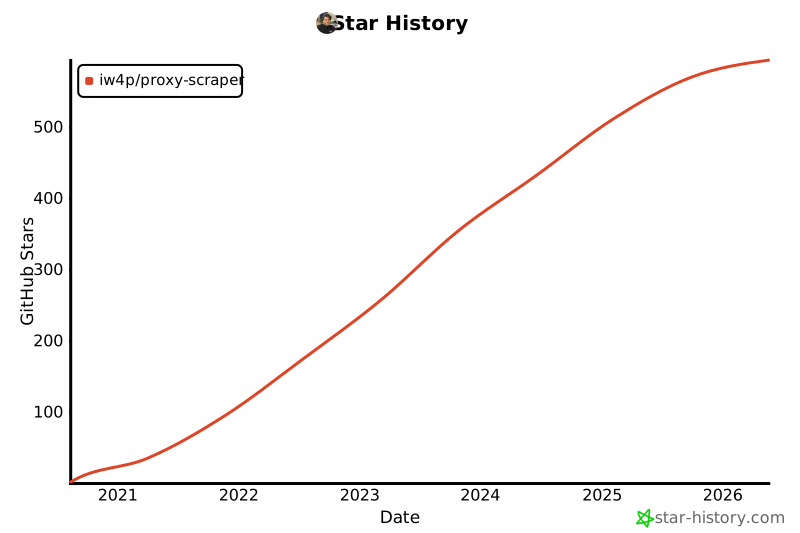
Star History
Contributing
Pull requests are welcome. For major changes, please open an issue first to discuss what you would like to change.
Issues
Feel free to submit issues and enhancement requests or contact me via vida.page/nima.
License
1 maintainer

Metadata
1 maintainer
Release files for proxyz 0.2.0
For a detailed explanation of source distributions (sdists) and built distributions (wheels), please see the package formats documentation.
Source distribution (sdist)
| File | Size | Uploaded | Provenance | |
|---|---|---|---|---|
| proxyz-0.2.0.tar.gz | 6.9 kB | Without provenance | Details |
Built distribution (wheel)
| File | Interpreter | ABI | Platform | Reset |
|---|---|---|---|---|
| proxyz-0.2.0-py3-none-any.whl | Python 3 | none | any | Details |
Total release size: 14.7 kB
Release files / proxyz-0.2.0.tar.gz
| Download URL | proxyz-0.2.0.tar.gz |
|---|---|
| Size | 6.9 kB |
| Tags | Source |
|
SHA-256 checksum How to use checksums |
c63f54048fb16931e82ed2ce89629469c070277036b31c8625f0b8457a28d90d
|
|
BLAKE2b-256 checksum How to use checksums |
32964663c083fbf3c96499b2c5fd81278858afbf2ab612a65112fa96ba5da795
|
| Upload date | |
|
Uploaded using Trusted Publishing? What is trusted publishing? |
No |
| Uploaded via |
twine/5.1.1 CPython/3.12.4
|
Release files / proxyz-0.2.0-py3-none-any.whl
| Download URL | proxyz-0.2.0-py3-none-any.whl |
|---|---|
| Size | 7.8 kB |
| Tags | Python 3 |
|
SHA-256 checksum How to use checksums |
dc4bc9d6c961fcbe419cb250a80ab6b3860dbf3566ac4baab4ed4f812ea856ff
|
|
BLAKE2b-256 checksum How to use checksums |
d54750264df747c72957486fdd42a4a24ad2e21de05de8a86be49d76524dc57e
|
| Upload date | |
|
Uploaded using Trusted Publishing? What is trusted publishing? |
No |
| Uploaded via |
twine/5.1.1 CPython/3.12.4
|
Security for proxyz 0.2.0
Provenance
Provenance describes where a file came from. On PyPI, provenance is shared via attestations, which provide a verifiable record of the build or publishing details. View details, limitations and caveats.
No provenance found
None of the files in this release were uploaded with provenance metadata.
A note on package security
PyPI is a repository for distributing packages, not a service for auditing them. While third-party security researchers and our staff do their best to detect and remove malicious packages, PyPI cannot guarantee the quality, security or suitability of any given package.














