
This release has been yanked by its maintainers, and will be ignored by installers, except when explicitly specified.
Consider using release 0.8.0 instead.
Reason given by maintainers: Bug in this release, tool will not start. Fixed in 0.3.1





puncover
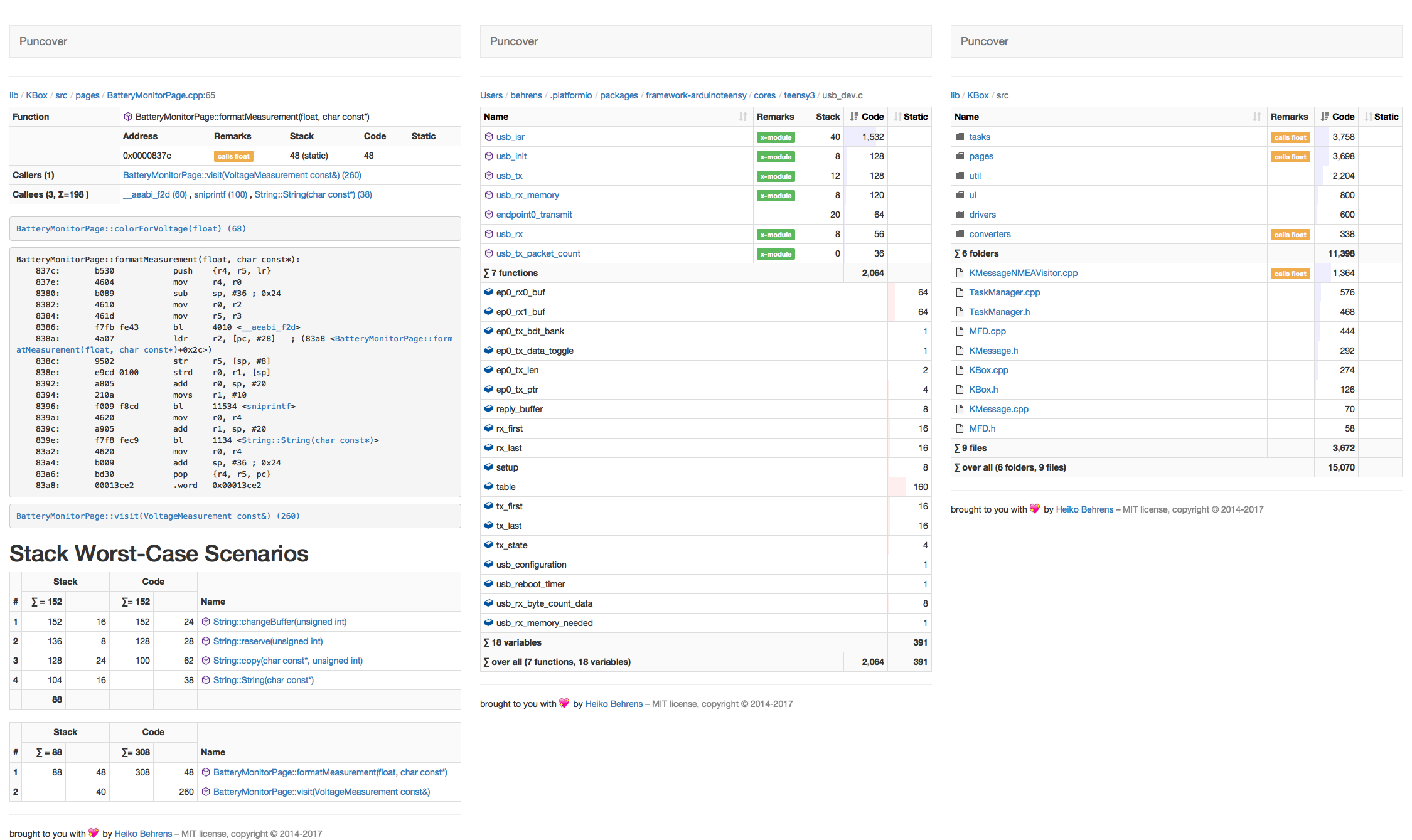
Analyzes C/C++ binaries for code size, static variables and stack usages. It creates a report with disassembler and call-stack analysis per directory, file, or function.
Installation and Usage
Install with pip:
pip install puncoverRun it by passing the binary to analyze:
puncover --elf_file project.elf
...
* Running on http://127.0.0.1:5000/ (Press CTRL+C to quit)
Open the link in your browser to view the analysis.
Running Tests Locally
To run the tests locally, you need to install the development dependencies:
install pyenv: https://github.com/pyenv/pyenv
curl https://pyenv.run | bashinstall all the python environments, using this bashism (this can take a few minutes):
for _py in $(<.python-version ); do pyenv install ${_py}; doneinstall the development dependencies:
pip install -r requirements-dev.txt
Then you can run the tests with:
toxPublishing Release
Update the version in puncover/__version__.py.
Commit the version update: .. code-block:: bash
git add . && git commit -m “Bump version to x.y.z”
Create an annotated tag: .. code-block:: bash
git tag -a {-m=,}x.y.z
Push the commit and tag: .. code-block:: bash
git push && git push –tags
Either wait for the GitHub Action to complete and download the release artifact for uploading: https://github.com/HBehrens/puncover/actions OR Build the package locally: python setup.py sdist bdist_wheel
Upload the package to PyPI: .. code-block:: bash
twine upload dist/*
Create GitHub releases: - gh release create --generate-notes x.y.z - attach the artifacts to the release too: gh release upload x.y.z dist/*
Release Script
See scripts/release.sh for a script that automates the above steps.
Contributing
Contributions are welcome! Please open an issue or pull request on GitHub.


Release files for puncover 0.3.0
For a detailed explanation of source distributions (sdists) and built distributions (wheels), please see the package formats documentation.
Source distribution (sdist)
| File | Size | Uploaded | Provenance | Actions |
|---|---|---|---|---|
| puncover-0.3.0.tar.gz | 171.4 kB | Without provenance | Details for puncover-0.3.0.tar.gz |
Built distribution (wheel)
| File | Interpreter | ABI | Platform | Actions Reset |
|---|---|---|---|---|
| puncover-0.3.0-py3-none-any.whl | Python 3 | none | any | Details for puncover-0.3.0-py3-none-any.whl |
Total release size: 342.1 kB
Release files / puncover-0.3.0.tar.gz
| Download URL | puncover-0.3.0.tar.gz |
|---|---|
| Size | 171.4 kB |
| Tags | Source |
|
SHA-256 checksum How to use checksums |
f5878302ec945ed45182827c58c67221b93c379fa1c99846e5f16e88ba7c0db5
|
|
BLAKE2b-256 checksum How to use checksums |
2fd3637b2c8b9838bff924469b211064fa5a56c29f155dee5903c079d4a40478
|
| Upload date | |
|
Uploaded using Trusted Publishing? What is trusted publishing? |
No |
| Uploaded via |
twine/4.0.2 CPython/3.10.7
|
Release files / puncover-0.3.0-py3-none-any.whl
| Download URL | puncover-0.3.0-py3-none-any.whl |
|---|---|
| Size | 170.7 kB |
| Tags | Python 3 |
|
SHA-256 checksum How to use checksums |
3f460a966fb40a235c6090db77b06f9f3d26abed91d959f17e13b8ae07f8e567
|
|
BLAKE2b-256 checksum How to use checksums |
f107879235e0b45c0424abea594bde944c1dd4815feeb9fc68b467dab40afc52
|
| Upload date | |
|
Uploaded using Trusted Publishing? What is trusted publishing? |
No |
| Uploaded via |
twine/4.0.2 CPython/3.10.7
|
Security for puncover 0.3.0
Provenance
Provenance describes where a file came from. On PyPI, provenance is shared via attestations, which provide a verifiable record of the build or publishing details. View details, limitations and caveats.
No provenance found
None of the files in this release were uploaded with provenance metadata.
A note on package security
PyPI is a repository for distributing packages, not a service for auditing them. While third-party security researchers and our staff do their best to detect and remove malicious packages, PyPI cannot guarantee the quality, security or suitability of any given package.
To learn more about protecting yourself from malicious actors, visit our package security documentation.














