
An Extensible Possible Worlds Explorer for Answer Set Programming
To get started (using Conda) -- recommended
-
conda create -n your-pwe-env-name -
Activate the environment created above using
conda activate your-pwe-env-nameorsource activate your-pwe-env-name(depending on the version of conda). -
Install DLV from here and ensure it is available in the path.
-
conda install -c potassco clingo -
conda install -c anaconda graphviz -
conda install -c anaconda pygraphviz -
pip install PW_explorer
(To use PWE in Jupyter Notebooks, install Jupyter)
-
conda install -c anaconda jupyter -
Install PWE-NB-Extension to activate Notebook-specific functionality like in-line editing, etc. using:
pip install PWE_NB_ExtensionLoad the extension in the notebook using
%load_ext PWE_NB_Extension
Alternatively, to get started (using venv):
-
Install clingo. PW_explorer has been tested with clingo version: 5.2.1
-
Install DLV.
-
Make sure the packages graphviz>=0.8.2 and pygraphviz>=1.5 are installed. These are required to be able to use the visualization functionality. You can find instructions to install pygraphviz here.
These commands usually work as well:
a. apt-get install python-dev graphviz libgraphviz-dev pkg-config OR brew install graphviz
b. pip3 install pygraphviz
(Might need to run them using sudo)
-
python3 -m venv /path/to/new/virtual/environment -
source /path/to/new/virtual/environment/bin/activate -
python3 -m pip install PW_explorer
To deactivate the virtualenv after you're done working:
deactivate
Repeat Step 5 to resume work and Step 7 to exit the virtualenv again.
Launch a ASP+PWE friendly computing environment on Binder

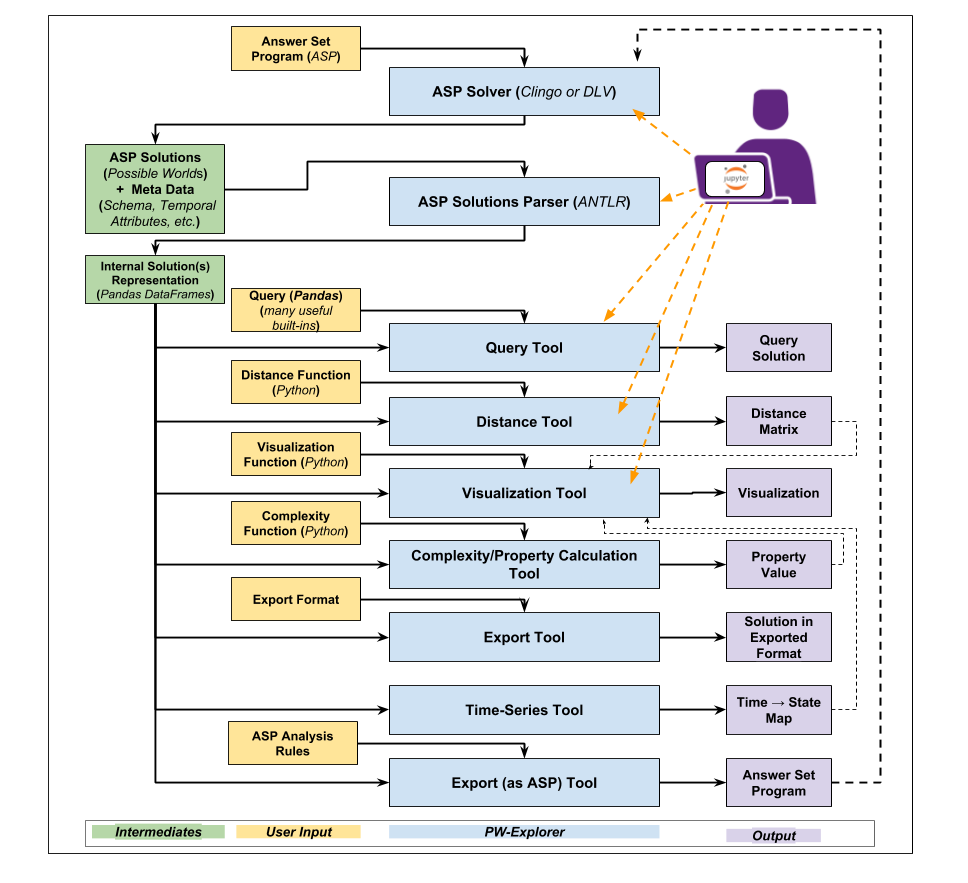
General System Architecture:
PWE Demos available here
1 maintainer

Metadata
1 maintainer
Release files for PW-explorer 0.0.25
For a detailed explanation of source distributions (sdists) and built distributions (wheels), please see the package formats documentation.
Source distribution (sdist)
| File | Size | Uploaded | |
|---|---|---|---|
| PW_explorer-0.0.25.tar.gz | 38.1 kB | Details |
Built distribution (wheel)
| File | Interpreter | ABI | Platform | Reset |
|---|---|---|---|---|
| PW_explorer-0.0.25-py3-none-any.whl | Python 3 | none | any | Details |
Total release size: 166.1 kB
Release files / PW_explorer-0.0.25.tar.gz
| Download URL | PW_explorer-0.0.25.tar.gz |
|---|---|
| Size | 38.1 kB |
| Tags | Source |
|
SHA-256 checksum How to use checksums |
930467b0e64bd9b4a09882fa01181efc2a210412113cb0fe0fffbb24d77efe01
|
|
BLAKE2b-256 checksum How to use checksums |
e208bcbaa524e76c7613bd4d2908faebe9d7a9f6dd9d25763491ee896ed18042
|
| Upload date | |
|
Uploaded using Trusted Publishing? What is trusted publishing? |
No |
| Uploaded via |
twine/1.12.1 pkginfo/1.4.2 requests/2.19.1 setuptools/40.8.0 requests-toolbelt/0.8.0 tqdm/4.26.0 CPython/3.7.2
|
Release files / PW_explorer-0.0.25-py3-none-any.whl
| Download URL | PW_explorer-0.0.25-py3-none-any.whl |
|---|---|
| Size | 128.0 kB |
| Tags | Python 3 |
|
SHA-256 checksum How to use checksums |
891f5bdc0c9ae60fd99a4bb4b5a6a6299b30448804429ea4969b189a0dff970f
|
|
BLAKE2b-256 checksum How to use checksums |
aad18b5f0b0499ab1bb0bff6d11a3b23e2d0b362bc8d7ca55b3a75137ffe989e
|
| Upload date | |
|
Uploaded using Trusted Publishing? What is trusted publishing? |
No |
| Uploaded via |
twine/1.12.1 pkginfo/1.4.2 requests/2.19.1 setuptools/40.8.0 requests-toolbelt/0.8.0 tqdm/4.26.0 CPython/3.7.2
|














