
Altdns - Subdomain discovery through alterations and permutations
Altdns is a DNS recon tool that allows for the discovery of subdomains that conform to patterns. Altdns takes in words that could be present in subdomains under a domain (such as test, dev, staging) as well as takes in a list of subdomains that you know of.
From these two lists that are provided as input to altdns, the tool then generates a massive output of "altered" or "mutated" potential subdomains that could be present. It saves this output so that it can then be used by your favourite DNS bruteforcing tool.
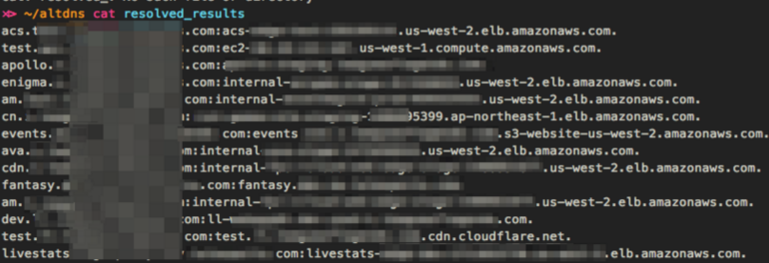
Alternatively, the -r flag can be passed to altdns so that once this output is generated, the tool can then resolve these subdomains (multi-threaded) and save the results to a file.
Altdns works best with large datasets. Having an initial dataset of 200 or more subdomains should churn out some valid subdomains via the alterations generated.
Further information on attack methodology and this tool release can be found here: https://docs.google.com/presentation/d/1PCnjzCeklOeGMoWiE2IUzlRGOBxNp8K5hLQuvBNzrFY/
Installation
pip install py-altdns
Usage
# altdns -i subdomains.txt -o data_output -w words.txt -r -s results_output.txt
subdomains.txtcontains the known subdomains for an organizationdata_outputis a file that will contain the massive list of altered and permuted subdomainswords.txtis your list of words that you'd like to permute your current subdomains with (i.e.admin,staging,dev,qa) - one word per line- the
-rcommand resolves each generated, permuted subdomain - the
-scommand tells altdns where to save the results of the resolved permuted subdomains.results_output.txtwill contain the final list of permuted subdomains found that are valid and have a DNS record. - the
-tcommand limits how many threads the resolver will use simultaneously -d 1.2.3.4overrides the system default DNS resolver and will use the specified IP address as the resolving server. Setting this to the authoritative DNS server of the target domain may increase resolution performance
Screenshots

Show some love
If this tool was useful at all to you during DNS recon stages - we'd love to know. Any suggestions or ideas for this tool are welcome - just tweet @infosec_au or @nnwakelam and we'll work on it.
1 maintainer

Metadata
1 maintainer
Release files for py-altdns 1.0.2
For a detailed explanation of source distributions (sdists) and built distributions (wheels), please see the package formats documentation.
Source distribution (sdist)
| File | Size | Uploaded | Provenance | |
|---|---|---|---|---|
| py-altdns-1.0.2.tar.gz | 5.3 kB | Without provenance | Details |
Release files / py-altdns-1.0.2.tar.gz
| Download URL | py-altdns-1.0.2.tar.gz |
|---|---|
| Size | 5.3 kB |
| Tags | Source |
|
SHA-256 checksum How to use checksums |
61cfe5ed4b4a882e03f914b9314c08a8eba56efd10d1cf52069c1d00998278ce
|
|
BLAKE2b-256 checksum How to use checksums |
c1cb2d22022785b4f82b17c6d3cf3e1dc407ce24c9efd5f56d1c9badbe76e36d
|
| Upload date | |
|
Uploaded using Trusted Publishing? What is trusted publishing? |
No |
| Uploaded via |
twine/1.15.0 pkginfo/1.7.1 requests/2.26.0 setuptools/41.0.1 requests-toolbelt/0.9.1 tqdm/4.62.2 CPython/2.7.16
|
Security for py-altdns 1.0.2
Provenance
Provenance describes where a file came from. On PyPI, provenance is shared via attestations, which provide a verifiable record of the build or publishing details. View details, limitations and caveats.
No provenance found
None of the files in this release were uploaded with provenance metadata.
A note on package security
PyPI is a repository for distributing packages, not a service for auditing them. While third-party security researchers and our staff do their best to detect and remove malicious packages, PyPI cannot guarantee the quality, security or suitability of any given package.
To learn more about protecting yourself from malicious actors, visit our package security documentation.














