
Py-AutoML










Introduction
What is Py-AutoML?
Py-AutoML is an open source low-code machine learning library in Python that aims to reduce the hypothesis to insights cycle time in a ML experiment. It mainly helps to do our pet projects quickly and efficiently. In comparison with the other open source machine learning libraries, Py-AutoML is an alternative low-code library that can be used to perform complex machine learning tasks with only few lines of code. Py-AutoML is essentially a Python wrapper around several machine learning libraries and frameworks such as scikit-learn, 'tensorflow','keras' and many more.
The design and simplicity of Py-AutoML is inspired by the two principles KISS (keep it simple and sweet) and DRY (Don't Repeat Yourself) . We as engineers have to find a way effective way to mitigate this gap and address data related challenges in business setting.
Modules
Py-AutoML is a minimalistic library which not simplifies the machine learning tasks and also makes our work easier.
Py-AutoML consists of so many functionalities. such as
-
model.py- implementing popular neural networks such as googlenet , vgg16, simple cnn ,basic cnn, lenet5, alexnet, lstm, mlp etc..
-
checkpoint.py - consists of callbacks function which is used to store metrics
-
utils.py - consists of some functionalities used to preprocess test images, spliting the data.
-
preprocess.py - used to preprocess image dataset such as resize, reshape, convert to greyscale, normalisation etc..
-
ml.py - allow us to implement and check metrics of popular classical machine learning models such as random forest, decision tree, svm , logistic regression and also displays metric reports of every model
-
visualize.py - allow us to visualize neural networks in pictorial and graphs form.
ml.py -> Implemented algorithms
-
Logistic Regression
-
Support Vector Machine
-
Decision Tree Classifier
-
Random Forest Classifier
-
K-Nearest Neighbors
model.py -> Implemented popular neural network architectures
with predefined configurations
Getting started
Install the package
pip install py-automl
Navigate to folder and install requirements:
pip install -r requirements.txt
Usage
Importing the package
import pyAutoML
from pyAutoML import *
from pyAutoML.model import *
# like that...
Assign the variables X and Y to the desired columns and assign the variable size to the desired test_size.
X = < df.features >
Y = < df.target >
size = < test_size >
Encoding Categorical Data
Encode target variable if non-numerical:
from pyAutoML import *
Y = EncodeCategorical(Y)
Running py-automl
signature is as follows : ML(X, Y, size=0.25, *args)
from pyAutoML.ml import ML,ml, EncodeCategorical

import pandas as pd
import numpy as np
from sklearn.ensemble import RandomForestClassifier
from sklearn.tree import DecisionTreeClassifier
from sklearn.neighbors import KNeighborsClassifier
from sklearn.linear_model import LogisticRegression
from sklearn.svm import SVC
from sklearn import datasets


##reading the Iris dataset into the code
df =  datasets.load_iris()

##assigning the desired columns to X and Y  in preparation for running fastML
X = df.data[:, :4]
Y = df.target

##running the EncodeCategorical function from fastML to handle the process of categorial encoding of data
Y = EncodeCategorical(Y)
size = 0.33

ML(X, Y, size, SVC(), RandomForestClassifier(), DecisionTreeClassifier(), KNeighborsClassifier(), LogisticRegression(max_iter = 7000))
output
____________________________________________________
.....................Py-AutoML......................
____________________________________________________
SVC ______________________________

Accuracy Score for SVC is
0.98


Confusion Matrix for SVC is
[[16  0  0]
 [ 0 18  1]
 [ 0  0 15]]


Classification Report for SVC is
              precision    recall  f1-score   support

           0       1.00      1.00      1.00        16
           1       1.00      0.95      0.97        19
           2       0.94      1.00      0.97        15

    accuracy                           0.98        50
   macro avg       0.98      0.98      0.98        50
weighted avg       0.98      0.98      0.98        50


____________________________________________________
RandomForestClassifier ______________________________

Accuracy Score for RandomForestClassifier is
0.96


Confusion Matrix for RandomForestClassifier is
[[16  0  0]
 [ 0 18  1]
 [ 0  1 14]]


Classification Report for RandomForestClassifier is
              precision    recall  f1-score   support

           0       1.00      1.00      1.00        16
           1       0.95      0.95      0.95        19
           2       0.93      0.93      0.93        15

    accuracy                           0.96        50
   macro avg       0.96      0.96      0.96        50
weighted avg       0.96      0.96      0.96        50


____________________________________________________
DecisionTreeClassifier ______________________________

Accuracy Score for DecisionTreeClassifier is
0.98


Confusion Matrix for DecisionTreeClassifier is
[[16  0  0]
 [ 0 18  1]
 [ 0  0 15]]


Classification Report for DecisionTreeClassifier is
              precision    recall  f1-score   support

           0       1.00      1.00      1.00        16
           1       1.00      0.95      0.97        19
           2       0.94      1.00      0.97        15

    accuracy                           0.98        50
   macro avg       0.98      0.98      0.98        50
weighted avg       0.98      0.98      0.98        50


____________________________________________________
KNeighborsClassifier ______________________________

Accuracy Score for KNeighborsClassifier is
0.98


Confusion Matrix for KNeighborsClassifier is
[[16  0  0]
 [ 0 18  1]
 [ 0  0 15]]


Classification Report for KNeighborsClassifier is
              precision    recall  f1-score   support

           0       1.00      1.00      1.00        16
           1       1.00      0.95      0.97        19
           2       0.94      1.00      0.97        15

    accuracy                           0.98        50
   macro avg       0.98      0.98      0.98        50
weighted avg       0.98      0.98      0.98        50


____________________________________________________
LogisticRegression ______________________________

Accuracy Score for LogisticRegression is
0.98


Confusion Matrix for LogisticRegression is
[[16  0  0]
 [ 0 18  1]
 [ 0  0 15]]


Classification Report for LogisticRegression is
              precision    recall  f1-score   support

           0       1.00      1.00      1.00        16
           1       1.00      0.95      0.97        19
           2       0.94      1.00      0.97        15

    accuracy                           0.98        50
   macro avg       0.98      0.98      0.98        50
weighted avg       0.98      0.98      0.98        50


                    Model Accuracy
0                     SVC     0.98
1  RandomForestClassifier     0.96
2  DecisionTreeClassifier     0.98
3    KNeighborsClassifier     0.98
4      LogisticRegression     0.98
you can also write as follows
ML(X,Y)
output
____________________________________________________
.....................Py-AutoML......................
____________________________________________________
SVC ______________________________

Accuracy Score for SVC is
0.9736842105263158


Confusion Matrix for SVC is
[[13  0  0]
 [ 0 15  1]
 [ 0  0  9]]


Classification Report for SVC is
              precision    recall  f1-score   support

           0       1.00      1.00      1.00        13
           1       1.00      0.94      0.97        16
           2       0.90      1.00      0.95         9

    accuracy                           0.97        38
   macro avg       0.97      0.98      0.97        38
weighted avg       0.98      0.97      0.97        38


____________________________________________________
RandomForestClassifier ______________________________

Accuracy Score for RandomForestClassifier is
0.9736842105263158


Confusion Matrix for RandomForestClassifier is
[[13  0  0]
 [ 0 15  1]
 [ 0  0  9]]


Classification Report for RandomForestClassifier is
              precision    recall  f1-score   support

           0       1.00      1.00      1.00        13
           1       1.00      0.94      0.97        16
           2       0.90      1.00      0.95         9

    accuracy                           0.97        38
   macro avg       0.97      0.98      0.97        38
weighted avg       0.98      0.97      0.97        38


____________________________________________________
DecisionTreeClassifier ______________________________

Accuracy Score for DecisionTreeClassifier is
0.9736842105263158


Confusion Matrix for DecisionTreeClassifier is
[[13  0  0]
 [ 0 15  1]
 [ 0  0  9]]


Classification Report for DecisionTreeClassifier is
              precision    recall  f1-score   support

           0       1.00      1.00      1.00        13
           1       1.00      0.94      0.97        16
           2       0.90      1.00      0.95         9

    accuracy                           0.97        38
   macro avg       0.97      0.98      0.97        38
weighted avg       0.98      0.97      0.97        38


____________________________________________________
KNeighborsClassifier ______________________________

Accuracy Score for KNeighborsClassifier is
0.9736842105263158


Confusion Matrix for KNeighborsClassifier is
[[13  0  0]
 [ 0 15  1]
 [ 0  0  9]]


Classification Report for KNeighborsClassifier is
              precision    recall  f1-score   support

           0       1.00      1.00      1.00        13
           1       1.00      0.94      0.97        16
           2       0.90      1.00      0.95         9

    accuracy                           0.97        38
   macro avg       0.97      0.98      0.97        38
weighted avg       0.98      0.97      0.97        38


____________________________________________________
LogisticRegression ______________________________

Accuracy Score for LogisticRegression is
0.9736842105263158


Confusion Matrix for LogisticRegression is
[[13  0  0]
 [ 0 15  1]
 [ 0  0  9]]


Classification Report for LogisticRegression is
              precision    recall  f1-score   support

           0       1.00      1.00      1.00        13
           1       1.00      0.94      0.97        16
           2       0.90      1.00      0.95         9

    accuracy                           0.97        38
   macro avg       0.97      0.98      0.97        38
weighted avg       0.98      0.97      0.97        38


                    Model            Accuracy
0                     SVC  0.9736842105263158
1  RandomForestClassifier  0.9736842105263158
2  DecisionTreeClassifier  0.9736842105263158
3    KNeighborsClassifier  0.9736842105263158
4      LogisticRegression  0.9736842105263158
Defining popular neural networks
implementing alexNet may looks like this
 #Instantiation
   AlexNet = Sequential()

   #1st Convolutional Layer
   AlexNet.add(Conv2D(filters=96, input_shape=input_shape, kernel_size=(11,11), strides=(4,4), padding='same'))
   AlexNet.add(BatchNormalization())
   AlexNet.add(Activation('relu'))
   AlexNet.add(MaxPooling2D(pool_size=(2,2), strides=(2,2), padding='same'))

   #2nd Convolutional Layer
   AlexNet.add(Conv2D(filters=256, kernel_size=(5, 5), strides=(1,1), padding='same'))
   AlexNet.add(BatchNormalization())
   AlexNet.add(Activation('relu'))
   AlexNet.add(MaxPooling2D(pool_size=(2,2), strides=(2,2), padding='same'))

   #3rd Convolutional Layer
   AlexNet.add(Conv2D(filters=384, kernel_size=(3,3), strides=(1,1), padding='same'))
   AlexNet.add(BatchNormalization())
   AlexNet.add(Activation('relu'))

   #4th Convolutional Layer
   AlexNet.add(Conv2D(filters=384, kernel_size=(3,3), strides=(1,1), padding='same'))
   AlexNet.add(BatchNormalization())
   AlexNet.add(Activation('relu'))

   #5th Convolutional Layer
   AlexNet.add(Conv2D(filters=256, kernel_size=(3,3), strides=(1,1), padding='same'))
   AlexNet.add(BatchNormalization())
   AlexNet.add(Activation('relu'))
   AlexNet.add(MaxPooling2D(pool_size=(2,2), strides=(2,2), padding='same'))

   #Passing it to a Fully Connected layer
   AlexNet.add(Flatten())
   # 1st Fully Connected Layer
   AlexNet.add(Dense(4096, input_shape=(32,32,3,)))
   AlexNet.add(BatchNormalization())
   AlexNet.add(Activation('relu'))
   # Add Dropout to prevent overfitting
   AlexNet.add(Dropout(0.4))

   #2nd Fully Connected Layer
   AlexNet.add(Dense(4096))
   AlexNet.add(BatchNormalization())
   AlexNet.add(Activation('relu'))
   #Add Dropout
   AlexNet.add(Dropout(0.4))

   #3rd Fully Connected Layer
   AlexNet.add(Dense(1000))
   AlexNet.add(BatchNormalization())
   AlexNet.add(Activation('relu'))
   #Add Dropout
   AlexNet.add(Dropout(0.4))

   #Output Layer
   AlexNet.add(Dense(10))
   AlexNet.add(BatchNormalization())
   AlexNet.add(Activation(classifier_function))

   AlexNet.compile('adam', loss_function, metrics=['acc'])
   return AlexNet
But we implement this in a single line of code like below using this package.
alexNet_model = model(input_shape= (30,30,4) , arch="alexNet", classify="Mulit" )
Similarly we can also implement
alexNet_model = model("alexNet")

lenet5_model = model("lenet5")

googleNet_model = model("googleNet")

vgg16_model = model("vgg16")

### etc...
For more generalization , let's observe following code.
# Lets take all models that are defined in the py_automl and which are implemented in a signle line of code
models = ["simple_cnn", "basic_cnn", "googleNet", "inception","vgg16","lenet5","alexNet", "basic_mlp","deep_mlp","basic_lstm","deep_lstm" ]

d= {}

for i in models:
  d[i] = model(i)  # assigning all architectures to its model names using dictionary
Visualization
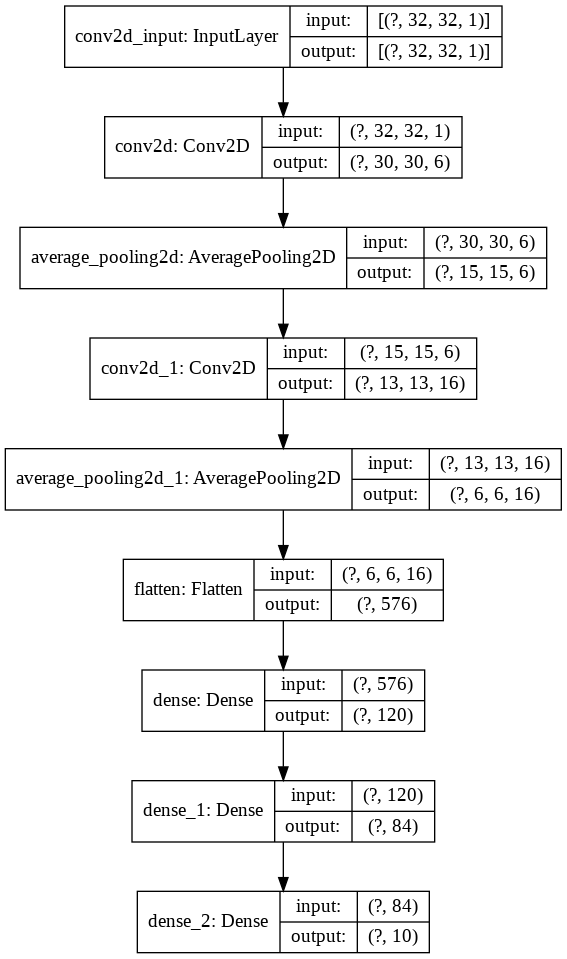
we can visualize neural networks architecture in different forms with ease.
Let's observe the following code for better understanding
import keras
from keras import layers
model = keras.Sequential()

model.add(layers.Conv2D(filters=6, kernel_size=(3, 3), activation='relu', input_shape=(32,32,1)))
model.add(layers.AveragePooling2D())

model.add(layers.Conv2D(filters=16, kernel_size=(3, 3), activation='relu'))
model.add(layers.AveragePooling2D())

model.add(layers.Flatten())

model.add(layers.Dense(units=120, activation='relu'))

model.add(layers.Dense(units=84, activation='relu'))

model.add(layers.Dense(units=10, activation = 'softmax'))
now let's visualise this
nn_visualize(model)
By default , it returns keras visualization object
output:
from keras.models import Sequential
from keras.layers import Dense
import numpy
# fix random seed for reproducibility
numpy.random.seed(7)
# load pima indians dataset
dataset = numpy.loadtxt("pima-indians-diabetes.csv", delimiter=",")
# split into input (X) and output (Y) variables
X = dataset[:,0:8]
Y = dataset[:,8]
# create model
model = Sequential()
model.add(Dense(12, input_dim=8, activation='relu'))
model.add(Dense(8, activation='relu'))
model.add(Dense(1, activation='sigmoid'))
# Compile model
model.compile(loss='binary_crossentropy', optimizer='adam', metrics=['accuracy'])
# Fit the model
model.fit(X, Y, epochs=150, batch_size=10)
# evaluate the model
scores = model.evaluate(X, Y)
print("\n%s: %.2f%%" % (model.metrics_names[1], scores[1]*100))


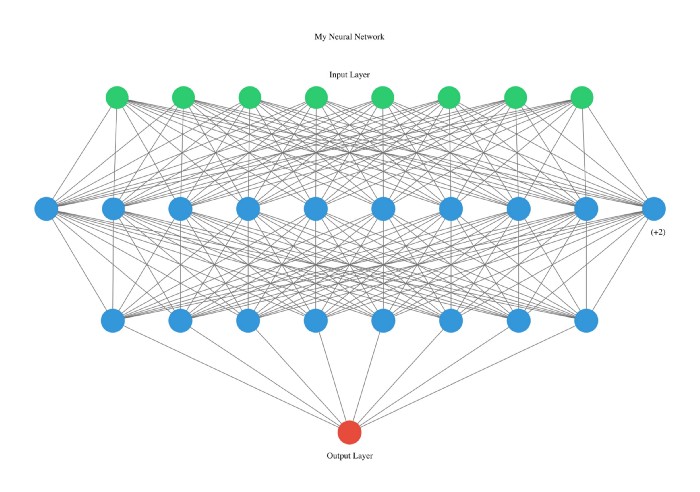
#Neural network visualization

nn_visualize(model,type = "graphviz")
output
This library is so developer friendly that even we declare type with starting letters.
from pyAutoML.model import *
model2 = model(arch="alexNet")

nn_visualize(model2,type="k")
output:

This is a minimal documentation about the package.
For more information and understanding, see examples HERE and source code: GITHUB
Author: Prudhvi GNV
Contact:
1 maintainer

Metadata
1 maintainer
Release files for py-automl 1.0.6
For a detailed explanation of source distributions (sdists) and built distributions (wheels), please see the package formats documentation.
Source distribution (sdist)
| File | Size | Uploaded | Provenance | Actions |
|---|---|---|---|---|
| py-automl-1.0.6.tar.gz | 15.8 kB | Without provenance | Details for py-automl-1.0.6.tar.gz |
Release files / py-automl-1.0.6.tar.gz
| Download URL | py-automl-1.0.6.tar.gz |
|---|---|
| Size | 15.8 kB |
| Tags | Source |
|
SHA-256 checksum How to use checksums |
06b6c60ea190d45b1a8b9db50d5b673884530c7866a1f7044ba23c4e8818a226
|
|
BLAKE2b-256 checksum How to use checksums |
2451f2cfef7c6d158456678819df3af50d45ad22231945ea7b64adc9bf22f6ec
|
| Upload date | |
|
Uploaded using Trusted Publishing? What is trusted publishing? |
No |
| Uploaded via |
twine/3.2.0 pkginfo/1.5.0.1 requests/2.24.0 setuptools/40.8.0 requests-toolbelt/0.9.1 tqdm/4.48.2 CPython/3.7.3
|
Security for py-automl 1.0.6
Provenance
Provenance describes where a file came from. On PyPI, provenance is shared via attestations, which provide a verifiable record of the build or publishing details. View details, limitations and caveats.
No provenance found
None of the files in this release were uploaded with provenance metadata.
A note on package security
PyPI is a repository for distributing packages, not a service for auditing them. While third-party security researchers and our staff do their best to detect and remove malicious packages, PyPI cannot guarantee the quality, security or suitability of any given package.
To learn more about protecting yourself from malicious actors, visit our package security documentation.














