
Tasker




You know Ansible right? Well, this works kind of the same way, except you create tasks to automate your local computer.
How? You're in luck. Just create an InstructionSet (you can use the CLI command tasker create to get started) and let your life get easier!
Index
For more detailed information visit the Documentation
Installation
There are 2 ways of installation:
- Via source files available at GitHub.
- Using Pip
$ pip install pyTasker
Reference System
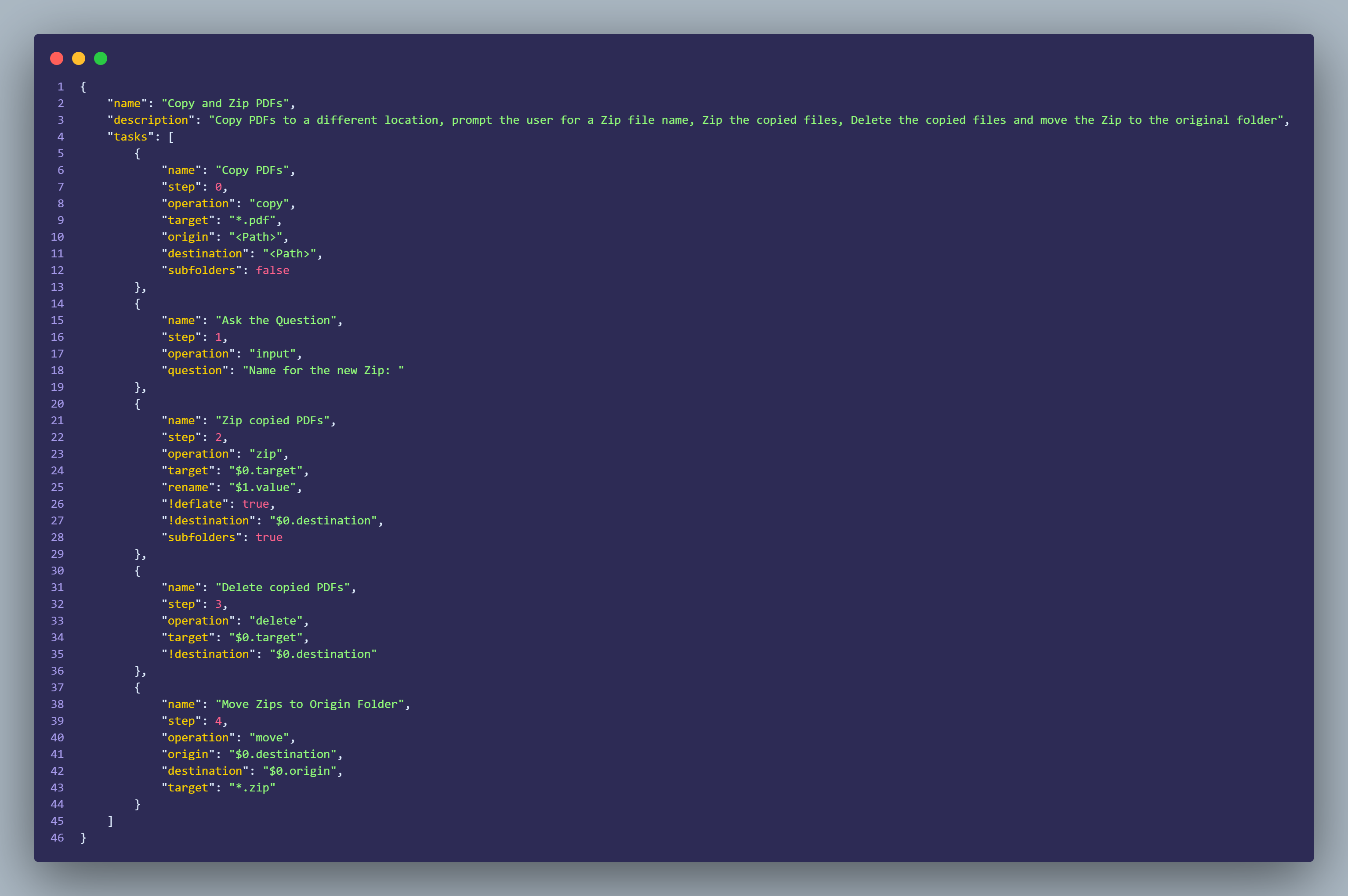
Tasker includes a reference system which allows the user to access values from a previous step and/or value, like the Input Action. References are a way to simplify the InstructionSets.
To get started with references simply use $<Step Number> or $<Step Number>.<Field Name> on a field. If no additional data is appended to the reference, like $0, the system will fallback to the key where reference was invoked.
Example:
{
    "name": "<Step Name>",
    "step": 0,
    "operation": "input",
    "question": "<Question Value>"
},
{
    "name": "<Step Name>",
    "step": 1,
    "operation": "zip",
    "target": "*",
    "rename": "$0.value",
    "!deflate": true,
    "!destination": "<Destination Path>",
    "subfolders": true
}
Key Features
For extra information use tasker -h
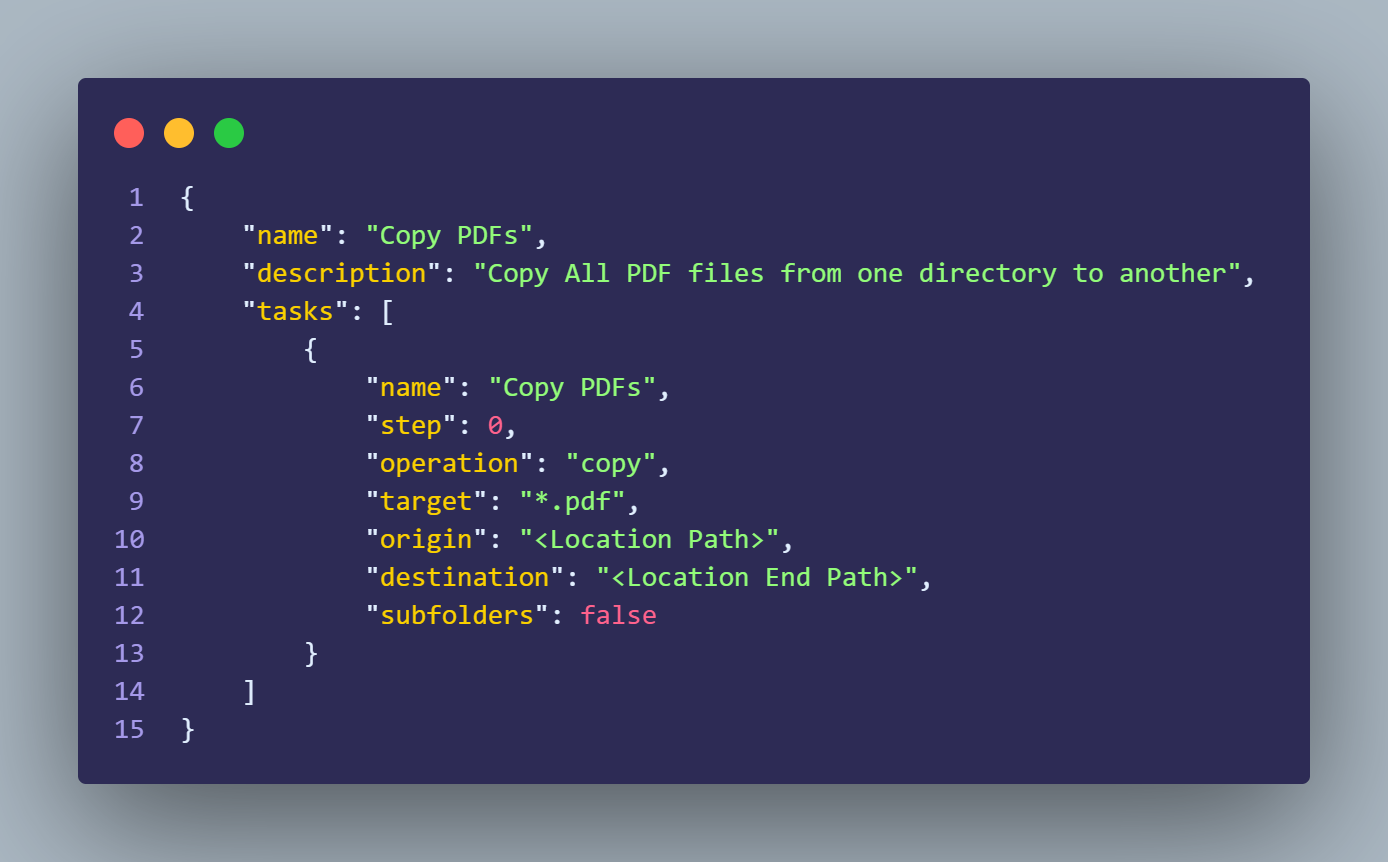
Copy Action
{
    "name": "<Name of Step>",
    "step": 0,
    "operation": "copy",
    "target": "<File(s) or File Type>",
    "origin": "<Location Path>",
    "destination": "<Location End Path>",
    "subfolders": false //Should Tasker also include subfolders inside main location
}
Zip Action
{
    "name": "<Name of Step>",
    "step": 0,
    "operation": "zip",
    "target": "<Location Path>",
    "rename": "<Name of Zip file>",
    "!destination": "<Name of Zip file>",
    "!deflate": false, //When Zip is created should the Folder structure be with current system Path or just the pretended folder
    "subfolders": true //Should Tasker also include subfolders inside main location
}
Delete Action
Warning: This permanently deletes the file(s) from computer
{
    "name": "<Name of Step>",
    "step": 0,
    "operation": "delete",
    "destination": "<Location to delete files>",
    "target": "<File(s) or File Type>", //Can use location + file name/type
}
Move Action
{
    "name": "<Name of Step>",
    "step": 0,
    "operation": "move",
    "origin": "<File(s) or File Type>", //Can use location + file name/type
    "destinaton": "<File(s) or File Type>", //Can use location + file name/type
    "target": "<File(s) or File Type>" //Can use location + file name/type
}
Input Action
This action stores the Answer in the
valuevariable
{
    "name": "<Name of Step>",
    "step": 0,
    "operation": "input",
    "question": "<Question to prompt the user>"
}
Echo Action
{
    "name": "<Name of Step>",
    "step": 0,
    "operation": "input",
    "value": "<Value to output to console>"
}
Request Action
This action stores the Response in the
responsevariable
{
    "name": "<Name of Step>",
    "step": 0,
    "operation": "request",
    "endpoint": "<URL to query>",
    "method": "<get | post | put | delete>", //Must be only 1 option
    "!body": {}, //Optional parameter
    "!headers": {} //Optional Parameter
}
Registry Action
{
    "name": "<Name of Step>",
    "step": 0,
    "operation": "registry",
    "start_key": "<classes-root | current-user | current-config | local-machine | users>",
    "key": "<path to the key>",
    "function": "<get | set | create | backup>",
    "type": "<sz | multisz | none | binary | dword | qword>",
    "value": "<data>",
    "rename": "<file name for backup>"
}
Custom Action
Allows the usage of Custom Extension when created via the
tasker extension -n <Name of Extension>command
{
    "name": "<Name of Step>",
    "step": 0,
    "operation": "custom",
    "extension_name": ""
}
Stepparameter is the order Tasker will pick up the tasks
Parameters starting with "!" are optional parameters
Usage
Roadmap
This is a project I'm working on my free time, however I have some new Actions in mind I want to implement.
Actions in Pipeline
Input Action- Command Action
- Encrypt Action
Registry Action (for Windows)
General Improvements
- Change reference system
Support
1 maintainer

Metadata
1 maintainer
Release files for pyTasker 0.6.7
For a detailed explanation of source distributions (sdists) and built distributions (wheels), please see the package formats documentation.
Source distribution (sdist)
| File | Size | Uploaded | |
|---|---|---|---|
| pyTasker-0.6.7.tar.gz | 475.8 kB | Details |
Release files / pyTasker-0.6.7.tar.gz
| Download URL | pyTasker-0.6.7.tar.gz |
|---|---|
| Size | 475.8 kB |
| Tags | Source |
|
SHA-256 checksum How to use checksums |
8f2bbb1ed4c119d3b5ea82f98f009b0e45516ed265b85bfaf6715003f95f023e
|
|
BLAKE2b-256 checksum How to use checksums |
9a685b01fa122969b5ef7710da2009d80b504b416b9bb177441e0245ab522fd4
|
| Upload date | |
|
Uploaded using Trusted Publishing? What is trusted publishing? |
No |
| Uploaded via |
twine/3.8.0 pkginfo/1.8.2 readme-renderer/32.0 requests/2.25.1 requests-toolbelt/0.9.1 urllib3/1.26.8 tqdm/4.62.3 importlib-metadata/4.11.0 keyring/23.5.0 rfc3986/2.0.0 colorama/0.4.4 CPython/3.10.1
|














