
Neural building blocks for speaker diarization

Project description
Neural speaker diarization with pyannote.audio
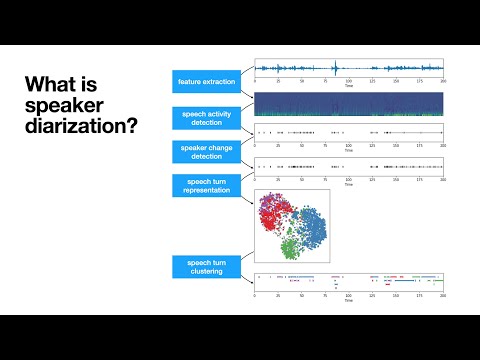
pyannote.audio is an open-source toolkit written in Python for speaker diarization. Based on PyTorch machine learning framework, it provides a set of trainable end-to-end neural building blocks that can be combined and jointly optimized to build speaker diarization pipelines.
TL;DR 
# 1. visit hf.co/pyannote/speaker-diarization and accept user conditions (only if requested)
# 2. visit hf.co/settings/tokens to create an access token (only if you had to go through 1.)
# 3. instantiate pretrained speaker diarization pipeline
from pyannote.audio import Pipeline
pipeline = Pipeline.from_pretrained("pyannote/speaker-diarization",
                                    use_auth_token="ACCESS_TOKEN_GOES_HERE")

# 4. apply pretrained pipeline
diarization = pipeline("audio.wav")

# 5. print the result
for turn, _, speaker in diarization.itertracks(yield_label=True):
    print(f"start={turn.start:.1f}s stop={turn.end:.1f}s speaker_{speaker}")
# start=0.2s stop=1.5s speaker_0
# start=1.8s stop=3.9s speaker_1
# start=4.2s stop=5.7s speaker_0
# ...
What's new in pyannote.audio 2.x?
For version 2.x of pyannote.audio, I decided to rewrite almost everything from scratch.
Highlights of this release are:
- :exploding_head: much better performance (see Benchmark)
- :snake: Python-first API
- :hugs: pretrained pipelines (and models) on :hugs: model hub
- :zap: multi-GPU training with pytorch-lightning
- :control_knobs: data augmentation with torch-audiomentations
- :boom: Prodigy recipes for model-assisted audio annotation
Installation
Only Python 3.8+ is officially supported (though it might work with Python 3.7)
conda create -n pyannote python=3.8
conda activate pyannote

# pytorch 1.11 is required for speechbrain compatibility
# (see https://pytorch.org/get-started/previous-versions/#v1110)
conda install pytorch==1.11.0 torchvision==0.12.0 torchaudio==0.11.0 -c pytorch

pip install -qq https://github.com/pyannote/pyannote-audio/archive/develop.zip
Documentation
- Changelog
- Models
- Available tasks explained
- Applying a pretrained model
- Training, fine-tuning, and transfer learning
- Pipelines
- Available pipelines explained
- Applying a pretrained pipeline
- Training a pipeline
- Contributing
- Adding a new model
- Adding a new task
- Adding a new pipeline
- Sharing pretrained models and pipelines
- Blog
- 2022-10-23 > "One speaker segmentation model to rule them all"
- 2021-08-05 > "Streaming voice activity detection with pyannote.audio"
- Miscellaneous
- Training with
pyannote-audio-traincommand line tool - Annotating your own data with Prodigy
- Speaker verification
- Visualization and debugging
- Training with
Frequently asked questions
How does one capitalize and pronounce the name of this awesome library?
📝 Written in lower case: pyannote.audio (or pyannote if you are lazy). Not PyAnnote nor PyAnnotate (sic).
📢 Pronounced like the french verb pianoter. pi like in piano, not py like in python.
🎹 pianoter means to play the piano (hence the logo 🤯).
Pretrained pipelines do not produce good results on my data. What can I do?
- Annotate dozens of conversations manually and separate them into development and test subsets in
pyannote.database. - Optimize the hyper-parameters of the pretained pipeline using the development set. If performance is still not good enough, go to step 3.
- Annotate hundreds of conversations manually and set them up as training subset in
pyannote.database. - Fine-tune the models (on which the pipeline relies) using the training set.
- Optimize the hyper-parameters of the pipeline using the fine-tuned models using the development set. If performance is still not good enough, go back to step 3.
Benchmark
Out of the box, pyannote.audio default speaker diarization pipeline is expected to be much better (and faster) in v2.x than in v1.1. Those numbers are diarization error rates (in %)
| Dataset \ Version | v1.1 | v2.0 | v2.1.1 (finetuned) |
|---|---|---|---|
| AISHELL-4 | - | 14.6 | 14.1 (14.5) |
| AliMeeting (channel 1) | - | - | 27.4 (23.8) |
| AMI (IHM) | 29.7 | 18.2 | 18.9 (18.5) |
| AMI (SDM) | - | 29.0 | 27.1 (22.2) |
| CALLHOME (part2) | - | 30.2 | 32.4 (29.3) |
| DIHARD 3 (full) | 29.2 | 21.0 | 26.9 (21.9) |
| VoxConverse (v0.3) | 21.5 | 12.6 | 11.2 (10.7) |
| REPERE (phase2) | - | 12.6 | 8.2 ( 8.3) |
| This American Life | - | - | 20.8 (15.2) |
Citations
If you use pyannote.audio please use the following citations:
@inproceedings{Bredin2020,
  Title = {{pyannote.audio: neural building blocks for speaker diarization}},
  Author = {{Bredin}, Herv{\'e} and {Yin}, Ruiqing and {Coria}, Juan Manuel and {Gelly}, Gregory and {Korshunov}, Pavel and {Lavechin}, Marvin and {Fustes}, Diego and {Titeux}, Hadrien and {Bouaziz}, Wassim and {Gill}, Marie-Philippe},
  Booktitle = {ICASSP 2020, IEEE International Conference on Acoustics, Speech, and Signal Processing},
  Year = {2020},
}
@inproceedings{Bredin2021,
  Title = {{End-to-end speaker segmentation for overlap-aware resegmentation}},
  Author = {{Bredin}, Herv{\'e} and {Laurent}, Antoine},
  Booktitle = {Proc. Interspeech 2021},
  Year = {2021},
}
Support
For commercial enquiries and scientific consulting, please contact me.
Development
The commands below will setup pre-commit hooks and packages needed for developing the pyannote.audio library.
pip install -e .[dev,testing]
pre-commit install
Tests rely on a set of debugging files available in test/data directory.
Set PYANNOTE_DATABASE_CONFIG environment variable to test/data/database.yml before running tests:
PYANNOTE_DATABASE_CONFIG=tests/data/database.yml pytest
Release history Release notifications | RSS feed


Download files
Download the file for your platform. If you're not sure which to choose, learn more about installing packages.
Source Distribution
Built Distribution
Filter files by name, interpreter, ABI, and platform.
If you're not sure about the file name format, learn more about wheel file names.
Copy a direct link to the current filters
File details
Details for the file pyannote.audio-2.1.1.tar.gz.
File metadata
- Download URL: pyannote.audio-2.1.1.tar.gz
- Upload date:
- Size: 14.3 MB
- Tags: Source
- Uploaded using Trusted Publishing? No
- Uploaded via: twine/4.0.1 CPython/3.10.8
File hashes
| Algorithm | Hash digest | |
|---|---|---|
| SHA256 |
1366970765ef63730f1b847a0ab23894e79d1d77b1ce8314d1674d44d326166b
|
|
| MD5 |
cae561f652e98b47dab2cbff43d6d89d
|
|
| BLAKE2b-256 |
1365a9a485faa945b4120e3203765d057b2d2ee08adc98e022c4a6dabd0a4110
|
File details
Details for the file pyannote.audio-2.1.1-py2.py3-none-any.whl.
File metadata
- Download URL: pyannote.audio-2.1.1-py2.py3-none-any.whl
- Upload date:
- Size: 390.7 kB
- Tags: Python 2, Python 3
- Uploaded using Trusted Publishing? No
- Uploaded via: twine/4.0.1 CPython/3.10.8
File hashes
| Algorithm | Hash digest | |
|---|---|---|
| SHA256 |
06e70ec3649c573b058643da8bf276d41f711cce8e4ae076c285c84103bcdca5
|
|
| MD5 |
f1f848fdebc238a18e656eb010e52413
|
|
| BLAKE2b-256 |
bd9963369541370dbb9ff1202c4f2b419d6e8cd26390992afc7e44dcb4b65a38
|






