
pyCEURmake
CEUR make python implementation for https://ceur-ws.org/
| PyPi |      |
| GitHub |       |
| Code |    |
| Docs |    |
| Cite |  |
Cite as
If you use pyCEURmake in your research, please cite it via its Zenodo concept DOI (which always resolves to the latest version):
Fahl, W., Holzheim, T., & Ayan9801. pyCEURmake — Python implementation for CEUR Workshop Proceedings. Zenodo. https://doi.org/10.5281/zenodo.20034998
Machine-readable metadata is available in CITATION.cff;
GitHub's "Cite this repository" button and Zenodo pick it up automatically.
For a specific release, use the version DOI shown on the corresponding
Zenodo record.
Docs and Tutorials
Demos
CEUR-Volume Browser at RWTH Aachen i5
Installation
pipx install pyCEURmake
Usage
usage: ceur-ws [-h] [-a] [-d] [--debugLocalPath DEBUGLOCALPATH]
               [--debugPort DEBUGPORT] [--debugRemotePath DEBUGREMOTEPATH]
               [--debugServer DEBUGSERVER] [-f] [-q] [-v] [-V]
               [--apache APACHE] [-c] [-l] [-i INPUT] [-rol] [--host HOST]
               [--port PORT] [-s] [-dbu] [-nq] [-den DBLP_ENDPOINT_NAME]
               [--list] [-rc] [-uv] [-wen WIKIDATA_ENDPOINT_NAME] [-wdu]

CEUR-WS Volume browser

options:
  -h, --help            show this help message and exit
  -a, --about           show version info and open documentation
  -d, --debug           enable debug output
  --debugLocalPath DEBUGLOCALPATH
                        remote debug Server path mapping - localPath - path on
                        machine where python runs
  --debugPort DEBUGPORT
                        remote debug Port [default: 5678]
  --debugRemotePath DEBUGREMOTEPATH
                        remote debug Server path mapping - remotePath - path
                        on debug server
  --debugServer DEBUGSERVER
                        remote debug Server
  -f, --force           force overwrite or unsafe actions
  -q, --quiet           suppress all output
  -v, --verbose         increase output verbosity
  -V, --version         show program's version number and exit
  --apache APACHE       create an apache configuration file for the given
                        domain
  -c, --client          start client
  -l, --local           run with local file system access
  -i INPUT, --input INPUT
                        input file
  -rol, --render_on_load
                        render on load
  --host HOST           the host to serve / listen from (default: localhost)
  --port PORT           the port to serve from (default: 9998)
  -s, --serve           start webserver
  -dbu, --dblp_update   update dblp cache
  -nq, --namedqueries   generate named queries [default: False]
  -den DBLP_ENDPOINT_NAME, --dblp_endpoint_name DBLP_ENDPOINT_NAME
                        name of dblp endpoint to use dblp-qlever
  --list                list all volumes [default: False]
  -rc, --recreate       recreate caches e.g. volume table
  -uv, --update         update volumes by parsing index.html adding recently
                        published volumes
  -wen WIKIDATA_ENDPOINT_NAME, --wikidata_endpoint_name WIKIDATA_ENDPOINT_NAME
                        name of wikidata endpoint to use wikidata
  -wdu, --wikidata_update
                        update tables from wikidata
List
List all volumes:
ceur-ws --list | tail
Vol-4193
Vol-4194
Vol-4195
Vol-4196
Vol-4197
Vol-4198
Vol-4199
Vol-4200
Vol-4201
Vol-4202
Serve
Start the local CEUR-WS volume browser (default port 9998):
ceur-ws --serve
See also the public demo: CEUR-Volume Browser at RWTH Aachen i5
Version
Show the current version:
ceur-ws --version
Model
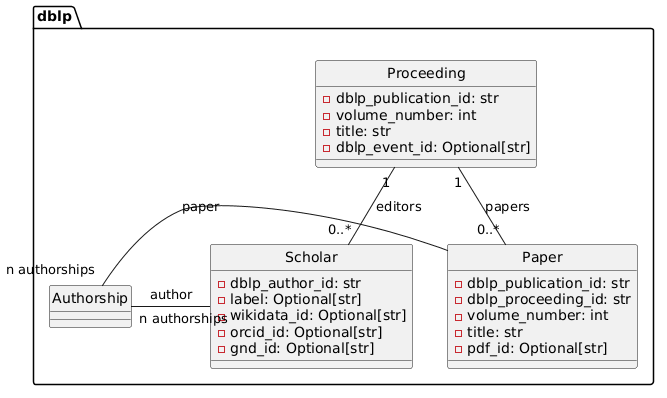
Source: docs/model.puml
Wikidata Community Contributions
ceur-wd-contributions analyses community contributions to CEUR-WS
related items on Wikidata. It fetches revision histories for items in
the configured Wikidata classes and produces per-user statistics and
optional pie charts.
usage: ceur-wd-contributions [-h] [-a] [-d] [--debugLocalPath DEBUGLOCALPATH]
                             [--debugPort DEBUGPORT] [--debugRemotePath DEBUGREMOTEPATH]
                             [--debugServer DEBUGSERVER] [-f] [-q] [-v] [-V]
                             [--class CLASS_QIDS] [--config CONFIG] [--endpoint ENDPOINT]
                             [--format {markdown,latex,json}] [--threshold THRESHOLD]
                             [--plot DIR] [--progress] [--sample N]

CEUR-WS Wikidata community contribution analysis

options:
  -h, --help            show this help message and exit
  -a, --about           show version info and open documentation
  -d, --debug           enable debug output
  --debugLocalPath DEBUGLOCALPATH
                        remote debug Server path mapping - localPath - path on machine
                        where python runs
  --debugPort DEBUGPORT
                        remote debug Port [default: 5678]
  --debugRemotePath DEBUGREMOTEPATH
                        remote debug Server path mapping - remotePath - path on debug
                        server
  --debugServer DEBUGSERVER
                        remote debug Server
  -f, --force           force overwrite or unsafe actions
  -q, --quiet           suppress all output
  -v, --verbose         increase output verbosity
  -V, --version         show program's version number and exit
  --class CLASS_QIDS    restrict analysis to this Wikidata class QID (repeatable).
                        Default: all classes from config.
  --config CONFIG       path to a WdContributionsConfig YAML file (defaults to bundled
                        resource)
  --endpoint ENDPOINT   override SPARQL endpoint URL from config
  --format {markdown,latex,json}
                        output format for the statistics table [default: markdown]
  --threshold THRESHOLD
                        in plots, aggregate users below this percent of total into
                        'others' [default: 1.0]
  --plot DIR            also render community-contribution pie charts (PNG) into DIR
  --progress            show tqdm progress bars during revision fetch
  --sample N            cap analysis to N QIDs per class (useful for testing)
Options explained
--class CLASS_QIDS: restrict the analysis to one or more Wikidata class QIDs (repeatable). Defaults to all classes listed in the config.--config CONFIG: path to aWdContributionsConfigYAML file. Defaults to the bundled resource shipped with pyCEURmake.--endpoint ENDPOINT: override the SPARQL endpoint URL from the config (for example to target a private Wikidata mirror).--format {markdown,latex,json}: output format for the statistics table; defaults tomarkdown.--threshold THRESHOLD: in pie charts, aggregate users contributing less than this percent of the total into anothersslice. Default1.0.--plot DIR: render community-contribution pie charts as PNG files into the given directory (in addition to the text table).--progress: showtqdmprogress bars while fetching revisions.--sample N: cap the analysis toNQIDs per class, useful for quick test runs before a full analysis.
1 maintainer

Metadata
1 maintainer
Release files for pyCEURmake 0.5.4
For a detailed explanation of source distributions (sdists) and built distributions (wheels), please see the package formats documentation.
Source distribution (sdist)
| File | Size | Uploaded | |
|---|---|---|---|
| pyceurmake-0.5.4.tar.gz | 130.7 kB | Details |
Built distribution (wheel)
| File | Interpreter | ABI | Platform | Reset |
|---|---|---|---|---|
| pyceurmake-0.5.4-py3-none-any.whl | Python 3 | none | any | Details |
Total release size: 220.5 kB
Release files / pyceurmake-0.5.4.tar.gz
| Download URL | pyceurmake-0.5.4.tar.gz |
|---|---|
| Size | 130.7 kB |
| Tags | Source |
|
SHA-256 checksum How to use checksums |
8aa182280ada5f7dd55b18d2d05c5b71553783f6203a39f1c02fc37b5622516b
|
|
BLAKE2b-256 checksum How to use checksums |
44d5c54873baeea96893aedd95bd617e07cd42d4e97e13f5b07261c59e70c758
|
| Upload date | |
|
Uploaded using Trusted Publishing? What is trusted publishing? |
Yes |
| Uploaded via |
twine/7.0.0 CPython/3.13.14
|
Provenance
Provenance describes where a file came from. On PyPI, provenance is shared via attestations, which provide a verifiable record of the build or publishing details. View details, limitations and caveats.


PyPI Publish Attestation
PyPI verified that this artifact, at this checksum, originated from the publisher listed below.
Signed by GitHub Actions, verified by PyPI on Sep 30, 2026.
Transparency logRelease files / pyceurmake-0.5.4-py3-none-any.whl
| Download URL | pyceurmake-0.5.4-py3-none-any.whl |
|---|---|
| Size | 89.8 kB |
| Tags | Python 3 |
|
SHA-256 checksum How to use checksums |
aa6061b0244360d5bda78d7f07e683eb343aeb629488f9f9acd79259e814a25c
|
|
BLAKE2b-256 checksum How to use checksums |
88f051995b14fed1926de7e095d65be5b8afdb4487f68970eece31a02757869b
|
| Upload date | |
|
Uploaded using Trusted Publishing? What is trusted publishing? |
Yes |
| Uploaded via |
twine/7.0.0 CPython/3.13.14
|
Provenance
Provenance describes where a file came from. On PyPI, provenance is shared via attestations, which provide a verifiable record of the build or publishing details. View details, limitations and caveats.
PyPI Publish Attestation
PyPI verified that this artifact, at this checksum, originated from the publisher listed below.
Signed by GitHub Actions, verified by PyPI on Sep 30, 2026.
Transparency log













