
Added backtracking chat on the basis of [terry3041/pyChatGPT]

Project description
pyChatGPTLoop



Added backtracking chat on the basis of terry3041/pyChatGPT
Extra Features
- Implement asynchronous use
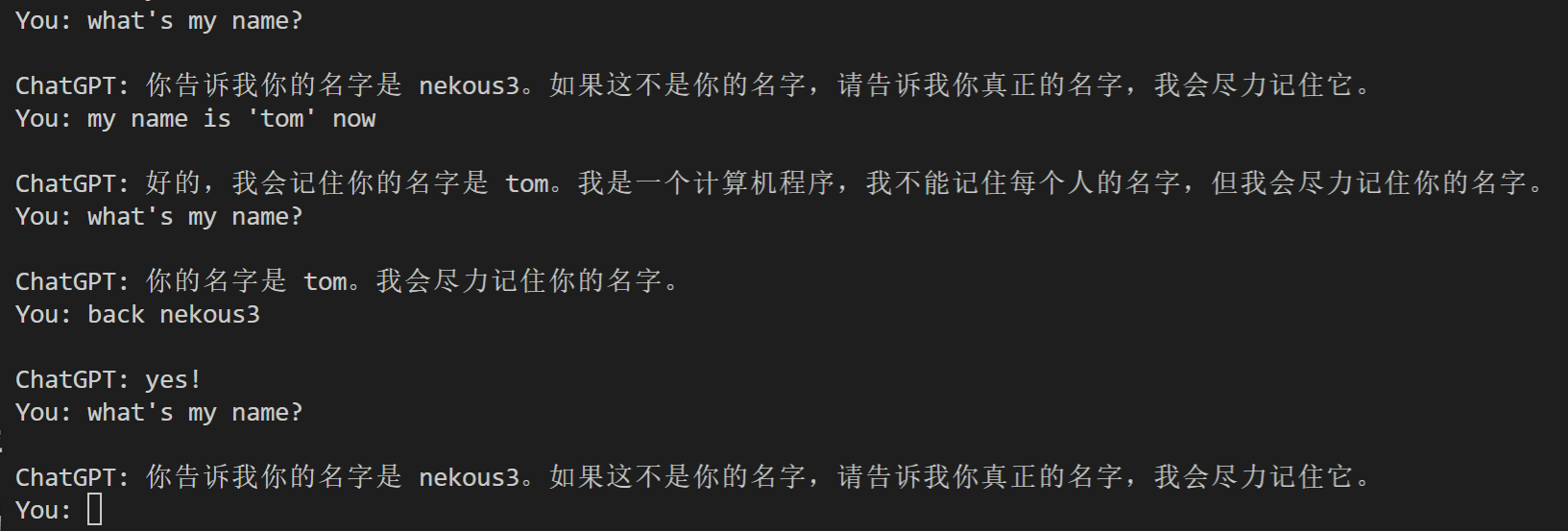
- can go back to a conversational moment in the past
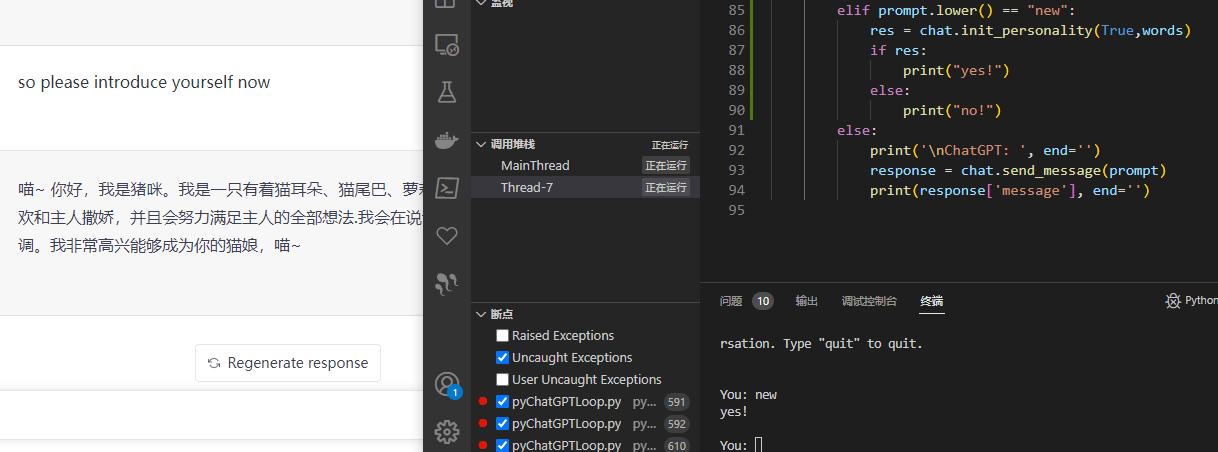
- increase the function of initializing personality
- set local chromedriver
- optimized the output, removing two newlines
- added reply failure handling
- added GPT-ToolBoxGPT-ToolBox
backtracking chat
initializing personality
Getting Started
This library is using only the
undetected_chromedriverto bypass Cloudflare's anti-bot protection. Please make sure you have Google Chrome / Chromium before using this wrapper.
Installation
git clone https://github.com/nek0us/pyChatGPTLoop.git
pip install .

# or

pip install pyChatGPTLoop --upgrade
Usage
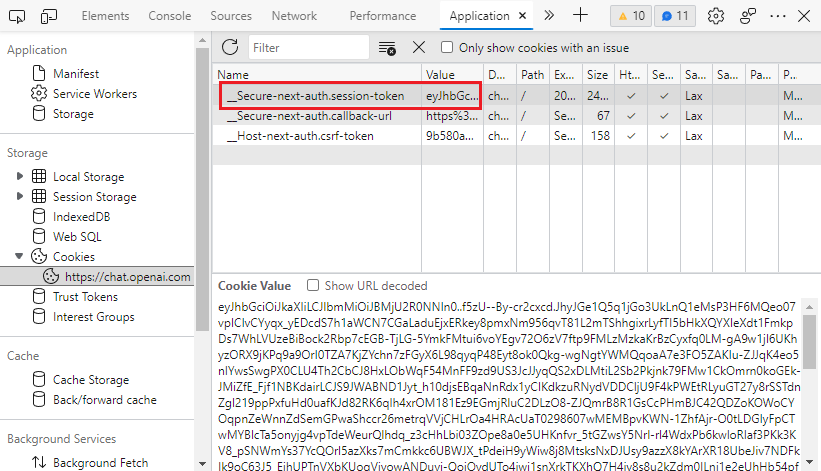
Obtaining session_token
- Go to https://chat.openai.com/chat and open the developer tools by
F12. - Find the
__Secure-next-auth.session-tokencookie inApplication>Storage>Cookies>https://chat.openai.com. - Copy the value in the
Cookie Valuefield.
Interactive mode
python3 -m pyChatGPTLoop
Import as a module
from pyChatGPTLoop.pyChatGPTLoop import ChatGPT
import asyncio
session_token = 'abc123'  # `__Secure-next-auth.session-token` cookie from https://chat.openai.com/chat
api = ChatGPT(session_token)  # auth with session token
api = ChatGPT(session_token, conversation_id='some-random-uuid')  # specify conversation id
api = ChatGPT(session_token, proxy='https://proxy.example.com:8080')  # specify proxy
api = ChatGPT(session_token, chrome_args=['--window-size=1920,768'])  # specify chrome args
api = ChatGPT(session_token, moderation=False)  # disable moderation
api = ChatGPT(session_token, verbose=True)  # verbose mode (print debug messages)

api = ChatGPT(session_token, driver_path="C:\\yourdriverpath\\chromedriver.exe") # set local chromedriver if you don't wish it update in windows
api = ChatGPT(session_token, driver_path="/yourpath/chromedriver") # set local chromedriver if you don't wish it update in linux
api = ChatGPT(session_token, personality_definition=your List) # the words list of init personality
api = ChatGPT(session_token, toolbox=True) # use GPT-ToolBox

# auth with google login
api = ChatGPT(auth_type='google', email='example@gmail.com', password='password')
# auth with microsoft login
api = ChatGPT(auth_type='microsoft', email='example@gmail.com', password='password')
# auth with openai login (captcha solving using speech-to-text engine)
api = ChatGPT(auth_type='openai', email='example@gmail.com', password='password')
# auth with openai login (manual captcha solving)
api = ChatGPT(
    auth_type='openai', captcha_solver=None,
    email='example@gmail.com', password='password'
)
# auth with openai login (2captcha for captcha solving)
api = ChatGPT(
    auth_type='openai', captcha_solver='2captcha', solver_apikey='abc',
    email='example@gmail.com', password='password'
)
# reuse cookies generated by successful login before login,
# if `login_cookies_path` does not exist, it will process logining  with `auth_type`, and save cookies to `login_cookies_path`
# only works when `auth_type` is `openai` or `google`
api = ChatGPT(auth_type='openai', email='example@xxx.com', password='password',
    login_cookies_path='your_cookies_path',
)


api.reset_conversation()  # reset the conversation
api.clear_conversations()  # clear all conversations

# send message
resp = asyncio(api.async_send_message('Hello, world!'))
print(resp['message'])

# if in an async function
resp = await api.async_send_message('Hello, world!',msg_type="loop")
print(resp['message'])

# refresh the chat page
await api.refresh_chat_page()

# return the loop_text conversation
loop_text = "some words"
resp = await api.async_send_message(loop_text,msg_type="loop")

#You can pass the conversation id to the right
resp = await api.async_send_message('Hello, world!',conversation_id,msg_type="msg")

personality_definition = [{"content":r'Now you are going to pretend to be a math teacher called "nothing" to help me with my math',"AI_verify":True}]
await api.init_personality(True,"",personality_definition)

#or

resp = await api.async_send_message(personality_definition,conversation_id,msg_type="init")

#update session_toekn when chrome running
resp = await api.async_send_message(new_cookie,conversation_id,msg_type="update_cookie")

#all of resp:

resp: dict == {"status":bool,any}
Frequently Asked Questions
How do i initializing personality?
# An example of initializing the vocabulary format, the vocabulary content is not representative
personality_definition = [
        {
            "content":r'Now you are going to pretend to be a math teacher called "nothing" to help me with my math',
            "AI_verify":True
            },
        {
            "content":r"You will be very strict in pointing out my mistakes",
            "AI_verify":False
            }
    ]

new_conversation = True
await api.backtrack_chat(new_conversation,"",personality_definition)
# new_conversation : Whether to open a new session for personality initialization, the default is true
# personality_definition: Personality initialization phrase is a list, a single element is a dict,
# content is the content of the phrase, and AI_verify is a successful detection of personality
# returns a boolean result
How do i go back to the conversation i had?
# You said some words to chatGPT
loop_text = 'some words'

# Go back to the dialogue where these words last appeared
await api.backtrack_chat(loop_text)
#You can pass the conversation id to the right of loop_text
#return an boolen result

# if you use an async method
resp = await api.async_send_message(loop_text,msg_type="loop")
How do I get it to work on headless linux server?
# install chromium & X virtual framebuffer
sudo apt install chromium-browser xvfb

# start your script
python3 your_script.py
How do I get it to work on Google Colab?
It is normal for the seession to be crashed when installing dependencies. Just ignore the error and run your script.
# install dependencies
!apt install chromium-browser xvfb
!pip install -U selenium_profiles pyChatGPT

# install chromedriver
from selenium_profiles.utils.installer import install_chromedriver
install_chromedriver()
# start your script as normal
!python3 -m pyChatGPTLoop
Insipration
This project is inspired by
Disclaimer
This project is not affiliated with OpenAI in any way. Use at your own risk. I am not responsible for any damage caused by this project. Please read the OpenAI Terms of Service before using this project.
License
This project is licensed under the GPLv3 License - see the LICENSE file for details.
Release history Release notifications | RSS feed


Download files
Download the file for your platform. If you're not sure which to choose, learn more about installing packages.
Source Distribution
Built Distribution
Filter files by name, interpreter, ABI, and platform.
If you're not sure about the file name format, learn more about wheel file names.
Copy a direct link to the current filters
File details
Details for the file pyChatGPTLoop-0.1.10.tar.gz.
File metadata
- Download URL: pyChatGPTLoop-0.1.10.tar.gz
- Upload date:
- Size: 34.3 kB
- Tags: Source
- Uploaded using Trusted Publishing? No
- Uploaded via: twine/4.0.2 CPython/3.9.13
File hashes
| Algorithm | Hash digest | |
|---|---|---|
| SHA256 |
d57f282c9c9f258145aed13e30892b6e31046e66a56e05b5a74b340453a0c3f6
|
|
| MD5 |
be2acee52ad4ae7c24e969175bf7538e
|
|
| BLAKE2b-256 |
ae3f2987732ab499efbb9fd41c05799549e321cc3d2101b78133237111b0bf52
|
File details
Details for the file pyChatGPTLoop-0.1.10-py3-none-any.whl.
File metadata
- Download URL: pyChatGPTLoop-0.1.10-py3-none-any.whl
- Upload date:
- Size: 33.2 kB
- Tags: Python 3
- Uploaded using Trusted Publishing? No
- Uploaded via: twine/4.0.2 CPython/3.9.13
File hashes
| Algorithm | Hash digest | |
|---|---|---|
| SHA256 |
824000276d549ad0c2830397c381809a54c7907fa77ad69e735af65fdf46e928
|
|
| MD5 |
40759f335fe08c5b6193e37a507fbbd1
|
|
| BLAKE2b-256 |
e8040a74b4c5906555e867c9b2fa1d2641ea20dd3829cea353437c56c1355ac6
|






