
” 🐍 Python Port 🐍 Based on COINMON
💰 Cryptocurrency price ticker CLI.
Check cryptocurrencies’ prices, changes on your console. Best CLI tool for those who are both Crypto investors and Engineers.
All data comes from coinmarketcap.com APIs.
Installation
You can install or upgrade pycoinmon with:
$ pip install pycoinmon --upgrade
Or you can install from source with:
$ git clone https://github.com/RDCH106/pycoinmon.git --recursive
$ cd pycoinmon
$ pip install .
Usage
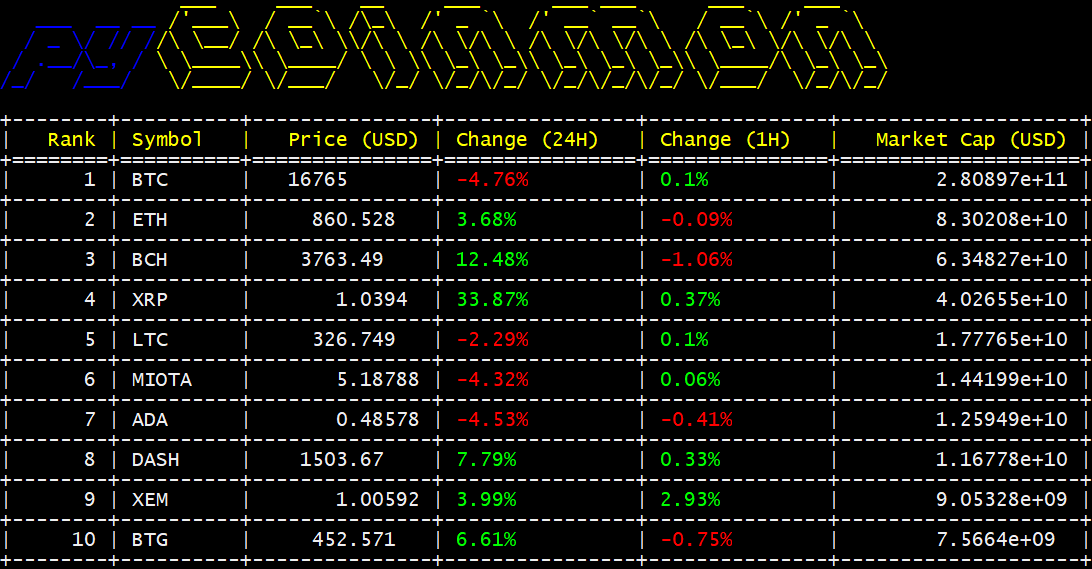
To check the top 10 cryptocurrencies ranked by their market cap, simply execute
$ pycoinmon
Options
You can use the -c (or --convert) with the fiat currency symbol to find in terms of another currency. The default currency is USD and it supports AUD, BRL, CAD, CHF, CLP, CNY, CZK, DKK, EUR, GBP, HKD, HUF, IDR, ILS, INR, JPY, KRW, MXN, MYR, NOK, NZD, PHP, PKR, PLN, RUB, SEK, SGD, THB, TRY, TWD, ZAR.
$ pycoinmon -c eur // convert prices to Euro
$ pycoinmon -c jpy // convert prices to Yen
You can use the -f (or --find) with coin symbol to search cryptocurrencies. You can add symbols seperated by space.
$ pycoinmon -f btc // search coins included keyword btc
$ pycoinmon -f btc eth // search coins included keyword btc or eth
You can use the -l (or --layout) with template name to print the table with different style. The default layout template is grid and it supports plain, simple, fancy_grid, pipe, orgtbl, ‘presto’, ‘psql’, ‘rst’.
$ pycoinmon -l plain // show table with plain style
$ pycoinmon -l fancy_grid // show table with fancy_grid style
You can use the -t (or --top) with the index to find the top n cryptocurrencies ranked by their market cap.
$ pycoinmon -t 50 // find top 50
$ pycoinmon -t 1000 // find top 1000
You can use the -u (or --update) with the refresh frequency in seconds. The value must be bigger than 0.
$ pycoinmon -u 10 // update data each 10 seconds
You can use the -H (or --humanize) to display market cap in humanized format.
$ pycoinmon -H // show market cap in humanized format like 58.9 billion
You can use the -h (or --help) to find all valid options of pycoinmon.
$ pycoinmon -h
You can use the --debug to show debug info when an error occurred.
$ pycoinmon --debug
Screenshot
1 maintainer

Release files for pycoinmon 0.4.8
For a detailed explanation of source distributions (sdists) and built distributions (wheels), please see the package formats documentation.
Source distribution (sdist)
| File | Size | Uploaded | |
|---|---|---|---|
| pycoinmon-0.4.8.tar.gz | 6.7 kB | Details |
Release files / pycoinmon-0.4.8.tar.gz
| Download URL | pycoinmon-0.4.8.tar.gz |
|---|---|
| Size | 6.7 kB |
| Tags | Source |
|
SHA-256 checksum How to use checksums |
800f45ee5f7945a6c1ee28d385656d5fba769d62a96469a0090625855fe84af4
|
|
BLAKE2b-256 checksum How to use checksums |
e5e9152145f80c2e9ac0744c5f6da2b5e2b06b289ca6a1c5c3683ac28071c7f7
|
| Upload date | |
|
Uploaded using Trusted Publishing? What is trusted publishing? |
No |
| Uploaded via |
Python-urllib/3.5
|














