
INTRODUCTION
pycomando is a Library for creating command line program's command with minimal effort pycomando is based on argparse allowing the creation of commands starting from a simple yml file.
- PyPI: https://pypi.python.org/pypi/pycomando/
- GitLab: https://gitlab.com/doberti/pycomando/
- Documentation: https://gitlab.com/doberti/pycomando/-/wikis/Documentation/
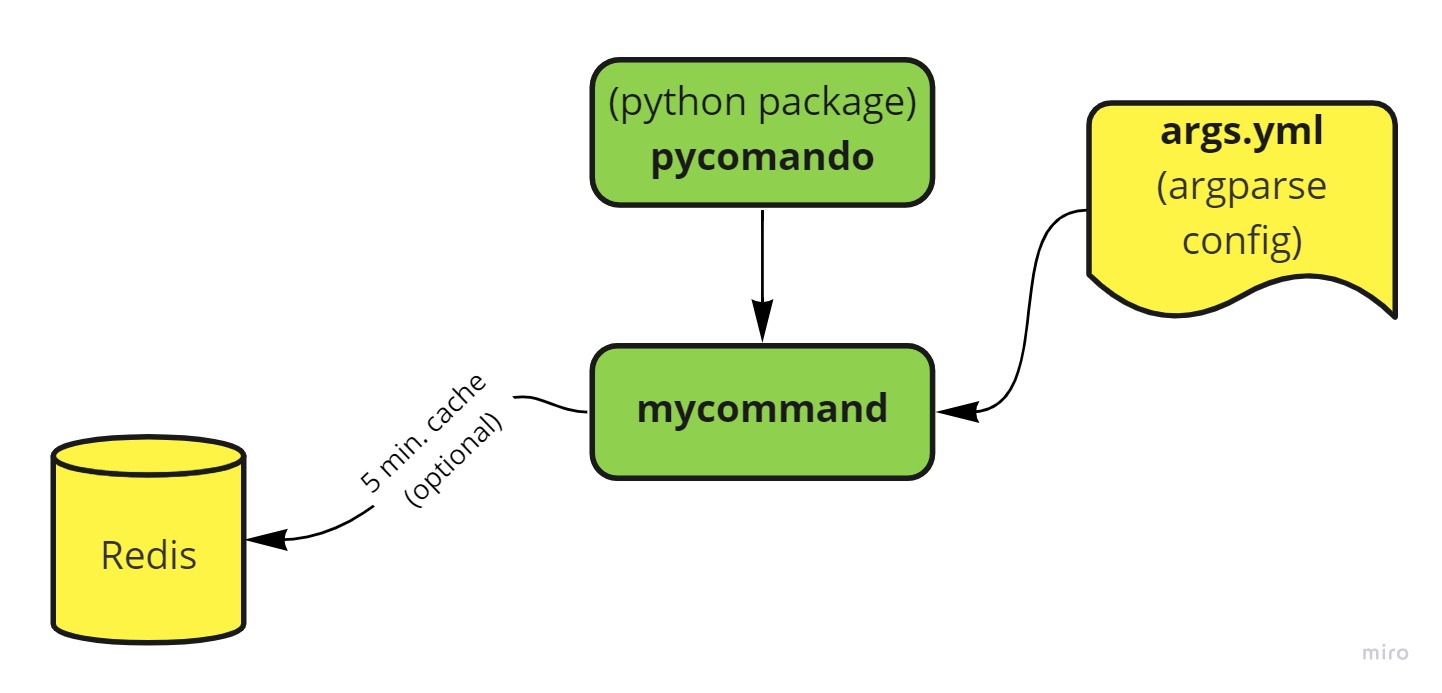
MAINTAINERS:
- Daniel Oberti (obertidaniel@gmail.com)
Install this package
Using a distribuible package:
This project is deployed as a python package. Once cloned we advice to install it with pip. In order to do that the user needs to open a command prompt, go into the directory containing the project and execute the next command:
git clone <REPO>

# creating the dist. package
cd <REPO>
python setup.py sdist

# install the dist. package (located on folder "sdist")
pip install <PACKAGE.tar.gz>
Using git + pip
git clone <REPO>
pip install -e <PACKAGE>
Using pypi
How to - uploading to pypi
# install the required tools
python -m pip install -U pip setuptools twine
python setup.py bdist_wheel
# (publicar en pypi)
python -m twine upload dist/* --skip-existing
How to - install from pypi
# install the package anywhere:
pip install <PACKAGE>
Uninstall this package
pip uninstall <PACKAGE>
Redis server setup using Docker
pycomando has an option to store commands into a redis db. You can use docker to deploy it easely as shown below:
Run redis in docker with:
$ docker run --name redis -p 7010:6379 -d redis:6.2.6
Autocomplete setup
tcsh:
eval `register-python-argcomplete --shell tcsh pycomando`
bash:
eval "$(register-python-argcomplete pycomando)"
Environment variables
# DEBUG_LEVEL can be used to set the app logging_level as shown below:
setenv DEBUG_LEVEL INFO
setenv DEBUG_LEVEL DEBUG
setenv DEBUG_LEVEL WARNING

setenv REDIS_SERVER sjs5-015s
setenv REDIS_PORT 7010
Usage Example
A simple usage example is on the folder "examples" (before run it, you should install this package)
References
- https://es.acervolima.com/como-publicar-el-paquete-python-en-pypi-usando-el-modulo-twine/
- https://programmerclick.com/article/2710482940/
- https://choosealicense.com/
- https://pypi.org/ (here you must register as well if you want to publish packages)
1 maintainer

Metadata
1 maintainer
Release files for pycomando 0.2.0
For a detailed explanation of source distributions (sdists) and built distributions (wheels), please see the package formats documentation.
Built distribution (wheel)
| File | Interpreter | ABI | Platform | Actions Reset |
|---|---|---|---|---|
| pycomando-0.2.0-py2.py3-none-any.whl | Python 3, Python 2 | none | any | Details for pycomando-0.2.0-py2.py3-none-any.whl |
Release files / pycomando-0.2.0-py2.py3-none-any.whl
| Download URL | pycomando-0.2.0-py2.py3-none-any.whl |
|---|---|
| Size | 14.2 kB |
| Tags | Python 2 Python 3 |
|
SHA-256 checksum How to use checksums |
8abfa5990bb9b8d3143008b7c1d2f4e33e75f586e63a4650931bdf306f67ef67
|
|
BLAKE2b-256 checksum How to use checksums |
450ed751629bd93655406b53f29189ce177e699bf6d138d581b94652853d86a9
|
| Upload date | |
|
Uploaded using Trusted Publishing? What is trusted publishing? |
No |
| Uploaded via |
twine/4.0.0 CPython/3.10.4
|
Security for pycomando 0.2.0
Provenance
Provenance describes where a file came from. On PyPI, provenance is shared via attestations, which provide a verifiable record of the build or publishing details. View details, limitations and caveats.
No provenance found
None of the files in this release were uploaded with provenance metadata.
A note on package security
PyPI is a repository for distributing packages, not a service for auditing them. While third-party security researchers and our staff do their best to detect and remove malicious packages, PyPI cannot guarantee the quality, security or suitability of any given package.
To learn more about protecting yourself from malicious actors, visit our package security documentation.














