
PyDCF (Davis Chandrasekhar Fermi Method In Python)
The Davis Chandrasekhar Fermi method is an proposed theory that uses the polarization of light to calculate the magnetic field strength of molecular clouds. Through this method, we can analyze polarization maps in order to have a stronger understanding of the role that magnetic fields play in the Star Formation Process.
Many variations of the DCF method have been formulated over the past decades, one of which is the famous HH09 Analytical Dispersion method proposed by Martin Houde et al. (2009)- https://arxiv.org/pdf/0909.5227.pdf.
PyDCF serves as a Python implementation of the HH09 Analytical DCF method, a variation of the Classical DCF method which can correct for the overestimation effects not accounted in the Classical DCF method such as: beam smoothing, differential rotation, and bending of the magnetic field due to gravity.
A quick, in-depth guide is shown below. If anything is still confusing, please do not hestitate to reach out to me at jp7dec23@gmail.com.
Installation
PyDCF is available for installation through PyPI (Current version is 1.0.7).
pip3 install PyDCF==1.0.7
Tutorial
Import PyDCF to start things off. We're also going to need the fits module from astropy to load the data. If you're an Astronomer, I'm going to assume you already have astropy installed.
import PyDCF
from astropy.io import fits
Now, we load the data. Using the fits module, load the polarization data, velocity dispersion and mean density maps.
You will have to change the file name in the code below to your respective files.
data = fits.open("Polarization_Data.fits")[0].data
velocity = fits.open("Velocity_Dispersion_Data.fits")[0].data
density = fits.open("Mean_Density_Data.fits")[0].data
You're going to need to input the resolution and pixel scale of the data as well. Now we initialize PyDCF.
pold1 = PyDCF(polarization = data_pol_region,
              velocity = data_v_region,
              density = data_rho_region,
              beam_resolution = 0.1,
              pixel_scale = 10/512)
⚠️ If you are dealing with large maps, the computation can be quite expensive. The run-time complexity of the HH09 DCF method is O(n!) for reference.
Let's cut the map into smaller regions for analysis instead. You can choose to just use the entire map but it could take a while.
y_cen = (280)
x_cen = (140)
rad = 60

# Take a smaller region from the entire map.
data_pol_region = PyDCF.data_cut(x_cen, y_cen, rad, data, show=True)
data_v_region = PyDCF.data_cut(x_cen, y_cen, rad, velocity, show=False)
data_rho_region = PyDCF.data_cut(x_cen, y_cen, rad, density, show=False)
Update the data with the smaller regions. This replaces the previous polarization, velocity, density maps with the newer ones.
PyDCF.update_data(data_pol_region, data_v_region, data_rho_region):
Next we calculate the angular dispersion function as defined by Eq. 6 in https://arxiv.org/pdf/0909.5227.pdf. This is necessary in order to calculate the magnetic field strength using the HH09 DCF method.
pold1.calculate_angular_dispersions()
Finally, call the fit function as shown. This step is described in the method section of https://arxiv.org/pdf/0909.5227.pdf.
pold1.HH09_fit(fit0 = 18, fitf = 25, cloud_depth = 1.51)
pold1.HH09_parameters()
You should get a pretty plot that looks something like this!
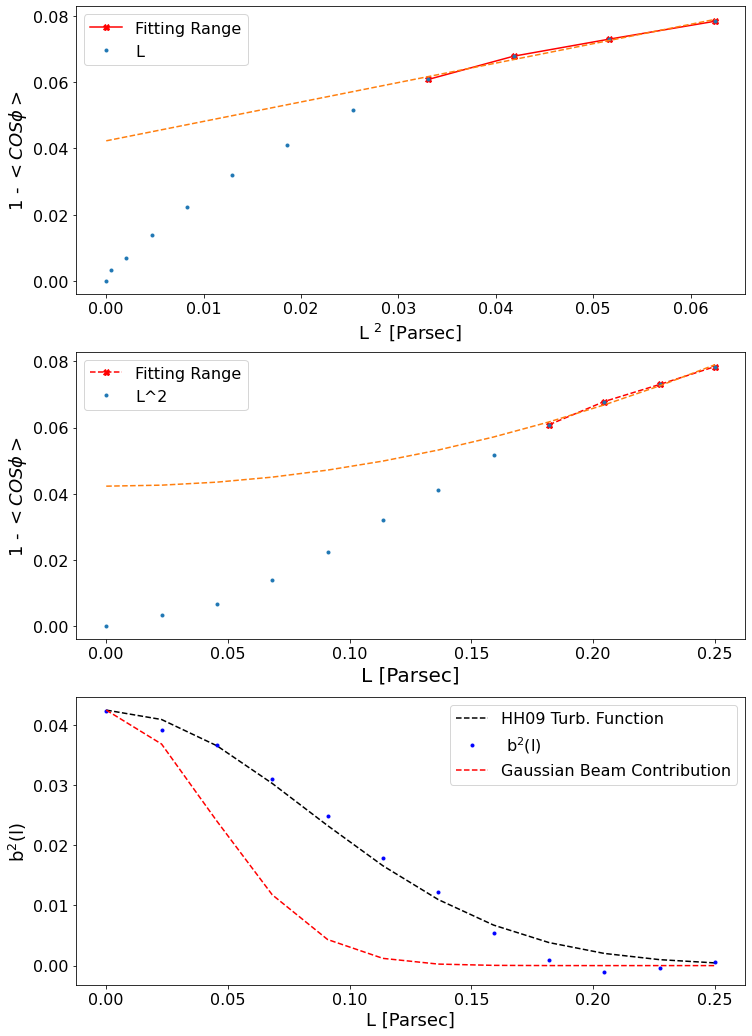
Now you can calculate the magnetic field strength through using the HH09 DCF method. I've also included the Classical DCF (https://articles.adsabs.harvard.edu/pdf/1953ApJ...118..113C) and Skalidis DCF (https://arxiv.org/pdf/2010.15141.pdf) methods in this Python Package.
The DCF methods return the field strength in Gauss.
print(str(pold1.ClassicalDCF_calculation()) + " Gauss")
print(str(pold1.SkalidisDCF_calculation()) + " Gauss")
print(str(pold1.HH09DCF_calculation()) + " Gauss")
1 maintainer

Metadata
1 maintainer
Release files for PyDCF 1.0.7
For a detailed explanation of source distributions (sdists) and built distributions (wheels), please see the package formats documentation.
Source distribution (sdist)
| File | Size | Uploaded | |
|---|---|---|---|
| PyDCF-1.0.7.tar.gz | 3.9 kB | Details |
Built distribution (wheel)
| File | Interpreter | ABI | Platform | Reset |
|---|---|---|---|---|
| PyDCF-1.0.7-py3-none-any.whl | Python 3 | none | any | Details |
Total release size: 7.6 kB
Release files / PyDCF-1.0.7.tar.gz
| Download URL | PyDCF-1.0.7.tar.gz |
|---|---|
| Size | 3.9 kB |
| Tags | Source |
|
SHA-256 checksum How to use checksums |
f28eb155fec1a7e9794179f7c67fda111af053d309b44b4277e628db3bfcd4eb
|
|
BLAKE2b-256 checksum How to use checksums |
e32a72f06371ec0af5600db7ccaa546cdb4be82240a7232a7223d5a298fb5a3b
|
| Upload date | |
|
Uploaded using Trusted Publishing? What is trusted publishing? |
No |
| Uploaded via |
twine/3.8.0 pkginfo/1.8.2 readme-renderer/34.0 requests/2.25.1 requests-toolbelt/0.9.1 urllib3/1.26.4 tqdm/4.59.0 importlib-metadata/4.11.3 keyring/23.5.0 rfc3986/2.0.0 colorama/0.4.4 CPython/3.8.5
|
Release files / PyDCF-1.0.7-py3-none-any.whl
| Download URL | PyDCF-1.0.7-py3-none-any.whl |
|---|---|
| Size | 3.7 kB |
| Tags | Python 3 |
|
SHA-256 checksum How to use checksums |
2455fe3c9d953b5e0268f7ffafb17c6a970bafebbcd064997bbe773ee8c2412d
|
|
BLAKE2b-256 checksum How to use checksums |
7f25165d92d7951da058328c531d41cddf2e53c617adbc6a7807882258a6042d
|
| Upload date | |
|
Uploaded using Trusted Publishing? What is trusted publishing? |
No |
| Uploaded via |
twine/3.8.0 pkginfo/1.8.2 readme-renderer/34.0 requests/2.25.1 requests-toolbelt/0.9.1 urllib3/1.26.4 tqdm/4.59.0 importlib-metadata/4.11.3 keyring/23.5.0 rfc3986/2.0.0 colorama/0.4.4 CPython/3.8.5
|














