



PyDGGRID
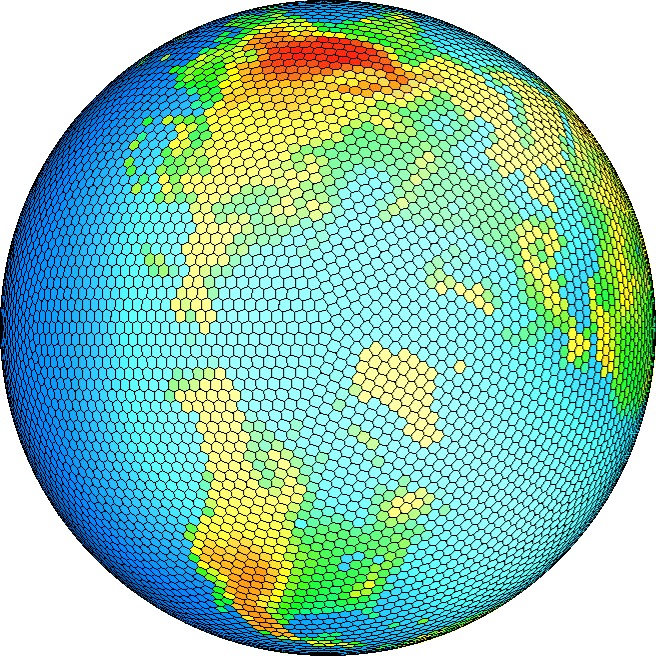
A wrapper for DGGRID in python. Currently based on last DGGRID from Kevin Sahr.
Changes
-
0.0.16
-
DGGRID is updated to version 7.3
-
Some bugs fixed
-
Richard Barnes's dglib class is decomposed in order to upgrade DGGRID
-
0.0.15
-
Not released
-
DGGRID is updated to version 7.1 (https://github.com/sahrk/DGGRID)
-
Removed
BoostGeometry suppert to useGDALsupport since mainDGGRIDlibrary started to useGDALlibrary -
Added
VCPKGsupport for windows version -
Cleaned up setup process
-
0.0.14
-
Added different system build environments
Installation
Note: The main DGGRID library needs 'GDAL' library to compile. so make sure you have installed GDAL C++ library before installing. To installing GDAL on linux is pretty straightforward. For windows you can use vcpkg to compile and install it. The process of installing and using vcpkg on windows can be found on its github (https://github.com/microsoft/vcpkg/)
- Install GDAL on linux
sudo add-apt-repository ppa:ubuntugis/ppa && sudo apt-get update
sudo apt-get update
sudo apt-get install gdal-bin
sudo apt-get install libgdal-dev
- Install GDAL on windows
Prerequisites:
Windows 10, 8.1, 7, Linux, or MacOS
Visual Studio 2015 Update 3 or newer (on Windows)
Git
To get started:
> git clone https://github.com/Microsoft/vcpkg.git
> cd vcpkg

PS> .\bootstrap-vcpkg.bat
then
PS> .\vcpkg integrate install
Install GDAL packages with
PS> .\vcpkg install gdal:x64-windows shapelib::x64-windows
NOTE: The GDAL version must match with your python compiled version. So if you have a x86 python use vcpkg install gdal:x86-windows, othewise use vcpkg install gdal:x64-windows
Then simply use pip to install this library
pip install pydggrid
Build From source
On Unix (Linux, OS X)
- install GDAL, shapelib
- clone this repository
pip install ./pydggrid
or you can easily call
python setup.py install
On Windows
- You need Build Tools for Visual Studio to be able to compile it from source. so Install it from this link
https://visualstudio.microsoft.com/downloads/ - install GDAL, shapelib
- clone this repository
pip install ./pydggrid
or you can easily call
python setup.py install
How To Use In order to use this library use following example. (more updates are comming on documentations section)
#import librarry
import pydggrid as m
#Construct a dggs object
m.dgconstruct()
#getting Q2di index for a (lat,long) point
m.geo_to_q2di(50,50)
#[4, 71, 211]
#getting Q2dd index for a (lat,long) point
m.geo_to_q2dd(50,50)
#[4.0, -0.1427860170187444, 0.7514696738643607]
#getting ProjTri index for a (lat,long) point
m.geo_to_projtri(50,50)
#[3.0, 0.5793988192307712, 0.4993911549756102]`
TODO
- [ ]Supporting All DGGRID functions
- [ ]Adding GDAL export Geometry Support
- [ ]Support GridGeneration using DGGRID
Building the documentation
Documentation for the project is generated using Sphinx. Sphinx has the ability to automatically inspect the signatures and documentation strings in the extension module to generate beautiful documentation in a variety formats. The following command generates HTML-based reference documentation; for other formats please refer to the Sphinx manual:
cd pydggrid/docsmake html
Run tests
To run all tests for the package call folowing command in package directory
python3 -m unittest discover
License
By using, distributing, or contributing to this project, you agree to the terms and conditions of this license.
Based on Kevin Sahr's DGGRID library (https://discreteglobalgrids.org).
Developed on top of the R package which was developed by Richard Barnes (https://github.com/r-barnes/dggridR/).
1 maintainer

Release files for pydggrid 0.0.16
For a detailed explanation of source distributions (sdists) and built distributions (wheels), please see the package formats documentation.
Built distributions (wheels)
| File | Interpreter | ABI | Platform | Reset |
|---|---|---|---|---|
| pydggrid-0.0.16-cp37-cp37m-win32.whl | CPython 3.7 | CPython 3.7 pymalloc | Windows x86-32 | Details |
| pydggrid-0.0.16-cp36-cp36m-win32.whl | CPython 3.6 | CPython 3.6 pymalloc | Windows x86-32 | Details |
Total release size: 19.4 MB
Release files / pydggrid-0.0.16-cp37-cp37m-win32.whl
| Download URL | pydggrid-0.0.16-cp37-cp37m-win32.whl |
|---|---|
| Size | 9.7 MB |
| Tags | CPython 3.7 CPython 3.7 pymalloc Windows x86-32 |
|
SHA-256 checksum How to use checksums |
c6fbad91876f2d64725f3a2c50ae29a96167c116bcd25c1501e74ca406fa2692
|
|
BLAKE2b-256 checksum How to use checksums |
f3e0441bd46d13f9289207a59c1de90e491c049eeb7c03b2a45d10807e8f36a2
|
| Upload date | |
|
Uploaded using Trusted Publishing? What is trusted publishing? |
No |
| Uploaded via |
twine/3.1.1 pkginfo/1.5.0.1 requests/2.22.0 setuptools/41.2.0 requests-toolbelt/0.9.1 tqdm/4.40.1 CPython/3.7.5
|
Release files / pydggrid-0.0.16-cp36-cp36m-win32.whl
| Download URL | pydggrid-0.0.16-cp36-cp36m-win32.whl |
|---|---|
| Size | 9.7 MB |
| Tags | CPython 3.6 CPython 3.6 pymalloc Windows x86-32 |
|
SHA-256 checksum How to use checksums |
3d6083374831fd520c747e3200869fa186abf6a15cf8910a3a9f1800060314bb
|
|
BLAKE2b-256 checksum How to use checksums |
113150a4820138c5726f83453492c0f71f76df62aa9340624be21ecf15a88adb
|
| Upload date | |
|
Uploaded using Trusted Publishing? What is trusted publishing? |
No |
| Uploaded via |
twine/3.1.1 pkginfo/1.5.0.1 requests/2.22.0 setuptools/40.6.2 requests-toolbelt/0.9.1 tqdm/4.40.1 CPython/3.6.8
|














