





Support the project
If your company has embedded pyexcel and its components into a revenue generating product, please support me on patreon or bounty source to maintain the project and develop it further.
If you are an individual, you are welcome to support me too and for however long you feel like. As my backer, you will receive early access to pyexcel related contents.
And your issues will get prioritized if you would like to become my patreon as pyexcel pro user.
With your financial support, I will be able to invest a little bit more time in coding, documentation and writing interesting posts.
Known constraints
Fonts, colors and charts are not supported.
Introduction
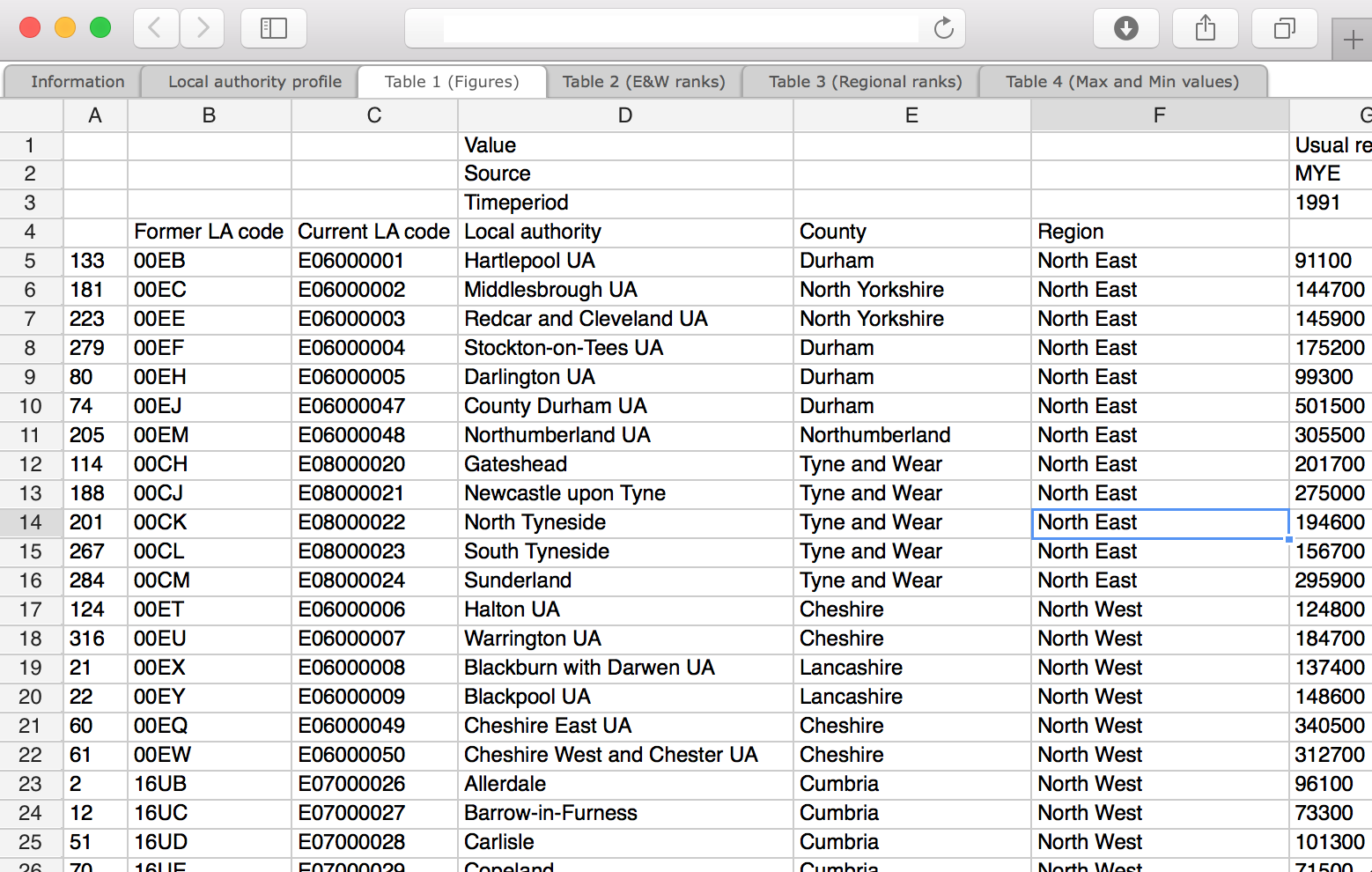
pyexcel-handsontable is a rendering plugin to pyexcel and renders pyexcel.Sheet and pyexcel.Book into a handsontable in your web page. As long as you have a browser, you could view the data. However, please note that this library does not aim to replace any current excel softwares, such as Micorsoft Office. But it aims to extends the capability of a Python user/developer in viewing plain data.
Main features:
transform your excel sheets into excel alike html file.
embed your excel sheets into your web page.
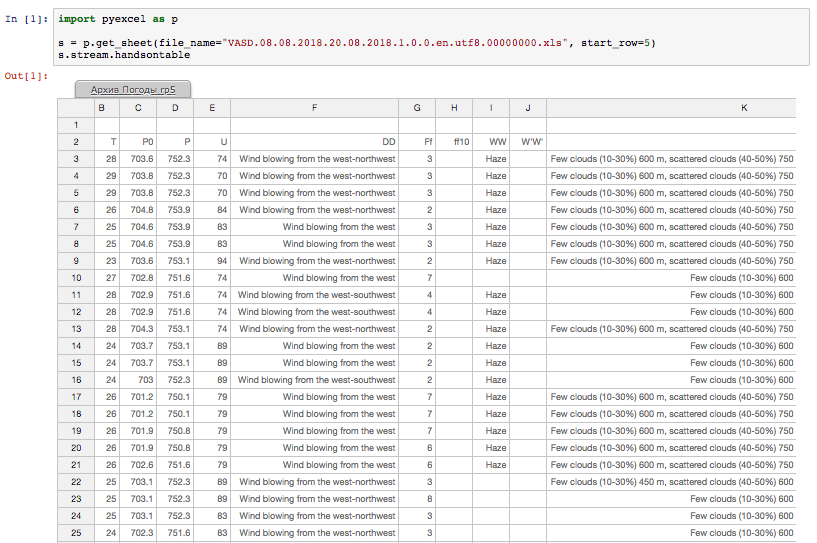
show your data like excel in jupyter notebook (added in 0.0.2).
Here is one liner to use it with pyexcel:
import pyexcel as p

p.save_as(file_name='your.xls', dest_file_name='your.handsontable.html')
Alternatively, you can use this library with pyexcel cli module:
$ pip install pyexcel-cli
$ pyexcel transcode your.xls your.handsontable.html
Please remember to give this file suffix always: handsontable.html. It is because handsontable.html triggers this plugin in pyexcel.
Screenshots
View as html
View in jupyter notebook
Installation
You can install pyexcel-handsontable via pip:
$ pip install pyexcel-handsontableor clone it and install it:
$ git clone https://github.com/pyexcel-renderers/pyexcel-handsontable.git
$ cd pyexcel-handsontable
$ python setup.py install
Development guide
Development steps for code changes
git clone https://github.com/pyexcel/pyexcel-handsontable.git
cd pyexcel-handsontable
Upgrade your setup tools and pip. They are needed for development and testing only:
pip install –upgrade setuptools pip
Then install relevant development requirements:
pip install -r rnd_requirements.txt # if such a file exists
pip install -r requirements.txt
pip install -r tests/requirements.txt
Once you have finished your changes, please provide test case(s), relevant documentation and update CHANGELOG.rst.
How to test your contribution
Although nose and doctest are both used in code testing, it is adviable that unit tests are put in tests. doctest is incorporated only to make sure the code examples in documentation remain valid across different development releases.
On Linux/Unix systems, please launch your tests like this:
$ make
On Windows systems, please issue this command:
> test.bat
How to update test environment and update documentation
Additional steps are required:
pip install moban
git clone https://github.com/moremoban/setupmobans.git # generic setup
git clone https://github.com/pyexcel/pyexcel-commons.git commons
make your changes in .moban.d directory, then issue command moban
What is pyexcel-commons
Many information that are shared across pyexcel projects, such as: this developer guide, license info, etc. are stored in pyexcel-commons project.
What is .moban.d
.moban.d stores the specific meta data for the library.
Acceptance criteria
Has Test cases written
Has all code lines tested
Passes all Travis CI builds
Has fair amount of documentation if your change is complex
Please update CHANGELOG.rst
Please add yourself to CONTRIBUTORS.rst
Agree on NEW BSD License for your contribution
Update styles
styles/style.scss control the look and feel of the frame. In order to view the changes in that file, you will need to compile, moban and install it. Here is the sequence of commands:
$ make css
$ moban
$ python setup.py install
$ make -C demo
Then please open handsontable.html from demo directory.
License
New BSD License
No contributors yet
Your github link will be listed here after your PR is merged
Change log
0.0.3 - 20-02-2022
Updated
#7: upgrade handsontable to 6.2.2
0.0.2 - 19-08-2018
Updated
Added
support jupyter-notebook
0.0.1 - 19-06-2017
Added
initial release
1 maintainer

Metadata
1 maintainer
Release files for pyexcel-handsontable 0.0.3
For a detailed explanation of source distributions (sdists) and built distributions (wheels), please see the package formats documentation.
Source distribution (sdist)
| File | Size | Uploaded | Provenance | |
|---|---|---|---|---|
| pyexcel_handsontable-0.0.3.tar.gz | 228.9 kB | With provenance | Details |
Built distribution (wheel)
| File | Interpreter | ABI | Platform | Reset |
|---|---|---|---|---|
| pyexcel_handsontable-0.0.3-py3-none-any.whl | Python 3 | none | any | Details |
Total release size: 458.7 kB
Release files / pyexcel_handsontable-0.0.3.tar.gz
| Download URL | pyexcel_handsontable-0.0.3.tar.gz |
|---|---|
| Size | 228.9 kB |
| Tags | Source |
|
SHA-256 checksum How to use checksums |
8343f6016ea49b17fa87dc5b2e4aa500da22ffd0987659bc5ae220cd114e4e78
|
|
BLAKE2b-256 checksum How to use checksums |
18cafccc352921976b185e8c58600ae9d83c8422c7d5f29043514103655be80f
|
| Upload date | |
|
Uploaded using Trusted Publishing? What is trusted publishing? |
Yes |
| Uploaded via |
twine/6.1.0 CPython/3.13.7
|
Provenance
Provenance describes where a file came from. On PyPI, provenance is shared via attestations, which provide a verifiable record of the build or publishing details. View details, limitations and caveats.


PyPI Publish Attestation
PyPI verified that this artifact, at this checksum, originated from the publisher listed below.
Signed by GitHub Actions, verified by PyPI on Nov 2, 2025.
Transparency logRelease files / pyexcel_handsontable-0.0.3-py3-none-any.whl
| Download URL | pyexcel_handsontable-0.0.3-py3-none-any.whl |
|---|---|
| Size | 229.8 kB |
| Tags | Python 3 |
|
SHA-256 checksum How to use checksums |
3a2493f91c0d106c4f8420482f51d810332eb73c77c4eaa43594a94a395e6627
|
|
BLAKE2b-256 checksum How to use checksums |
dc429b8664c4a96f52033561d3ea72c37d4bcc8efd77f756d14ea3eaf4a44e85
|
| Upload date | |
|
Uploaded using Trusted Publishing? What is trusted publishing? |
Yes |
| Uploaded via |
twine/6.1.0 CPython/3.13.7
|
Provenance
Provenance describes where a file came from. On PyPI, provenance is shared via attestations, which provide a verifiable record of the build or publishing details. View details, limitations and caveats.
PyPI Publish Attestation
PyPI verified that this artifact, at this checksum, originated from the publisher listed below.
Signed by GitHub Actions, verified by PyPI on Nov 2, 2025.
Transparency logSecurity for pyexcel-handsontable 0.0.3
Provenance
Provenance describes where a file came from. On PyPI, provenance is shared via attestations, which provide a verifiable record of the build or publishing details. View details, limitations and caveats.
Full provenance
All 2 files in this release have been uploaded with provenance metadata.
Attestation for pyexcel_handsontable-0.0.3.tar.gz
PyPI Publish Attestation
PyPI verified that this artifact, at this checksum, originated from the publisher listed below.
Signed by GitHub Actions, verified by PyPI on Nov 2, 2025.
Transparency logA note on package security
PyPI is a repository for distributing packages, not a service for auditing them. While third-party security researchers and our staff do their best to detect and remove malicious packages, PyPI cannot guarantee the quality, security or suitability of any given package.
To learn more about protecting yourself from malicious actors, visit our package security documentation.














