
HarmoniCA - Harmonizing Clinical Assessments




Background
Diversity in the design of clinical assessment instruments creates fundamental incompatibilities when attempting to use them in a retrospective collaborative research setting (retrospective multi-site consortia, machine learning analyses, federated learning settings etc.). Previous harmonization approaches for questionnaire data have primarily relied on psychometric linking methods such as Item Response Theory (IRT) or Principal Component Analysis (PCA). While valuable, these methods require overlapping response data between questionnaires, which is often unavailable in retrospective multi-site analyses.
Functionality of the tool
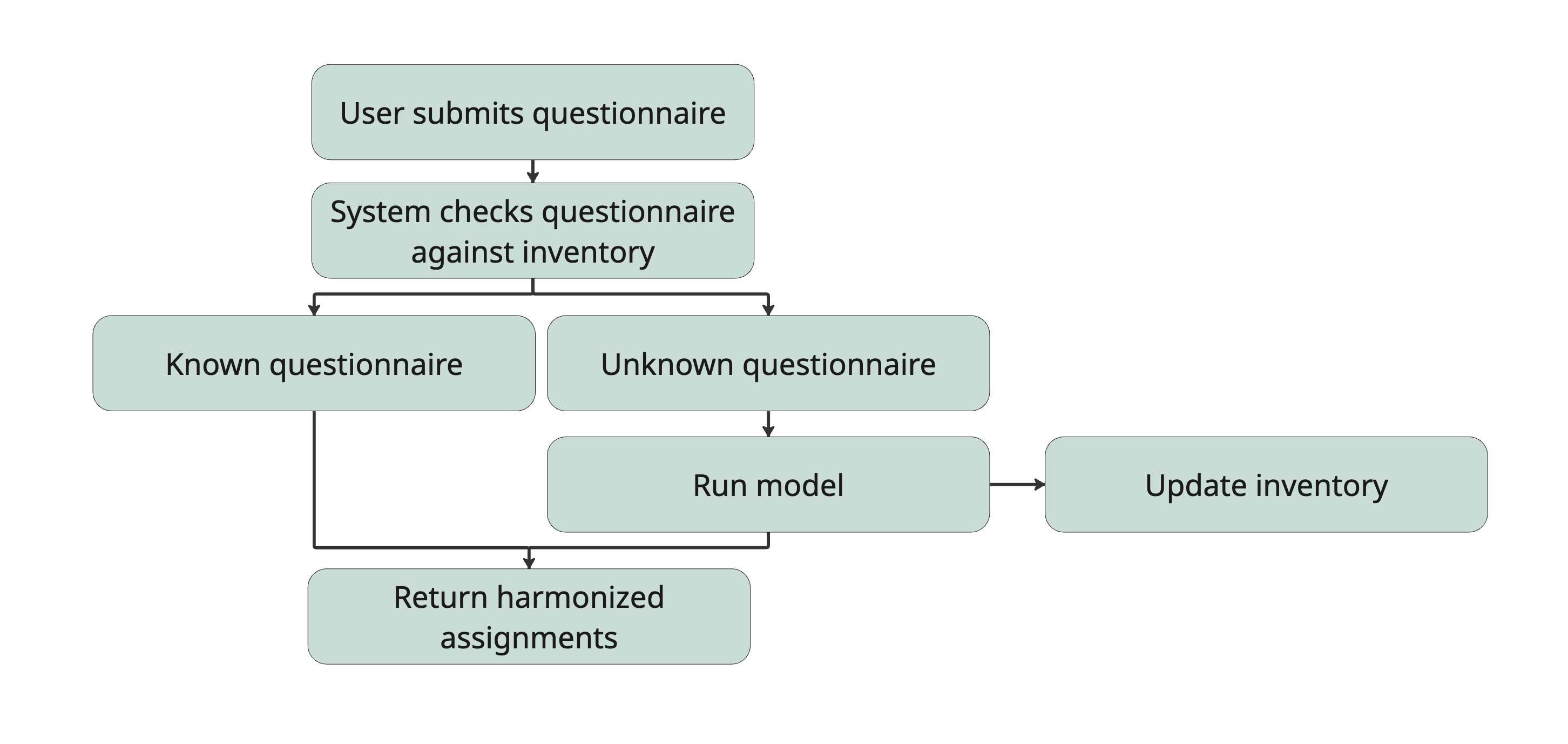
This tool offers mapping of individual questionnaire items from multiple instruments to pre-defined symptom dimensions. Dimension scores are subsequently transformed to allow comparability across different clinical instruments.
How to use
pip install pyHarmoniCA
Run harmonization:
harmonica [-h] --items <items.csv> [--output OUTPUT] [--force-rerun] [--duplicates {ask,same,new}] [--models-dir MODELS_DIR] [--inventory INVENTORY]
This writes a results table to <items>_harmonized.csv (next to your input file), containing the questionnaires you included in items.csv. Use -o <path> to choose a different output location. The columns are construct, questionnaire, item_id, item_text, dimension, dimension_label, confidence and source, where source says for every item whether its assignment was reused from the inventory or predicted by the model; the web app writes the same columns.
Your items.csv needs to look like this:
construct,questionnaire,item_id,item_text
depression,CES-D,CES-D_01,I was bothered by things that usually don’t bother me.
depression,CES-D,CES-D_02,"I did not feel like eating; my appetite was poor."
anxiety,DASS,DASS_02,I was aware of dryness of my mouth.,
anxiety,DASS,DASS_04,I experienced breathing difficulty,
...
Whitespace is trimmed and construct is read in lower case. If your file also has the columns answer_options and scoring, they are carried into the results, which is all the web app's score transformation needs.
Models for each construct are pulled from Huggingface during the harmonization process, so make sure to have an internet connection and enough local space (~1.5GB per model/construct).
If one of your items has the same text as an item already in the inventory but under a different item_id (e.g. your PHQ9_1 vs. the inventory's PHQ-9_01), HarmoniCA will detect it and ask you on the terminal whether it's the same item before reusing its cached assignment (press Enter for "same item"). Use --duplicates same or --duplicates new to decide for all such items without being asked, for example in scripts.
New model predictions are added to the inventory file (harmonica/inventory/harmonized_inventory.csv), so that they can be contributed (see below).
Web app
Prefer a browser over the command line? The repository contains a Streamlit app in harmonica-ui/. It is not part of the PyPI package, so run it from a clone:
git clone https://github.com/julia-pfarr/HarmoniCA.git
cd HarmoniCA
pip install -e .
pip install -r harmonica-ui/requirements.txt
cd harmonica-ui
python -m streamlit run app.py
It guides you through five steps:
- Upload: pick questionnaires from the inventory, upload your own CSV/Excel files, or both. Uploaded files need six columns:
construct,questionnaire,item_id,item_text,answer_optionsandscoring(a template is offered in the app). - Review & confirm: items we think are already in the inventory are listed as possible duplicates. Tick the ones that are the same (same confirmation as the terminal prompt above, but as a list); the others go to the model.
- Harmonization: runs the model for the new items.
- Results: a table of the harmonized items, a review list for low-confidence model predictions (inventory items are expert consensus and never changed), charts, and the CSV download.
- Score transformation: download the research score-transformation code to turn your participants' item responses into comparable dimension scores.
Terminal and web app: what is the same, what differs
Both use the same engine, inventory file, model folder and dimension definitions, and give the same results (same assignments, confidence and source, same columns) for the same items and decisions about duplicates.
Terminal (harmonica) |
Web app (harmonica-ui) |
|
|---|---|---|
Possible duplicates (same wording, other item_id) |
asked on the terminal, or --duplicates same|new |
ticked in a list, one decision per item |
| Inventory | model predictions are appended to the inventory file | never edited; the new predictions are offered as a download ("New inventory rows"), ready for a pull request |
| Input | items CSV | CSV/Excel with column mapping, and/or questionnaires picked straight from the inventory |
| Reviewing results | no | review low-confidence model predictions, charts, table |
| Scores | offline scoring bundle below | research score-transformation code (step 5) |
Open a PR to contribute new harmonized questionnaires
The harmonized_inventory.csv get's updated automatically. We appreciate a Pull Request on this repo with your updated harmonized_inventory.csv so that we can have an ever growing inventory! :-)
You can try everything first with the test-items.csv from this repo!
Downloadable offline scoring
This is the command-line scoring bundle: participants supply raw answer options and the runner applies the scoring lookup, including reverse scoring. Step 5 of the web app works differently: it ships the research score-transformation code, which expects participants' responses to be numeric item scores already (reverse-scored where needed).
Generate a scoring ZIP alongside item harmonization:
harmonica --items scoring-items.csv --scoring-bundle scoring.zip
The definition CSV must include the usual columns plus answer_options and
scoring, each containing a list with corresponding entries. For example:
construct,questionnaire,item_id,item_text,answer_options,scoring
depression,Example,Example_01,I feel sad,"[0, 1, 2, 3]","[0, 1, 2, 3]"
depression,Example,Example_02,I feel happy,"[0, 1, 2, 3]","[3, 2, 1, 0]"
Only questionnaire definitions are needed to generate the bundle. Dimension
-1 items are excluded. The ZIP includes a versioned pipeline.json, a frozen
copy of score_transformation.py, requirements information, and instructions.
A future hosted app can offer the ZIP returned by harmonica.pipeline.save_bundle
as a download; this repository currently provides the CLI, not a website.
Extract the ZIP locally and run with Python 3.10 or newer:
python score_transformation.py --pipeline pipeline.json --responses responses.csv --output scores.csv
Participant CSVs require participant_id, questionnaire, and item-ID columns
for every scored item of the questionnaires present. One row represents one
participant/questionnaire pair. For example:
participant_id,questionnaire,Example_01,Example_02
p1,Example,2,0
p2,Example,0,3
Supply raw answer-option values; the runner applies the scoring lookup, including
reverse scoring. Do not reverse-score responses beforehand. Empty cells are
missing; use --missing-values -9 for an additional sentinel. Missing columns,
unknown questionnaires, invalid answers, and duplicate participant/questionnaire
pairs fail before an output file is written.
Dimension scores sum answered item scores and divide by the sum of those items' maximum scores. More than half missing, or no answers, yields an empty score. This adjusts the denominator rather than imputing responses. Scoring supports finite nonnegative item scores with positive maxima; it does not infer scoring rules from item text. Confidence describes item mapping and is not a scoring weight.
The output also includes per-questionnaire and pooled midpoint ECDF percentiles
estimated from the local sample. Questionnaire-averaged scores use
F_average^-1(F_questionnaire(x)) with linear interpolation, requiring at least
two questionnaires with two valid scores each; otherwise that column stays empty.
These are sample-dependent transformations, not a guarantee of clinical equivalence.
Fixed reference norms and site-weighted transforms are not included in this initial
portable runner. The item-count reliability flag is descriptive (4+ high, 2–3
moderate, 1 low, 0 none), not an estimated psychometric reliability coefficient.
The local runner uses only Python's standard library: no package installation, model weights, network access, or participant-data upload is required. Keep participant responses and generated scores on the researcher's approved system.
Repository layout
| Path | What it is |
|---|---|
src/harmonica/ |
The harmonica command (harmonize.py), the engine (harmonica/), the inventory (inventory/harmonized_inventory.csv), the offline scoring bundle (pipeline.py, local_scoring.py) and scripts/setup_encoders.py for model files |
src/harmonica/models/ |
Downloaded model weights (not in git, fetched from Hugging Face on demand) |
harmonica-ui/ |
The Streamlit web app, see its README |
tests/ |
Tests for the command-line package, the engine and the scoring bundle |
test-items.csv, docs/ |
A sample input file for the command line, and the image used above |
The research behind this tool
Symptom dimensions were chosen based on the convergence of evidence across original scale publications, validation studies, expert recommendations, diagnostic manuals, and neuroimaging applications, along with practical considerations regarding dimension homogeneity and sample characteristics (see our OSF project for the full literature review and consensus pipeline).
Clinicians and researchers assigned items to dimensions through a structured survey. Through semantic similarity analysis using different embedding models and computation of embeddings for both questionnaire items and dimension descriptions, the best performing embedding model for each construct was chosen (maximum cosine similarity between item and to dimension description embedding).
The best performing model for each construct was fine-tuned with the probability distribution of the expert mappings using contrastive learning.
Results
Cross validation results:
| Construct | Folds | Mean accuracy | SD |
|---|---|---|---|
| Depression | 14 | 86.9% | ±11.9% |
| Anxiety | 13 | 93.7% | ±10.7% |
| Sleep | 17 | 93.4% | ±12.1% |
| Apathy | 11 | 77.9% | ±25.0% |
Final models
All fine-tuned models can be found on Huggingface
Questionnaires mapped by experts
| Abbreviation | Full Name | Construct |
|---|---|---|
| BDI-I | Beck's Depression Inventory I | Depression |
| HDRS/HAM-D | Hamilton Depression Rating Scale | Depression |
| GDS | Geriatric Depression Scale | Depression |
| MADRS | Montgomery-Åsberg Depression Rating Scale | Depression |
| PHQ-9 | Patient Health Questionnaire-9 | Depression |
| SDS | Zung Self-Rating Depression Scale | Depression |
| DSI | Depressive Symptom Inventory | Depression |
| MFQ | Mood and Feelings Questionnaire | Depression |
| BAI | Beck's Anxiety Inventory | Anxiety |
| HARS/HAM-A | Hamilton Anxiety Rating Scale | Anxiety |
| STAI | State-Trait Anxiety Inventory | Anxiety |
| PAS | Parkinson Anxiety Scale | Anxiety |
| GAD-7 | Generalized Anxiety Disorder Scale | Anxiety |
| PSWQ | Penn State Worry Questionnaire | Anxiety |
| SMGAD | Severity Measure for Generalized Anxiety Disorder | Anxiety |
| ASensI | Anxiety Sensitivity Index | Anxiety |
| AES | Apathy Evaluation Scale | Apathy |
| SAS | Starkstein's Apathy Scale | Apathy |
| AMI | Apathy and Motivation Index | Apathy |
| LARS | Lille Apathy Rating Scale | Apathy |
| DAS | Dimensional Apathy Scale | Apathy |
| SHAPS | Snaith-Hamilton Pleasure Scales | Apathy |
| TEPS | Temporal Experience of Pleasure Scale | Apathy |
| QUIP-C | Questionnaire for Impulsive-Compulsive Disorders in Parkinson's Disease | Impulse Control Disorders |
| QUIP-RS | Quetionnaire for Impulsive-Compulsive Disorders in Parkinson's Disease - Rating Scale | Impulse Control Disorders |
| ESS | Epworth Sleepiness Scale | Sleep |
| PDSS | Parkinson's Disease Sleep Scale | Sleep |
| PSQI | Pittsburgh Sleep Quality Index | Sleep |
| RBDSQ | REM Sleep Behavior Disorder Screening Questionnaire | Sleep |
| ISI | Insomnia Severity Index | Sleep |
| SCOPA-sleep | Scales for Outcomes in Parkinson's Disease - sleep | Sleep |
| AIS | Athens Insomnia Scale | Sleep |
| MSQ | Mayo Sleep Questionnaire | Sleep |
| SDQ | Sleep Disorders Questionnaire | Sleep |
| PPRS | Parkinson's Psychosis Rating Scale | Psychosis |
| SCOPA-PC | Scales for Outcomes in Parkinson's Disease - Psychiatric Complications | Psychosis |
| SAPS-PD | Scale for the Assesment of Positive Symptoms - Parkinson's Disease | Psychosis |
| UMD-PDHQ | University of Miami Parkinson's Disease Hallucinations Questionnaire | Psychosis |
| CAPE-P15 | Community Assessment of Psychic Experiences, Positive scale, 15-item version | Psychosis |
| PQ-B | Prodromal Questionnaire, Brief version | Psychosis |
| HADS | Hopsital Anxiety and Depression Scale | Multi-category |
| SCL-90 | Symptom Checklist-90 | Multi-category |
| ASBPD | Ardouin Scale of Behavior in Parkinson's Disease | Multi-category |
| NPI | Neuropsychiatric Inventory | Multi-category |
| MDS-UPDRS I | Unified Parkinson's Disease Rating Scale - Part I | Multi-category |
| NMSS | Non-Motor Symptoms Scale for Parkinson's Disease | Multi-category |
| NMSQuest | Non-Motor Symptoms Questionnaire | Multi-category |
1 maintainer

Metadata
1 maintainer
Release files for pyHarmoniCA 0.0.2
For a detailed explanation of source distributions (sdists) and built distributions (wheels), please see the package formats documentation.
Source distribution (sdist)
| File | Size | Uploaded | Provenance | |
|---|---|---|---|---|
| pyharmonica-0.0.2.tar.gz | 63.0 kB | With provenance | Details |
Built distribution (wheel)
| File | Interpreter | ABI | Platform | Reset |
|---|---|---|---|---|
| pyharmonica-0.0.2-py3-none-any.whl | Python 3 | none | any | Details |
Total release size: 130.2 kB
Release files / pyharmonica-0.0.2.tar.gz
| Download URL | pyharmonica-0.0.2.tar.gz |
|---|---|
| Size | 63.0 kB |
| Tags | Source |
|
SHA-256 checksum How to use checksums |
b9156f681ea26fd7ee8bb42b490212c068974c3020dfae923b127cb3bc13b3f7
|
|
BLAKE2b-256 checksum How to use checksums |
4ccd34ea3c7e9aa5ba81fd986b674d6afbf107aa6fc138501b5bdff21d6886f5
|
| Upload date | |
|
Uploaded using Trusted Publishing? What is trusted publishing? |
Yes |
| Uploaded via |
twine/7.0.0 CPython/3.13.16
|
Provenance
Provenance describes where a file came from. On PyPI, provenance is shared via attestations, which provide a verifiable record of the build or publishing details. View details, limitations and caveats.


PyPI Publish Attestation
PyPI verified that this artifact, at this checksum, originated from the publisher listed below.
Signed by GitHub Actions, verified by PyPI on Oct 22, 2026.
Transparency logRelease files / pyharmonica-0.0.2-py3-none-any.whl
| Download URL | pyharmonica-0.0.2-py3-none-any.whl |
|---|---|
| Size | 67.2 kB |
| Tags | Python 3 |
|
SHA-256 checksum How to use checksums |
76f6ddf3ce199d70e51dc6b7807cef51c6e848511be7c4f5bf56ce6f8e71719c
|
|
BLAKE2b-256 checksum How to use checksums |
29eb06aa26e970e98664b88df89838a53237b46c41d0855a87215e296d4ec637
|
| Upload date | |
|
Uploaded using Trusted Publishing? What is trusted publishing? |
Yes |
| Uploaded via |
twine/7.0.0 CPython/3.13.16
|
Provenance
Provenance describes where a file came from. On PyPI, provenance is shared via attestations, which provide a verifiable record of the build or publishing details. View details, limitations and caveats.
PyPI Publish Attestation
PyPI verified that this artifact, at this checksum, originated from the publisher listed below.
Signed by GitHub Actions, verified by PyPI on Oct 22, 2026.
Transparency logSecurity for pyHarmoniCA 0.0.2
Provenance
Provenance describes where a file came from. On PyPI, provenance is shared via attestations, which provide a verifiable record of the build or publishing details. View details, limitations and caveats.
Full provenance
All 2 files in this release have been uploaded with provenance metadata.
Attestation for pyharmonica-0.0.2.tar.gz
PyPI Publish Attestation
PyPI verified that this artifact, at this checksum, originated from the publisher listed below.
Signed by GitHub Actions, verified by PyPI on Oct 22, 2026.
Transparency logA note on package security
PyPI is a repository for distributing packages, not a service for auditing them. While third-party security researchers and our staff do their best to detect and remove malicious packages, PyPI cannot guarantee the quality, security or suitability of any given package.














