

Hindsight
Internet history forensics for Google Chrome/Chromium and Mozilla Firefox
Hindsight is a free tool for analyzing web artifacts. It started with the browsing history of the Google Chrome web browser, has expanded to support other Chromium-based applications, and now also parses Mozilla Firefox profiles. Hindsight can parse a number of different types of web artifacts, including URLs, download history, cache records, bookmarks, autofill records, saved passwords, preferences, browser extensions, HTTP cookies, and Local Storage records (HTML5 cookies). Once the data is extracted from each file, it is correlated with data from other history files and placed in a timeline.
It has a simple web UI - to start it, run "hindsight_gui.py" (or on Windows, the packaged "hindsight_gui.exe") and visit http://localhost:8080 in a browser:
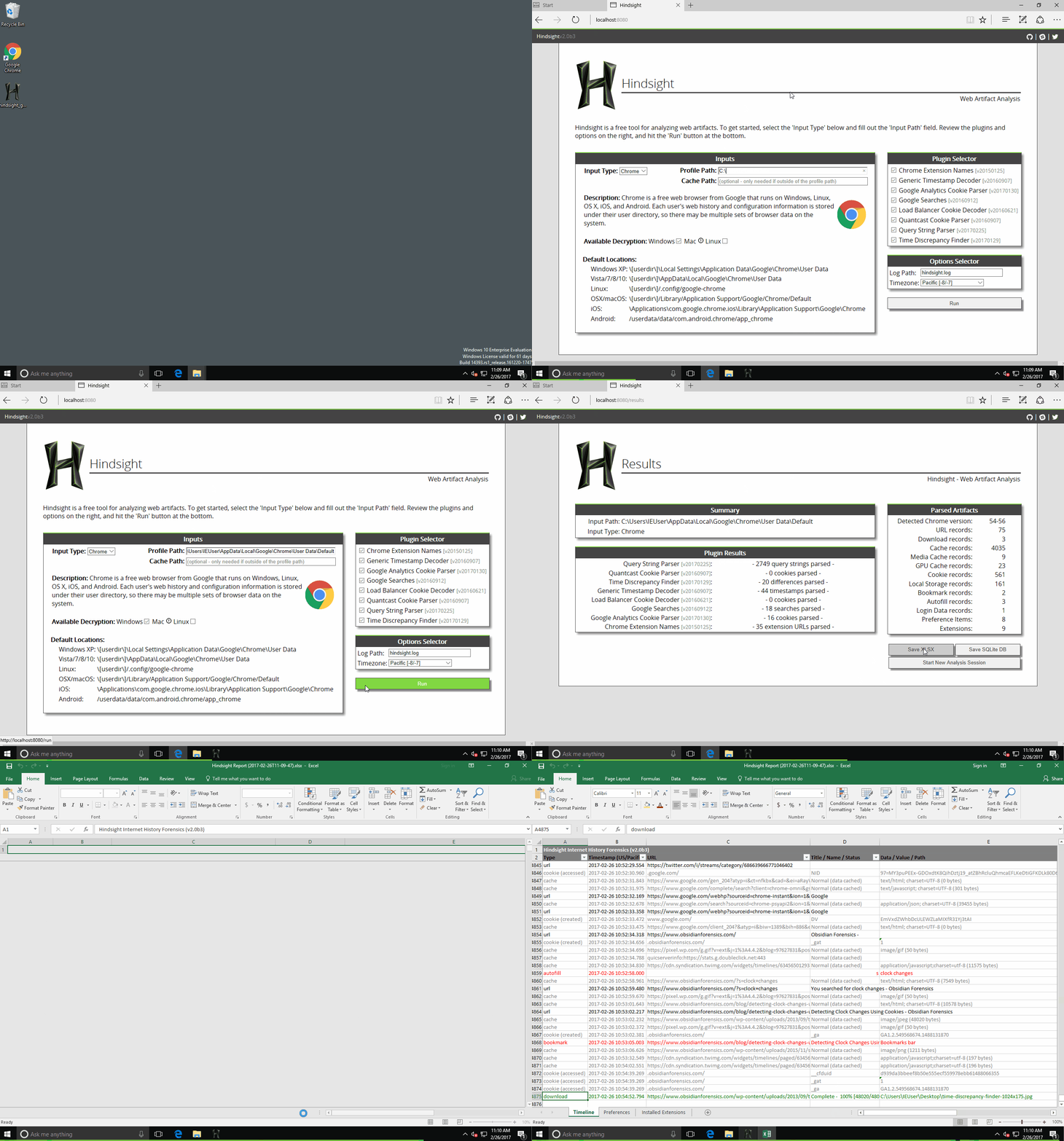
The only field you are required to complete is "Profile Path". This is the location of the browser profile you want to analyze (the default profile paths for different OSes are listed at the bottom of this page). Click "Run" and you'll be taken to the results page in where you can save the results to a spreadsheet (or other formats).
Manual Installation
Hindsight needs Python 3.11 or newer. To install it (both the command line tool and the web interface), do:
pip install pyhindsight
The "View SQLite DB in Browser" feature in the Hindsight web interface is not part of that install. It is only available when running Hindsight from a clone of this repository, and it needs Node.js and npm to build. From the root of the clone, run:
sh install-js.sh
Command Line
There also is a command line version of Hindsight - hindsight.py or hindsight.exe. After a pip install it is also available as hindsight, and the web interface as hindsight-gui. The user guide in the documentation folder covers many topics, but the info below should get you started with the command line version:
Example usage: > hindsight.py -i "C:\Users\Ryan\AppData\Local\Google\Chrome\User Data\Default" -o test_case
Command Line Options:
| Option | Description |
|---|---|
| -i or --input | Path to a browser profile, or a parent directory to search recursively for profiles |
| -o or --output | Name of the output file (without extension) |
| -f or --format | Output format (default is XLSX, other options are SQLite and JSONL) |
| -c or --cache | Path to the cache directory; only needed if the directory is outside the given "input" directory. Mac systems are setup this way by default. |
| -b or --browser_type | Force one browser for every profile: Chrome, Edge, Brave, Vivaldi, Firefox or Tor (case-insensitive; Chromium is an alias for Chrome). Omit to auto-detect each profile. |
| -l or --log | Location Hindsight should log to (will append if exists) |
| --log-level | How much detail to write to the log: debug, info (the default), warning or error. Use debug when reporting a bug |
| -h or --help | Shows these options and the default Chrome data locations |
| -t or --timezone | Display timezone for the timestamps in the output (all formats): an IANA name such as Asia/Kolkata or America/New_York, or an offset from UTC such as UTC+05:30 |
| --only or --artifacts | Only parse these artifacts (comma-separated; repeatable) |
| --skip or --exclude | Parse everything except these artifacts (comma-separated; repeatable) |
| --list-artifacts | Print the artifact names accepted by --only and --skip, then exit |
When the input contains profiles from several browsers, omit --browser_type to
let Hindsight detect each profile separately. Use the override only when you intend
to treat every discovered profile as the specified browser.
Selecting Which Artifacts to Parse
By default, Hindsight parses every artifact it finds. --only and --skip narrow that
down, which is useful for quick triage and for skipping the cache when it is large and
not relevant to the question at hand.
hindsight.py -i <profile> --only history,downloads
hindsight.py -i <profile> --skip cache
hindsight.py -i <profile> --only user-activity --skip sessions
Artifact names are browser-neutral: history selects Chrome's History URL records and
Firefox's places.sqlite URL records, so the same command works on either. Names are
case-insensitive, and spaces, underscores, and hyphens are interchangeable
(local-storage, local_storage, and "Local Storage" are the same name).
Group names can be used anywhere an artifact name can, and select everything under them:
user-activity, website-storage, browser-extensions, configuration, plus caches
(every cache artifact) and all. --only and --skip can be combined, with --skip
further narrowing --only.
Run hindsight.py --list-artifacts for the full list with descriptions and aliases.
An artifact excluded by a filter is reported as [ skipped ] during the run and noted in
the log, so a report that omits an artifact stays distinguishable from a profile that
never had it. An unrecognized name is an error rather than being ignored, so a typo can't
quietly produce a report covering the wrong artifacts.
Note that version detection still reads the profile's database schemas, so filtering does not change the detected browser version.
Default Profile Paths
The Chrome default profile folder default locations are:
- WinXP: [userdir]\Local Settings\Application Data\Google\Chrome\User Data\Default
- Windows Vista and later: [userdir]\AppData\Local\Google\Chrome\User Data\Default
- Linux: [userdir]/.config/google-chrome/Default
- macOS: [userdir]/Library/Application Support/Google/Chrome/Default
- iOS: \Applications\com.google.chrome.ios\Library\Application Support\Google\Chrome\Default
- Android: /userdata/data/com.android.chrome/app_chrome/Default
- CrOS: \home\user\<GUID>
Firefox keeps each profile in its own folder, named with a random prefix (for example ab12cd34.default-release). The default locations of those folders are:
- Windows: [userdir]\AppData\Roaming\Mozilla\Firefox\Profiles\<profile>
- Linux: [userdir]/.mozilla/firefox/<profile>
- macOS: [userdir]/Library/Application Support/Firefox/Profiles/<profile>
Feature Requests
Please file an issue if you have an idea for a new feature (or spotted something broken).
Contributing
See CONTRIBUTING.md for how to set up, run the two test suites, and get the browser profile corpus the end-to-end tests parse.
1 maintainer

Metadata
1 maintainer
Release files for pyhindsight 20261100
For a detailed explanation of source distributions (sdists) and built distributions (wheels), please see the package formats documentation.
Source distribution (sdist)
| File | Size | Uploaded | Provenance | Actions |
|---|---|---|---|---|
| pyhindsight-20261100.tar.gz | 2.1 MB | With provenance | Details for pyhindsight-20261100.tar.gz |
Built distribution (wheel)
| File | Interpreter | ABI | Platform | Actions Reset |
|---|---|---|---|---|
| pyhindsight-20261100-py3-none-any.whl | Python 3 | none | any | Details for pyhindsight-20261100-py3-none-any.whl |
Total release size: 4.4 MB
Release files / pyhindsight-20261100.tar.gz
| Download URL | pyhindsight-20261100.tar.gz |
|---|---|
| Size | 2.1 MB |
| Tags | Source |
|
SHA-256 checksum How to use checksums |
6a90b9c7bb97660fb0f93cdb429d0064ddf6adba33aabff704f9d80d496a0ac7
|
|
BLAKE2b-256 checksum How to use checksums |
7dc56e3b51558978a76972f345dd5d5a7a810478e9448c4dd448a6d8019f3970
|
| Upload date | |
|
Uploaded using Trusted Publishing? What is trusted publishing? |
Yes |
| Uploaded via |
twine/7.0.0 CPython/3.13.16
|
Provenance
Provenance describes where a file came from. On PyPI, provenance is shared via attestations, which provide a verifiable record of the build or publishing details. View details, limitations and caveats.


PyPI Publish Attestation
PyPI verified that this artifact, at this checksum, originated from the publisher listed below.
Signed by GitHub Actions, verified by PyPI on Nov 17, 2026.
Transparency logRelease files / pyhindsight-20261100-py3-none-any.whl
| Download URL | pyhindsight-20261100-py3-none-any.whl |
|---|---|
| Size | 2.3 MB |
| Tags | Python 3 |
|
SHA-256 checksum How to use checksums |
eeddae6009c0c5d629937b5a4a0704d297db0f4ebff200c53dce2a9945f914ca
|
|
BLAKE2b-256 checksum How to use checksums |
7fdef5a0171a82671a00c49da90bdd0bc5827ee408bafb560552914e70313c5a
|
| Upload date | |
|
Uploaded using Trusted Publishing? What is trusted publishing? |
Yes |
| Uploaded via |
twine/7.0.0 CPython/3.13.16
|
Provenance
Provenance describes where a file came from. On PyPI, provenance is shared via attestations, which provide a verifiable record of the build or publishing details. View details, limitations and caveats.
PyPI Publish Attestation
PyPI verified that this artifact, at this checksum, originated from the publisher listed below.
Signed by GitHub Actions, verified by PyPI on Nov 17, 2026.
Transparency logSecurity for pyhindsight 20261100
Provenance
Provenance describes where a file came from. On PyPI, provenance is shared via attestations, which provide a verifiable record of the build or publishing details. View details, limitations and caveats.
Full provenance
Both files in this release have been uploaded with provenance metadata.
Attestation for pyhindsight-20261100.tar.gz
PyPI Publish Attestation
PyPI verified that this artifact, at this checksum, originated from the publisher listed below.
Signed by GitHub Actions, verified by PyPI on Nov 17, 2026.
Transparency logA note on package security
PyPI is a repository for distributing packages, not a service for auditing them. While third-party security researchers and our staff do their best to detect and remove malicious packages, PyPI cannot guarantee the quality, security or suitability of any given package.
To learn more about protecting yourself from malicious actors, visit our package security documentation.














