
pykuwahara





Kuwahara filter in Python (NumPy + OpenCV).
The Kuwahara filter is a non-linear smoothing filter used in image processing for adaptive noise reduction. It is able to apply smoothing on the image while preserving the edges. Source: Wikipedia
Two variants: uniform window mean, or Gaussian window mean (ImageMagick-style notes).
Install
Python 3.9+.
python -m venv .venv
source .venv/bin/activate   # Windows: .venv\Scripts\activate
pip install -U pip
pip install pykuwahara
Dev / tests:
pip install -e ".[dev]"
pytest -q
pytest -q --cov=pykuwahara --cov-report=term-missing
Dependencies: numpy, opencv-python-headless. Do not install another PyPI package that ships its own cv2 alongside it.
Usage
Basic example
import cv2
from pykuwahara import kuwahara

image = cv2.imread('lena_std.jpg')

filt1 = kuwahara(image, method='mean', radius=3)
filt2 = kuwahara(image, method='gaussian', radius=3)   # default sigma: OpenCV

cv2.imwrite('lena-kfilt-mean.jpg', filt1)
cv2.imwrite('lena-kfilt-gaus.jpg', filt2)
Original image
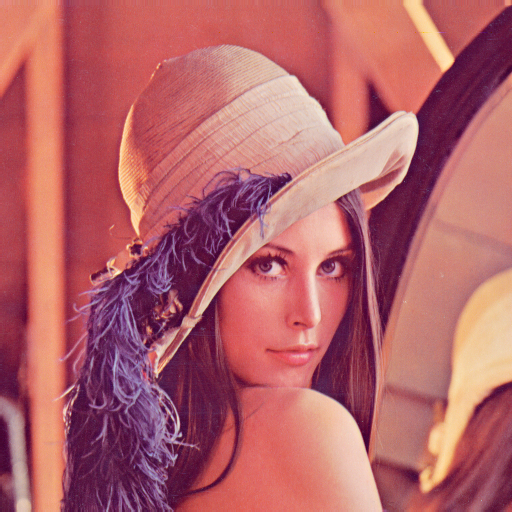
Filtered with Kuwahara (mean)

Filtered with Kuwahara (gaussian)

Painting-style effect
import cv2
from pykuwahara import kuwahara

image = cv2.imread('photo.jpg')

filt1 = kuwahara(image, method='mean', radius=4)
filt2 = kuwahara(image, method='gaussian', radius=4, sigma=1.5)

cv2.imwrite('photo-kfilt-mean.jpg', filt1)
cv2.imwrite('photo-kfilt-gaus.jpg', filt2)
Original image (source: wikipedia)

Filtered with Kuwahara (mean)

Filtered with Kuwahara (gaussian)

Colour: variance channel
For colour images, variance uses one channel (grayscale by default, or image_2d, or grayconv).
import cv2
from pykuwahara import kuwahara

image = cv2.imread('selfie.jpg')
image = (image / 255).astype('float32')

lab_image = cv2.cvtColor(image, cv2.COLOR_BGR2Lab)
l, a, b = cv2.split(lab_image)

hsv_image = cv2.cvtColor(image, cv2.COLOR_BGR2HSV)
h, s, v = cv2.split(hsv_image)

filt1 = kuwahara(image, method='gaussian', radius=5, sigma=2., image_2d=l)
filt2 = kuwahara(image, method='gaussian', radius=5, sigma=2., image_2d=v)

cv2.imwrite('selfie-kfilt-gaus1.jpg', filt1 * 255)
cv2.imwrite('selfie-kfilt-gaus2.jpg', filt2 * 255)
Original image (source)

Filtered with Kuwahara on L (Lab)

Filtered with Kuwahara on V (HSV)

1 maintainer

Metadata
1 maintainer
Release files for pykuwahara 0.5.0
For a detailed explanation of source distributions (sdists) and built distributions (wheels), please see the package formats documentation.
Source distribution (sdist)
| File | Size | Uploaded | Provenance | |
|---|---|---|---|---|
| pykuwahara-0.5.0.tar.gz | 42.7 kB | Without provenance | Details |
Built distribution (wheel)
| File | Interpreter | ABI | Platform | Reset |
|---|---|---|---|---|
| pykuwahara-0.5.0-py3-none-any.whl | Python 3 | none | any | Details |
Total release size: 61.2 kB
Release files / pykuwahara-0.5.0.tar.gz
| Download URL | pykuwahara-0.5.0.tar.gz |
|---|---|
| Size | 42.7 kB |
| Tags | Source |
|
SHA-256 checksum How to use checksums |
e4b4be61a3f016d200b96b2e12e42129d9c8bbec31d24ce044eb0d7deb8f7cfb
|
|
BLAKE2b-256 checksum How to use checksums |
de7fec56077baf9f916c738f086f3bb098bb50e366a683603b7ee8764c64ebe6
|
| Upload date | |
|
Uploaded using Trusted Publishing? What is trusted publishing? |
No |
| Uploaded via |
twine/7.0.0 CPython/3.12.13
|
Release files / pykuwahara-0.5.0-py3-none-any.whl
| Download URL | pykuwahara-0.5.0-py3-none-any.whl |
|---|---|
| Size | 18.5 kB |
| Tags | Python 3 |
|
SHA-256 checksum How to use checksums |
97f8d45f8e5e5639ac7567662324891bb7cf0faeedc9d9f0c71d147f2fec99af
|
|
BLAKE2b-256 checksum How to use checksums |
26a478ade2175f29a39e44f4ce6c3cf3c08d8a0292abff83bf47e1f96da1826d
|
| Upload date | |
|
Uploaded using Trusted Publishing? What is trusted publishing? |
No |
| Uploaded via |
twine/7.0.0 CPython/3.12.13
|
Security for pykuwahara 0.5.0
Provenance
Provenance describes where a file came from. On PyPI, provenance is shared via attestations, which provide a verifiable record of the build or publishing details. View details, limitations and caveats.
No provenance found
None of the files in this release were uploaded with provenance metadata.
A note on package security
PyPI is a repository for distributing packages, not a service for auditing them. While third-party security researchers and our staff do their best to detect and remove malicious packages, PyPI cannot guarantee the quality, security or suitability of any given package.















