
pylor
Library for outputting colorful text
Supports 16 foreground and 16 background colors
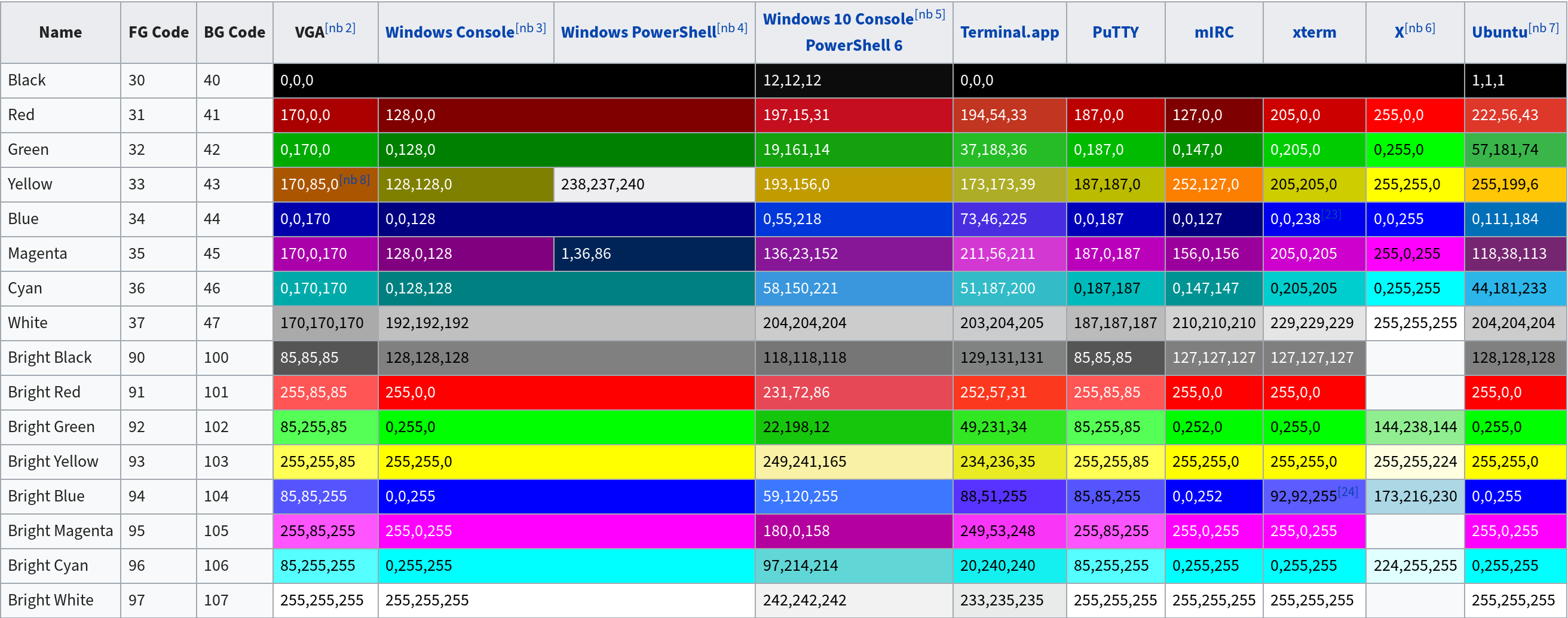
Table from Wikipedia
QuickStart
Use: pip install pylor to install the module.
Imports
import pylor
from pylor import colors # Imports class full of colors to choose from
from pylor import decorations # Imports class full of decorations
from pylor import cursor # Imports class for cursor movement
Testing the installation
import pylor
print( pylor.test() ) # This will print the project logo
Functions
color()
The color function is used to create colored strings.
Arguments:
- String
- Foreground color
- Background color [Optional]
Example:
import pylor
from pylor import colors

print( pylor.color("Hello world!", colors.foreground.red) )
Returns string
colorNoReset()
The color function is used to create colored strings, does not set the color back to default (continues to color any future output).
Arguments:
- String
- Foreground color
- Background color [Optional]
Example:
import pylor
from pylor import colors

print( pylor.colorNoReset("Hello world!", colors.foreground.red) )
Returns string
formatting()
Function used for formatting text.
Arguments:
- String
- Formatting type
Example:
import pylor
from pylor import decorations

print( pylor.formatting("Hello world!", decorations.bold) )
Returns string
formattingNoReset()
Function used for formatting text, does not set the color back to default (continues to decorate any future output).
Arguments:
- String
- Formatting type
Example:
import pylor
from pylor import decorations

print( pylor.formatting("Hello world!", decorations.bold) )
Returns string
reset()
Function used for resetting the color after using colorNoReset()
Arguments:
- None
Example:
import pylor

print( pylor.reset() )
Returns string
test()
Function for testing the installation of the package, returns the project logo.
Arguments:
- None
Example:
import pylor

print( pylor.test() )
Returns string
Codes
Colors
Foreground
colors.foreground.
red
black
green
yellow
blue
magenta
cyan
white
brightBlack
brightRed
brightGreen
brightYellow
brightBlue
brightMagenta
brightCyan
brightWhite
Background
colors.background.
red
black
green
yellow
blue
magenta
cyan
white
brightBlack
brightRed
brightGreen
brightYellow
brightBlue
brightMagenta
brightCyan
brightWhite
Decorations
decorations.
bold
underline
reverse
Cursor
cursor.
up
down
right
left
Exceptions
NotAColor
Exception for when the argument given is not an ANSI code.
Example of code that would trigger this Exception:
import pylor
from pylor import colors

print( pylor.color("Hello world!", "red") ) # This is an example of bad code, do not use this, it will not work.
correct code:
import pylor
from pylor import colors

print( pylor.color("Hello world!", colors.foreground.red) )
SameType
Exception for when the background/foreground colors are used twice.
Example of code that would trigger this Exception:
import pylor
from pylor import colors

print( pylor.color("Hello world!", colors.foreground.red, colors.foreground.green) ) # This is an example of bad code, do not use this, it will not work.
correct code:
import pylor
from pylor import colors

print( pylor.color("Hello world!", colors.foreground.red, colors.background.red) )
1 maintainer

Metadata
1 maintainer
Release files for pylor 0.0.2
For a detailed explanation of source distributions (sdists) and built distributions (wheels), please see the package formats documentation.
Source distribution (sdist)
| File | Size | Uploaded | Provenance | Actions |
|---|---|---|---|---|
| pylor-0.0.2.tar.gz | 3.4 kB | Without provenance | Details for pylor-0.0.2.tar.gz |
Built distribution (wheel)
| File | Interpreter | ABI | Platform | Actions Reset |
|---|---|---|---|---|
| pylor-0.0.2-py3-none-any.whl | Python 3 | none | any | Details for pylor-0.0.2-py3-none-any.whl |
Total release size: 7.5 kB
Release files / pylor-0.0.2.tar.gz
| Download URL | pylor-0.0.2.tar.gz |
|---|---|
| Size | 3.4 kB |
| Tags | Source |
|
SHA-256 checksum How to use checksums |
16ac276b3e50370ff0e30588662908b4b8be140b267b3563a55c52223f7efe1f
|
|
BLAKE2b-256 checksum How to use checksums |
074345426800acb9f22d0274d79ba2b22ac38e4394e0127a8f51647bcb2e0f7e
|
| Upload date | |
|
Uploaded using Trusted Publishing? What is trusted publishing? |
No |
| Uploaded via |
twine/3.2.0 pkginfo/1.5.0.1 requests/2.23.0 setuptools/46.1.1 requests-toolbelt/0.9.1 tqdm/4.48.0 CPython/3.7.6
|
Release files / pylor-0.0.2-py3-none-any.whl
| Download URL | pylor-0.0.2-py3-none-any.whl |
|---|---|
| Size | 4.1 kB |
| Tags | Python 3 |
|
SHA-256 checksum How to use checksums |
59ad3c684fa6c4d212b3aa08fb528411c163c404dd804174a337effe032cc709
|
|
BLAKE2b-256 checksum How to use checksums |
23f1afe25d25973a660b385535d89b296ccf626e2641dbf59fd002e9679757bb
|
| Upload date | |
|
Uploaded using Trusted Publishing? What is trusted publishing? |
No |
| Uploaded via |
twine/3.2.0 pkginfo/1.5.0.1 requests/2.23.0 setuptools/46.1.1 requests-toolbelt/0.9.1 tqdm/4.48.0 CPython/3.7.6
|
Security for pylor 0.0.2
Provenance
Provenance describes where a file came from. On PyPI, provenance is shared via attestations, which provide a verifiable record of the build or publishing details. View details, limitations and caveats.
No provenance found
None of the files in this release were uploaded with provenance metadata.
A note on package security
PyPI is a repository for distributing packages, not a service for auditing them. While third-party security researchers and our staff do their best to detect and remove malicious packages, PyPI cannot guarantee the quality, security or suitability of any given package.
To learn more about protecting yourself from malicious actors, visit our package security documentation.














