
pymessenger2 
Python Wrapper for Facebook Messenger Platform.
Disclaimer: This wrapper is NOT an official wrapper and do not attempt to represent Facebook in anyway.
About
This wrapper has the following functions:
send_text_message(recipient_id, message)
send_message(recipient_id, message)
send_generic_message(recipient_id, elements)
send_button_message(recipient_id, text, buttons)
send_quick_reply(recipient_id, text, buttons)
send_attachment(recipient_id, attachment_type, attachment_path)
send_attachment_url(recipient_id, attachment_type, attachment_url)
send_image(recipient_id, image_path)
send_image_url(recipient_id, image_url)
send_audio(recipient_id, audio_path)
send_audio_url(recipient_id, audio_url)
send_video(recipient_id, video_path)
send_video_url(recipient_id, video_url)
send_file(recipient_id, file_path)
send_file_url(recipient_id, file_url)
send_action(recipient_id, action)
send_raw(payload)
get_user_info(recipient_id)
You can see the code/documentation for there in bot.py.
The functions return the full JSON body of the actual API call to Facebook.
Register for an Access Token
You’ll need to setup a Facebook App, Facebook Page, get the Page Access Token and link the App to the Page before you can really start to use the Send/Receive service.
Installation
pip install pymessenger2Usage
from pymessenger2.bot import Bot

bot = Bot(<access_token>, [optional: app_secret])
bot.send_text_message(recipient_id, message)Note: From Facebook regarding User IDs
These ids are page-scoped. These ids differ from those returned from Facebook Login apps which are app-scoped. You must use ids retrieved from a Messenger integration for this page in order to function properly.
If app_secret is initialized, an app_secret_proof will be generated and send with every request. Appsecret Proofs helps further secure your client access tokens. You can find out more on the Facebook Docs
Sending a generic template message:
Generic Template Messages allows you to add cool elements like images, text all in a single bubble.
from pymessenger2.bot import Bot
from pymessenger2 import Element
bot = Bot(<access_token>)
elements = []
element = Element(title="test", image_url="<arsenal_logo.png>", subtitle="subtitle", item_url="http://arsenal.com")
elements.append(element)

bot.send_generic_message(recipient_id, elements)
Output:

Generic Bot Output
Sending an image/video/file using an URL:
from pymessenger2.bot import Bot
bot = Bot(<access_token>)
image_url = "http://url/to/image.png"
bot.send_image_url(recipient_id, image_url)
Todo
Structured Messages
Receipt Messages
Airlines
Tests!
Example
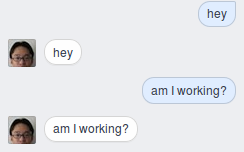
Screenshot of Echo Facebook Bot
You can find an example of an Echo Facebook Bot in examples/
1 maintainer

Metadata
1 maintainer
Release files for pymessenger3 1.0.0
For a detailed explanation of source distributions (sdists) and built distributions (wheels), please see the package formats documentation.
Source distribution (sdist)
| File | Size | Uploaded | Provenance | Actions |
|---|---|---|---|---|
| pymessenger3-1.0.0.tar.gz | 8.8 kB | Without provenance | Details for pymessenger3-1.0.0.tar.gz |
Release files / pymessenger3-1.0.0.tar.gz
| Download URL | pymessenger3-1.0.0.tar.gz |
|---|---|
| Size | 8.8 kB |
| Tags | Source |
|
SHA-256 checksum How to use checksums |
62feef3bc6ef3ceab65802449c92df84d51f9ad45e2703d3fcf1ed0ffc050374
|
|
BLAKE2b-256 checksum How to use checksums |
772bf417875610acfc7642c8344d74813b40bce15042e70be4c8b0821707e828
|
| Upload date | |
|
Uploaded using Trusted Publishing? What is trusted publishing? |
No |
Security for pymessenger3 1.0.0
Provenance
Provenance describes where a file came from. On PyPI, provenance is shared via attestations, which provide a verifiable record of the build or publishing details. View details, limitations and caveats.
No provenance found
None of the files in this release were uploaded with provenance metadata.
A note on package security
PyPI is a repository for distributing packages, not a service for auditing them. While third-party security researchers and our staff do their best to detect and remove malicious packages, PyPI cannot guarantee the quality, security or suitability of any given package.
To learn more about protecting yourself from malicious actors, visit our package security documentation.













