
Badge |
Status |
|---|---|
Python versions |
|
Documentation |
|
Scientific article |
|
Continuous integration |
|
Test coverage |
|
Web app |
|
Google Colab |
|
PyPI package |
|
PyPI downloads |
|
Anaconda package |
|
Anaconda downloads |
|
Latest Anaconda release |












PyMieSim
PyMieSim is an open-source Python package for fast and flexible Mie scattering simulations. It supports spherical, cylindrical and core–shell particles and provides helper classes for custom sources and detectors. The project targets both quick single-scatterer studies and large parametric experiments.
Try the live webapp
Run Mie scattering simulations in your browser—no installation required.
Launch the PyMieSimX webapp to configure optical setups, run parameter sweeps, explore individual particles, and download your results as CSV files. The hosted service brings PyMieSim to a graphical interface, making it easy to try simulations before installing the Python package. The interface is developed in PyMieSimX.
Features
Solvers for spheres, cylinders and core–shell geometries.
Built-in models for plane wave and Gaussian sources.
Multiple detector types including photodiodes and coherent modes.
Simple data analysis with pandas DataFrame outputs.
See PyMieSim in action
Explore electromagnetic fields around an individual particle, then sweep parameters to see how scattering changes across a whole experiment. These illustrative plots come from PyMieSim workflows; follow the links to the runnable examples and their configurations.
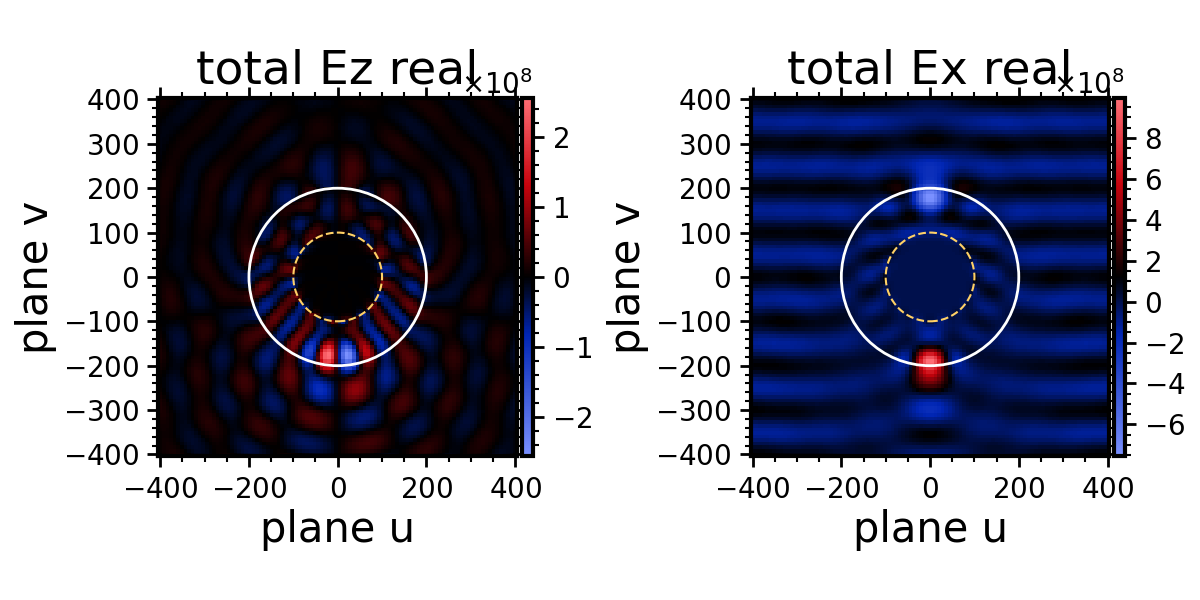
Single particle: near field
Visualize the real components of the total electric field in a plane through a core–shell particle. The circles mark the core and shell interfaces. Explore the near-field example.
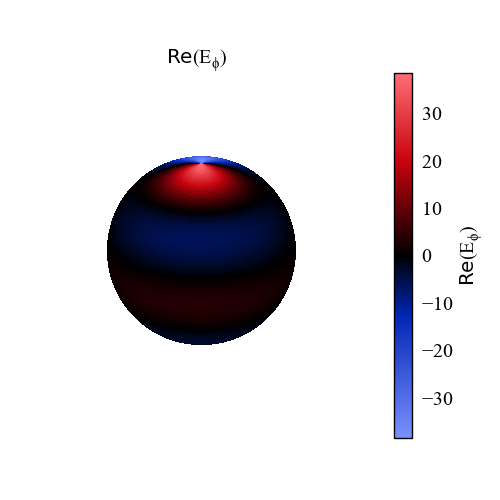
Single particle: far field
Inspect the angular distribution of a scattered electric-field component for a sphere. Explore the far-field example.
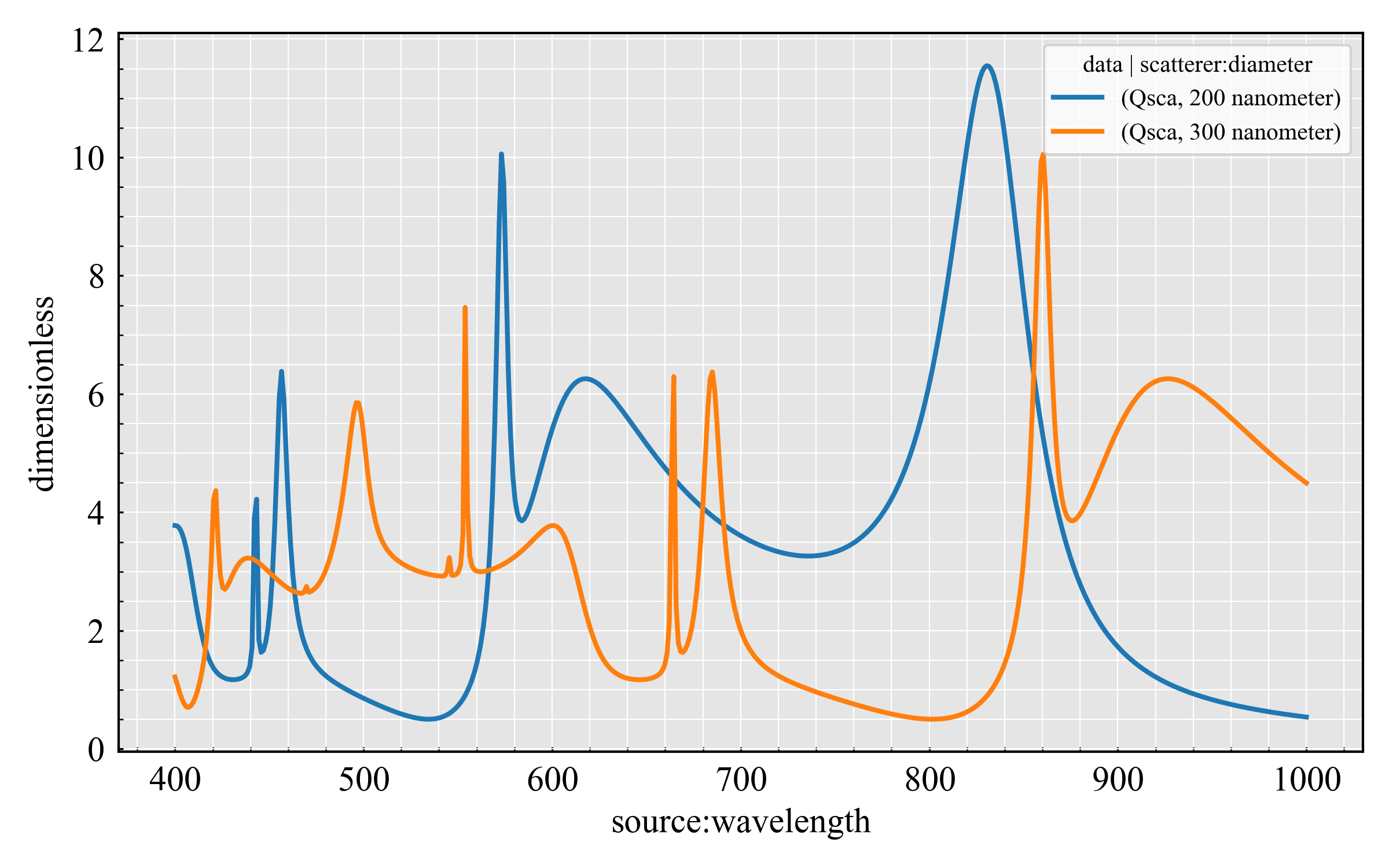
Experiment: scattering resonances
Compare scattering efficiency across wavelengths for spheres of two sizes. The peaks reveal resonances and how they shift with particle diameter. Explore sphere parameter sweeps.
Installation
PyMieSim is available on PyPI and Anaconda. Install it with:
pip install PyMieSim
conda install PyMieSim  --channels MartinPdeS
This installs a pre-built wheel when one is available for your operating system, architecture, and Python version. Wheels are the recommended option for using PyMieSim because they include the compiled C++ and Fortran extensions.
Verify the installation with the same Python interpreter that you will use for your simulations:
python -c "import PyMieSim; print(PyMieSim.__version__)"Named optical materials use PyOptik’s provenance-preserving RefractiveIndex.INFO catalog. Initialize its local snapshot once before using constructors such as SellmeierMaterial("BK7") or TabulatedMaterial("silver"):
python -m PyOptik setupBuilding from source is intended for development or platforms without a matching wheel. It requires a C++20 compiler, Fortran, CMake, pybind11, and OpenMP; see troubleshooting if the compiled extension cannot be imported.
First simulation
Create a source, a scatterer, and a Simulation. Physical quantities use the built-in ureg unit registry, while refractive indices are dimensionless real or complex values.
from PyMieSim import (
    Gaussian,
    PolarizationState,
    Simulation,
    Sphere,
    ureg,
)

source = Gaussian(
    wavelength=633 * ureg.nanometer,
    polarization=PolarizationState(angle=0 * ureg.degree),
    optical_power=1e-3 * ureg.watt,
    numerical_aperture=0.2,
)

scatterer = Sphere(
    diameter=200 * ureg.nanometer,
    material=1.5 + 0.01j,
    medium=1.0,
)

simulation = Simulation(scatterer=scatterer, source=source)
qsca = simulation.run("Qsca")
print(qsca.quantity)
This prints a dimensionless scattering efficiency, approximately:
0.2080989068292113 dimensionlessInspect the measures supported by the configured simulation with:
print(simulation.available_measures)For explicit measure and unit metadata, request a typed result:
result = simulation.run("Qsca")
print(result.measure, result.quantity, result.units)
Units and material conventions
Always attach units to wavelengths, lengths, powers, and angles:
633 * ureg.nanometer
200 * ureg.nanometer
1e-3 * ureg.watt
0 * ureg.degree
Refractive indices are dimensionless. A complex index such as 1.5 + 0.01j represents an absorbing material under PyMieSim’s optical convention. Built-in and tabulated materials have supported wavelength ranges; use load_material and validate_wavelength when working with real material data.
Parameter sweeps
Use Experiment when you want to evaluate several wavelengths, particle sizes, or material parameters. Results retain named dimensions and coordinates, and can be converted to NumPy or pandas explicitly.
import numpy as np
from PyMieSim import (
    Experiment,
    GaussianSet,
    PolarizationSet,
    SphereSet,
    ureg,
)

source = GaussianSet(
    wavelength=np.linspace(500, 700, 5) * ureg.nanometer,
    polarization=PolarizationSet(angles=0 * ureg.degree),
    optical_power=1e-3 * ureg.watt,
    numerical_aperture=0.2,
)
scatterer = SphereSet(
    diameter=np.linspace(100, 500, 9) * ureg.nanometer,
    material=1.5,
    medium=1.0,
)

experiment = Experiment(scatterer_set=scatterer, source_set=source)
result = experiment.run("Qsca")
values = result.as_numpy()
dataframe = result.as_dataframe()
The experiment grid has five wavelength values and nine diameter values, so values.shape is (5, 9). See the parameter sweep guide for multiple measures and plotting.
Detector coupling
Add a detector when you need collected or coupled power rather than only a scatterer property:
from PyMieSim import (
    Gaussian,
    Photodiode,
    PolarizationState,
    Simulation,
    Sphere,
    ureg,
)

single_source = Gaussian(
    wavelength=633 * ureg.nanometer,
    polarization=PolarizationState(angle=0 * ureg.degree),
    optical_power=1e-3 * ureg.watt,
    numerical_aperture=0.2,
)
single_scatterer = Sphere(
    diameter=200 * ureg.nanometer,
    material=1.5 + 0.01j,
    medium=1.0,
)

detector = Photodiode(
    sampling=500,
    numerical_aperture=0.2,
    phi_offset=0 * ureg.degree,
    gamma_offset=0 * ureg.degree,
    medium=1.0,
)
simulation = Simulation(
    scatterer=single_scatterer,
    source=single_source,
    detector=detector,
)
coupling = simulation.run("coupling")
print(coupling.quantity)
coupling requires a detector. Other available detector types include CoherentMode and IntegratingSphere; see the detector coupling guide.
Common issues
If import PyMieSim fails, run python -m pip show PyMieSim and check that it uses the same Python executable as your script.
If a constructor reports a unit error, check that every dimensional input has units and convert it with .to(...) when necessary.
If coupling is unavailable, add a detector and inspect simulation.available_measures.
For slow or memory-heavy sweeps, print experiment.array_shape and experiment.total_iterations before requesting a result.
On servers or in CI, select a non-interactive Matplotlib backend such as Agg before importing plotting code.
See the online documentation for theory, performance guidance, runnable examples, and advanced near-field and far-field workflows.
Code structure
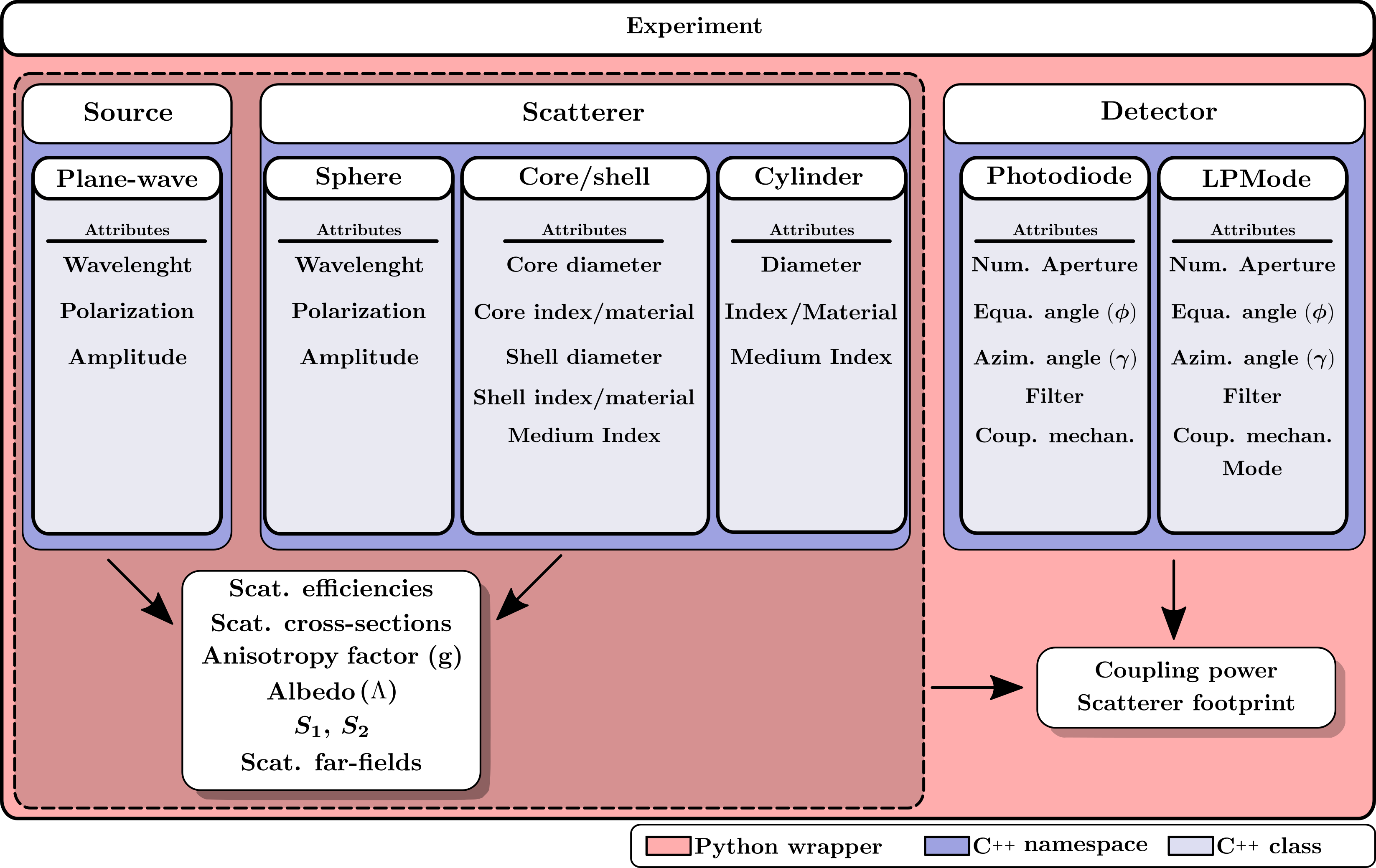
Here is the architecture for a standard workflow using PyMieSim:
Developer setup
Clone the repository, select the Python interpreter you want to use, install the development and testing dependencies, and build an editable installation:
git clone https://github.com/MartinPdeS/PyMieSim.git
cd PyMieSim
python -m pip install ".[testing,documentation,dev]"
python -m PyOptik setup --no-progress
make PYTHON=python editable
make editable builds the native extensions in the local build directory and installs them into the same environment. Always run tests with that same interpreter:
python -c "import PyMieSim; print(PyMieSim.__version__)"
python -m pytest --config-file=pytest.ini
If the import reports missing native extensions, the build was not completed for this interpreter. Re-run make editable after checking that CMake, Fortran, pybind11, and OpenMP are installed. Do not mix build artifacts from different Python versions or architectures.
Building from source manually
The equivalent lower-level workflow is:
python -m pip install --no-build-isolation -Cbuild-dir=build -e .The editable workflow is preferred because it keeps the Python sources and compiled extensions aligned. A released wheel does not require a compiler or the native build toolchain.
Testing
After the developer setup, run the unit tests with:
python -m pytest --config-file=pytest.iniCiting PyMieSim
If you use PyMieSim in academic work, please cite:
@article{PoinsinetdeSivry-Houle:23,
    author = {Martin Poinsinet de Sivry-Houle and Nicolas Godbout and Caroline Boudoux},
    journal = {Opt. Continuum},
    title = {PyMieSim: an open-source library for fast and flexible far-field Mie scattering simulations},
    volume = {2},
    number = {3},
    pages = {520--534},
    year = {2023},
    doi = {10.1364/OPTCON.473102},
}
Contact
For questions or contributions, contact martin.poinsinet.de.sivry@gmail.com.
1 maintainer

Metadata
1 maintainer
Release files for PyMieSim 6.1.7
For a detailed explanation of source distributions (sdists) and built distributions (wheels), please see the package formats documentation.
Built distributions (wheels)
Total release size: 99.0 MB
Release files / pymiesim-6.1.7-cp314-cp314-win_amd64.whl
| Download URL | pymiesim-6.1.7-cp314-cp314-win_amd64.whl |
|---|---|
| Size | 14.2 MB |
| Tags | CPython 3.14 Windows x86-64 |
|
SHA-256 checksum How to use checksums |
58f8c8754b5a6da20d8f08de747ffa1cab3984ec8eacfec0d4d508eafb41d0b5
|
|
BLAKE2b-256 checksum How to use checksums |
19276b4b0bdef93507b9c07da81b6e2ca08a2bc66e4f6572a267593a93e67f1a
|
| Upload date | |
|
Uploaded using Trusted Publishing? What is trusted publishing? |
No |
| Uploaded via |
twine/7.0.0 CPython/3.11.18
|
Release files / pymiesim-6.1.7-cp314-cp314-manylinux_2_27_x86_64.manylinux_2_28_x86_64.whl
| Download URL | pymiesim-6.1.7-cp314-cp314-manylinux_2_27_x86_64.manylinux_2_28_x86_64.whl |
|---|---|
| Size | 6.1 MB |
| Tags | CPython 3.14 Linux glibc 2.27+ x86-64 Linux glibc 2.28+ x86-64 |
|
SHA-256 checksum How to use checksums |
8ac6db8e36cdfea4411391360b0d4c77cc72080beb5185738d8fd34b157cc877
|
|
BLAKE2b-256 checksum How to use checksums |
394c807096c2a87eb1bd6015a18cb45eb0608540b8bb7b4856ef69aa2068452d
|
| Upload date | |
|
Uploaded using Trusted Publishing? What is trusted publishing? |
No |
| Uploaded via |
twine/7.0.0 CPython/3.11.18
|
Release files / pymiesim-6.1.7-cp314-cp314-macosx_26_0_arm64.whl
| Download URL | pymiesim-6.1.7-cp314-cp314-macosx_26_0_arm64.whl |
|---|---|
| Size | 4.8 MB |
| Tags | CPython 3.14 macOS 26.0+ ARM64 |
|
SHA-256 checksum How to use checksums |
c8b9d399f0a2b0b2ffbe22937a53bfe0bb427c2acf0c81da2e7bf4c65ab9469e
|
|
BLAKE2b-256 checksum How to use checksums |
829c3ed6fcea4337b956caad937a380ccc6bf02656c97804a294704a8ac6b0f8
|
| Upload date | |
|
Uploaded using Trusted Publishing? What is trusted publishing? |
No |
| Uploaded via |
twine/7.0.0 CPython/3.11.18
|
Release files / pymiesim-6.1.7-cp313-cp313-win_amd64.whl
| Download URL | pymiesim-6.1.7-cp313-cp313-win_amd64.whl |
|---|---|
| Size | 13.8 MB |
| Tags | CPython 3.13 Windows x86-64 |
|
SHA-256 checksum How to use checksums |
45b3145e2b037b7d2d0fdfe6a496cc725fd87cd6e828b6c96b20a5576228c685
|
|
BLAKE2b-256 checksum How to use checksums |
451136932671ba84f01a1fe239f6358297a3fb78bda3abfd002797f332aade72
|
| Upload date | |
|
Uploaded using Trusted Publishing? What is trusted publishing? |
No |
| Uploaded via |
twine/7.0.0 CPython/3.11.18
|
Release files / pymiesim-6.1.7-cp313-cp313-manylinux_2_27_x86_64.manylinux_2_28_x86_64.whl
| Download URL | pymiesim-6.1.7-cp313-cp313-manylinux_2_27_x86_64.manylinux_2_28_x86_64.whl |
|---|---|
| Size | 6.1 MB |
| Tags | CPython 3.13 Linux glibc 2.27+ x86-64 Linux glibc 2.28+ x86-64 |
|
SHA-256 checksum How to use checksums |
a9246392e3d8122db5e304698400f96bcefb0cfe479c6e4c9d2026d66a486bb8
|
|
BLAKE2b-256 checksum How to use checksums |
3cf2c0f1673e06fd40025f9bac5bfda1ab47d2335ef299bea920aad709372ae7
|
| Upload date | |
|
Uploaded using Trusted Publishing? What is trusted publishing? |
No |
| Uploaded via |
twine/7.0.0 CPython/3.11.18
|
Release files / pymiesim-6.1.7-cp313-cp313-macosx_26_0_arm64.whl
| Download URL | pymiesim-6.1.7-cp313-cp313-macosx_26_0_arm64.whl |
|---|---|
| Size | 4.8 MB |
| Tags | CPython 3.13 macOS 26.0+ ARM64 |
|
SHA-256 checksum How to use checksums |
b5bc71041bb632619e6d052a2af04bbf11b9930c0445b40580bfbdd362a117fd
|
|
BLAKE2b-256 checksum How to use checksums |
f788558dd131528cd2c026ee1fa07b6fc81c33bec56b212fe89d7103886fa4bb
|
| Upload date | |
|
Uploaded using Trusted Publishing? What is trusted publishing? |
No |
| Uploaded via |
twine/7.0.0 CPython/3.11.18
|
Release files / pymiesim-6.1.7-cp312-cp312-win_amd64.whl
| Download URL | pymiesim-6.1.7-cp312-cp312-win_amd64.whl |
|---|---|
| Size | 13.8 MB |
| Tags | CPython 3.12 Windows x86-64 |
|
SHA-256 checksum How to use checksums |
28f329b6e0ce2de52aa333fe059cf68ddd4908c067fe09cf55106c82013c18c7
|
|
BLAKE2b-256 checksum How to use checksums |
3e134cf98357e9128d3137b731785017b27bbafcbdd77faef9591ed9533ccf8e
|
| Upload date | |
|
Uploaded using Trusted Publishing? What is trusted publishing? |
No |
| Uploaded via |
twine/7.0.0 CPython/3.11.18
|
Release files / pymiesim-6.1.7-cp312-cp312-manylinux_2_27_x86_64.manylinux_2_28_x86_64.whl
| Download URL | pymiesim-6.1.7-cp312-cp312-manylinux_2_27_x86_64.manylinux_2_28_x86_64.whl |
|---|---|
| Size | 6.1 MB |
| Tags | CPython 3.12 Linux glibc 2.27+ x86-64 Linux glibc 2.28+ x86-64 |
|
SHA-256 checksum How to use checksums |
612cc10026f88d5f73172c730d15dc0644cca20978d8ef8682e0d9f31717ff41
|
|
BLAKE2b-256 checksum How to use checksums |
8869a2959de960454382a00b5c39277df7645af84846872d3a342f879e3a981b
|
| Upload date | |
|
Uploaded using Trusted Publishing? What is trusted publishing? |
No |
| Uploaded via |
twine/7.0.0 CPython/3.11.18
|
Release files / pymiesim-6.1.7-cp312-cp312-macosx_26_0_arm64.whl
| Download URL | pymiesim-6.1.7-cp312-cp312-macosx_26_0_arm64.whl |
|---|---|
| Size | 4.8 MB |
| Tags | CPython 3.12 macOS 26.0+ ARM64 |
|
SHA-256 checksum How to use checksums |
7fec2ef192335f90200242b5744ef193928ef2de8f854101ff63f6c3325293e5
|
|
BLAKE2b-256 checksum How to use checksums |
cebe106188b6ac28d16655486df03a10ca48d0d5034e8854e61b48fce062cc94
|
| Upload date | |
|
Uploaded using Trusted Publishing? What is trusted publishing? |
No |
| Uploaded via |
twine/7.0.0 CPython/3.11.18
|
Release files / pymiesim-6.1.7-cp311-cp311-win_amd64.whl
| Download URL | pymiesim-6.1.7-cp311-cp311-win_amd64.whl |
|---|---|
| Size | 13.7 MB |
| Tags | CPython 3.11 Windows x86-64 |
|
SHA-256 checksum How to use checksums |
d4f1a0f76f004b82313d5f7dc5fc39b88519cc49056e58fca94ef620641b69cd
|
|
BLAKE2b-256 checksum How to use checksums |
a73ce24f737bc1443c14ed90b79ba775bc07f76bbcec13697c8ef0fc098220e0
|
| Upload date | |
|
Uploaded using Trusted Publishing? What is trusted publishing? |
No |
| Uploaded via |
twine/7.0.0 CPython/3.11.18
|
Release files / pymiesim-6.1.7-cp311-cp311-manylinux_2_27_x86_64.manylinux_2_28_x86_64.whl
| Download URL | pymiesim-6.1.7-cp311-cp311-manylinux_2_27_x86_64.manylinux_2_28_x86_64.whl |
|---|---|
| Size | 6.0 MB |
| Tags | CPython 3.11 Linux glibc 2.27+ x86-64 Linux glibc 2.28+ x86-64 |
|
SHA-256 checksum How to use checksums |
2ae37ceaa60280ecccee8eec67d35874741b988ba070eb815f5067d9dece5db3
|
|
BLAKE2b-256 checksum How to use checksums |
95c0c60b3bc699df2cf69c36f3d4e71a6b22a1e3bc082d940f562834b6f33d77
|
| Upload date | |
|
Uploaded using Trusted Publishing? What is trusted publishing? |
No |
| Uploaded via |
twine/7.0.0 CPython/3.11.18
|
Release files / pymiesim-6.1.7-cp311-cp311-macosx_26_0_arm64.whl
| Download URL | pymiesim-6.1.7-cp311-cp311-macosx_26_0_arm64.whl |
|---|---|
| Size | 4.8 MB |
| Tags | CPython 3.11 macOS 26.0+ ARM64 |
|
SHA-256 checksum How to use checksums |
c011e1f5d3523c17b9f5ae823ea34da3221fc7cc66d364142d4c2cd4c583f5a7
|
|
BLAKE2b-256 checksum How to use checksums |
5c312475fa98e82bc03462e6026fe97eb333dd1d3e3d12db5ee10d7c1874f8f3
|
| Upload date | |
|
Uploaded using Trusted Publishing? What is trusted publishing? |
No |
| Uploaded via |
twine/7.0.0 CPython/3.11.18
|
Security for PyMieSim 6.1.7
Provenance
Provenance describes where a file came from. On PyPI, provenance is shared via attestations, which provide a verifiable record of the build or publishing details. View details, limitations and caveats.
No provenance found
None of the files in this release were uploaded with provenance metadata.
A note on package security
PyPI is a repository for distributing packages, not a service for auditing them. While third-party security researchers and our staff do their best to detect and remove malicious packages, PyPI cannot guarantee the quality, security or suitability of any given package.
To learn more about protecting yourself from malicious actors, visit our package security documentation.














