
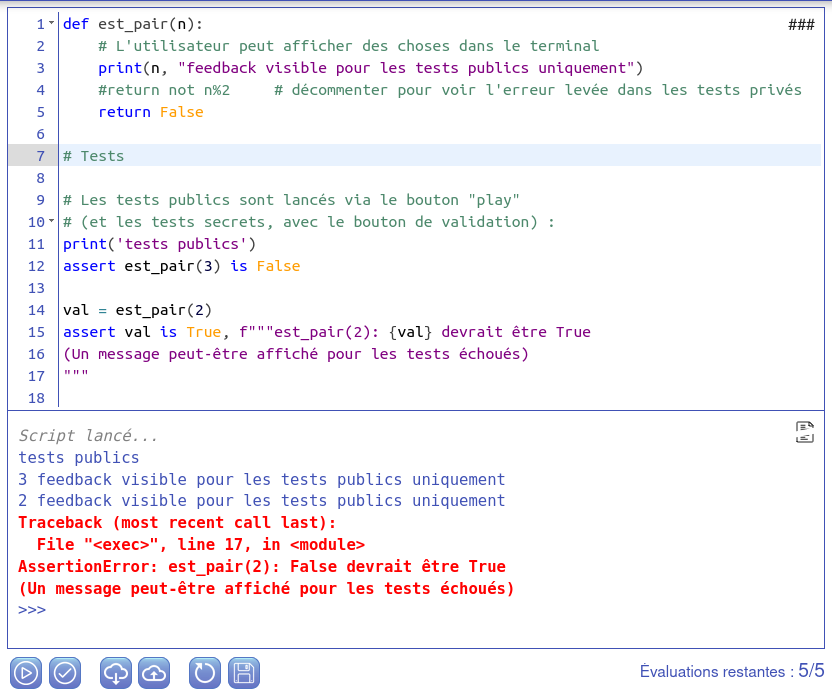
Pyodide-MkDocs-Theme is a MkDocs theme for building static websites that allow to run Python code in browser as:
- code editor snippets (IDEs),
- interactive Python consoles (terminals),
- instant assessments for user-written functions associated with solutions for excercises and instructor remarks.
There are many additional features including auto-corrected multiple choice questions (MCQs) and compatibility to use:
- p5.js animations,
- dynamic matplotlib drawings,
- PIL,
- dynamic mermaid graphs, and
- mathjax syntax.
Guarantees
- There are no cookies
- No registration needed
- Created by teachers for teachers and students
Quickstart
The following commands should install pyodide_mkdocs_theme, scaffold a new project and serve a sample website that you can open a browser, usually at http://127.0.0.1:8000/.
pip install pyodide_mkdocs_theme
python -m pyodide_mkdocs_theme --new your_project_name
cd your_project_name
pip install -r requirements.txt
mkdocs serve
Note: you will need to add site_url parameter in mkdocs.yml
in order to run mkdocs build command.
Links
- Online documentation (French only)
- GitLab repository
Flexibility
Pyodide-MkDocs-Theme is highly configurable on many aspects:
- theme configuration,
- add your own macros to the theme,
- add custom logic here or there,
- and quite a few other options.
How it works
The technology enabling this feat is called Pyodide. It is associated with JavaScript elements such as jquery.terminal and ACE Editor.
Pyodide uses WebAssembly to bridge between Python and JavaScript and provide an environment for manipulating the JavaScript DOM with Python, or vice versa for manipulating Python from JavaScript.
Pyodide-MkDocs-Theme is based on a modern mkdocs-material theme for MkDocs static site generator.
Project history
This project is a complete redesign of the prototype pyodide-mkdocs from Vincent Bouillot.
1 maintainer

Metadata
1 maintainer
Release files for pyodide-mkdocs-theme 5.7.2
For a detailed explanation of source distributions (sdists) and built distributions (wheels), please see the package formats documentation.
Source distribution (sdist)
| File | Size | Uploaded | Provenance | Actions |
|---|---|---|---|---|
| pyodide_mkdocs_theme-5.7.2.tar.gz | 410.4 kB | Without provenance | Details for pyodide_mkdocs_theme-5.7.2.tar.gz |
Built distribution (wheel)
| File | Interpreter | ABI | Platform | Actions Reset |
|---|---|---|---|---|
| pyodide_mkdocs_theme-5.7.2-py3-none-any.whl | Python 3 | none | any | Details for pyodide_mkdocs_theme-5.7.2-py3-none-any.whl |
Total release size: 962.2 kB
Release files / pyodide_mkdocs_theme-5.7.2.tar.gz
| Download URL | pyodide_mkdocs_theme-5.7.2.tar.gz |
|---|---|
| Size | 410.4 kB |
| Tags | Source |
|
SHA-256 checksum How to use checksums |
3b2916f972716aac4367fd4d2affc81356cf9efd522e33f006ffb3a6730aed12
|
|
BLAKE2b-256 checksum How to use checksums |
0fab7e9d554dd35a817f861295f937c127d4c6e29cf00a236be94641c54cc28d
|
| Upload date | |
|
Uploaded using Trusted Publishing? What is trusted publishing? |
No |
| Uploaded via |
poetry/2.5.1 CPython/3.13.5 Linux/7.0.0-38-generic
|
Release files / pyodide_mkdocs_theme-5.7.2-py3-none-any.whl
| Download URL | pyodide_mkdocs_theme-5.7.2-py3-none-any.whl |
|---|---|
| Size | 551.9 kB |
| Tags | Python 3 |
|
SHA-256 checksum How to use checksums |
04ec75120c06aa057c69885d0945841f86c82de1316818a10667a9104bc6a377
|
|
BLAKE2b-256 checksum How to use checksums |
e626c071f51e8fadc01c0caa2036a8f91245edfd96110ae1ffa7ad319f09a5d4
|
| Upload date | |
|
Uploaded using Trusted Publishing? What is trusted publishing? |
No |
| Uploaded via |
poetry/2.5.1 CPython/3.13.5 Linux/7.0.0-38-generic
|
Security for pyodide-mkdocs-theme 5.7.2
Provenance
Provenance describes where a file came from. On PyPI, provenance is shared via attestations, which provide a verifiable record of the build or publishing details. View details, limitations and caveats.
No provenance found
None of the files in this release were uploaded with provenance metadata.
A note on package security
PyPI is a repository for distributing packages, not a service for auditing them. While third-party security researchers and our staff do their best to detect and remove malicious packages, PyPI cannot guarantee the quality, security or suitability of any given package.
To learn more about protecting yourself from malicious actors, visit our package security documentation.














