
PLT - Preference Learning Toolbox
A toolbox for preference learning implemented in Python.

Preference learning (PL) is a core area of machine learning that handles datasets with ordinal relations. As the number of generated data of ordinal nature such as ranks and subjective ratings is increasing, the importance and role of the PL field becomes central within machine learning research and practice.
The Preference Learning Toolbox (PLT) is an open source software application and package which supports the key data modelling phases incorporating various popular data pre-processing, feature selection and preference learning methods.
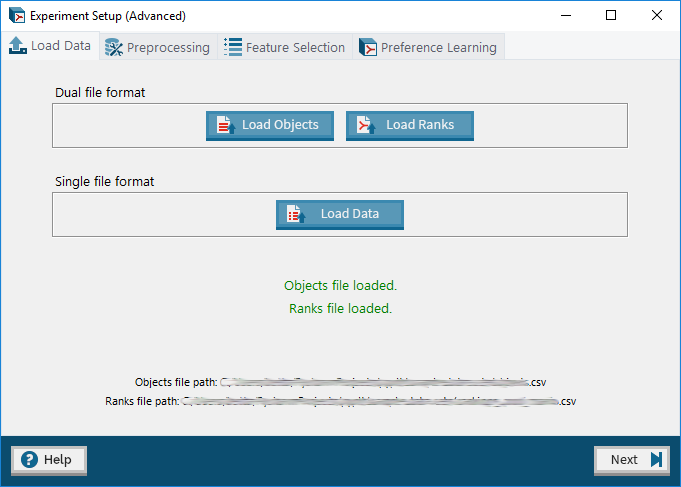
PLT may be used either via its GUI or its API. This README is based on the API which is made available via the Python package pyplt. For more information on the GUI or to download the GUI application, please visit the PLT website.
The API documentation may be found at: https://plt.readthedocs.io/.
Features:
- Dataset Pre-processing (including automatic feature extraction)
- Automatic Feature Selection (SFS)
- Preference Learning Algorithms (RankSVM, ANN-Backpropagation, RankNet)
- Experiment Reporting and Model Storage
Installation:
The Python package for PLT, pyplt, may be installed via pip:
pip install pyplt
Usage Example:
The following example loads a dataset in the single file format (refer to Detailed Guidelines for more information about file formats) and carries out preference learning using the RankSVM algorithm and K-Fold Cross Validation. At the end, the results are saved to file.
from pyplt.experiment import Experiment
from pyplt.plalgorithms.ranksvm import RankSVM
from pyplt.util.enums import KernelType
from pyplt.evaluation.cross_validation import KFoldCrossValidation
import time

exp = Experiment()

# load ratings data
exp.load_single_data("sample data sets\\single_synth.csv", has_ids=True, has_fnames=True)

# set up RankSVM algorithm
pl_algorithm = RankSVM(kernel=KernelType.RBF, gamma=1)
exp.set_pl_algorithm(pl_algorithm)

# set up K-Fold Cross Validation
pl_evaluator = KFoldCrossValidation(k=3)
exp.set_pl_evaluator(pl_evaluator)

# run the experiment
exp.run()

# save the results
t = time.time()
exp.save_exp_log(t, path="my_results.csv")
For more a more detailed usage guide, please check out the tutorial.
Development Setup
PLT has the following package dependencies:
- keras
- ttkthemes
- numpy
- matplotlib
- pandas
- tensorflow
- scikit_learn
- scipy
These depenencies may be easily istalled via pip:
pip install -r requirements.txt
Citing
The tool is free for scientific use. If you use PLT in your scientific work, please cite as:
Farrugia, Vincent E., Héctor P. MartÃnez, and Georgios N. Yannakakis. "The Preference Learning Toolbox." arXiv preprint arXiv:1506.01709 (2015)
License
PLT is licensed under the GNU General Public License v3.0. See LICENSE for more information.
1 maintainer

Metadata
1 maintainer
Release files for pyplt 0.2.3
For a detailed explanation of source distributions (sdists) and built distributions (wheels), please see the package formats documentation.
Source distribution (sdist)
| File | Size | Uploaded | Provenance | |
|---|---|---|---|---|
| pyplt-0.2.3.tar.gz | 245.7 kB | Without provenance | Details |
Built distribution (wheel)
| File | Interpreter | ABI | Platform | Reset |
|---|---|---|---|---|
| pyplt-0.2.3-py3-none-any.whl | Python 3 | none | any | Details |
Total release size: 469.8 kB
Release files / pyplt-0.2.3.tar.gz
| Download URL | pyplt-0.2.3.tar.gz |
|---|---|
| Size | 245.7 kB |
| Tags | Source |
|
SHA-256 checksum How to use checksums |
595afe33525a9c274e56e560ba3999bc2cfdd5bb80263eb4962b96d21089d76c
|
|
BLAKE2b-256 checksum How to use checksums |
af5b65f37a63152c483fd2879cf2605aa85f2a3cdd35766498e0cdcb7ddf9d3d
|
| Upload date | |
|
Uploaded using Trusted Publishing? What is trusted publishing? |
No |
| Uploaded via |
twine/1.13.0 pkginfo/1.5.0.1 requests/2.21.0 setuptools/39.0.1 requests-toolbelt/0.9.1 tqdm/4.31.1 CPython/3.6.5
|
Release files / pyplt-0.2.3-py3-none-any.whl
| Download URL | pyplt-0.2.3-py3-none-any.whl |
|---|---|
| Size | 224.1 kB |
| Tags | Python 3 |
|
SHA-256 checksum How to use checksums |
723c28d08046bbf932ff336121ac3220a552df298191181825d0e1ac906aaf5d
|
|
BLAKE2b-256 checksum How to use checksums |
ba836c053e119012de2f6a7d19f8c9710fb14db23410fc35fe194686d9126a2b
|
| Upload date | |
|
Uploaded using Trusted Publishing? What is trusted publishing? |
No |
| Uploaded via |
twine/1.13.0 pkginfo/1.5.0.1 requests/2.21.0 setuptools/39.0.1 requests-toolbelt/0.9.1 tqdm/4.31.1 CPython/3.6.5
|
Security for pyplt 0.2.3
Provenance
Provenance describes where a file came from. On PyPI, provenance is shared via attestations, which provide a verifiable record of the build or publishing details. View details, limitations and caveats.
No provenance found
None of the files in this release were uploaded with provenance metadata.
A note on package security
PyPI is a repository for distributing packages, not a service for auditing them. While third-party security researchers and our staff do their best to detect and remove malicious packages, PyPI cannot guarantee the quality, security or suitability of any given package.
To learn more about protecting yourself from malicious actors, visit our package security documentation.














