
PyQtExtendedScene
PyQtExtendedScene is a little library for creating workspaces.
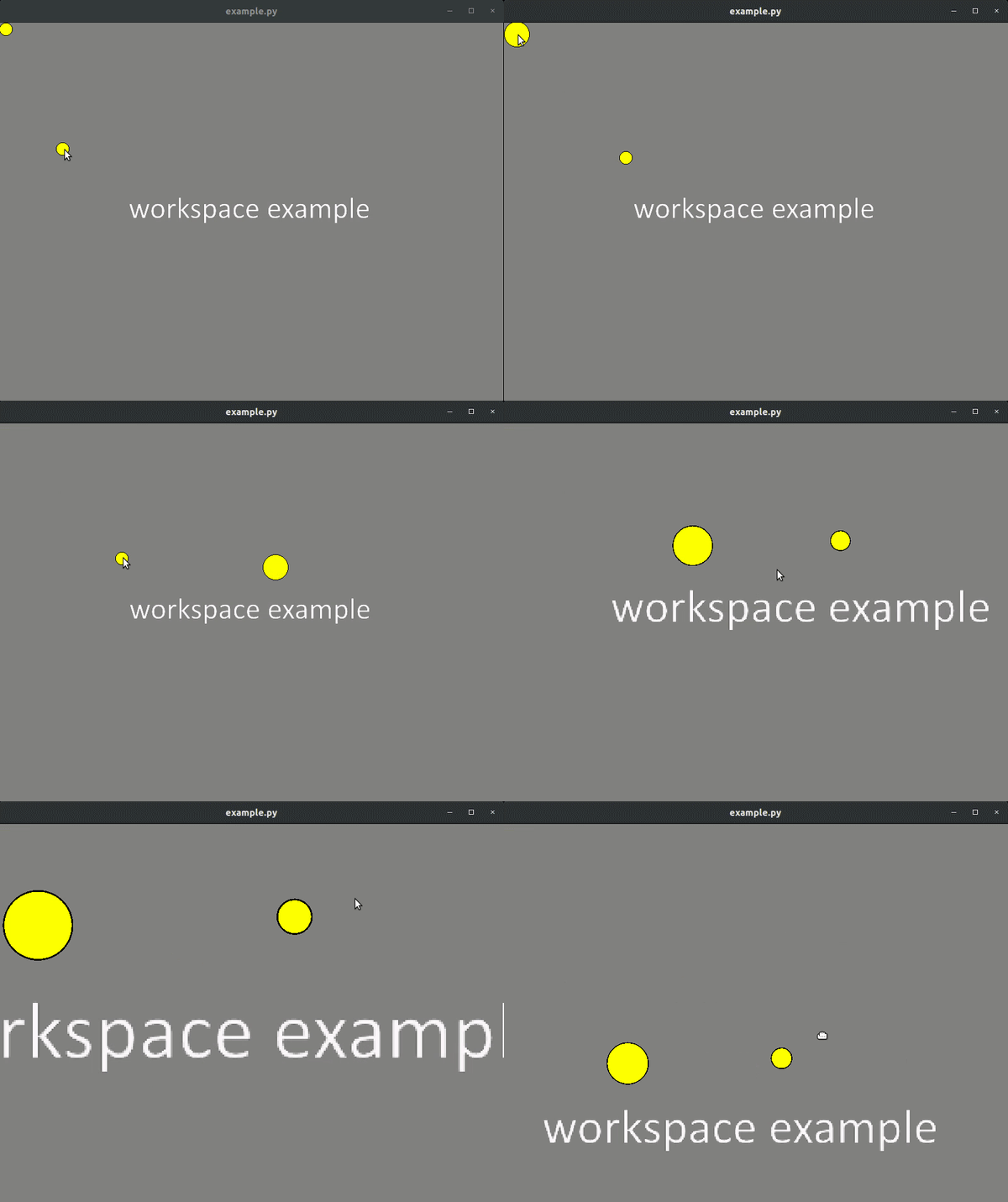
Having described the method of drawing your components, with this library you get (draggable) workspace (scene) where the components you described can be selected, moved, deleted, etc. The scene itself can be increased, reduced, the work area may be moved.
In short, with this library you can create minimalistic (very minimalistic) similarities of such programs as AutoCAD, Labview, yEd, etc.
Repository: https://github.com/EPC-MSU/PyQtExtendedScene
Installation
Installation is very simple:
pip install PyQtExtendedScene
Working example
import os
import sys
from PyQt5.QtCore import QPointF, QRectF
from PyQt5.QtGui import QBrush, QColor, QPixmap
from PyQt5.QtWidgets import QApplication, QFileDialog, QGraphicsEllipseItem
from PyQtExtendedScene import AbstractComponent, ExtendedScene


# Let's describe our own component
class MyComponent(AbstractComponent):

    selected_size = 20
    normal_size = 10

    def __init__(self, x: float, y: float, descr: str = "") -> None:
        super().__init__(draggable=True, selectable=True, unique_selection=True)
        self._r = self.normal_size

        self.setPos(QPointF(x, y))

        # We must describe how to draw our own component. Our own component will be just a circle
        self._item = QGraphicsEllipseItem(-self._r, -self._r, self._r * 2, self._r * 2, self)
        # ... yellow circle
        self._item.setBrush(QBrush(QColor(0xFFFF00)))

        # Add description to our object - it will be used in "click" callback function
        self._descr = descr

    # We must override parent method "select" because our component changes shape when selected
    def select(self, selected: bool = True) -> None:
        # Radius of our circle changes when selected
        self._r = self.selected_size if selected else self.normal_size
        # redraw our object with new radius
        self._item.setRect(QRectF(-self._r, -self._r, self._r * 2, self._r * 2))

    @property
    # That is our own property
    def description(self) -> str:
        return self._descr


def left_click(component) -> None:
    if isinstance(component, MyComponent):
        print(f"Left click on '{component.description}'")


if __name__ == '__main__':
    app = QApplication(sys.argv)

    # Open workspace background image
    path_to_image = "workspace.png"
    if not os.path.isfile(path_to_image):
        path_to_image = QFileDialog().getOpenFileName(caption="Open workspace image",
                                                      filter="Image Files (*.png *.jpg *.bmp *.tiff)")[0]

    image = QPixmap(path_to_image)
    image = image.scaled(800, 600)
    # Create workspace!
    widget = ExtendedScene(image)

    # Let's add some components to our workspace
    widget.add_component(MyComponent(10, 10, "My component 1"))
    widget.add_component(MyComponent(100, 200, "My component 2"))

    # Handle left click
    widget.on_component_left_click.connect(left_click)
    widget.show()

    sys.exit(app.exec_())
Workspace example:
1 maintainer

Metadata
1 maintainer
Release files for PyQtExtendedScene 1.0.14
For a detailed explanation of source distributions (sdists) and built distributions (wheels), please see the package formats documentation.
Source distribution (sdist)
| File | Size | Uploaded | |
|---|---|---|---|
| PyQtExtendedScene-1.0.14.tar.gz | 5.4 kB | Details |
Built distribution (wheel)
| File | Interpreter | ABI | Platform | Reset |
|---|---|---|---|---|
| PyQtExtendedScene-1.0.14-py3-none-any.whl | Python 3 | none | any | Details |
Total release size: 12.0 kB
Release files / PyQtExtendedScene-1.0.14.tar.gz
| Download URL | PyQtExtendedScene-1.0.14.tar.gz |
|---|---|
| Size | 5.4 kB |
| Tags | Source |
|
SHA-256 checksum How to use checksums |
d1d778839d611a9c1f72c5c102d5d25a2b36b18349a825f2b0811047990758d2
|
|
BLAKE2b-256 checksum How to use checksums |
542727c77dfc41f7e601fb6ac86ca054d08fce1050b0d1b84b16fbce0957a1e7
|
| Upload date | |
|
Uploaded using Trusted Publishing? What is trusted publishing? |
No |
| Uploaded via |
twine/3.8.0 pkginfo/1.8.2 readme-renderer/34.0 requests/2.27.1 requests-toolbelt/0.9.1 urllib3/1.26.8 tqdm/4.63.0 importlib-metadata/4.8.3 keyring/23.4.1 rfc3986/1.5.0 colorama/0.4.4 CPython/3.6.8
|
Release files / PyQtExtendedScene-1.0.14-py3-none-any.whl
| Download URL | PyQtExtendedScene-1.0.14-py3-none-any.whl |
|---|---|
| Size | 6.6 kB |
| Tags | Python 3 |
|
SHA-256 checksum How to use checksums |
66aa850bca34821eb6b20817026e9f625375c3a61c5a4e0b33828d6e0fa949bb
|
|
BLAKE2b-256 checksum How to use checksums |
24c6aac51bbb29d41b1811691874a0e84c5b6c2c86816e96d008e099f898bb61
|
| Upload date | |
|
Uploaded using Trusted Publishing? What is trusted publishing? |
No |
| Uploaded via |
twine/3.8.0 pkginfo/1.8.2 readme-renderer/34.0 requests/2.27.1 requests-toolbelt/0.9.1 urllib3/1.26.8 tqdm/4.63.0 importlib-metadata/4.8.3 keyring/23.4.1 rfc3986/1.5.0 colorama/0.4.4 CPython/3.6.8
|














