
Quibbler: your data - interactive!
Interactive, reproducible and efficient data analytics


With Quibbler, your data analysis is automatically live and interactive.
What is it?
Quibbler is a toolset for building highly interactive, yet reproducible, transparent and efficient data analysis pipelines. Quibbler allows using standard Python syntax to process data through any series of analysis steps, while automatically maintaining connectivity between downstream results and upstream raw data sources. Quibbler facilitates and embraces human interventions as an inherent part of the analysis pipeline: input parameters, as well as exceptions and overrides, can be specified and adjusted either programmatically, or by interacting with live graphics, and all such interventions are automatically recorded in well-documented human-machine readable files. Changes to such parameters propagate downstream, pinpointing which specific data items, or even specific elements thereof, are affected, thereby vastly saving unnecessary recalculations. Quibbler, therefore, facilitates hands-on interactions with data in ways that are not only flexible, fun and interactive, but also traceable, reproducible, and computationally efficient.
Main Features
-
Interactivity
-
Creating interactive graphics is as simple as calling standard Matplotlib graphics functions with arguments that represent your parameter values.
-
Any data presented graphically is automatically live and interactive (no need for the tedious programming of callback functions).
-
-
Traceability and Reproducibility
-
Trace which specific data items and analysis parameters affect focal downstream results (see dependency graph).
-
Inherent undo/redo functionality.
-
Save/load parameter values as human-readable records (either as external text files, or inside Jupyter notebook).
-
-
Computational efficiency
- Upon parameter changes, Quibbler pinpoints and only recalculates the specifically affected array elements of downstream analysis steps (here).
-
Very little to learn: your standard-syntax code automatically comes to life.
- To get started with Quibbler, you do not need to learn any new syntax or new functions. Just encapsulate your
input parameters with
iquiband your analysis and graphics automatically become live and interactive. - Quibbler supports standard coding syntax with all Python operators, slicing, getitem, Numpy functions, Matplotlib graphics functions, Matplotlib widgets, and ipywidgets. It further provides an easy way to incorporate any user functions or functions from any other non-graphics packages (here). Support for other graphics packages, besides Matplotlib, will be offered in future releases.
- To get started with Quibbler, you do not need to learn any new syntax or new functions. Just encapsulate your
input parameters with
Minimal app
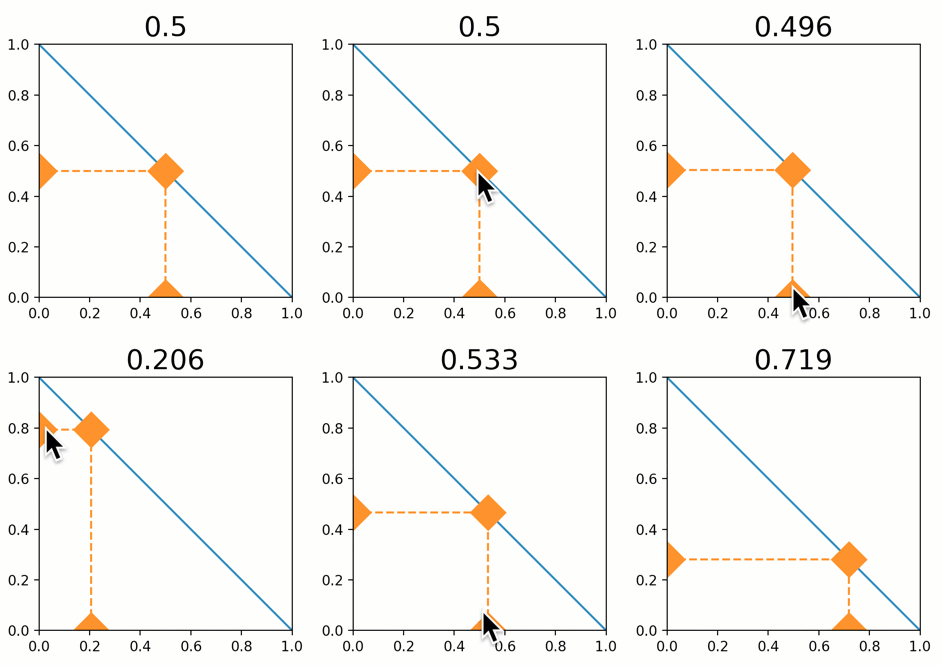
from pyquibbler import initialize_quibbler, iquib
initialize_quibbler()
import matplotlib.pyplot as plt

x = iquib(0.5)
y = 1 - x
plt.plot([0, 1], [1, 0], '-')
plt.plot([0, x, x], [y, y, 0], '--', marker='D')
plt.title(x, fontsize=20)
Documentation and Examples
For complete documentation and a getting-started tour, see readthedocs.
For simple demos and small apps, see our Examples.
Installation
We recommend installing Quibbler in a new virtual environment (see creating a new environment).
To install run:
pip install pyquibbler
If you are using Quibbler within Jupyter lab, you can also add the pyquibbler Jupyter Lab extension:
pip install pyquibbler_labextension
Development
To install for developers, see our guide here.
Credit
Quibbler was created by Roy Kishony, initially implemented as a Matlab toolbox.
The first release of Quibbler for Python, pyquibbler, was developed at the Kishony lab, Technion - Israel Institute of Technology, by Maor Kern, Maor Kleinberger and Roy Kishony.
We very much welcome any thoughts, suggestions and ideas and of course welcome PR contributions (for some proposed directions, see our pending issues).
Related packages
1 maintainer

Metadata
1 maintainer
Release files for pyquibbler 0.2.11
For a detailed explanation of source distributions (sdists) and built distributions (wheels), please see the package formats documentation.
Built distribution (wheel)
| File | Interpreter | ABI | Platform | Reset |
|---|---|---|---|---|
| pyquibbler-0.2.11-py3-none-any.whl | Python 3 | none | any | Details |
Release files / pyquibbler-0.2.11-py3-none-any.whl
| Download URL | pyquibbler-0.2.11-py3-none-any.whl |
|---|---|
| Size | 272.6 kB |
| Tags | Python 3 |
|
SHA-256 checksum How to use checksums |
060309cdbcdfb488a0f1b787f5d6bf0c4fbf4fe556a7abf593d006c1fead8ea6
|
|
BLAKE2b-256 checksum How to use checksums |
ee854b42120852293f54db515f6866547570d7005a0c1d61df6a943162618816
|
| Upload date | |
|
Uploaded using Trusted Publishing? What is trusted publishing? |
No |
| Uploaded via |
twine/5.1.0 CPython/3.9.19
|
Security for pyquibbler 0.2.11
Provenance
Provenance describes where a file came from. On PyPI, provenance is shared via attestations, which provide a verifiable record of the build or publishing details. View details, limitations and caveats.
No provenance found
None of the files in this release were uploaded with provenance metadata.
A note on package security
PyPI is a repository for distributing packages, not a service for auditing them. While third-party security researchers and our staff do their best to detect and remove malicious packages, PyPI cannot guarantee the quality, security or suitability of any given package.
To learn more about protecting yourself from malicious actors, visit our package security documentation.














