
PyReporter

A Python reporting API that helps with reading and writing tabular data to/from different formats like Excel, SQL tables, etc...
Install
Using Pip:
pip install -U PyReporter
Examples
For more examples, you can go here.
Writing tables to different sheets in an Excel file
import pandas as pd
import Reporter as rp

view = rp.ReportSubject()

view.attach(rp.ExcelObserver())


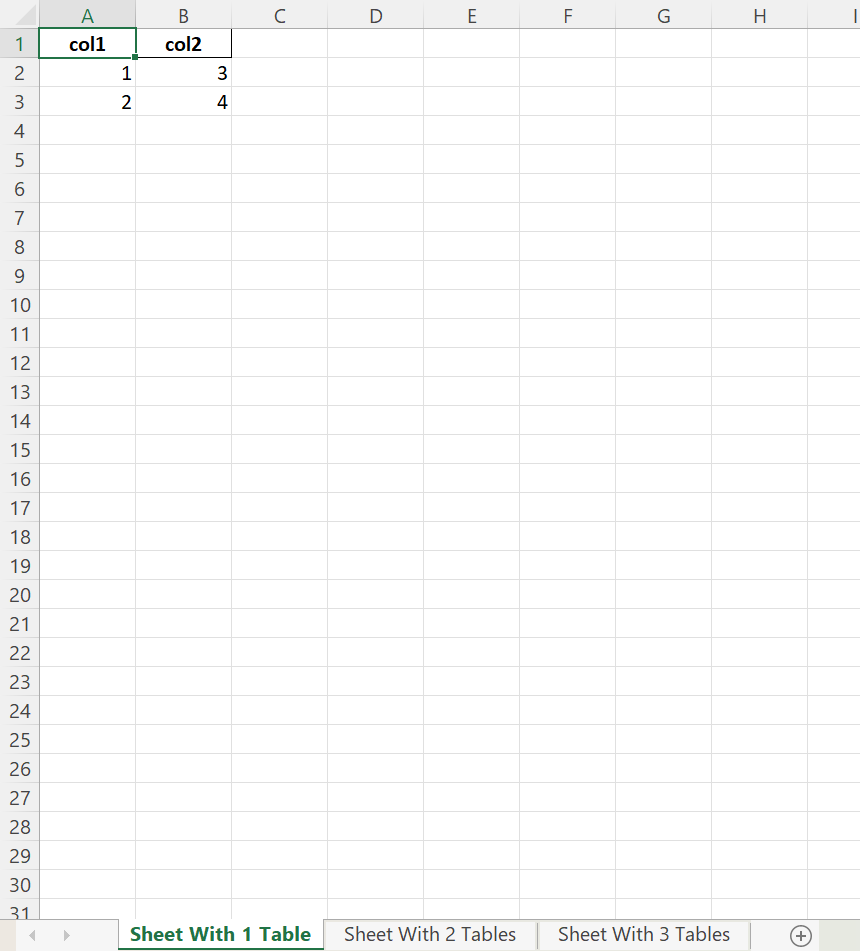
data = pd.DataFrame({"col1": [1, 2], "col2": [3, 4]})
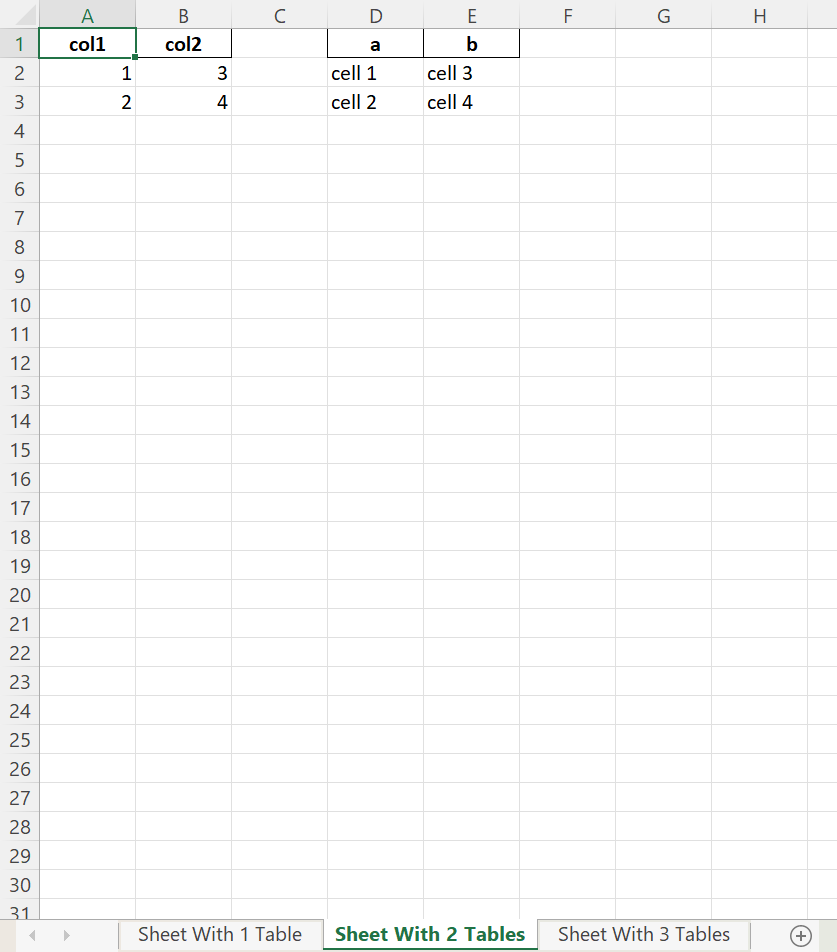
data2 = pd.DataFrame({"a": ["cell 1", "cell 2"], "b": ["cell 3", "cell 4"]})
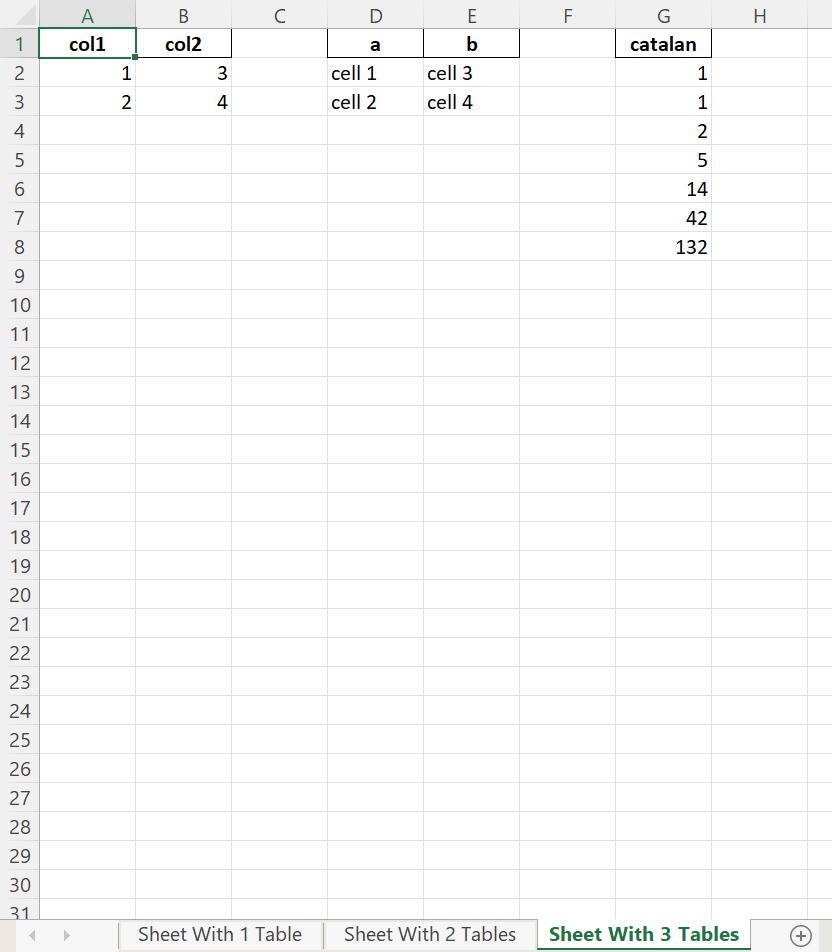
data3 = pd.DataFrame({"catalan": [1, 1, 2, 5, 14, 42, 132]})


# output the number of tables indicated by the sheet name
view.notify(rp.ExcelExportEvent({"Sheet With 1 Table": [rp.ExcelDf(data)],
                                 "Sheet With 2 Tables": [rp.ExcelDf(data), rp.ExcelDf(data2, startcol = 3)],
                                 "Sheet With 3 Tables": [rp.ExcelDf(data), rp.ExcelDf(data2, startcol = 3), rp.ExcelDf(data3, startcol = 6)]} ,"output.xlsx"))
Output Result
Reading only a portion of a table not centered at A1
Available Files to Read
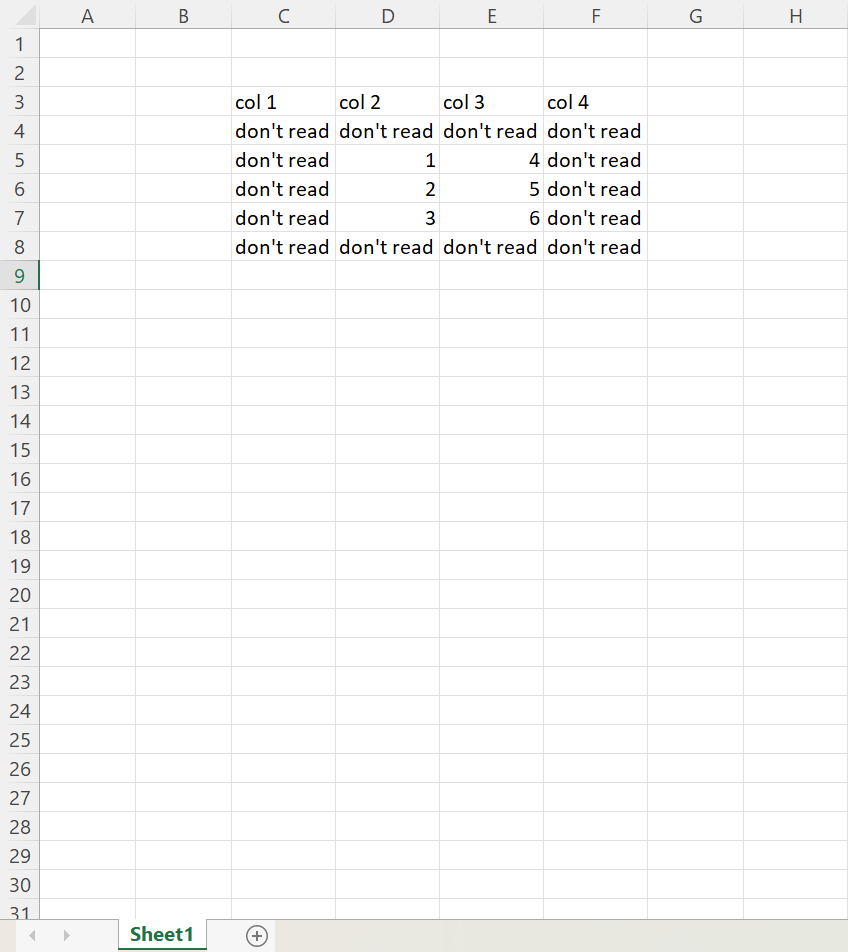
input2.xlsx
import pandas as pd
import Reporter as rp
import asyncio


async def main():
    data_sources = rp.DataSources()
    data_sources["MyInput"] = rp.SourceManager("Only Numbers", "Read Table",
                                               {"Read Table": rp.ExcelSource("input2.xlsx", post_processor = {"full set": rp.DFProcessor(header_row_pos = 1, top = 2, bottom = 7, left = 2, right = 6),
                                                                                                              "subset": rp.DFProcessor(header_row_pos = 1, top = 3, bottom = -1, left = 3, right = -1)})})

    # prints out only the numbers in the table
    output = await data_sources["MyInput"].prepare("subset")
    print(f"-- Subset --\n{output}")

    # prints the full table
    output = await data_sources["MyInput"].prepare("full set")
    print(f"\n-- Full Table --\n{output}")


loop = asyncio.new_event_loop()
loop.run_until_complete(main())
loop.close()
Output Result
-- Subset --
1 col 2 col 3
3     1     4
4     2     5
5     3     6

-- Full Table --
1       col 1       col 2       col 3       col 4
2  don't read  don't read  don't read  don't read
3  don't read           1           4  don't read
4  don't read           2           5  don't read
5  don't read           3           6  don't read
6  don't read  don't read  don't read  don't read
Select a subset of Columns
Available Files to Read
input4.xlsx
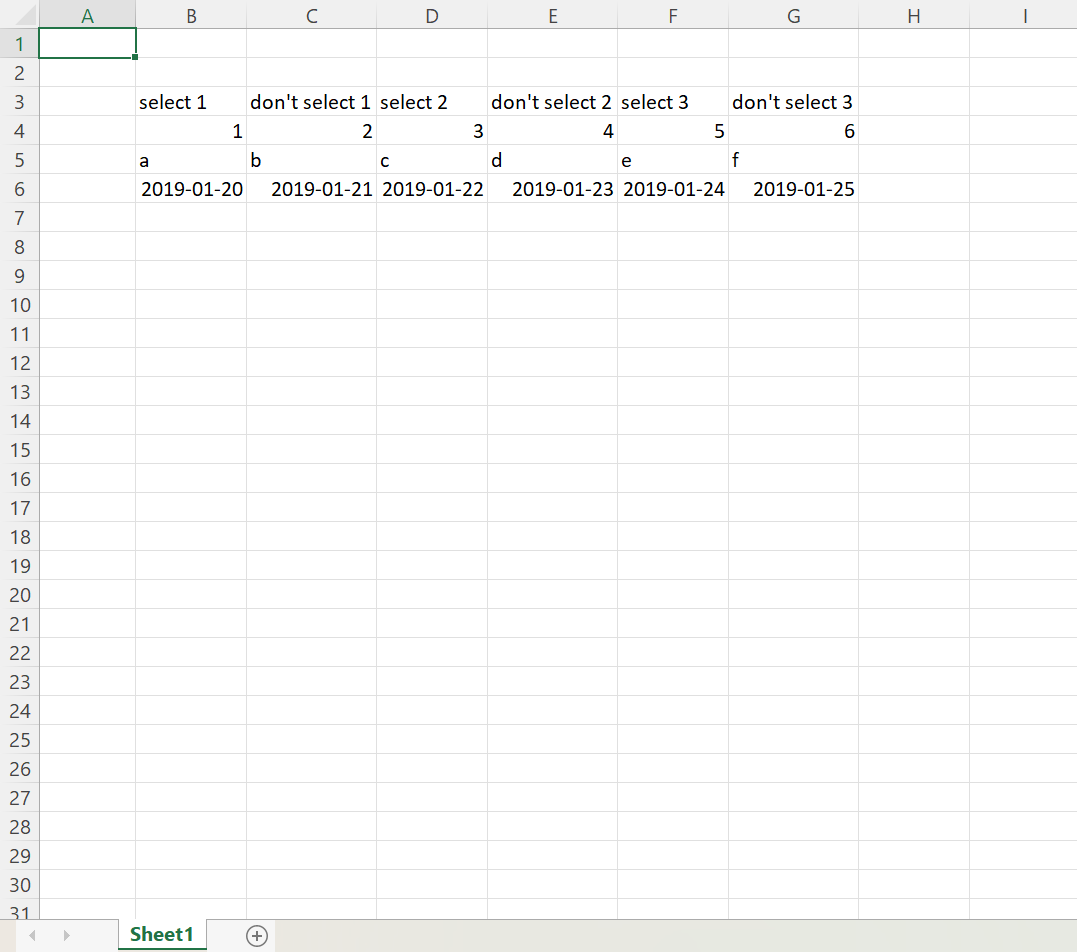
import pandas as pd
import Reporter as rp
import asyncio


async def main():
    data_sources = rp.DataSources()
    data_sources["MyInput"] = rp.SourceManager("Renamed Columns", "Rename",
                                               {"Rename": rp.ExcelSource("input4.xlsx",
                                                                          post_processor = {"original": rp.DFProcessor(header_row_pos = 1, top = 2, bottom = 5, left = 1, right = 7),
                                                                                            "filtered": rp.DFProcessor(header_row_pos = 1, top = 2, bottom = 5, left = 1, right = 7,
                                                                                                                       ind_selected_columns = [0, 2], selected_columns = ["select 3", "repeat"])})})

    # select the correct columns
    output = await data_sources["MyInput"].prepare("filtered")
    print(f"-- Selected Columns --\n{output}")

    # the original table
    output  = await data_sources["MyInput"].prepare("original")
    print(f"\n-- Original Table --\n{output}")


loop = asyncio.new_event_loop()
loop.run_until_complete(main())
loop.close()
Output Result
-- Selected Columns --
1             select 1             select 2             select 3
2                    1                    3                    5
3                    a                    c                    e
4  2019-01-20 00:00:00  2019-01-22 00:00:00  2019-01-24 00:00:00

-- Original Table --
1             select 1       don't select 1             select 2       don't select 2             select 3       don't select 3
2                    1                    2                    3                    4                    5                    6
3                    a                    b                    c                    d                    e                    f
4  2019-01-20 00:00:00  2019-01-21 00:00:00  2019-01-22 00:00:00  2019-01-23 00:00:00  2019-01-24 00:00:00  2019-01-25 00:00:00
1 maintainer

Metadata
1 maintainer
Release files for PyReporter 1.0.10
For a detailed explanation of source distributions (sdists) and built distributions (wheels), please see the package formats documentation.
Source distribution (sdist)
| File | Size | Uploaded | |
|---|---|---|---|
| PyReporter-1.0.10.tar.gz | 35.8 kB | Details |
Built distribution (wheel)
| File | Interpreter | ABI | Platform | Reset |
|---|---|---|---|---|
| PyReporter-1.0.10-py3-none-any.whl | Python 3 | none | any | Details |
Total release size: 88.4 kB
Release files / PyReporter-1.0.10.tar.gz
| Download URL | PyReporter-1.0.10.tar.gz |
|---|---|
| Size | 35.8 kB |
| Tags | Source |
|
SHA-256 checksum How to use checksums |
15e19c9cbf66338444ae8c275fc0a2997e4cbf831b507aa0e4d37abf17bf3947
|
|
BLAKE2b-256 checksum How to use checksums |
46b7fa8d64ac4c8660f7447254073edbee75b1e85ba1d317e713e9a140d94e2d
|
| Upload date | |
|
Uploaded using Trusted Publishing? What is trusted publishing? |
No |
| Uploaded via |
twine/4.0.1 CPython/3.9.3
|
Release files / PyReporter-1.0.10-py3-none-any.whl
| Download URL | PyReporter-1.0.10-py3-none-any.whl |
|---|---|
| Size | 52.6 kB |
| Tags | Python 3 |
|
SHA-256 checksum How to use checksums |
eeff8baddc82beda1900ff36e5671bef46c9656cd1fe6fc4e4b4f7ea3cb6d936
|
|
BLAKE2b-256 checksum How to use checksums |
9fee172bd072c003a5e6a96d79b767264548810fbb47cf21d1746120fd833e6d
|
| Upload date | |
|
Uploaded using Trusted Publishing? What is trusted publishing? |
No |
| Uploaded via |
twine/4.0.1 CPython/3.9.3
|














