







PyScaffold is a project generator for bootstrapping high quality Python packages, ready to be shared on PyPI and installable via pip. It is easy to use and encourages the adoption of the best tools and practices of the Python ecosystem, helping you and your team to stay sane, happy and productive. The best part? It is stable and has been used by thousands of developers for over half a decade!
Checkout out this demo project, which was set up using PyScaffold and if you are still not convinced yet, also have a look at these reasons to use PyScaffold.
NOTE - This document refers to the latest version of PyScaffold (v4). Please refer to v3.3 for the previous stable version.
Quickstart
Just pick your favourite installation method:
## Good old pip
# (make sure it is up-to-date: pip install -U pip setuptools)
pip install pyscaffold

## Conda for the datascience fans
conda install -c conda-forge pyscaffold

## Or even pipx for the virtualenv aficionados
pipx install pyscaffold
If you want to install all PyScaffold’s extensions you can even:
pip install pyscaffold[all]
(More details of each method are available in the installation docs)
After the installation, a new putup command will be available and you can just type:
putup my_project
This will create a new folder called my_project containing a perfect project template with everything you need for some serious coding.
After cd-ing into your new project and creating (or activating) an isolated development environment (with virtualenv, conda or your preferred tool), you can do the usual editable install:
pip install -e .
… all set and ready to go!
We also recommend using tox, so you can take advantage of the automation tasks we have setup for you, like:
tox -e build  # to build your package distribution
tox -e publish  # to test your project uploads correctly in test.pypi.org
tox -e publish -- --repository pypi  # to release your package to PyPI
tox -av  # to list all the tasks available
The following figure demonstrates the usage of putup with the new experimental interactive mode for setting up a simple project. It uses the –cirrus flag to add CI support (via Cirrus CI), and tox to run automated project tasks like building a package file for distribution (or publishing).
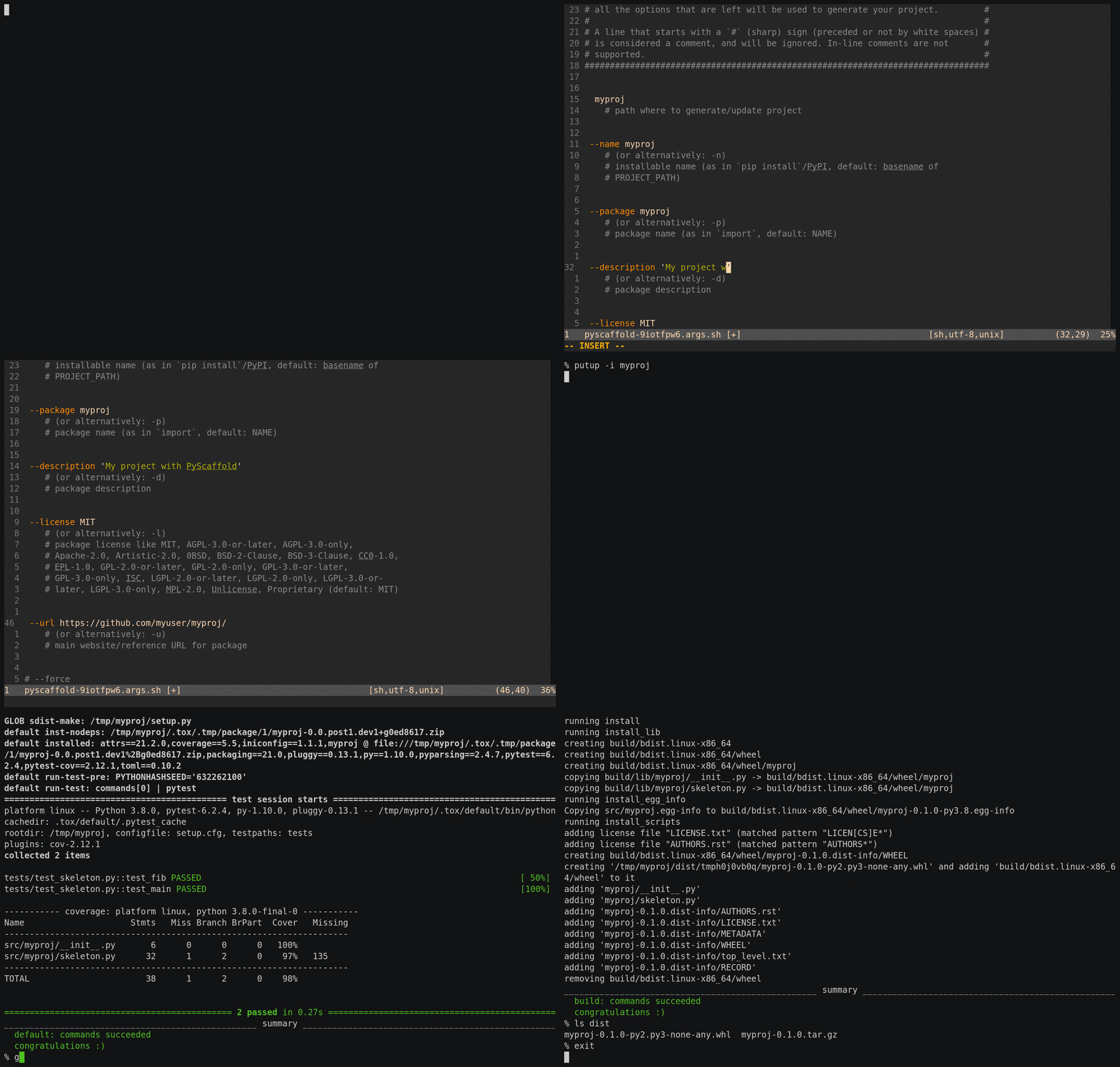
Type putup -h to learn about more configuration options. PyScaffold assumes that you have Git installed and set up on your PC, meaning at least your name and email are configured.
The project template provides you with following features:
Configuration & Packaging
All configuration can be done in setup.cfg like changing the description, URL, classifiers, installation requirements and so on as defined by setuptools. That means in most cases it is not necessary to tamper with setup.py.
In order to build a source or wheel distribution, just run tox -e build (if you don’t use tox, you can also install build and run python -m build).
Package and Files Data
Additional data, e.g. images and text files, that reside within your package and are tracked by Git will automatically be included if include_package_data = True in setup.cfg. It is not necessary to have a MANIFEST.in file for this to work.
Note that the include_package_data option in setup.cfg is only guaranteed to be read when creating a wheels distribution. Other distribution methods might behave unexpectedly (e.g. always including data files even when include_package_data = False). Therefore, the best option if you want to have data files in your repository but not as part of the pip installable package is to add them somewhere outside the src directory (e.g. a files directory in the root of the project, or inside tests if you use them for checks). Additionally you can exclude them explicitly via the [options.packages.find] exclude option in setup.cfg.
Versioning and Git Integration
Your project is an already initialised Git repository and uses the information of tags to infer the version of your project with the help of setuptools_scm. To use this feature, you need to tag with the format MAJOR.MINOR[.PATCH] , e.g. 0.0.1 or 0.1. This version will be used when building a package and is also accessible through my_project.__version__.
Unleash the power of Git by using its pre-commit hooks. This feature is available through the --pre-commit flag. After your project’s scaffold was generated, make sure pre-commit is installed, e.g. pip install pre-commit, then just run pre-commit install.
A default .gitignore file is also provided; it is well adjusted for Python projects and the most common tools.
Sphinx Documentation
PyScaffold will prepare a docs directory with all you need to start writing your documentation. Start editing the file docs/index.rst to extend the documentation. The documentation also works with Read the Docs.
The Numpy and Google style docstrings are activated by default.
If you have tox in your system, simply run tox -e docs or tox -e doctests to compile the docs or run the doctests.
Alternatively, if you have make and Sphinx installed in your computer, build the documentation with make -C docs html and run doctests with make -C docs doctest. Just make sure Sphinx 1.3 or above is installed.
Automation, Tests & Coverage
PyScaffold relies on pytest to run all automated tests defined in the subfolder tests. Some sane default flags for pytest are already defined in the [tool:pytest] section of setup.cfg. The pytest plugin pytest-cov is used to automatically generate a coverage report. It is also possible to provide additional parameters and flags on the commandline, e.g., type:
pytest -h
to show the help of pytest (requires pytest to be installed in your system or virtualenv).
Projects generated with PyScaffold by default support running tests via tox, a virtualenv management and test tool, which is very handy. If you run:
tox
in the root of your project, tox will download its dependencies, build the package, install it in a virtualenv and run the tests using pytest, so you are sure everything is properly tested.
JUnit and Coverage HTML/XML
For usage with a continuous integration software JUnit and Coverage XML output can be activated in setup.cfg. Use the flag --cirrus to generate templates of the Cirrus CI configuration file .cirrus.yml which even features the coverage and stats system Coveralls.
Management of Requirements & Licenses
Installation requirements of your project can be defined inside setup.cfg, e.g. install_requires = numpy; scipy. To avoid package dependency problems it is common to not pin installation requirements to any specific version, although minimum versions, e.g. sphinx>=1.3, and/or maximum versions, e.g. pandas<0.12, are used frequently in accordance with semantic versioning.
All licenses from choosealicense.com can be easily selected with the help of the --license flag.
Extensions
PyScaffold comes with several extensions:
If you want a project setup for a Data Science task, just use --dsproject after having installed pyscaffoldext-dsproject.
Have a README.md based on Markdown instead of README.rst by using --markdown after having installed pyscaffoldext-markdown.
Create a Django project with the flag --django which is equivalent to django-admin startproject my_project enhanced by PyScaffold’s features (requires pyscaffoldext-django).
… and many more like --gitlab to create the necessary files for GitLab, --travis for Travis CI (see pyscaffoldext-travis), or --cookiecutter for Cookiecutter integration (see pyscaffoldext-cookiecutter).
Find more extensions within the PyScaffold organisation and consider contributing your own, it is very easy! You can quickly generate a template for your extension with the --custom-extension option after having installed pyscaffoldext-custom-extension.
All extensions can easily be installed with pip install pyscaffoldext-NAME.
Easy Updating
Keep your project’s scaffold up-to-date by applying putup --update my_project when a new version of PyScaffold was released. An update will only overwrite files that are not often altered by users like setup.py. To update all files use --update --force. An existing project that was not setup with PyScaffold can be converted with putup --force existing_project. The force option is completely safe to use since the git repository of the existing project is not touched!
3 maintainers


Metadata
3 maintainers
Release files for PyScaffold 4.4.1
For a detailed explanation of source distributions (sdists) and built distributions (wheels), please see the package formats documentation.
Source distribution (sdist)
| File | Size | Uploaded | Provenance | Actions |
|---|---|---|---|---|
| PyScaffold-4.4.1.tar.gz | 5.2 MB | Without provenance | Details for PyScaffold-4.4.1.tar.gz |
Built distribution (wheel)
| File | Interpreter | ABI | Platform | Actions Reset |
|---|---|---|---|---|
| PyScaffold-4.4.1-py3-none-any.whl | Python 3 | none | any | Details for PyScaffold-4.4.1-py3-none-any.whl |
Total release size: 5.4 MB
Release files / PyScaffold-4.4.1.tar.gz
| Download URL | PyScaffold-4.4.1.tar.gz |
|---|---|
| Size | 5.2 MB |
| Tags | Source |
|
SHA-256 checksum How to use checksums |
4dbdb76c45ad860dfe64e00103c18a6279ce382ddd5a7f18651c129c5539a0ab
|
|
BLAKE2b-256 checksum How to use checksums |
377605bff97dac925b5e7592e25e9976dc10d00637f2d3fbf15d83e9bf5be1ce
|
| Upload date | |
|
Uploaded using Trusted Publishing? What is trusted publishing? |
No |
| Uploaded via |
twine/4.0.2 CPython/3.7.16
|
Release files / PyScaffold-4.4.1-py3-none-any.whl
| Download URL | PyScaffold-4.4.1-py3-none-any.whl |
|---|---|
| Size | 174.6 kB |
| Tags | Python 3 |
|
SHA-256 checksum How to use checksums |
00e70169ef6d853f799ec5d794086ac16826ef8e6cc294c22e32f7b10bf4b21b
|
|
BLAKE2b-256 checksum How to use checksums |
e6f42d176e58cd9e6e4875261fa7da24a3bcc4a93db7ad2b2cca6d50a78868cd
|
| Upload date | |
|
Uploaded using Trusted Publishing? What is trusted publishing? |
No |
| Uploaded via |
twine/4.0.2 CPython/3.7.16
|
Security for PyScaffold 4.4.1
Provenance
Provenance describes where a file came from. On PyPI, provenance is shared via attestations, which provide a verifiable record of the build or publishing details. View details, limitations and caveats.
No provenance found
None of the files in this release were uploaded with provenance metadata.
A note on package security
PyPI is a repository for distributing packages, not a service for auditing them. While third-party security researchers and our staff do their best to detect and remove malicious packages, PyPI cannot guarantee the quality, security or suitability of any given package.
To learn more about protecting yourself from malicious actors, visit our package security documentation.














