
pysen
Install
PyPI
If you have no preference of linter versions (recommended for newbies)
pip install "pysen[lint]"
Install pysen with your choice of linter versions
pip install pysen
pip install black==21.10b0 flake8==4.0.1 isort==5.10.1 mypy==0.910
Other installation examples
# pipenv
pipenv install --dev "pysen[lint]==0.11.0"
# poetry
poetry add -D pysen==0.11.0 -E lint
Quickstart: Set up linters using pysen
Put the following pysen configuration to either pysen.toml or pyproject.toml of your python package:
[tool.pysen]
version = "0.11"

[tool.pysen.lint]
enable_black = true
enable_flake8 = true
enable_isort = true
enable_mypy = true
mypy_preset = "strict"
line_length = 88
py_version = "py38"
[[tool.pysen.lint.mypy_targets]]
  paths = ["."]
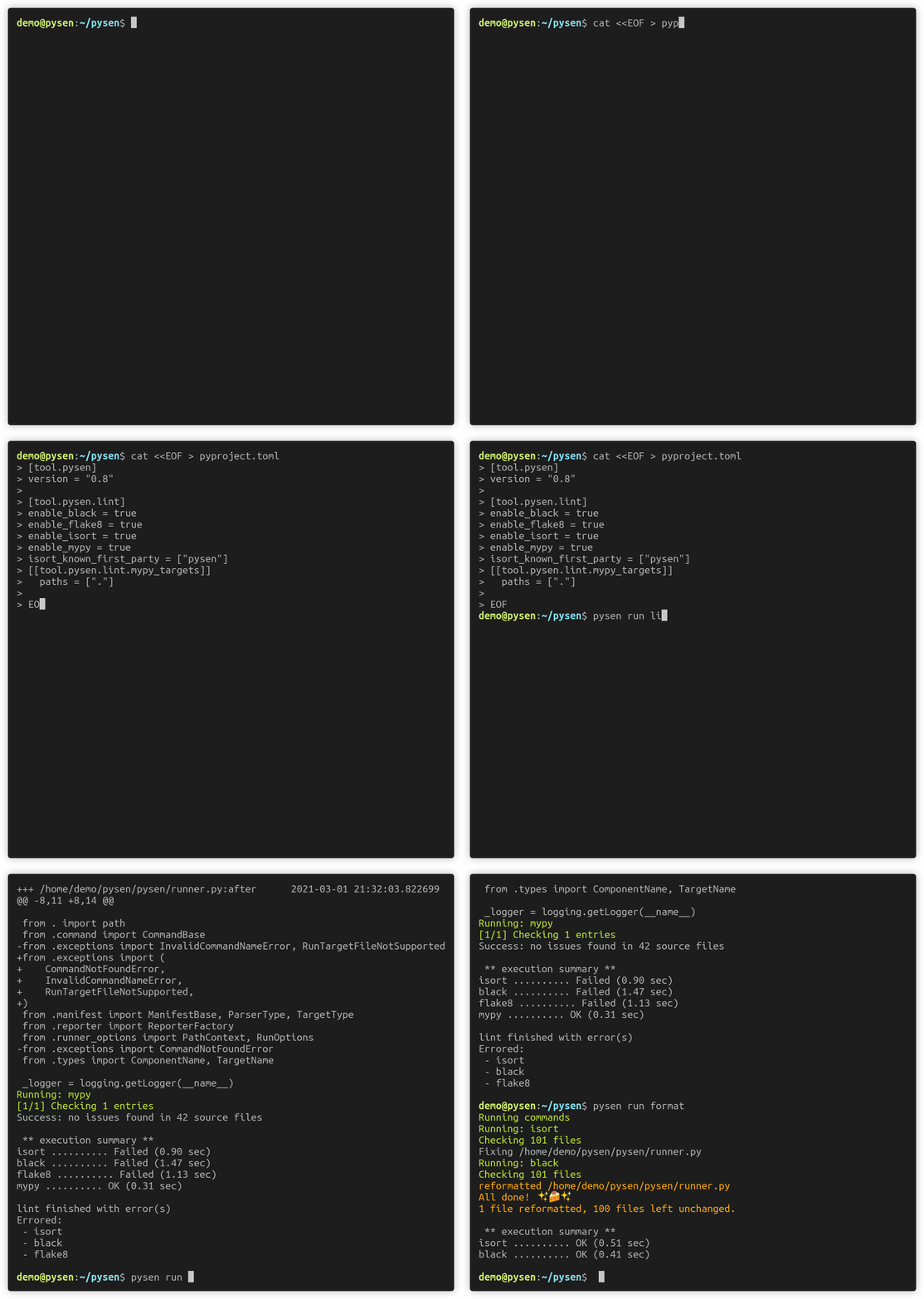
then, execute the following command:
$ pysen run lint
$ pysen run format  # corrects errors with compatible commands (black, isort)
That's it!
pysen, or more accurately pysen tasks that support the specified linters, generate setting files for black, isort, mypy, and flake8
and run them with the appropriate configuration.
For more details about the configuration items that you can write in a config file, please refer to pysen/pyproject_model.py.
You can also add custom setup commands to your Python package by adding the following lines to its setup.py:
import pysen
setup = pysen.setup_from_pyproject(__file__)
$ python setup.py lint
We also provide a Python interface for customizing our configuration and extending pysen. For more details, please refer to the following two examples:
- Example configuration from Python:
examples/advanced_example/config.py - Example plugin for pysen:
examples/plugin_example/plugin.py
Frequently Asked Questions
Q. How do I use mypy >= 0.800?
A. See Install pysen with your choice of linter versions
Q. mypy reports the error Source file found twice under different module names.
A. Add tool.pysen.lint.mypy_targets section(s) so file names are unique in each section.
Q. How do I change specific settings for linter X?
A. We prioritize convention over configuration. However you can always create your own plugin. See: Create a plugin to customize pysen
Q. pysen seems to ignore some files.
A. pysen only checks files that are tracked in git. Try git adding the file under question.
You can also disable this behavior by setting the environment variable PYSEN_IGNORE_GIT=1.
Q. How do I run only [flake8|black|isort|mypy]?
A. Try the --enable and --disable options, for example, pysen --enable flake --enable black run lint.
Q. Files without filename extensions are not checked.
A. Explicitly add those files under the include section in tool.pysen.lint.source.
Q. How do I add additional settings to my pyproject.toml, e.g., pydantic-mypy?
A. Add settings_dir="." under the [tool.pysen-cli] section.
What is pysen?
pysen aims to provide a unified platform to configure and run day-to-day development tools. We envision the following scenarios in the future:
- You open any project and
pysen run lint,pysen run formatwill check and format the entire codebase - Standardized coding styles are setup with a few lines in a single config file
pysen centralizes the code and knowledge related to development tools that teams have accumulated, most notably for python linters.
You can make tasks that can be executed from both setup.py and our command-line tool.
We currently provide tasks that manage setting files for the following tools:
- linters
- flake8
- isort
- mypy
- black
- utilities
- (planned) protoc
What isn't pysen?
- pysen is not a linting tool per se. Rather,
pysen run lintorchestrates multiple python linting tools by automatically setting up their configurations from a more abstract setting for pysen. - pysen does not manage your dependencies and packages. We recommend using package managers such as pipenv or poetry to lock your dependency versions, including the versions for the linting tools that pysen coordinates (i.e., isort, mypy, flake8, black). The confirmed versions for these tools can be found in the
extra_requires/lintsection in pysen's setup.py, although higher versions may work. You should not rely onpip install pysen[lint]to control the versions of your linting tools. - pysen is not limited to linting purposes or python. See the plugin section for details.
How it works: Settings file directory
Under the hood, whenever you run pysen, it generates the setting files as ephemeral temporary files to be used by linters. You may want to keep those setting files on your disk, e.g. when you want to use them for your editor. If that is the case, run the following command to generate the setting files to your directory of choice:
$ pysen generate [out_dir]
You can specify the settings directory that pysen uses when you pysen run.
To do so add the following section to your config:
[tool.pysen-cli]
settings_dir = "path/to/generate/settings"
When you specify a directory that already contains some configurations, pysen merges the contents. The resulting behavior may differ from when you don't specify settings_dir.
Also keep in mind that this option is honored only when you use pysen through its CLI. When using pre-commit or setuptools you need to specify settings_dir as arguments.
Tips: IDE / Text editor integration
vim
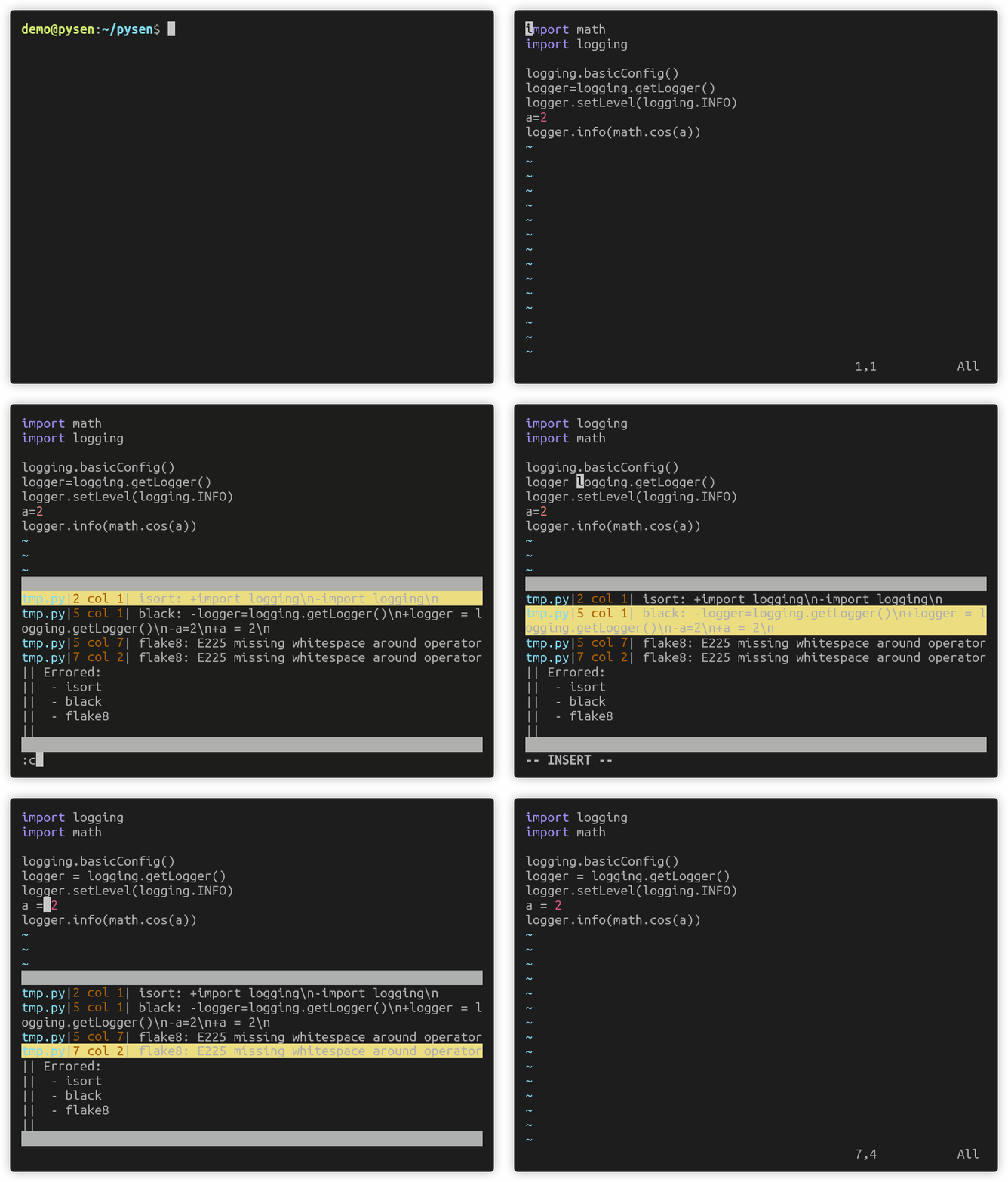
You can add errors that pysen reports to your quickfix window by:
:cex system("pysen run_files lint --error-format gnu ".expand('%:p'))
Another way is to set pysen to makeprg:
set makeprg=pysen\ run_files\ --error-format\ gnu\ lint\ %
Then running :make will populate your quickfix window with errors.
This also works with vim-dispatch as long as you invoke :Make instead of :Dispatch (for this reason)
The result will look like the following:
A third party plugin is also available.
Emacs
Refer to the Compilation mode. The following is an example hook for python.
(add-hook 'python-mode-hook
    (lambda ()
        (set (make-local-variable 'compile-command)
            (concat "pysen run_files lint --error-format gnu  " buffer-file-name))))
VSCode
A third party plugin is available.
Note that this may report duplicate errors if you have configured linters like flake8 directly through your VSCode python extension.
Configure pysen
We provide two methods to write configuration for pysen.
One is the [tool.pysen.lint] section in the config.
It is the most simple way to configure pysen, but the settings we provide are limited.
The other method is to write a python script that configures pysen directly.
If you want to customize configuration files that pysen generates, command-line arguments that pysen takes, or whatever actions pysen performs, we recommend you use this method.
For more examples, please refer to pysen/examples.
Configuration model
Please refer to pysen/pyproject_model.py for the latest model.
Here is an example of a basic configuration:
[tool.pysen]
version = "0.11"

[tool.pysen.lint]
enable_black = true
enable_flake8 = true
enable_isort = true
enable_mypy = true
mypy_preset = "strict"
line_length = 88
py_version = "py38"
isort_known_third_party = ["numpy"]
isort_known_first_party = ["pysen"]
mypy_ignore_packages = ["pysen.generated.*"]
mypy_path = ["stubs"]
[[tool.pysen.lint.mypy_targets]]
  paths = [".", "tests/"]

[tool.pysen.lint.source]
  includes = ["."]
  include_globs = ["**/*.template"]
  excludes = ["third_party/"]
  exclude_globs = ["**/*_grpc.py"]

[tool.pysen.lint.mypy_modules."pysen.scripts"]
  preset = "entry"

[tool.pysen.lint.mypy_modules."numpy"]
  ignore_errors = true
pysen looks for a configuration file in the following order:
pysen.tomlwith atool.pysensectionpyproject.tomlwith atool.pysensection
Create a plugin to customize pysen
We provide a plugin interface for customizing our tool support, setting files management, setup commands and so on.
For more details, please refer to pysen/examples/plugin_example.
Development
pipenv is required for managing our development environment.
# setup your environment
$ pipenv sync
# activate the environment
$ pipenv shell
- Update dependencies in
Pipfile.lock
$ pipenv lock --pre
- Run all tests
$ pipenv run tox
mypy presets
The mypy preset strict aims to make life easier for developers using the following packages:
- OpenCV
- PyTorch
- scikit-learn
We recommend developers mitigate some rules from the very strict preset to avoid some hassles.
If you use these packages with the strict preset and still have inconveniences, please let us know.
Contributing
Our main priority is to fulfil the demands from projects within Preferred Networks. Therefore, we must assess whether each feature/pull request is in the best interest of our projects. In principle, we are open to minor things like the following:
- Issues that report bugs
- Small PRs that fix typos or minor glitches
As for new features or major feature enhancements,
the core developers will determine whether the proposed idea is in line with the
goals and concepts of pysen for each case.
When in doubt, don't hesitate to open an Issue first.
4 maintainers


Metadata
4 maintainers
Release files for pysen 0.11.0
For a detailed explanation of source distributions (sdists) and built distributions (wheels), please see the package formats documentation.
Source distribution (sdist)
| File | Size | Uploaded | Provenance | Actions |
|---|---|---|---|---|
| pysen-0.11.0.tar.gz | 48.1 kB | Without provenance | Details for pysen-0.11.0.tar.gz |
Built distribution (wheel)
| File | Interpreter | ABI | Platform | Actions Reset |
|---|---|---|---|---|
| pysen-0.11.0-py3-none-any.whl | Python 3 | none | any | Details for pysen-0.11.0-py3-none-any.whl |
Total release size: 106.2 kB
Release files / pysen-0.11.0.tar.gz
| Download URL | pysen-0.11.0.tar.gz |
|---|---|
| Size | 48.1 kB |
| Tags | Source |
|
SHA-256 checksum How to use checksums |
b9ea6c67289360f7bd9c95f8c79f603a775decb9342d2635dc40fcda92dfa53a
|
|
BLAKE2b-256 checksum How to use checksums |
21545535af8606eb541771a017a06941b3bba252ad514bd2727d91e3b7616936
|
| Upload date | |
|
Uploaded using Trusted Publishing? What is trusted publishing? |
No |
| Uploaded via |
twine/5.0.0 CPython/3.12.2
|
Release files / pysen-0.11.0-py3-none-any.whl
| Download URL | pysen-0.11.0-py3-none-any.whl |
|---|---|
| Size | 58.1 kB |
| Tags | Python 3 |
|
SHA-256 checksum How to use checksums |
d4e81e12f9f1b4cf25df0399d10b0201a9a4bae18846fe0e279179b657daf015
|
|
BLAKE2b-256 checksum How to use checksums |
83a0206f4020d6cd6c219e040a35b83ae01fa6e76dfe6ce8044a1876ed285f72
|
| Upload date | |
|
Uploaded using Trusted Publishing? What is trusted publishing? |
No |
| Uploaded via |
twine/5.0.0 CPython/3.12.2
|
Security for pysen 0.11.0
Provenance
Provenance describes where a file came from. On PyPI, provenance is shared via attestations, which provide a verifiable record of the build or publishing details. View details, limitations and caveats.
No provenance found
None of the files in this release were uploaded with provenance metadata.
A note on package security
PyPI is a repository for distributing packages, not a service for auditing them. While third-party security researchers and our staff do their best to detect and remove malicious packages, PyPI cannot guarantee the quality, security or suitability of any given package.
To learn more about protecting yourself from malicious actors, visit our package security documentation.














