
PySSPFM
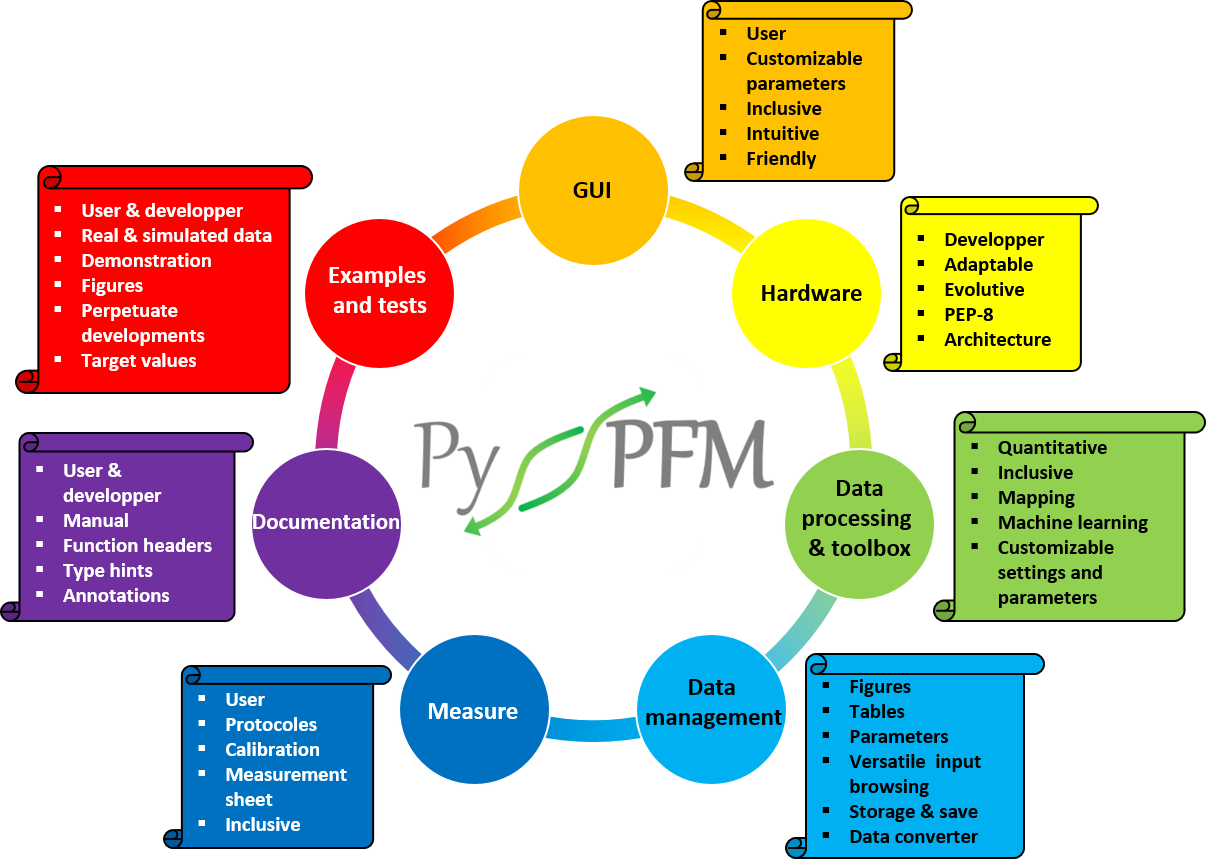
PySSFPM is a specific tool developed in Python dedicated to perform data analysis on SSPFM (Switching Spectroscopy Piezoresponse Force Microscopy) measurements with a GUI that aims to be as simple to use as possible and complete to accommodate the user's measurement requirements and conditions. The source code was developed to be easily customizable in order to meet the user's specific needs. Measurements can be processed in both standard SSPFM including fixed-frequency measurements on or off resonance, or with frequency sweeping to reconstruct the resonance peak, as well as SSPFM-DFRT (Dual Frequency Resonance Tracking) mode.
Important
This library is provided in its current state and remains under active development. The motivation behind the creation of the new PySSPFM application for SSPFM measurement processing stemmed from several factors :
• There was a desire to offer the scientific community in the PFM domain an open-source solution that is easily comprehensible, adaptable, and customizable according to individual requirements. All developments adhere to the PEP-8 development standard and are accompanied by comprehensive, internal script documentation.
• PySSPFM has been developed with the aim of achieving the most quantitative and advanced measurement processing compared to other existing solutions.
However, while it has shown reliable performance with the data used by the library's developer, it's crucial to emphasize that there are no assurances that this library will seamlessly process your unique data. Moreover, it should be noted that in order to extract data from a Bruker SPM file, DLL (Dynamic Link Library) files must be installed alongside the Nanoscope Analysis software (Bruker).
If you encounter any bugs or issues, you can kindly bring them to the developer's attention by visiting: PySSPFM issues.
Overview
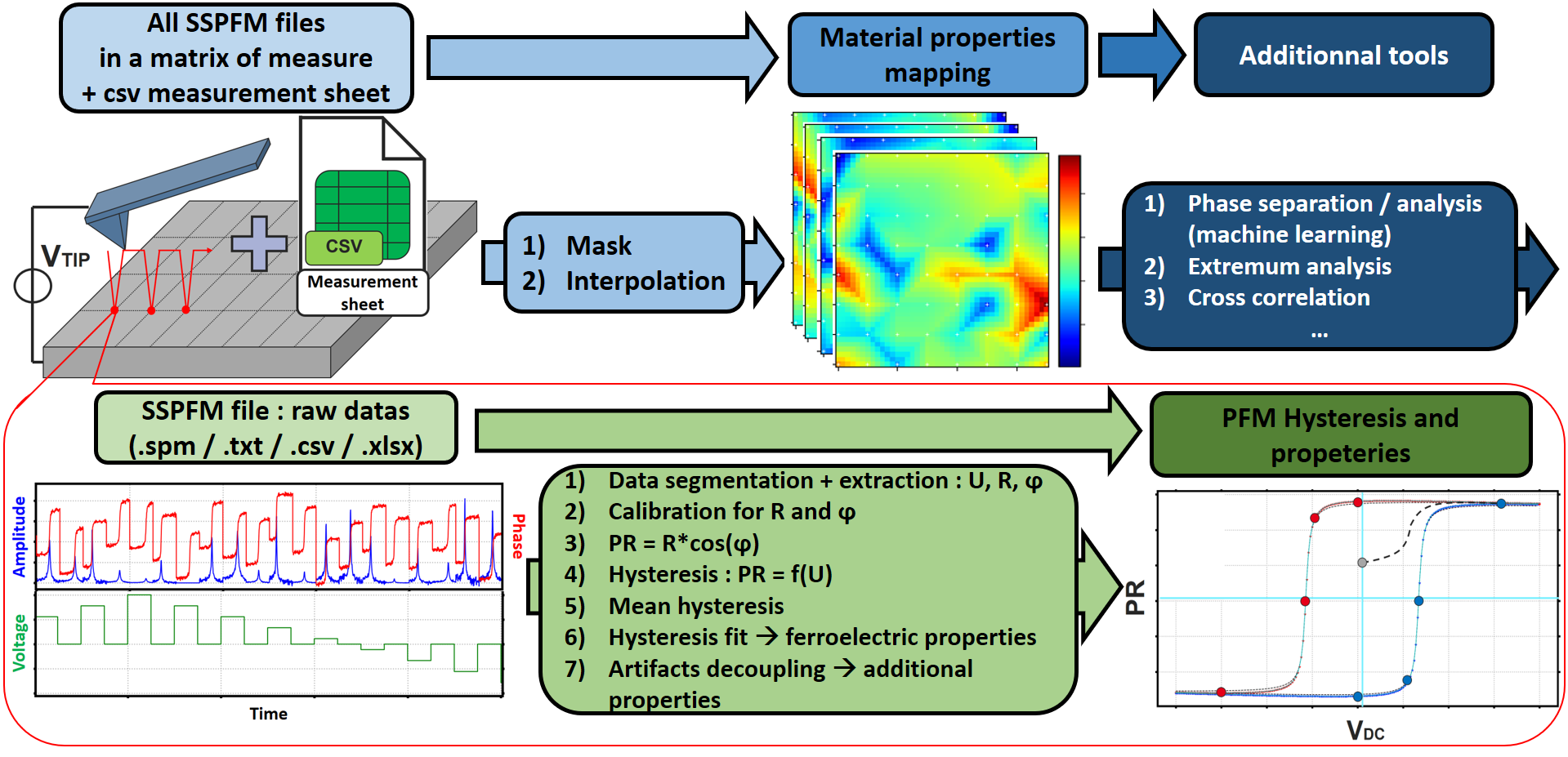
PySSPFM workflow
0) Measures
PySSPFM facilitates the processing of a set of SSPFM measurement data points by simply populating a measurement form (template for: measurement sheet model SSPFM). The range of measurement files to be processed may have the extensions:
• .spm (Bruker)
• .txt
• .csv
• .xlsx
1) First step of data analysis
For each of the SSPFM measurement files, amplitude and phase are extracted for each segment using a user-selected method:
• max: extract maximum or resonance peak (for frequency sweep mode)
• fit: perform a fit of the resonance peak based on SHO (Simple Harmonic Oscillator) model (for frequency sweep mode)
• single_freq: mean of the segment (for single frequency mode, in or out of resonance, and for DFRT mode without sidebands processing)
• dfrt: mean of the segment (for DFRT mode with sidebands processing: if errors occur, use the single_freq mode)
2) Second step of data analysis
The measurements are then automatically calibrated, and the piezoresponse hysteresis is created. It is subsequently fitted using an algorithm based on the lmfit library, and the piezoelectric and ferroelectric properties are extracted. Five different artifact decorrelation protocols (quadratic components: electrostatic, electrostrictive, and joules effects) allow for obtaining quantitative piezoelectric and ferroelectric measurements and for acquiring a more comprehensive understanding of material properties, such as the contact surface potential.
3) Mapping
Once the processing is complete for all the files, maps are generated. 2D interpolation tools and masks to mitigate the influence of problematic pixels are also available.
4) Toolbox
Finally, a toolbox is provided for the analysis of processing results: it includes algorithms of:
• Machine learning (K-Means, GMM, PCA)
• Phase separation
• Mapping cross-correlation
• SPM file converter
• ...
See the documentation for more details on PySSPFM workflow.
Usage
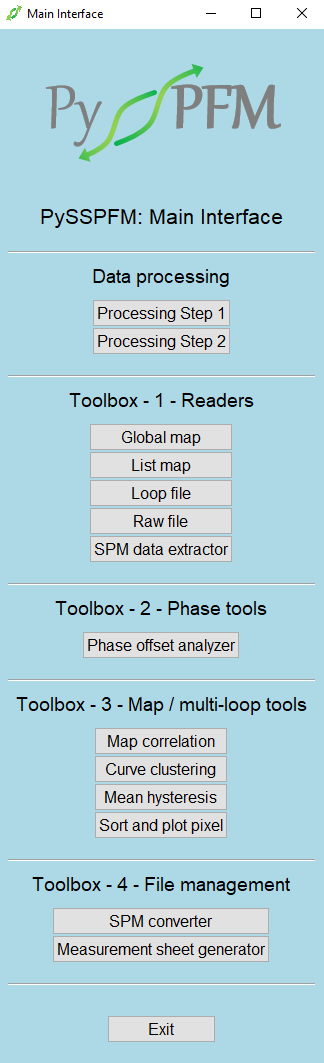
PySSPFM GUI main window
All code executed and parameter adjustments made through the GUI can be replicated in executable scripts:
• Data Processing
• Toolbox
Then, the user can adjust parameters directly either in a pre-filled JSON file, in a TOML file, or in the executable Python code. The JSON and TOML files, which manage the global settings of PySSPFM as well as the parameters specific to each executable script, are stored in a .pysspfm folder located in the user's C drive (e.g., C:\Users\HV265662.pysspfm). This folder is created during the PySSPFM installation process, detailed in the PySSPFM Overview file. It is possible to run the post_install.py script (via a terminal, console, etc.) to regenerate it. These files are also available in the resources folder, distributed across the resources/data_processing and resources/toolbox directories.
You can check the examples (based on both real and simulated SSPFM measurements) to grasp the utilization of the scripts, and the tests to ensure the proper functioning of the scripts. The examples and tests follow the same directory structure as the main PySSPFM scripts.
See the documentation for more details on PySSPFM usage.
Installation
From PyPI
pip install PySSPFM
From GitHub
With poetry
poetry add git+https://github.com/CEA-MetroCarac/PySSPFM.git
With pip
pip install git+https://github.com/CEA-MetroCarac/PySSPFM.git
Launch the GUI
PySSPFM
Create the Settings and Parameters Folder
The settings and parameters folder (containing files with .json and .toml extensions) is automatically created during installation. To regenerate it, run the post_install.py script (via a terminal, console, etc.) after installation.
Optional dependencies
• pytest to run tests python files.
• toml to load user parameters directly from toml file, for excecutable python script.
• Nanoscope Analysis software (Bruker) installed on computer to extract data from SSPFM Bruker measurement files (spm extension).
Citing
In the case you use this library for your work, please think about citing it:
• H. Valloire, P. Quéméré, N. Vaxelaire, H. Kuentz, G. Le Rhun, Ł. Borowik, "Enhancing ferroelectric characterization at nanoscale: A comprehensive approach for data processing in spectroscopic piezoresponse force microscopy", J. Appl. Phys, 21 May 2024, 135 (19): 194101, DOI: https://doi.org/10.1063/5.0197226
• Hugo Valloire, Patrick Quéméré, 2024, November 22, PySSPFM (Version 2024.11).
1 maintainer

Metadata
1 maintainer
Release files for PySSPFM 2024.12
For a detailed explanation of source distributions (sdists) and built distributions (wheels), please see the package formats documentation.
Built distribution (wheel)
| File | Interpreter | ABI | Platform | Reset |
|---|---|---|---|---|
| PySSPFM-2024.12-py3-none-any.whl | Python 3 | none | any | Details |
Release files / PySSPFM-2024.12-py3-none-any.whl
| Download URL | PySSPFM-2024.12-py3-none-any.whl |
|---|---|
| Size | 413.7 kB |
| Tags | Python 3 |
|
SHA-256 checksum How to use checksums |
5f24fd18130add145cc67128a44abe00b4a59cdd599ab79e1457df30ef6d3673
|
|
BLAKE2b-256 checksum How to use checksums |
f146680096712c37bf2b1baa951d9fe807169b2047b28f35d4ecdac6c2e0c44e
|
| Upload date | |
|
Uploaded using Trusted Publishing? What is trusted publishing? |
No |
| Uploaded via |
twine/5.1.0 CPython/3.12.8
|














