
PyStormTracker










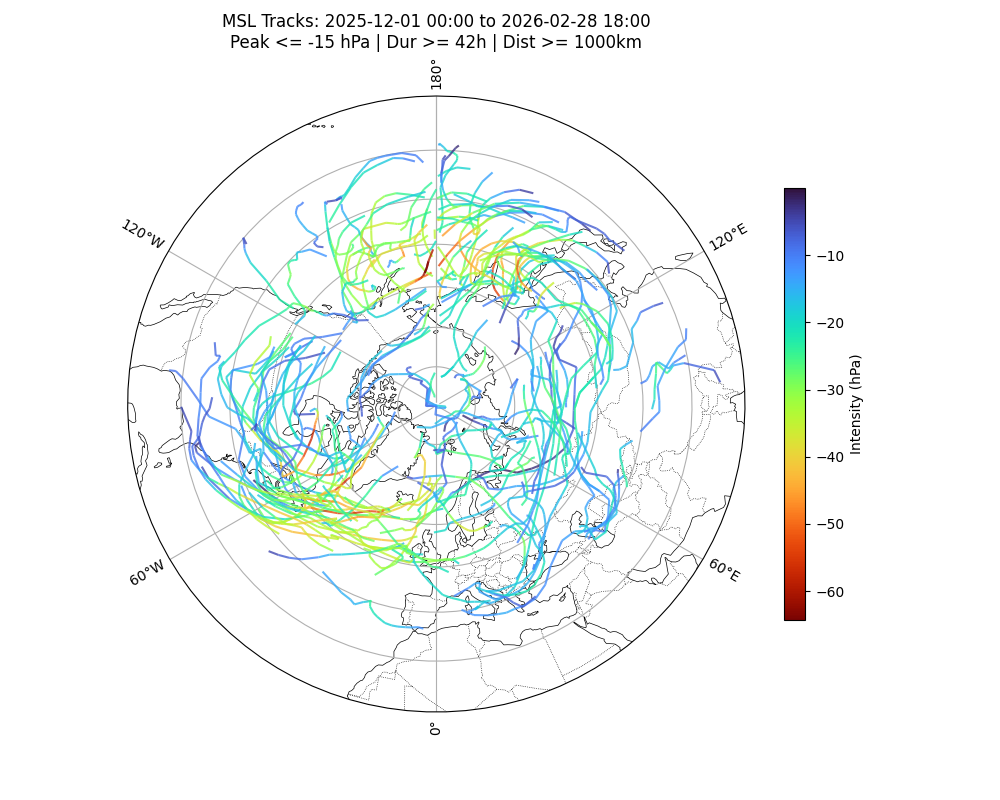
Storm Track Explorer (Interactive Map)
PyStormTracker is a Python package for cyclone trajectory analysis. It implements the "Simple Tracker" algorithm described in Yau and Chang (2020) and the "Hodges (TRACK)" algorithm with adaptive constraints described in Hodges (1999). It provides a scalable framework for processing large-scale climate datasets like ERA5.
Initially developed at the National Center for Atmospheric Research (NCAR) as part of the 2015 SIParCS program, PyStormTracker leverages task-parallel strategies and tree reduction algorithms to efficiently process large-scale climate datasets.
Features
- Vectorized Architecture: Uses an Array-Backed data model to eliminate Python object overhead and ensure zero-copy serialization during parallel execution. Achieves up to 11.8x speedup in serial workloads.
- JIT-Optimized Kernels: Core mathematical filters are implemented in Numba, executing with C-level efficiency while releasing the GIL for multi-process execution.
- Multiple Algorithms:
- Simple (Default): Fast, heuristic linking optimized for higher resolutions.
- Hodges (TRACK): Algorithmic parity with the industry-standard TRACK software, including object-based detection (CCL), spherical cost functions, and recursive MGE optimization. Accuracy Metrics.
- Xarray Native: Seamlessly handles NetCDF and GRIB formats with coordinate-aware processing and robust variable alias handling (e.g.,
msl/slp,lon/longitude). - Scalable Backends:
- Serial: Standard sequential execution. Default fallback.
- Dask: Multi-process scaling for local or distributed environments. Selected if
--workersis provided without MPI. - MPI: High-performance distributed execution via
mpi4py. Selected automatically in MPI environments.
- Typed Implementation: Built for Python 3.11+ with strict type safety and
mypycompliance. - Interoperable: Full support for the standard IMILAST and TRACK (tdump) intercomparison formats.
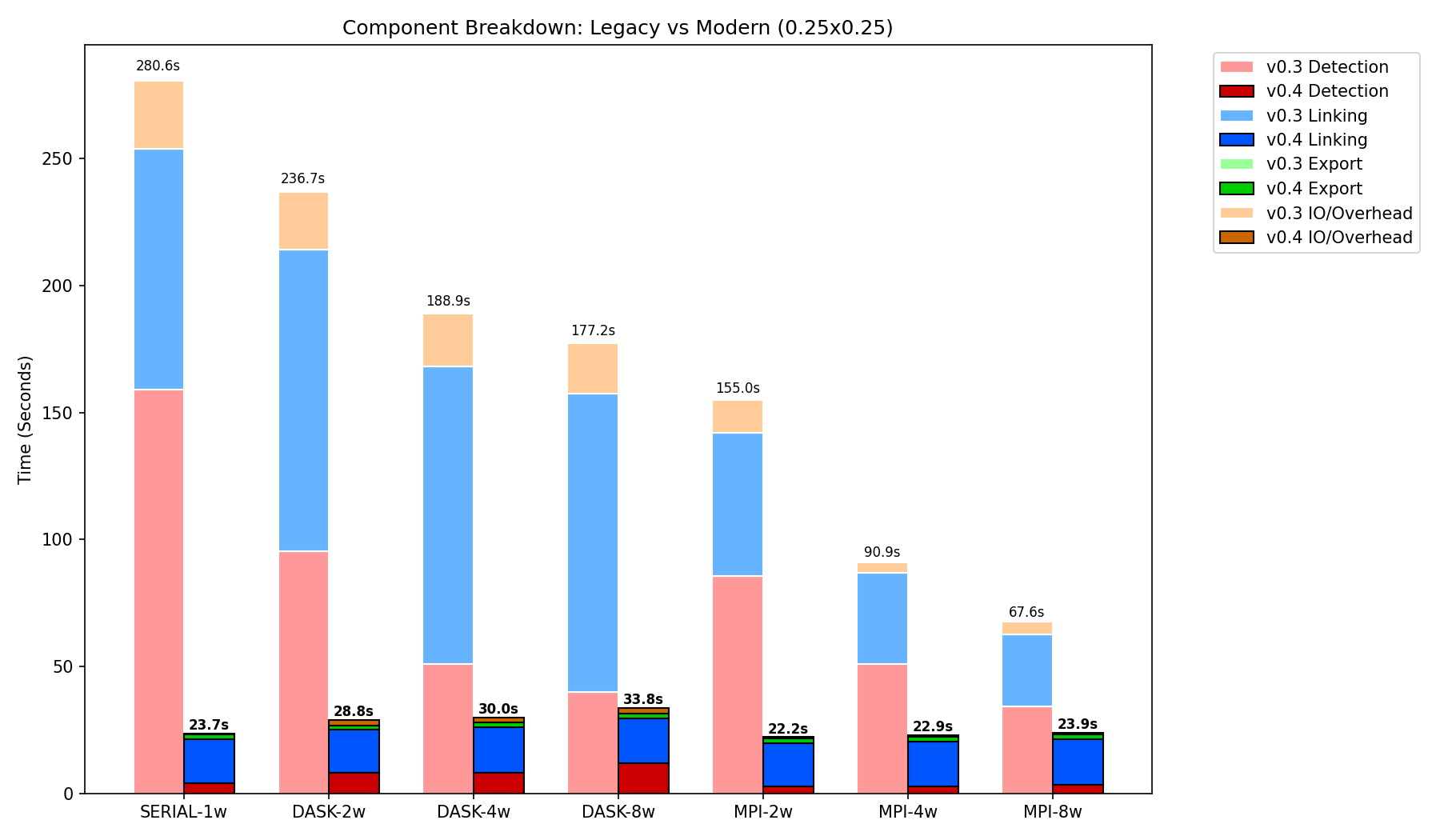
Significant performance gains in v0.4.0+ compared to the v0.3.3 architecture on high-resolution ERA5 data.
Technical Methodology
PyStormTracker treats meteorological fields as 2D images and leverages JIT-compiled Numba loops for feature detection:
- Local Extrema Detection: Employs an optimized sliding window filter to identify local minima (e.g., cyclones) or maxima (e.g., anticyclones, vorticity).
- Intensity & Refinement: Applies the discrete Laplacian operator to measure the "sharpness" of the field at each candidate center. This metric resolves duplicate detections, ensuring only the most physically intense point is retained when adjacent pixels are flagged.
- Trajectory Linking: Connects detected centers across consecutive time steps into continuous trajectories using a vectorized nearest-neighbor heuristic linking strategy.
Documentation
Full documentation, including API references and advanced usage examples, is available at pystormtracker.readthedocs.io.
Installation
Prerequisites
- Python 3.11+
- MPI Support:
- Linux/macOS:
OpenMPIis recommended and included as a development dependency. - Windows: Use
winget install -e --id Microsoft.msmpi(recommended) or MS-MPI.
- Linux/macOS:
- SHT Backend:
ducc0(Core dependency): High-precision C++ library providing high performance spherical harmonic transforms.
- Windows: GRIB support is experimental.
ducc0is used automatically on all platforms.MS-MPIcan be installed viawinget.
From PyPI
You can install the latest stable version of PyStormTracker directly from PyPI:
Using pip:
# Standard installation
pip install PyStormTracker

# With optional components
pip install PyStormTracker[mpi]     # Includes mpi4py for distributed execution
pip install PyStormTracker[grib]    # Includes GRIB support
pip install PyStormTracker[netcdf4] # Includes NetCDF4 backend
pip install PyStormTracker[zarr]    # Includes Zarr support (with remote HTTP/S3/GS)
pip install PyStormTracker[viz]     # Includes visualization (matplotlib, cartopy, etc.)
pip install PyStormTracker[all]     # Includes all core optional components
Using uv:
# For use as a CLI tool
uv tool install PyStormTracker --with mpi

# For use as a library in your project
uv add PyStormTracker --extra mpi
From Conda-Forge
You can also install PyStormTracker from conda-forge:
Using mamba:
mamba install -c conda-forge pystormtracker
Using conda:
conda install -c conda-forge pystormtracker
From Source
Install with uv:
git clone https://github.com/mwyau/PyStormTracker.git
cd PyStormTracker
uv sync
Usage
Command Line Interface
Once installed, you can use the stormtracker command directly:
stormtracker -i data.nc -v msl -o my_tracks.txt
Command Line Arguments
| Argument | Short | Description |
|---|---|---|
| Required | ||
--input |
-i |
Path to the input NetCDF/GRIB file. |
--var |
-v |
Variable name to track (e.g., msl, vo). |
--output |
-o |
Path to the output track file (e.g., tracks.txt). |
| General | ||
--algorithm |
-a |
simple (default) or hodges. |
--format |
-f |
Output format: imilast (default) or hodges. |
--mode |
-m |
min (default) for cyclones, max for vorticity. |
--threshold |
-t |
Intensity threshold for feature detection. |
--filter-range |
Spectral filter range (min-max). Default '5-42'. | |
--no-filter |
Disable default T5-42 spectral filtering. | |
--num |
-n |
Number of time steps to process. |
| Performance | ||
--backend |
-b |
serial, dask, or mpi. Auto-detected by default. |
--workers |
-w |
Number of parallel workers. Auto-detected for MPI; sets Dask if not MPI. |
--chunk-size |
-c |
Steps per chunk for Dask/RSPLICE (default 60). |
--overlap |
Overlap steps between chunks for splicing (default 3). | |
--engine |
-e |
Xarray engine (e.g., h5netcdf, netcdf4). |
| Hodges-Specific | ||
--min-points |
Minimum grid points per object (default 1). | |
--taper |
Number of points for boundary tapering (default 0). | |
--w1, --w2 |
Cost weights for direction (0.2) and speed (default 0.8). | |
--dmax |
Max search radius in degrees (default 6.5). | |
--phimax |
Smoothness penalty (default 0.5). | |
--iterations |
Max MGE optimization passes (default 3). | |
--min-lifetime |
Minimum time steps for a valid track (default 3). | |
--max-missing |
Max consecutive missing frames (default 0). | |
--zone-file / --zones |
Path to legacy zone.dat or JSON string for regional DMAX zones. |
|
--adapt-file / --adapt-params |
Path to legacy adapt.dat or JSON string for adaptive smoothness (2x4 array). |
Python API
You can easily integrate PyStormTracker into your own scripts or Jupyter Notebooks:
import pystormtracker as pst

# 1. Instantiate the tracker (Simple or Hodges)
# tracker = pst.SimpleTracker()
tracker = pst.HodgesTracker()

# 2. Run the tracking algorithm. Returns an array-backed Tracks object.
tracks = tracker.track(
    infile="data.nc",
    varname="vo",
    mode="max"
)
Analyze the results programmatically
for track in tracks:
    if len(track) >= 8:
        print(f"Track {track.track_id} lived for {len(track)} steps.")
Export results
tracks.write("output.txt", format="imilast")
Sample Data
Sample datasets for testing and benchmarking are hosted in the PyStormTracker-Data repository.
Development
Setup
Using uv to set up your development environment:
# Install dependencies and sync virtual environment
uv sync
Quality Control
Run automated checks using uv run:
Linting & Formatting:
uv run ruff check . --fix
uv run ruff format .
Type Checking:
uv run mypy src/
Tiered Testing
To keep development cycles fast, testing is tiered:
- Fast Tests: Default local runs (skips integration tests).
- Integration Tests: Integration and regression tests.
- Local: Runs "short" variants (60 time steps) to ensure backend consistency quickly.
- CI: Runs "full" (all time steps) variants, including legacy regressions.
- Full Suite: Everything.
Run fast unit tests only (Default):
uv run pytest
Run integration tests (Short variants locally):
uv run pytest --run-integration
Run everything:
uv run pytest --run-all
Citations
If you use this software in your research, please cite the following:
-
Yau, A. M. W., 2026: mwyau/PyStormTracker. Zenodo, https://doi.org/10.5281/zenodo.18764813.
-
Yau, A. M. W. and Chang, E. K. M., 2020: Finding Storm Track Activity Metrics That Are Highly Correlated with Weather Impacts. J. Climate, 33, 10169–10186, https://doi.org/10.1175/JCLI-D-20-0393.1.
References
-
Yau, A. M. W., K. Paul and J. Dennis, 2016: PyStormTracker: A Parallel Object-Oriented Cyclone Tracker in Python. 96th American Meteorological Society Annual Meeting, New Orleans, LA. Zenodo, https://doi.org/10.5281/zenodo.18868625.
-
Neu, U., et al., 2013: IMILAST: A Community Effort to Intercompare Extratropical Cyclone Detection and Tracking Algorithms. Bull. Amer. Meteor. Soc., 94, 529–547, https://doi.org/10.1175/BAMS-D-11-00154.1.
- IMILAST Intercomparison Protocol: https://proclim.scnat.ch/en/activities/project_imilast/intercomparison
- IMILAST Data Download: https://proclim.scnat.ch/en/activities/project_imilast/data_download
-
Schaeffer, N., 2013: Efficient spherical harmonic transforms aimed at pseudospectral numerical simulations. Geochem. Geophys. Geosyst., 14, 751–758, https://doi.org/10.1002/ggge.20071.
-
Hodges, K. I., 1999: Adaptive Constraints for Feature Tracking. Mon. Wea. Rev., 127, 1362–1373, https://doi.org/10.1175/1520-0493(1999)127<1362:ACFFT>2.0.CO;2.
-
Hodges, K. I., 1995: Feature Tracking on the Unit Sphere. Mon. Wea. Rev., 123, 3458–3465, https://doi.org/10.1175/1520-0493(1995)123<3458:FTOTUS>2.0.CO;2.
-
Hodges, K. I., 1994: A General Method for Tracking Analysis and Its Application to Meteorological Data. Mon. Wea. Rev., 122, 2573–2586, https://doi.org/10.1175/1520-0493(1994)122<2573:AGMFTA>2.0.CO;2.
License
This project is licensed under the BSD-3-Clause terms found in the LICENSE file.
1 maintainer

Metadata
1 maintainer
Release files for PyStormTracker 0.5.0
For a detailed explanation of source distributions (sdists) and built distributions (wheels), please see the package formats documentation.
Source distribution (sdist)
| File | Size | Uploaded | Provenance | Actions |
|---|---|---|---|---|
| pystormtracker-0.5.0.tar.gz | 34.8 MB | With provenance | Details for pystormtracker-0.5.0.tar.gz |
Built distribution (wheel)
| File | Interpreter | ABI | Platform | Actions Reset |
|---|---|---|---|---|
| pystormtracker-0.5.0-py3-none-any.whl | Python 3 | none | any | Details for pystormtracker-0.5.0-py3-none-any.whl |
Total release size: 34.9 MB
Release files / pystormtracker-0.5.0.tar.gz
| Download URL | pystormtracker-0.5.0.tar.gz |
|---|---|
| Size | 34.8 MB |
| Tags | Source |
|
SHA-256 checksum How to use checksums |
e4cd51004049a9a781f7f49ba2f96140e8db4da1e1603386e31e110665a84e91
|
|
BLAKE2b-256 checksum How to use checksums |
5147b443efbd1fd5c80851a75386762c4bbe66c264f5c5619a5e1b211e49e3c9
|
| Upload date | |
|
Uploaded using Trusted Publishing? What is trusted publishing? |
Yes |
| Uploaded via |
twine/6.1.0 CPython/3.13.12
|
Provenance
Provenance describes where a file came from. On PyPI, provenance is shared via attestations, which provide a verifiable record of the build or publishing details. View details, limitations and caveats.


PyPI Publish Attestation
PyPI verified that this artifact, at this checksum, originated from the publisher listed below.
Signed by GitHub Actions, verified by PyPI on Apr 8, 2026.
Transparency logRelease files / pystormtracker-0.5.0-py3-none-any.whl
| Download URL | pystormtracker-0.5.0-py3-none-any.whl |
|---|---|
| Size | 84.8 kB |
| Tags | Python 3 |
|
SHA-256 checksum How to use checksums |
a8453b76f3570fc9fa7d4f52d2725daff28ff961c8c9f3c2d210737d5d9e7fb0
|
|
BLAKE2b-256 checksum How to use checksums |
86c2b27f0a705821156a47f37cda27833cfc54a126f57d03ecc875464cbd2b4e
|
| Upload date | |
|
Uploaded using Trusted Publishing? What is trusted publishing? |
Yes |
| Uploaded via |
twine/6.1.0 CPython/3.13.12
|
Provenance
Provenance describes where a file came from. On PyPI, provenance is shared via attestations, which provide a verifiable record of the build or publishing details. View details, limitations and caveats.
PyPI Publish Attestation
PyPI verified that this artifact, at this checksum, originated from the publisher listed below.
Signed by GitHub Actions, verified by PyPI on Apr 8, 2026.
Transparency logSecurity for PyStormTracker 0.5.0
Provenance
Provenance describes where a file came from. On PyPI, provenance is shared via attestations, which provide a verifiable record of the build or publishing details. View details, limitations and caveats.
Full provenance
Both files in this release have been uploaded with provenance metadata.
Attestation for pystormtracker-0.5.0.tar.gz
PyPI Publish Attestation
PyPI verified that this artifact, at this checksum, originated from the publisher listed below.
Signed by GitHub Actions, verified by PyPI on Apr 8, 2026.
Transparency logA note on package security
PyPI is a repository for distributing packages, not a service for auditing them. While third-party security researchers and our staff do their best to detect and remove malicious packages, PyPI cannot guarantee the quality, security or suitability of any given package.
To learn more about protecting yourself from malicious actors, visit our package security documentation.














