
PyTabTex
Developped by a M. Eng. student in AI & Data science, who usually find himself preparing reports of projects using LaTex. This implies summarizing results in tables, as we can find in a lot of scientific papers. In the context of Machine Learning projects, the results are most probably the output of a python code. So why copying them from python and have a painful time creating the table in LaTeX ?
The goal is to use python to translate these results directly into LaTeX format with a reasonable amount of customization while still working with Python!
Key features
- Work with multilevel column.
- Load data from dataframe, csv file or dictionary.
- Automatically highlight max/min by rows/cols.
Installation
You can clone the repository or simply installing it from PyPI using pip
pip install pytabtex
How to use
For the moment, the specific use case of this library is tables assembling results.
Define columns:
The columns parameter is a dictionary where each key is the name of the columns, the value is 0 if there are no subcolulmns, or a list of subcolumns names if there are subcolumns.
Example (simple columns) :
Desired output :

Python code :
columns = {"column 1" : 0, "column 2" : 0, "column 3" : 0, "column 4" : 0}
Example (multilevel columns) :
Desired output :

Python code :
columns = {"column 1" : ["Sub-column 1", "Sub-column 2"],\
           "column 2" : 0,
           "column 3" : 0}
Define body of the table
The body of the table can be a dictionary, a pandas Dataframe or a csv file path.
Example
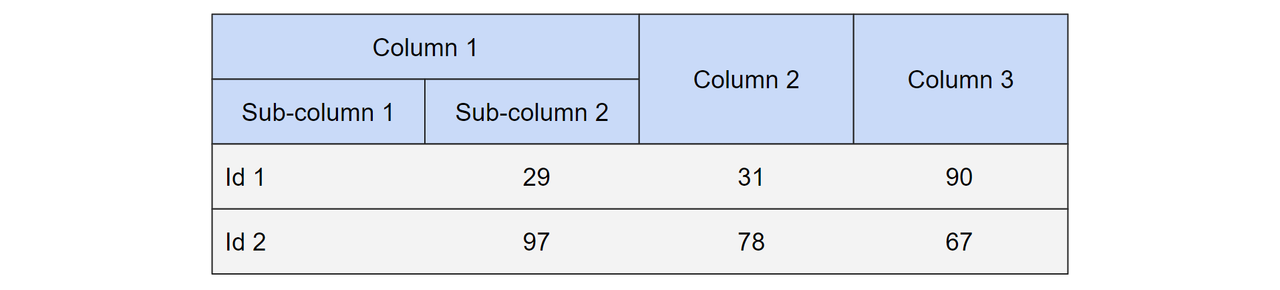
Dictionary
{
    "id 1" : [29, 31, 90],
    "id 2" : [97, 78, 67]
}
Dataframe
if the dataframe has a header, don't include it.
| id 1 | 29 | 31 | 90 |
| id 2 | 97 | 78 | 67 |
CSV file
if the dataframe has a header, don't include it.
csv_file = "path\to\csv"
Create table
- columns : columns defined in the format specified above.
- body : table rows in one of the different formats.
- title : title of the table if needed.
- highlight : {func : axis} defined as follows - max by rows : {max: 0}, max by cols : {min: 0}, min by rows : {min: 0}, min by cols : {min: 1}
- orientation : "P" for portrait and "L" for landscape
- position of the table : htbp by default, check latex for other positions.
- align cols : "c" center, "l" left, "r" right.
from pytabtex import Table

table = Table(columns = columns,\
              body = body,\
              title=None,\
              highlight=None,\
              caption=None,\
              orientation="P",\
              position="htbp",\
              align_cols="c"
            )
Use case examples
Example 1

Defintion of columns
"columns": { "Model" : 0, "Base":0, "10 MTS" : 0, "15 MTS": 0, "Fuzzing": 0, "SQLite Format" : 0, "7-shot" : 0, "9-shot" : 0 }
Body from csv file (No header)
open data1.csv
Create table
caption = """The prediction accuracy of GPT-3.5-turbo and GPT-4 on different hyper-parameters. “Base” is our baseline (5 MTS, Random Selection, the CSV database format, 5-shot), while the rest are by changing one of the hyper-parameters"""

table = Table(columns, "tests/data1.csv", caption=caption)
Example 2
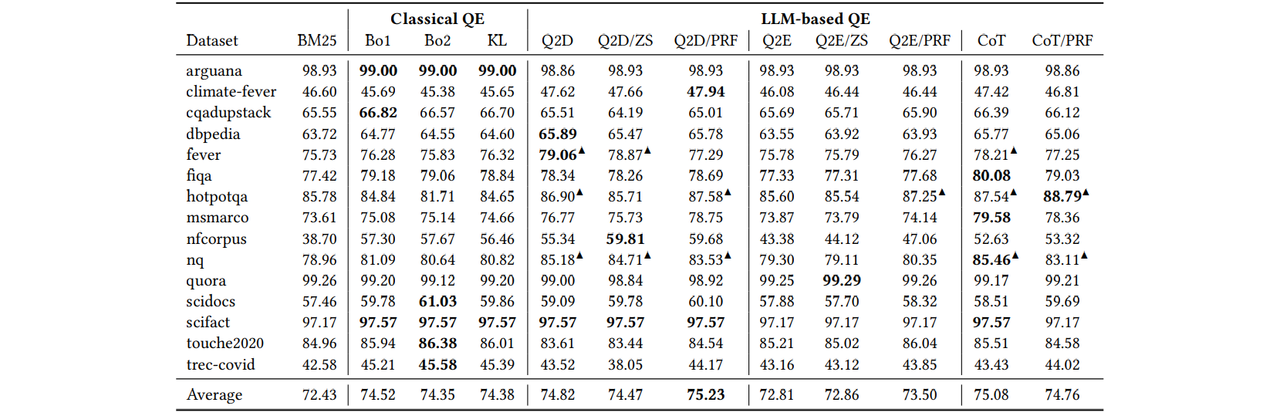 src :
src : Defintion of columns
"columns": {
    "": ["Dataset", "BM25"],
    "Classical QE" : ["Bo1", "Bo2", "KL"],
    "LLM-based QE" : ["Q2D", "Q2D/ZS", "Q2D/PRF", "Q2E", "Q2E/ZS", "Q2E/PRF", "CoT", "CoT/PRF"]
}
Body from pandas Dataframe
import pandas as pd
body = pd.read_csv("tests/file.csv", header=None)
Create table
In this example we want to highlight the highest value by row.
caption = "Recall@1K of various prompts on BEIR using Flan-UL2"
highlight = {"max": 0}
table = Table(columns, body, caption=caption, highlight=highlight)
1 maintainer

Metadata
1 maintainer
Release files for pytabtex 0.1.3
For a detailed explanation of source distributions (sdists) and built distributions (wheels), please see the package formats documentation.
Source distribution (sdist)
| File | Size | Uploaded | Provenance | Actions |
|---|---|---|---|---|
| pytabtex-0.1.3.tar.gz | 6.1 kB | Without provenance | Details for pytabtex-0.1.3.tar.gz |
Built distribution (wheel)
| File | Interpreter | ABI | Platform | Actions Reset |
|---|---|---|---|---|
| pytabtex-0.1.3-py3-none-any.whl | Python 3 | none | any | Details for pytabtex-0.1.3-py3-none-any.whl |
Total release size: 11.9 kB
Release files / pytabtex-0.1.3.tar.gz
| Download URL | pytabtex-0.1.3.tar.gz |
|---|---|
| Size | 6.1 kB |
| Tags | Source |
|
SHA-256 checksum How to use checksums |
7d4249c5536389e026a049cbb47d537763b4b28326a98afbd1203b15ac03d3ed
|
|
BLAKE2b-256 checksum How to use checksums |
06e14ff2046adb666bbd90bf28afe3d06d66aa2cef6e98df99cb4ba5c9d8d8cd
|
| Upload date | |
|
Uploaded using Trusted Publishing? What is trusted publishing? |
No |
| Uploaded via |
twine/5.0.0 CPython/3.10.11
|
Release files / pytabtex-0.1.3-py3-none-any.whl
| Download URL | pytabtex-0.1.3-py3-none-any.whl |
|---|---|
| Size | 5.8 kB |
| Tags | Python 3 |
|
SHA-256 checksum How to use checksums |
6b2680fac408a7e4204299ce216976b3fc106e2431d33c8af4d6d177bba4c704
|
|
BLAKE2b-256 checksum How to use checksums |
8fde881508cfbb18414d1ef15ac8dc26b2ede874c858c8c637719d716bb84219
|
| Upload date | |
|
Uploaded using Trusted Publishing? What is trusted publishing? |
No |
| Uploaded via |
twine/5.0.0 CPython/3.10.11
|
Security for pytabtex 0.1.3
Provenance
Provenance describes where a file came from. On PyPI, provenance is shared via attestations, which provide a verifiable record of the build or publishing details. View details, limitations and caveats.
No provenance found
None of the files in this release were uploaded with provenance metadata.
A note on package security
PyPI is a repository for distributing packages, not a service for auditing them. While third-party security researchers and our staff do their best to detect and remove malicious packages, PyPI cannot guarantee the quality, security or suitability of any given package.
To learn more about protecting yourself from malicious actors, visit our package security documentation.














