
PyTermStylePlus: Elegant Terminal Styling for Python


PyTermStylePlus is a lightweight yet powerful Python library designed to bring vibrant colors, rich formatting, and consistent semantic styling to your terminal output. It provides a fluent, chainable API and a theme management system, making it easy to create beautiful and readable command-line interfaces and debug logs.
Features
-
Fluent API: Chain multiple styling methods intuitively (e.g.,
style("text").red().bold().underline()). -
Semantic Styling: Define and apply named styles (e.g.,
error,success,info) that adapt to chosen themes. -
Theme Management: Switch between predefined or custom themes to instantly change your application's visual identity.
-
Comprehensive Color Support: Includes standard 8-bit ANSI colors, with options for 256-color and true-color (RGB) extensions.
-
Text Formatting: Apply bold, italic, underline, strikethrough, and more.
-
Automatic ANSI Detection: Gracefully degrades to unstyled text in terminals that don't support ANSI escape codes.
Installation
You can install PyTermStylePlus directly from PyPI using pip:
pip install PyTermStylePlus
Manual Installation (for development or specific use cases)
For manual installation or when developing the library:
-
Download the
PyTermStylePlus.pyfile. -
Place it in your Python project directory, or in a location included in your Python path.
Quick Start
Here's a simple example of how to use PyTermStylePlus in your Python script:
# my_app.py
from PyTermStylePlus import style, set_theme

# 1. Basic fluent API usage
print(style("Hello, colorful world!").green().bold())

# 2. Semantic styling with the default theme
print(style.info("Application starting..."))
print(style.success("Operation completed successfully."))

# 3. Switch to a different theme
set_theme("dark")
print(style.error("ERROR: Something critical occurred!"))

# 4. Use within f-strings
username = "DevUser"
action = "login attempt"
print(f"User: {style(username).cyan()} made a {style(action).orange().underline()}.")

# 5. Switch back
set_theme("default")
print(style.notice("Remember to check the logs for details."))
Examples
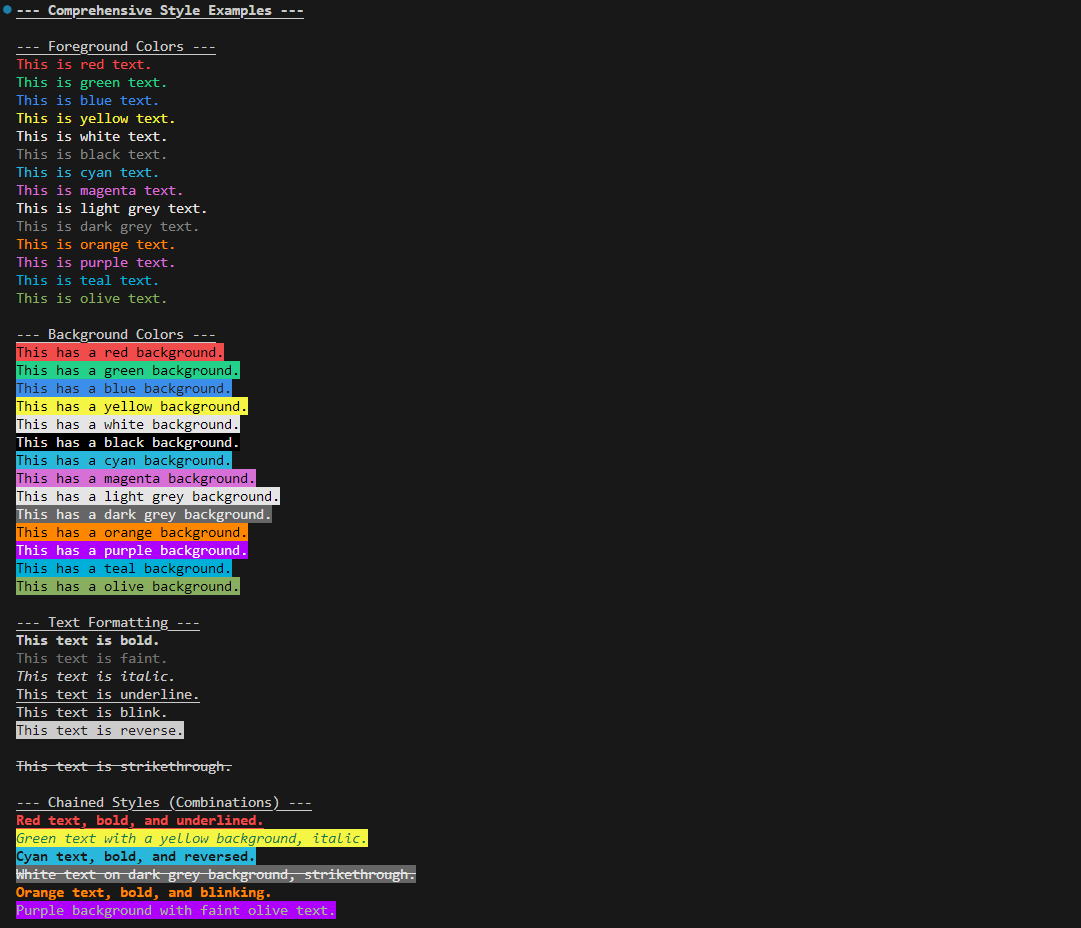
A comprehensive example file, examples.py, demonstrates all available colors, background colors, text formats, chained styles, and semantic themes.
To run the examples:
-
If running from the cloned repository, ensure
PyTermStylePlus.pyandexamples.pyare in the same directory (orPyTermStylePlus.pyis in your Python path). -
Execute
examples.pyfrom your terminal:python examples.py
You will see various styled messages, demonstrating:
-
All foreground and background colors.
-
All text formatting options (bold, underline, italic, etc.).
-
Combinations of styles.
-
Semantic styles (e.g.,
error,success,info,notice,emphasis,status_ok)- These will appear differently when the theme is switched from
defaulttodark.
- These will appear differently when the theme is switched from
-
Graceful degradation behavior in simulated "dumb" terminals.
API Reference
style(text: str) -> TermStyle
The main entry point for the fluent API. Call style() with your text to start chaining styling methods.
print(style("My text").red().bold().underline())
style.semantic_name(text: str) -> TermStyle
Applies a predefined semantic style based on the currently active theme.
Available Semantic Styles:
-
style.error(text) -
style.success(text) -
style.info(text) -
style.warning(text) -
style.highlight(text) -
style.primary(text) -
style.secondary(text) -
style.notice(text) -
style.emphasis(text) -
style.status_ok(text)
set_theme(theme_name: str)
Changes the active theme for all subsequent semantic styling calls.
Available Themes: "default", "dark"
from PyTermStylePlus import set_theme

set_theme("dark") # All semantic styles will now use the 'dark' theme definitions
print(style.info("This is now dark theme info."))
Available Basic Styling Methods
These methods are chained onto style(text):
Foreground Colors:
red(), green(), blue(), yellow(), white(), black(), cyan(), magenta(), light_grey(), dark_grey(), orange(), purple(), teal(), olive()
Background Colors:
bg_red(), bg_green(), bg_blue(), bg_yellow(), bg_white(), bg_black(), bg_cyan(), bg_magenta(), bg_light_grey(), bg_dark_grey(), bg_orange(), bg_purple(), bg_teal(), bg_olive()
Text Formats:
bold(), faint(), italic(), underline(), blink(), reverse(), concealed(), strikethrough()
Terminal Compatibility
PyTermStylePlus automatically checks if your terminal environment supports ANSI escape codes. If support is not detected (e.g., TERM=dumb, or older Windows consoles), styling will be automatically disabled to prevent garbled output. This ensures your application remains readable across various terminal environments.
For Windows users, PyTermStylePlus attempts to enable ANSI support using os.system('') on initialization, which is often sufficient for modern terminals like Windows Terminal, PowerShell, or VS Code's integrated terminal.
Contributing
Contributions are welcome! If you have ideas for new features, bug fixes, or improvements to existing styles/themes, please feel free to:
-
Fork the repository at
https://github.com/Mohammedcha/PyTermStylePlus. -
Create a new branch (
git checkout -b feature/your-feature). -
Make your changes.
-
Commit your changes (
git commit -am 'Add new feature'). -
Push to the branch (
git push origin feature/your-feature). -
Create a new Pull Request.
License
This project is licensed under the MIT License - see the LICENSE file for details.
1 maintainer

Metadata
1 maintainer
Release files for PyTermStylePlus 0.1.1
For a detailed explanation of source distributions (sdists) and built distributions (wheels), please see the package formats documentation.
Source distribution (sdist)
| File | Size | Uploaded | |
|---|---|---|---|
| pytermstyleplus-0.1.1.tar.gz | 7.0 kB | Details |
Built distribution (wheel)
| File | Interpreter | ABI | Platform | Reset |
|---|---|---|---|---|
| pytermstyleplus-0.1.1-py3-none-any.whl | Python 3 | none | any | Details |
Total release size: 14.2 kB
Release files / pytermstyleplus-0.1.1.tar.gz
| Download URL | pytermstyleplus-0.1.1.tar.gz |
|---|---|
| Size | 7.0 kB |
| Tags | Source |
|
SHA-256 checksum How to use checksums |
4c2e60a3067976fa410ecf6ec3b3af12900df5f68848cd1d115ebc2bc6d3c71e
|
|
BLAKE2b-256 checksum How to use checksums |
18cf31857d8f2d0c60c88f78afec1305603e8f624ca1273c8f99b493d32cc253
|
| Upload date | |
|
Uploaded using Trusted Publishing? What is trusted publishing? |
No |
| Uploaded via |
twine/6.1.0 CPython/3.10.5
|
Release files / pytermstyleplus-0.1.1-py3-none-any.whl
| Download URL | pytermstyleplus-0.1.1-py3-none-any.whl |
|---|---|
| Size | 7.3 kB |
| Tags | Python 3 |
|
SHA-256 checksum How to use checksums |
8fb9b5981ab6a1bc1d6dc2250af86fe864c8dc808f0986a4f02bd6baace7190e
|
|
BLAKE2b-256 checksum How to use checksums |
7c3914dd1c09b2a6227e73dcd1b5b5623ea19bcfe8c1c62bf220ad96e5d3920a
|
| Upload date | |
|
Uploaded using Trusted Publishing? What is trusted publishing? |
No |
| Uploaded via |
twine/6.1.0 CPython/3.10.5
|














