
pyTextColor v1.0
Introduction
pyTextColor is a simple Python Library to display colorful outputs in Terminal, etc.
Note: Your Terminal or any software in which you are going to print a text should support the ANSI Escape Sequences or it may not work!
Install
To install this library, type pip install pyTextColor in the Terminal(command prompt)
Import
To import the library, use the following code:
import pyTextColor
Print Basic Colored Output
See the following program to print a colorful text in Python!
import pyTextColor  # Import the library

pytext = pyTextColor.pyTextColor()  # Create an object of the pyTextColor class

text = pytext.format_text(text="Hi!", color="white",
                          bgcolor="black")  # Format the text with the color/bgcolor of your choice

print(text)  # Print the text
The above program will give the output as:
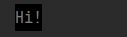
You can also change the style/color/background of the text!
Following is a list of all color names you can use for both background and text:
- black
- red
- green
- yellow
- blue
- magenta
- cyan
- white
Note: You can also use HEX color values to color a text or background. Remember: HEX color values should have '#' before the main color value
Example Code:
import pyTextColor

pytext = pyTextColor.pyTextColor()

text = pytext.format_text(text="This text will be printed out in yellow color with red background", color="#ff0000",
                          bgcolor="#FFFF00")  # HEX values

print(text)  # Print the text
The output of the above code will be:

Text Styles
There are many text styles you can use. Use the text_style parameter to change the text style. Example code:
import pyTextColor

pytext = pyTextColor.pyTextColor()

text = pytext.format_text(text="I am bold text", color="#ff0000",
                          bgcolor="#FFFF00", text_style="bold")  # bold text

print(text)  # Print the text
The output of the above program will be:

There are many text styles you can use! See the list of available styles:
normal> for normal textbold> for bold textfaint> for faint textitalic> for italic textunderline> for underlined textblink> for blinking textreverse> for reversed text. The color of the text will be changed to background color while the background color will be changed to text colorhidden> for hidden textstrikethrough> for strikethrough text
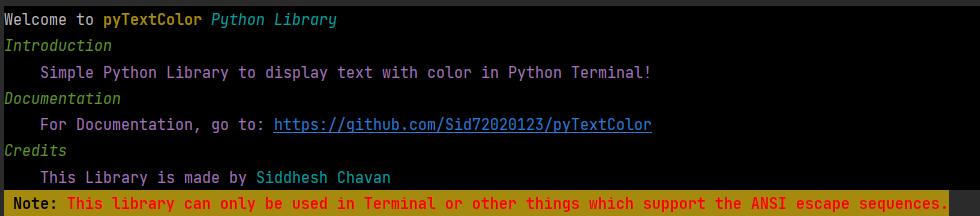
Print the documentation
To pretty print the documentation for this library, run the following code:
import pyTextColor

pytext = pyTextColor.pyTextColor()
pytext.pretty_print_help()  # Print the docs
The output will be:
Parameters of the format_text() function
The format_text() function has many parameters such as:
text> The text you wantcolor> The color you wantbgcolor> The background color you wanttext_style> The text style you wantbg_full_line> Set this toTrueif you want the background color to be printed on full line
Make output fully customised?
See the following program to make the output fully customized:
import pyTextColor

pytext = pyTextColor.pyTextColor()

color = pytext.color  # Color Function
style = pytext.style  # Style Function
bg = pytext.background  # Background Function
reset = pytext.reset  # Reset Function (To reset all styles/colors/etc.)

name = "Siddhesh"
age = 15
hobby = "programming"

text = f"""{bg("black")}{color("#ffffff")}Hi! I am {color("magenta")}{name}{color("#ffffff")}. I am {color("magenta")}{age}{color("#ffffff")} years old. My favourite hobby is {color("green")}{style("italic")}{hobby}{reset()}"""  # Make an f-string and edit the text

print(text)  # Print the output
The output will be:

Remember to use the reset() function or the normal text will be printed out with styles when you print a text
below the styled text.
Thank you!
1 maintainer

Metadata
1 maintainer
Release files for pyTextColor 1.0.1
For a detailed explanation of source distributions (sdists) and built distributions (wheels), please see the package formats documentation.
Source distribution (sdist)
| File | Size | Uploaded | |
|---|---|---|---|
| pyTextColor-1.0.1.tar.gz | 4.5 kB | Details |
Release files / pyTextColor-1.0.1.tar.gz
| Download URL | pyTextColor-1.0.1.tar.gz |
|---|---|
| Size | 4.5 kB |
| Tags | Source |
|
SHA-256 checksum How to use checksums |
b25b46c9392afec696ae255a79b459b17b837048c18f45fc651de0c39181953b
|
|
BLAKE2b-256 checksum How to use checksums |
56992d446d152c5823128d3467badbef685e67e15f5be9f4c896adbdb9210d88
|
| Upload date | |
|
Uploaded using Trusted Publishing? What is trusted publishing? |
No |
| Uploaded via |
twine/3.4.2 importlib_metadata/4.8.1 pkginfo/1.7.1 requests/2.26.0 requests-toolbelt/0.9.1 tqdm/4.62.3 CPython/3.10.0
|














