
👾 Chips
Handsome testing tool. It inserts "chips" to your code, detecting unused fragments. Then shows unused functions in a pretty table.
Visit chips git to see the insights
Installation
Use the package manager pip to install Chips
pip install python-chips
Setup Chips
By default chips setups everything for you, after -s command. If you are running into problems, use args below.
-v --venv <on/off>Defaults toon. Determine whether you are using virtualenv or not. If set toonChips will search for a virtualenv on a root path. Note: if--venv off, you should run commands below withpython -m chipsinstead of$chips-p --path <YOUR_VIRTUALENV_PATH>Specify virtualenv path if venv not found
python -m chips -s
Open a new tab in terminal or run source <YOUR_VIRTUALENV_PATH>/bin/activate
Usage
BEFORE YOU START: If you want to fully "chip" a big project (not a single app directory), it's highly recommended
to use --auto off with -a command, for improving project performance. Learn more about --auto option below.
- Add chips to your project (-a --add)
$chips -a
-
Use your code (trigger functions in a way: make api requests, click website, etc..)
-
Generate results file with
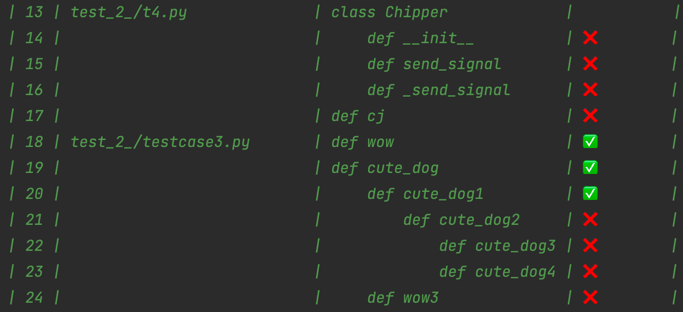
$chips -rs(only if--auto offon-a). See the generated results at .chipping_results/results.py in a pretty table
- Remove chips (-r --remove)
$chips -r
Ignore particular dirs and files
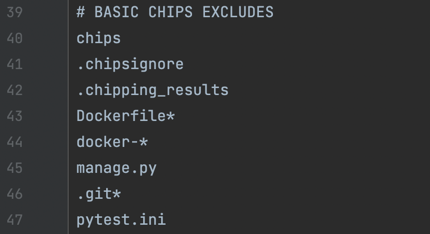
To exclude particular dirs and files from chipping (f.e. tests and manage.py in Django) Chips generates a .chipsignore file, based on your .gitignore. Syntax is the same.
There's a basic excludes list in .chipsignore. You can modify it any time you want.
Chipping path
Basically Chips are performing on a root path of your project. You can specify a folder or file local path, where you want Chips to perform (add or remove). Use -p --path arg.
$chips -a -p <DESIRED PATH>
Bad performance
If you struggle from a bad performance after chipping, use --auto off to turn off auto generated results
$chips -a --auto off
Then you'll need to generate results manually (-rs --results)
$chips -rs
Chips logging
Choose logging type. Can be applied to remove and add (-rt --result_type)
- list (default for add) - list all affected files,
- count (default for remove) - print number of files affected,
- blind - no output
$chips -a -rt count
Contributing
Pull requests are welcome. For major changes, please open an issue first to discuss what you would like to change. git here
1 maintainer

Metadata
1 maintainer
Release files for python-chips 1.0.15
For a detailed explanation of source distributions (sdists) and built distributions (wheels), please see the package formats documentation.
Source distribution (sdist)
| File | Size | Uploaded | Provenance | Actions |
|---|---|---|---|---|
| python-chips-1.0.15.tar.gz | 11.7 kB | Without provenance | Details for python-chips-1.0.15.tar.gz |
Built distribution (wheel)
| File | Interpreter | ABI | Platform | Actions Reset |
|---|---|---|---|---|
| python_chips-1.0.15-py3-none-any.whl | Python 3 | none | any | Details for python_chips-1.0.15-py3-none-any.whl |
Total release size: 24.7 kB
Release files / python-chips-1.0.15.tar.gz
| Download URL | python-chips-1.0.15.tar.gz |
|---|---|
| Size | 11.7 kB |
| Tags | Source |
|
SHA-256 checksum How to use checksums |
38a222dcfed01233a80049237b1e72218789503b5897b2e9fa57f4b7cd0220c4
|
|
BLAKE2b-256 checksum How to use checksums |
7945617fc194d8a0bef4512423d4afac1f0131414c24f0c4fbbcfb6cddfcf096
|
| Upload date | |
|
Uploaded using Trusted Publishing? What is trusted publishing? |
No |
| Uploaded via |
poetry/1.1.13 CPython/3.8.2 Darwin/20.6.0
|
Release files / python_chips-1.0.15-py3-none-any.whl
| Download URL | python_chips-1.0.15-py3-none-any.whl |
|---|---|
| Size | 13.0 kB |
| Tags | Python 3 |
|
SHA-256 checksum How to use checksums |
806cc697bc5c33cd1c494bd7cd117d50e30d3b319af7b47a1b44dcaf4fcddde3
|
|
BLAKE2b-256 checksum How to use checksums |
b9f4670007fe0a2414bc7c66d1e8894071160f310f053873a123318e8ce7b266
|
| Upload date | |
|
Uploaded using Trusted Publishing? What is trusted publishing? |
No |
| Uploaded via |
poetry/1.1.13 CPython/3.8.2 Darwin/20.6.0
|
Security for python-chips 1.0.15
Provenance
Provenance describes where a file came from. On PyPI, provenance is shared via attestations, which provide a verifiable record of the build or publishing details. View details, limitations and caveats.
No provenance found
None of the files in this release were uploaded with provenance metadata.
A note on package security
PyPI is a repository for distributing packages, not a service for auditing them. While third-party security researchers and our staff do their best to detect and remove malicious packages, PyPI cannot guarantee the quality, security or suitability of any given package.
To learn more about protecting yourself from malicious actors, visit our package security documentation.














