
PyTorchTS
PyTorchTS is a PyTorch Probabilistic Time Series forecasting framework which provides state of the art PyTorch time series models by utilizing GluonTS as its back-end API and for loading, transforming and back-testing time series data sets.
Installation
$ pip3 install pytorchts
Quick start
Here we highlight the the API changes via the GluonTS README.
import matplotlib.pyplot as plt
import pandas as pd
import torch

from gluonts.dataset.common import ListDataset
from gluonts.dataset.util import to_pandas

from pts.model.deepar import DeepAREstimator
from pts import Trainer
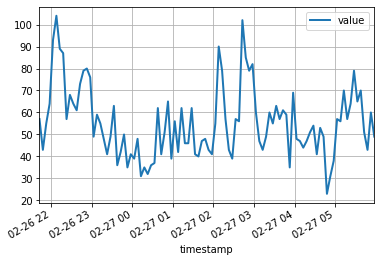
This simple example illustrates how to train a model on some data, and then use it to make predictions. As a first step, we need to collect some data: in this example we will use the volume of tweets mentioning the AMZN ticker symbol.
url = "https://raw.githubusercontent.com/numenta/NAB/master/data/realTweets/Twitter_volume_AMZN.csv"
df = pd.read_csv(url, header=0, index_col=0, parse_dates=True)
The first 100 data points look like follows:
df[:100].plot(linewidth=2)
plt.grid(which='both')
plt.show()
We can now prepare a training dataset for our model to train on. Datasets are essentially iterable collections of dictionaries: each dictionary represents a time series with possibly associated features. For this example, we only have one entry, specified by the "start" field which is the timestamp of the first data point, and the "target" field containing time series data. For training, we will use data up to midnight on April 5th, 2015.
training_data = ListDataset(
    [{"start": df.index[0], "target": df.value[:"2015-04-05 00:00:00"]}],
    freq = "5min"
)
A forecasting model is a predictor object. One way of obtaining predictors is by training a correspondent estimator. Instantiating an estimator requires specifying the frequency of the time series that it will handle, as well as the number of time steps to predict. In our example we're using 5 minutes data, so req="5min", and we will train a model to predict the next hour, so prediction_length=12. The input to the model will be a vector of size input_size=43 at each time point. We also specify some minimal training options in particular training on a device for epoch=10.
device = torch.device("cuda" if torch.cuda.is_available() else "cpu")

estimator = DeepAREstimator(freq="5min",
                            prediction_length=12,
                            input_size=43,
                            trainer=Trainer(epochs=10,
                                            device=device))
predictor = estimator.train(training_data=training_data, num_workers=4)
    45it [00:01, 37.60it/s, avg_epoch_loss=4.64, epoch=0]
    48it [00:01, 39.56it/s, avg_epoch_loss=4.2, epoch=1]
    45it [00:01, 38.11it/s, avg_epoch_loss=4.1, epoch=2]
    43it [00:01, 36.29it/s, avg_epoch_loss=4.05, epoch=3]
    44it [00:01, 35.98it/s, avg_epoch_loss=4.03, epoch=4]
    48it [00:01, 39.48it/s, avg_epoch_loss=4.01, epoch=5]
    48it [00:01, 38.65it/s, avg_epoch_loss=4, epoch=6]
    46it [00:01, 37.12it/s, avg_epoch_loss=3.99, epoch=7]
    48it [00:01, 38.86it/s, avg_epoch_loss=3.98, epoch=8]
    48it [00:01, 39.49it/s, avg_epoch_loss=3.97, epoch=9]
During training, useful information about the progress will be displayed. To get a full overview of the available options, please refer to the source code of DeepAREstimator (or other estimators) and Trainer.
We're now ready to make predictions: we will forecast the hour following the midnight on April 15th, 2015.
test_data = ListDataset(
    [{"start": df.index[0], "target": df.value[:"2015-04-15 00:00:00"]}],
    freq = "5min"
)
for test_entry, forecast in zip(test_data, predictor.predict(test_data)):
    to_pandas(test_entry)[-60:].plot(linewidth=2)
    forecast.plot(color='g', prediction_intervals=[50.0, 90.0])
plt.grid(which='both')
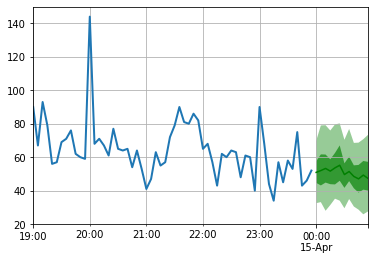
Note that the forecast is displayed in terms of a probability distribution: the shaded areas represent the 50% and 90% prediction intervals, respectively, centered around the median (dark green line).
Development
pip install -e .
pytest test
Citing
To cite this repository:
@software{pytorchgithub,
    author = {Kashif Rasul},
    title = {{P}yTorch{TS}},
    url = {https://github.com/zalandoresearch/pytorch-ts},
    version = {0.6.x},
    year = {2021},
}
Scientific Article
We have implemented the following model using this framework:
@INPROCEEDINGS{rasul2020tempflow,
  author = {Kashif Rasul and  Abdul-Saboor Sheikh and  Ingmar Schuster and Urs Bergmann and Roland Vollgraf},
  title = {{M}ultivariate {P}robabilistic {T}ime {S}eries {F}orecasting via {C}onditioned {N}ormalizing {F}lows},
  year = {2021},
  url = {https://openreview.net/forum?id=WiGQBFuVRv},
  booktitle = {International Conference on Learning Representations 2021},
}
@InProceedings{pmlr-v139-rasul21a,
  title = 	 {{A}utoregressive {D}enoising {D}iffusion {M}odels for {M}ultivariate {P}robabilistic {T}ime {S}eries {F}orecasting},
  author =       {Rasul, Kashif and Seward, Calvin and Schuster, Ingmar and Vollgraf, Roland},
  booktitle = 	 {Proceedings of the 38th International Conference on Machine Learning},
  pages = 	 {8857--8868},
  year = 	 {2021},
  editor = 	 {Meila, Marina and Zhang, Tong},
  volume = 	 {139},
  series = 	 {Proceedings of Machine Learning Research},
  month = 	 {18--24 Jul},
  publisher =    {PMLR},
  pdf = 	 {http://proceedings.mlr.press/v139/rasul21a/rasul21a.pdf},
  url = 	 {http://proceedings.mlr.press/v139/rasul21a.html},
}
@misc{gouttes2021probabilistic,
      title={{P}robabilistic {T}ime {S}eries {F}orecasting with {I}mplicit {Q}uantile {N}etworks},
      author={Adèle Gouttes and Kashif Rasul and Mateusz Koren and Johannes Stephan and Tofigh Naghibi},
      year={2021},
      eprint={2107.03743},
      archivePrefix={arXiv},
      primaryClass={cs.LG}
}
1 maintainer

Metadata
1 maintainer
Release files for pytorchts 0.6.0
For a detailed explanation of source distributions (sdists) and built distributions (wheels), please see the package formats documentation.
Source distribution (sdist)
| File | Size | Uploaded | Provenance | Actions |
|---|---|---|---|---|
| pytorchts-0.6.0.tar.gz | 88.3 kB | Without provenance | Details for pytorchts-0.6.0.tar.gz |
Release files / pytorchts-0.6.0.tar.gz
| Download URL | pytorchts-0.6.0.tar.gz |
|---|---|
| Size | 88.3 kB |
| Tags | Source |
|
SHA-256 checksum How to use checksums |
09c5c25601495075cfd690230a20769b424334bb05609cf078322b852733c536
|
|
BLAKE2b-256 checksum How to use checksums |
b6d776a5fa8591937ef75e4b06eecdb63feae745229204a4c0a0907b407423ac
|
| Upload date | |
|
Uploaded using Trusted Publishing? What is trusted publishing? |
No |
| Uploaded via |
twine/4.0.0 CPython/3.9.12
|
Security for pytorchts 0.6.0
Provenance
Provenance describes where a file came from. On PyPI, provenance is shared via attestations, which provide a verifiable record of the build or publishing details. View details, limitations and caveats.
No provenance found
None of the files in this release were uploaded with provenance metadata.
A note on package security
PyPI is a repository for distributing packages, not a service for auditing them. While third-party security researchers and our staff do their best to detect and remove malicious packages, PyPI cannot guarantee the quality, security or suitability of any given package.
To learn more about protecting yourself from malicious actors, visit our package security documentation.














