
pyuwb
python sdk for dw1000 uwb locating library.
how to install
pip install pyuwb
pyuwb-qt-demo:
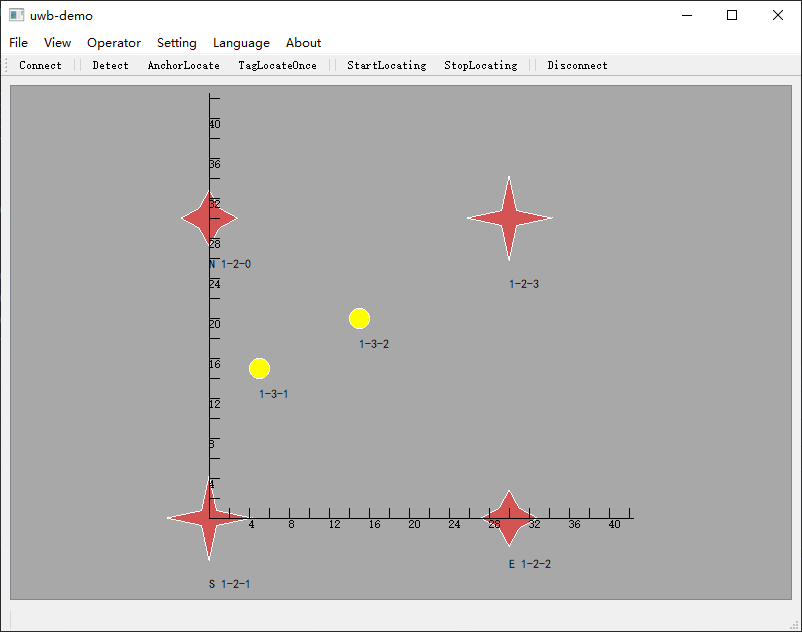
definition:
client_id: device sn,format:{group_id}-{type_id}-{client_no} a string.eg:1-2-4.
                where: group_id: fixed 1.
		     type_id:  2--anchorz(connect to computer). 1--normal anchor. 0 --tag
		client_no: client NO. start from 0.
use it step by step:
connect
from pyuwb import uwb
h=uwb()
#conect to serial
h.connect()
set or detect anchor & tag
set device list
# set device list
h.set_device(tag_no_list=[1], anchor_no_list=[0])
or auto-detect
# auto-detect the device nearby. if you don't know the device_no, you can use this instead of set_device
h.detect_device()
measure distance
# get distance of two device using the device client_id
dist_meter = h.get_distance('1-0-1', '1-1-0')
set anchor pos
locating the anchor using themselves
anchor_pos_list = h.locate_anchor()
# print the located anchor pos
print(anchor_pos_list)
or set anchor pos directly:
# set anchor position.  you could use this instead of locate_anchor() if you know the anchor exact pos.
anchor_pos_list = [{'client_id': '1-1-0', 'pos': {'x': 0, 'y': 5.5, 'z': 0.5}},
                       {'client_id': '1-1-1', 'pos': {'x': 0, 'y': 0, 'z': 1.1}},
                       {'client_id': '1-1-2', 'pos': {'x': 2.67, 'y': -0.33, 'z': 0.5}},
                       {'client_id': '1-1-3', 'pos': {'x': 4.03, 'y': 5.47, 'z': 1.1},
                       }]
h.set_anchor_location(anchor_pos_list)
measure tag pos
start tag locating once
located_tag_pos = h.start_locate_once()
print('located_tag_pos:', located_tag_pos)
or set callback function and locating in a loop
def function_to_call(tag_no,dist, pos):
	# this function will be called everytime one tag is located successfully
	print('function_to_call', tag_no,pos, dist)
# set callback
h.set_pos_callback(function_to_call)

# start and wait for 10-seconds
h.set_to_start()
t1=time.time()

while time.time()-t1<10:
	h.locate_loop()
# stop the continuous measure
h.stop_measure_h()
use it by example:
get distance:
from pyuwb import uwb
h=uwb()
#conect to serial
h.connect()
# set device list
h.set_device(tag_no_list=[1], anchor_no_list=[0])
# get distance of two device using the device client_id
dist_meter = h.get_distance('1-3-1', '1-2-0')
print('distance between 1-3-1 & 1-2-0', dist_meter,'meter')
locating example 1:
from pyuwb import uwb
h=uwb()
#conect to serial
h.connect(com_port="COM3") #set to None will auto-detect the port
# set device list
h.set_device(tag_no_list=[1,2], anchor_no_list=[0,1,2,3])
# locating the anchor using themself
anchor_pos_list = h.locate_anchor()
# print the located anchor pos
print(anchor_pos_list)
# start tag locating once
located_tag_pos = h.start_locate_once()
print('located_tag_pos:', located_tag_pos)
locating example 2:
from pyuwb import uwb
h=uwb()
h.connect(com_port="COM3") #set to None will auto-detect the port
# auto-detect the device nearby. if you don't know the device_no, you can use this instead of set_device
h.detect_device()
# set anchor position.  you could use this instead of locate_anchor() if you know the anchor exact pos.
anchor_pos_list = [{'client_id': '1-2-0', 'pos': {'x': 0, 'y': 5.5, 'z': 0.5}},
                       {'client_id': '1-2-1', 'pos': {'x': 0, 'y': 0, 'z': 1.1}},
                       {'client_id': '1-2-2', 'pos': {'x': 2.67, 'y': -0.33, 'z': 0.5}},
                       {'client_id': '1-2-3', 'pos': {'x': 4.03, 'y': 5.47, 'z': 1.1},
                       }]
h.set_anchor_location(anchor_pos_list)

def function_to_call(tag_no,dist, pos):
	# this function will be called everytime one tag is located successfully
	print('function_to_call', tag_no,pos, dist)
# set callback
h.set_pos_callback(function_to_call)

# start and wait for 10-seconds
h.set_to_start()
t1=time.time()

while time.time()-t1<10:
	h.locate_loop()
# stop the continuous measure
h.stop_measure_h()
1 maintainer

Release files for pyuwb 0.0.8
For a detailed explanation of source distributions (sdists) and built distributions (wheels), please see the package formats documentation.
Source distribution (sdist)
| File | Size | Uploaded | |
|---|---|---|---|
| pyuwb-0.0.8.tar.gz | 32.6 kB | Details |
Built distribution (wheel)
| File | Interpreter | ABI | Platform | Reset |
|---|---|---|---|---|
| pyuwb-0.0.8-py3-none-any.whl | Python 3 | none | any | Details |
Total release size: 68.3 kB
Release files / pyuwb-0.0.8.tar.gz
| Download URL | pyuwb-0.0.8.tar.gz |
|---|---|
| Size | 32.6 kB |
| Tags | Source |
|
SHA-256 checksum How to use checksums |
591661973fa2ccc1df47c9d2efa095869fb52d52142fc5ca03ae907fb9e9fee0
|
|
BLAKE2b-256 checksum How to use checksums |
a1e949aef47b3707bdeed3f45db90a60ea1eb4550432b35096f1ce124b15e290
|
| Upload date | |
|
Uploaded using Trusted Publishing? What is trusted publishing? |
No |
| Uploaded via |
twine/3.8.0 pkginfo/1.8.2 readme-renderer/34.0 requests/2.27.1 requests-toolbelt/0.9.1 urllib3/1.26.9 tqdm/4.63.0 importlib-metadata/4.11.3 keyring/23.5.0 rfc3986/2.0.0 colorama/0.4.4 CPython/3.9.9
|
Release files / pyuwb-0.0.8-py3-none-any.whl
| Download URL | pyuwb-0.0.8-py3-none-any.whl |
|---|---|
| Size | 35.7 kB |
| Tags | Python 3 |
|
SHA-256 checksum How to use checksums |
81d255b0ce77daa8876914013b44994026b3ce8937b56a540b14bbad186f06b0
|
|
BLAKE2b-256 checksum How to use checksums |
605a4abce77b013921324bb257a8c26162553cab89a52c8ae1ec90028a93c19a
|
| Upload date | |
|
Uploaded using Trusted Publishing? What is trusted publishing? |
No |
| Uploaded via |
twine/3.8.0 pkginfo/1.8.2 readme-renderer/34.0 requests/2.27.1 requests-toolbelt/0.9.1 urllib3/1.26.9 tqdm/4.63.0 importlib-metadata/4.11.3 keyring/23.5.0 rfc3986/2.0.0 colorama/0.4.4 CPython/3.9.9
|














