





Package pyVHR (short for Python framework for Virtual Heart Rate) is a comprehensive framework for studying methods of pulse rate estimation relying on video, also known as remote photoplethysmography (rPPG).
Description
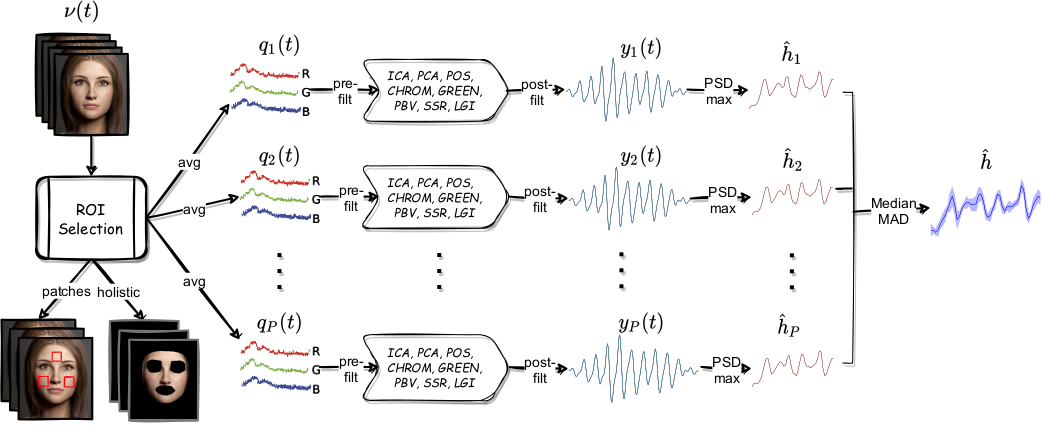
The methodological rationale behind the framework is that in order to study, develop and compare new rPPG methods in a principled and reproducible way, the following conditions should be met: i) a structured pipeline to monitor rPPG algorithms' input, output, and main control parameters; ii) the availability and the use of multiple datasets; iii) a sound statistical assessment of methods' performance. pyVHR allows to easily handle rPPGmethods and data, while simplifying the statistical assessment. Its main features lie in the following.
- Analysis-oriented. It constitutes a platform for experiment design, involving an arbitrary number of methods applied to multiple video datasets. It provides a systemic end-to-end pipeline, allowing to assess different rPPG algorithms, by easily setting parameters and meta-parameters.
- Openness. It comprises both method and dataset factory, so to easily extend the pool of elements to be evaluatedwith newly developed rPPG methods and any kind of videodatasets.
- Robust assessment. The outcomes are arranged intostructured data ready for in-depth analyses. Performance comparison is carried out based on robust nonparametric statistical tests.
Eight well-known rPPG methods, namely ICA, PCA, GREEN, CHROM, POS, SSR, LGI, PBV, are evaluated through extensive experiments across five public video datasets, i.e. PURE, LGI, UBFC, MAHNOB and COHFACE, and subsequent nonparametric statistical analysis.
Getting started
Dependencies
The quickest way to get started is to install the miniconda distribution, a lightweight minimal installation of Anaconda Python.
Once installed, create a new conda environment and automatically fetch all the dependencies based on your architecture (with or without GPU), using one of the following commands:
CPU-only version
conda env create --file https://raw.githubusercontent.com/phuselab/pyVHR/pyVHR_CPU/pyVHR_CPU_env.yml
CPU+GPU version
This yml environment is for cudatoolkit=10.2 and python=3.8.
conda env create --file https://raw.githubusercontent.com/phuselab/pyVHR/master/pyVHR_env.yml
Installation
Enter the newly created conda environment and install the latest stable release build of pyVHR with:
CPU-only version
conda activate pyvhr
(pyvhr) pip install pyvhr-cpu
CPU+GPU version
conda activate pyvhr
(pyvhr) pip install pyvhr
Basic usage and Notebooks
Run the following code to obtain BPM estimates over time for a single video:
from pyVHR.analysis.pipeline import Pipeline
import matplotlib.pyplot as plt

pipe = Pipeline()
time, BPM, uncertainty = pipe.run_on_video('/path/to/video', roi_approach="patches", roi_method="faceparsing")

plt.figure()
plt.plot(time, BPM)
plt.fill_between(time, BPM-uncertainty, BPM+uncertainty, alpha=0.2)
plt.show()
The full documentation of run_on_video method, with all the possible parameters, can be found here: https://phuselab.github.io/pyVHR/
The notebooks folder contains useful Jupyter notebooks.
GUI
In the folder realtime you can find an example of a simple GUI created using the pyVHR package.
You can launch it by going into the path pyVHR/realtime/ and using the command
python GUI.py
If you want to use a specific rPPG method and pre-post filterings, you must set them in the last lines of GUI.py.
Below is a video showing the use of the GUI.
Developing
The latest unstable development build of pyVHR is available on GitHub, and can be obtained downloading from source and installing via:
git clone git@github.com:phuselab/pyVHR.git
cd pyVHR/
python setup.py install
The main branch refers to the full pyVHR framework (requires GPU), while the pyVHR_CPU branch is dedicated to the CPU-only architectures.
Custom installation
If you want to create your environment from scratch you should follow these steps:
- Install PyTorch (here)
- Install Numba (here)
- Install Cupy (for GPU only) with the correct CUDA version (here)
- Install CuSignal (for GPU only) using conda and remove from the command 'cudatoolkit=x.y' (here)
- Install Kaleido (here)
- Install PyTables (here)
- Install pyVHR as shown above.
Methods
The framework contains the implementation of the most common methods for remote-PPG measurement, and are located in the methods folder. Currently implemented methods with reference publications are:
Green / Verkruysse, W., Svaasand, L. O., & Nelson, J. S. (2008). Remote plethysmographic imaging using ambient light. Optics express, 16(26), 21434-21445.
CHROM / De Haan, G., & Jeanne, V. (2013). Robust pulse rate from chrominance-based rPPG. IEEE Transactions on Biomedical Engineering, 60(10), 2878-2886.
ICA / Poh, M. Z., McDuff, D. J., & Picard, R. W. (2010). Non-contact, automated cardiac pulse measurements using video imaging and blind source separation. Optics express, 18(10), 10762-10774.
LGI / Pilz, C. S., Zaunseder, S., Krajewski, J., & Blazek, V. (2018). Local group invariance for heart rate estimation from face videos in the wild. In Proceedings of the IEEE Conference on Computer Vision and Pattern Recognition Workshops (pp. 1254-1262).
PBV / De Haan, G., & Van Leest, A. (2014). Improved motion robustness of remote-PPG by using the blood volume pulse signature. Physiological measurement, 35(9), 1913.
PCA / Lewandowska, M., Rumiński, J., Kocejko, T., & Nowak, J. (2011, September). Measuring pulse rate with a webcam—a non-contact method for evaluating cardiac activity. In 2011 federated conference on computer science and information systems (FedCSIS) (pp. 405-410). IEEE.
POS / Wang, W., den Brinker, A. C., Stuijk, S., & de Haan, G. (2016). Algorithmic principles of remote PPG. IEEE Transactions on Biomedical Engineering, 64(7), 1479-1491.
SSR / Wang, W., Stuijk, S., & De Haan, G. (2015). A novel algorithm for remote photoplethysmography: Spatial subspace rotation. IEEE transactions on biomedical engineering, 63(9), 1974-1984.
Datasets
Interfaces for five different datasets are provided in the datasets folder. Once the datasets are obtained, the respective files must be edited to match the correct path.
Currently supported datasets are:
COHFACE / https://www.idiap.ch/dataset/cohface
LGI-PPGI / https://github.com/partofthestars/LGI-PPGI-DB
MAHNOB-HCI / https://mahnob-db.eu/hci-tagging/
PURE / https://www.tu-ilmenau.de/en/neurob/data-sets-code/pulse/
UBFC1 / https://sites.google.com/view/ybenezeth/ubfcrppg
UBFC2 / https://sites.google.com/view/ybenezeth/ubfcrppg
Documentation
The full documentation of the pyVHR framework is available at https://phuselab.github.io/pyVHR/.
Reference
If you use this code, please cite the paper:
@article{Boccignone2020,
  doi = {10.1109/access.2020.3040936},
  url = {https://doi.org/10.1109/access.2020.3040936},
  year = {2020},
  publisher = {Institute of Electrical and Electronics Engineers ({IEEE})},
  pages = {1--1},
  author = {Giuseppe Boccignone and Donatello Conte and Vittorio Cuculo and Alessandro D’Amelio and Giuliano Grossi and Raffaella Lanzarotti},
  title = {An Open Framework for Remote-{PPG} Methods and their Assessment},
  journal = {{IEEE} Access}
}
License
This project is licensed under the GPL-3.0 License - see the LICENSE file for details
1 maintainer

Metadata
1 maintainer
Release files for pyVHR-cpu 1.0.2
For a detailed explanation of source distributions (sdists) and built distributions (wheels), please see the package formats documentation.
Source distribution (sdist)
| File | Size | Uploaded | |
|---|---|---|---|
| pyVHR-cpu-1.0.2.tar.gz | 92.9 kB | Details |
Built distribution (wheel)
| File | Interpreter | ABI | Platform | Reset |
|---|---|---|---|---|
| pyVHR_cpu-1.0.2-py3-none-any.whl | Python 3 | none | any | Details |
Total release size: 205.6 kB
Release files / pyVHR-cpu-1.0.2.tar.gz
| Download URL | pyVHR-cpu-1.0.2.tar.gz |
|---|---|
| Size | 92.9 kB |
| Tags | Source |
|
SHA-256 checksum How to use checksums |
3504379db7d751d5c23f2906f954f125176520b4e1fae4ab8ea5d37860d6f4b1
|
|
BLAKE2b-256 checksum How to use checksums |
b4f0c6de8b7f65073db762a0094e5314e1a0ab222ab6a7a2d9b8b2446b984dc3
|
| Upload date | |
|
Uploaded using Trusted Publishing? What is trusted publishing? |
No |
| Uploaded via |
twine/3.4.2 importlib_metadata/4.8.1 pkginfo/1.7.1 requests/2.26.0 requests-toolbelt/0.9.1 tqdm/4.62.3 CPython/3.10.0
|
Release files / pyVHR_cpu-1.0.2-py3-none-any.whl
| Download URL | pyVHR_cpu-1.0.2-py3-none-any.whl |
|---|---|
| Size | 112.7 kB |
| Tags | Python 3 |
|
SHA-256 checksum How to use checksums |
fb7ae40826f25984a9b7c21a6fb5ad90e5a1babe933346d789a4b94f8c0faa9a
|
|
BLAKE2b-256 checksum How to use checksums |
78339731ba2168712f7604d07d5004024ad5a17d8e741eac5053e83353381c29
|
| Upload date | |
|
Uploaded using Trusted Publishing? What is trusted publishing? |
No |
| Uploaded via |
twine/3.4.2 importlib_metadata/4.8.1 pkginfo/1.7.1 requests/2.26.0 requests-toolbelt/0.9.1 tqdm/4.62.3 CPython/3.10.0
|














