
pyvim
An implementation of Vim in Python
pip install pyvim
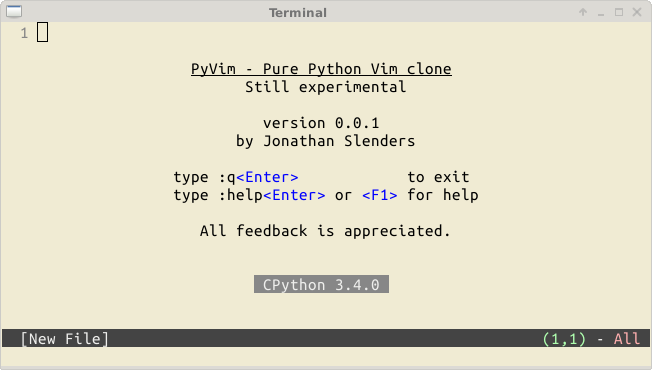
Issues, questions, wishes, comments, feedback, remarks? Please create a GitHub issue, I appreciate it.

Installation
Simply install pyvim using pip:
pip install pyvim
It is a good idea to add the following to your ~/.bashrc if you really want to use it:
alias vi=pyvim
export EDITOR=pyvim
The good things
The editor is written completely in Python. (There are no C extensions). This makes development a lot faster. It’s easy to prototype and integrate new features.
We have already many nice things, for instance:
Syntax highlighting of files, using the Pygments lexers.
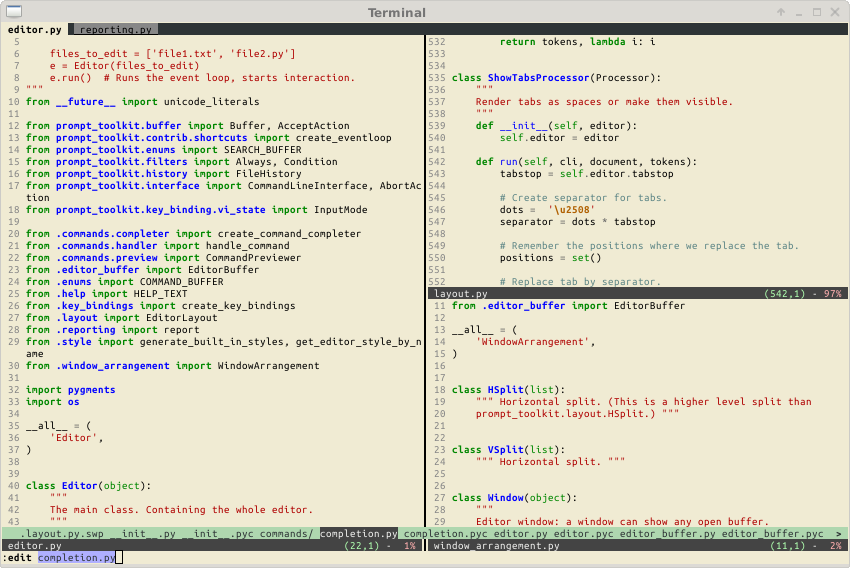
Horizontal and vertical splits, as well as tab pages. (Similar to Vim.)
All of the functionality of prompt_toolkit. This includes a lot of Vi key bindings, it’s platform independent and runs on every Python version from python 2.6 up to 3.4. It also runs on Pypy with a noticable performance boost.
Several :set ... commands have been implemented, like incsearch, number, ignorecase, wildmenu, expandtab, hlsearch, ruler, paste and tabstop.
Other working commands: vsplit, tabnew, only, badd, and many others.
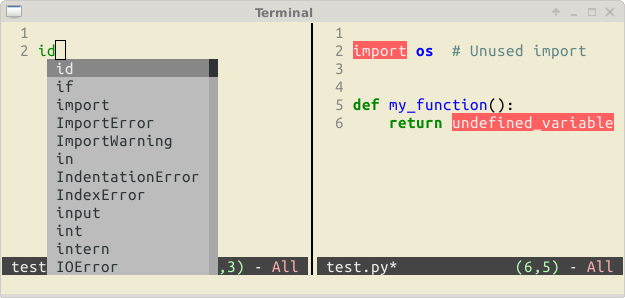
For Python source code, auto completion uses the amazing Jedi library, and code checking in done (asynchronously) through Pyflakes.
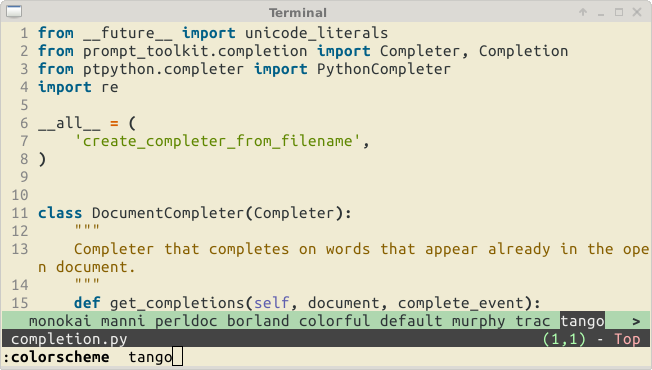
Colorschemes can be changed at runtime.
Further, when the project develops, it should also become possible to write extensions in Python, and use Python as a scripting language. (Instead of vimscript, for instance.)
We can also do some cool stuff. Like for instance running the editor on the Python asyncio event loop and having other coroutines interact with the editor.
Some more screenshots
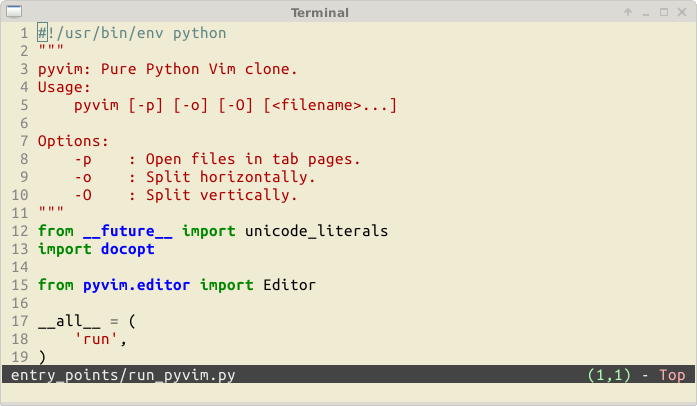
Editing its own source code:
Window layouts (horizontal and vertical splits + tab pages.)
Pyflakes for Python code checking and Jedi for autocompletion:
Other colorschemes:
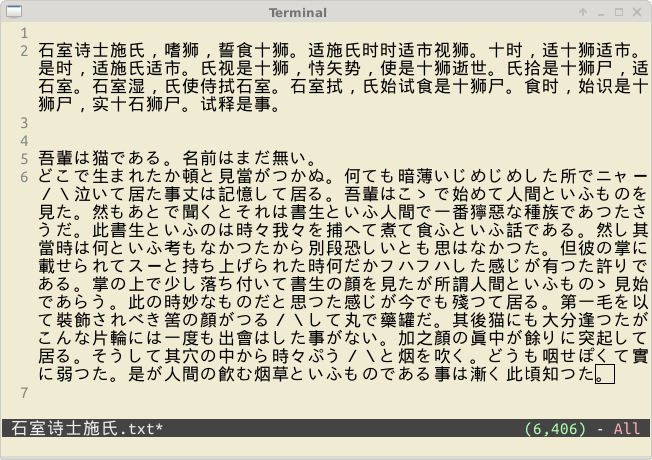
Chinese and Japanese input (double width characters):
Configuring pyvim
It is possible to create a .pyvimrc file for a custom configuration. Have a look at this example: pyvimrc
Limitations
Compared to Vi Improved, Pyvim is still less powerful in many aspects.
prompt_toolkit does not (or not yet) allow buffers to have an individual cursor when buffers are opened in several windows. Currently, this results in some unexpected behaviour, when a file is displayed in two windows at the same time. (The cursor could be displayed in the wrong window and other windows will sometimes scroll along when the cursor moves.) This has to be fixed in the future.
The data structure for a buffer is extremely simple. (Right now, it’s just a Python string, and an integer for the cursor position.) This works extremely well for development and quickly prototyping of new features, but it comes with a performance penalty. Depending on the system, when a file has above a thousand lines and syntax highlighting is enabled, editing will become noticable slower. (The bottleneck is probably the BufferControl code, which on every key press tries to reflow the text and calls pygments for highlighting. And this is Python code looping through single characters.)
A lot of nice Vim features, like line folding, macros, etcetera are not yet implemented.
Windows support is not that nice. It works, but could be improved. (I think most Windows users are not that interested in this project, but prove me wrong.)
Roadmap
There is no roadmap. I mostly implement the stuff which I need or interests me, or which gives me the opportunity to learn. But feel free to create a GitHub issue to request a new feature. Pull requests are also welcome. (Maybe create an issue first to discuss it, if you’re unsure whether I’ll merge it.)
Maybe some day we will have a better data structure (Rope), that makes it possible to open really large files. (With good algorithms, Python does not have to be slower than C code.)
Maybe we will also have line folding and probably block editing. Maybe some day we will have a built-in Python debugger or mouse support. We’ll see. :)
Testing
To run all tests, install pytest:
pip install pytest
And then run from root pyvim directory:
py.test
To test pyvim against all supported python versions, install tox:
pip install tox
And then run from root pyvim directory:
tox
You need to have installed all the supported versions of python in order to run tox command successfully.
Why did I create Pyvim?
There are several reasons.
The main reason is maybe because it was a small step after I created the Python prompt-toolkit library. That is a library which is actually only a simply pure Python readline replacement, but with some nice additions like syntax highlighting and multiline editing. It was never intended to be a toolkit for full-screen terminal applications, but at some point I realised that everything we need for an editor was in there and I liked to challenge its design. So, I started an editor and the first proof of concept was literally just a few hundred lines of code, but it was already a working editor.
The creation of pyvim will make sure that we have a solid architecture for prompt-toolkit, but it also aims to demonstrate the flexibility of the library. When it makes sense, features of pyvim will move back to prompt-toolkit, which in turn also results in a better Python REPL. (see ptpython, an alternative REPL.)
Above all, it is really fun to create an editor.
Alternatives
Certainly have a look at the alternatives:
Kaa: https://github.com/kaaedit/kaa by @atsuoishimoto
Vai: https://github.com/stefanoborini/vai by @stefanoborini
Vis: https://github.com/martanne/vis by @martanne
Q & A:
- Q
Do you use curses?
- A
No, it uses only prompt-toolkit.
Thanks
To Vi Improved, by Bram Moolenaar. For the inspiration.
To Jedi, pyflakes and the docopt Python libraries.
To the Python wcwidth port of Jeff Quast for support of double width characters.
To Guido van Rossum, for creating Python.
1 maintainer

Metadata
1 maintainer
Release files for pyvim 3.0.3
For a detailed explanation of source distributions (sdists) and built distributions (wheels), please see the package formats documentation.
Source distribution (sdist)
| File | Size | Uploaded | Provenance | Actions |
|---|---|---|---|---|
| pyvim-3.0.3.tar.gz | 37.1 kB | Without provenance | Details for pyvim-3.0.3.tar.gz |
Built distribution (wheel)
| File | Interpreter | ABI | Platform | Actions Reset |
|---|---|---|---|---|
| pyvim-3.0.3-py3-none-any.whl | Python 3 | none | any | Details for pyvim-3.0.3-py3-none-any.whl |
Total release size: 78.9 kB
Release files / pyvim-3.0.3.tar.gz
| Download URL | pyvim-3.0.3.tar.gz |
|---|---|
| Size | 37.1 kB |
| Tags | Source |
|
SHA-256 checksum How to use checksums |
2a3506690f73a79dd02cdc45f872d3edf20a214d4c3666d12459e2ce5b644baa
|
|
BLAKE2b-256 checksum How to use checksums |
c33104e144ec3a3a0303e3ef1ef9c6c1ec8a3b5ba9e88b98d21442d9152783c1
|
| Upload date | |
|
Uploaded using Trusted Publishing? What is trusted publishing? |
No |
| Uploaded via |
twine/4.0.0 CPython/3.9.12
|
Release files / pyvim-3.0.3-py3-none-any.whl
| Download URL | pyvim-3.0.3-py3-none-any.whl |
|---|---|
| Size | 41.8 kB |
| Tags | Python 3 |
|
SHA-256 checksum How to use checksums |
54cc831ee0c5d2ec0b2fa111ea98f7e13e022670a43d4091356b7a542db9683e
|
|
BLAKE2b-256 checksum How to use checksums |
dc1cae384ac2f62f66bc7e7b0a187aab7a219af5225515e02f6b81df5273a626
|
| Upload date | |
|
Uploaded using Trusted Publishing? What is trusted publishing? |
No |
| Uploaded via |
twine/4.0.0 CPython/3.9.12
|
Security for pyvim 3.0.3
Provenance
Provenance describes where a file came from. On PyPI, provenance is shared via attestations, which provide a verifiable record of the build or publishing details. View details, limitations and caveats.
No provenance found
None of the files in this release were uploaded with provenance metadata.
A note on package security
PyPI is a repository for distributing packages, not a service for auditing them. While third-party security researchers and our staff do their best to detect and remove malicious packages, PyPI cannot guarantee the quality, security or suitability of any given package.
To learn more about protecting yourself from malicious actors, visit our package security documentation.














