
PyXKCDPass



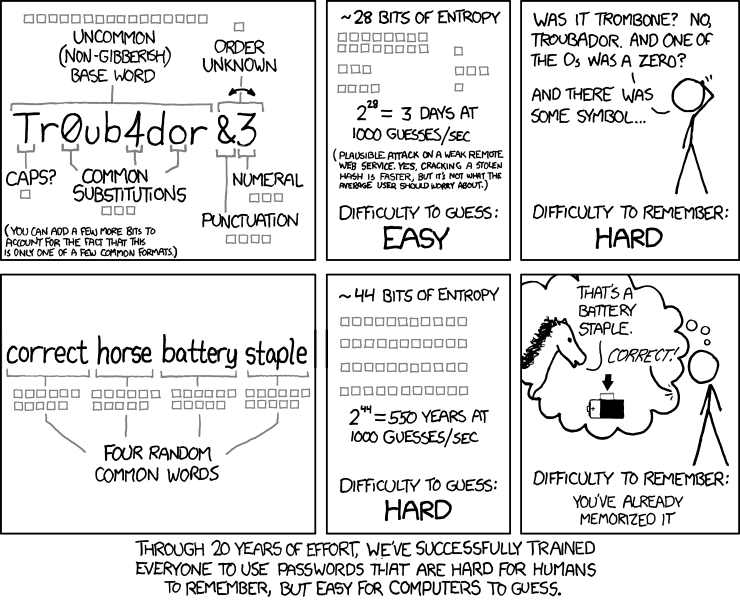
This script provides a simple way to generate secure and human readable passwords, based on XKCD #936
Free software: BSD license
Documentation: http://pyxkcdpass.rtfd.org.
Install
Open your terminal and type:
** pip install pyxkcdpass
or
** easy_install pyxkcdpass
Usage
Just call pyxckdpass and supply it with a dictionary:
** pyxkcdpass -d /usr/share/dict/words
or provide a dictionary and a password length
** pyxkcdpass -d /usr/share/dict/words -l 10
History
0.1.0 (2014-05-05)
First release on PyPI.
1 maintainer

Metadata
1 maintainer
Release files for pyxkcdpass 0.2.0
For a detailed explanation of source distributions (sdists) and built distributions (wheels), please see the package formats documentation.
Source distribution (sdist)
| File | Size | Uploaded | Provenance | |
|---|---|---|---|---|
| pyxkcdpass-0.2.0.zip | 18.6 kB | Without provenance | Details |
Release files / pyxkcdpass-0.2.0.zip
| Download URL | pyxkcdpass-0.2.0.zip |
|---|---|
| Size | 18.6 kB |
| Tags | Source |
|
SHA-256 checksum How to use checksums |
f6b7cfb0fe173b0e4361abf4e7a32747be964859e97d50fc2f79b73f09c58197
|
|
BLAKE2b-256 checksum How to use checksums |
f9ade33aa57ee18bd2d67de2e11f4416f37e081f0219222e6b3eeccc003e8738
|
| Upload date | |
|
Uploaded using Trusted Publishing? What is trusted publishing? |
No |
Security for pyxkcdpass 0.2.0
Provenance
Provenance describes where a file came from. On PyPI, provenance is shared via attestations, which provide a verifiable record of the build or publishing details. View details, limitations and caveats.
No provenance found
None of the files in this release were uploaded with provenance metadata.
A note on package security
PyPI is a repository for distributing packages, not a service for auditing them. While third-party security researchers and our staff do their best to detect and remove malicious packages, PyPI cannot guarantee the quality, security or suitability of any given package.














