
qA_Ap
query About Anything package


📝 Description
This package is a simple solution for implementing a Retrieval Augmented Generation (RAG) on custom documents. The database and LLM interfaces are modular.
Supports an all local setup with a flat file database and Ollama to a totally cloud based setup with a Baserow database and Cerebras (both free to use).
An optional API server (bottle.py) with custom authentication and an integrated frontend is available to query your documents simply and immediately.
Architecture
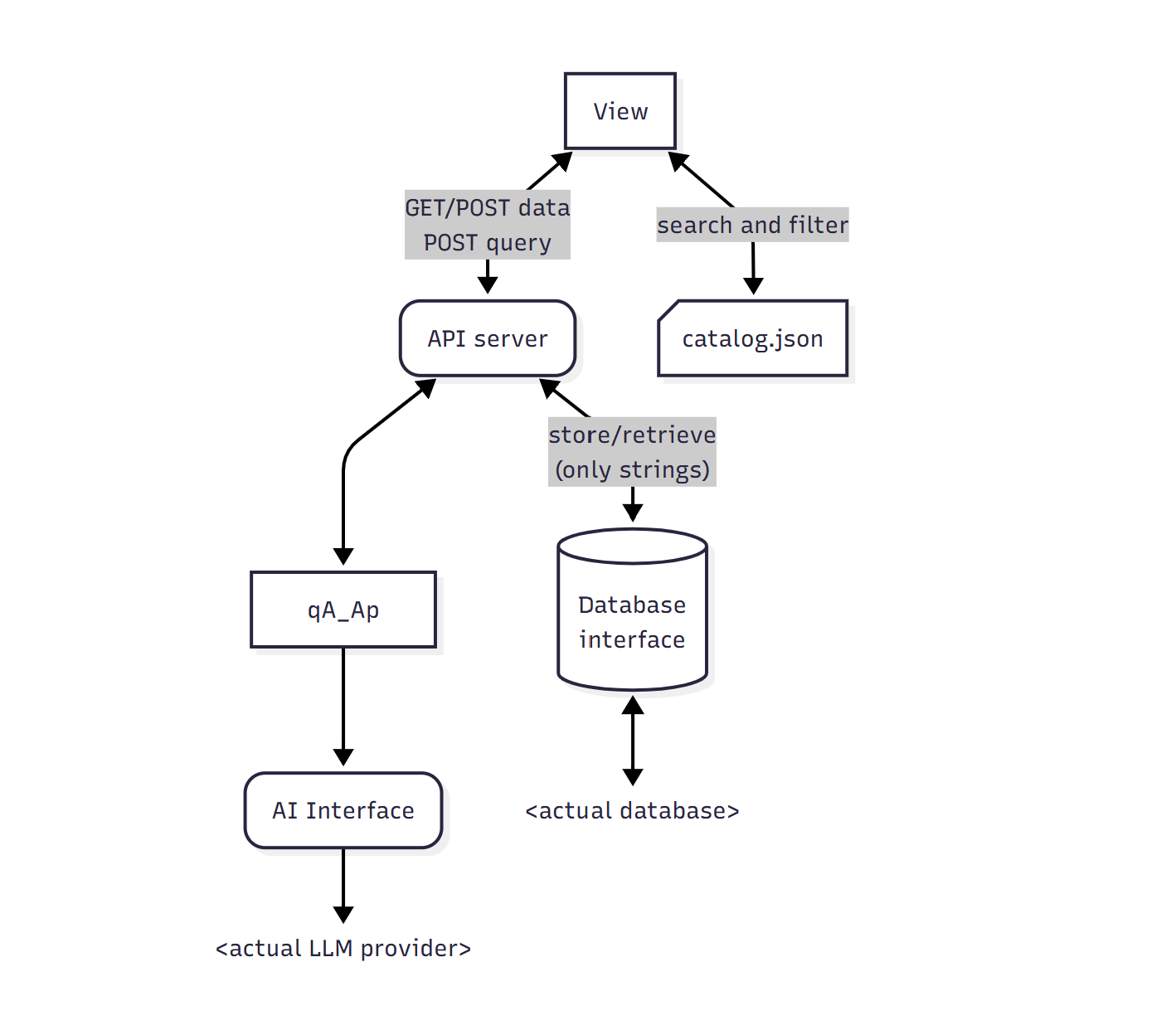
The logic of this package is to query an LLM to find Documents via RAG and expose them in the response. The main purpose would be to ask for solutions or informations for a certain need and have a nice response that presents a set of tools or solutions with direct links when possible.
A Document is defined as a qA_Ap.classes.Document class that consists of a text content, a title, any metadata and any medias.
Support for Notes (qA_Ap.classes.Note) is implemented though quite minimal at this time. Each document can have multiple Notes wich consists of a title, a text content, any metadata and any medias.
As this package is made with a frontend focus the compiles a catalog.json (containing title, short description and metadata of all documents) that should be used to do the search and filtering in the view then query the API for complete a document (and its notes) when needed.
Along with the catalog, indexes can be compiled for each unique values of a given metadata field. This is useful to get directly the list of all existing values for a document attribute. (i.e. your documents can have a tag field and indexing the tag attribute creates a list of all existing tags value that you can use to filter, display or populate a selection dropdown...)
For a better customization, the database and LLM are modulars. Implement your own qA_Ap.db.qaapDB class or qA_Ap.app.ai.AIInterface to suit your needs. Each of these classes are totally ignorant of the rest of the app and should only takes and returns native python types.
📦 Key Dependencies
oyaml >= 1.0
numpy >= 2.3.2
sentence-transformers >= 5.0.0
semantic-text-splitter >= 0.27.0
bottle >= 0.13.4
faiss-cpu >= 1.12.0             # install faiss if your gpu is suitable
# faiss >= 1.5.3
safer >= 5.1.0                  # required if you use the FlatFileDB or AnyFolderDB
ollama >= 0.5.3                 # required is you use the OllamaAIInterface
cerebras-cloud-sdk >= 1.46.0    # required if you use the CerebrasAIInterface
📁 Package Structure
qA_Ap # setup method and aliases to core components

qA_Ap.app # documents manipulation methods

qA_Ap.app.catalog # Catalog related functions

qA_Ap.app.ai # internal Vectorstore class for the RAG
qA_Ap.app.ai.interfaces # abstract classes for AI interface
qA_Ap.app.ai.interfaces.ollama # Ollama interface
qA_Ap.app.ai.interfaces.cerebras # Cerebras 'personal tier' interface
qA_Ap.app.ai.methods # AI related methods

qA_Ap.classes # Document and Note classes
qA_Ap.classes.errors # application errors
qA_Ap.classes.errors.db # databse errors

qA_Ap.db # abstract class for database
qA_Ap.db.baserowfreeapi # Baserow free API database class
qA_Ap.db.flatfiledb # flat file stuctured database class

qA_Ap.state # global objects used accross the app

qA_Ap.web # controls integrated frontend view
qA_Ap.web.api # API server
🛠️ How to use
You can find a raw documentation here (it will be refined)
Python Setup
- Install Python v3.10+ (3.12 recommended)
- Create a virtual environment:
python -m venv venv - Activate the environment:
- Windows:
venv\Scripts\activate - Unix/MacOS:
source venv/bin/activate
- Windows:
- Install dependencies:
pip install -r requirements.txt
qA_Ap.init() method
All the setup can be made with one method call:
import qA_Ap as qp

qp.init()
Customize your setup with these parameters:
-
database (str | ottoDB.ottoDB, optional): The database to use. Can be a path to a flat file database (uses a FlatFileDB instance) or an instance of ottoDB. Defaults to
"data/qaap_db". -
ai (AIInterface.AIInterface | str, optional): The AI interface to use. Can be a model name (if so it uses an OllamaAIInterface) or an instance of AIInterface. Defaults to
"qwen3:0.6b". -
embeddings_model (str, optional): The embeddings model to use via SentenceTransformer. Can be a local path or HuggingFace project name. Defaults to
"Qwen3-Embedding-0.6B". -
object_of_search (str, optional): The object of search. Will be replaced in the system_prompt. Defaults to
"solutions". -
system_prompt (str, optional): The system prompt to use. Defaults to
qA_Ap.default_system_prompt:
You are an assistant for question-answering tasks.
Your role is to guide the user to find {object_of_search} for its need.
Use the following pieces of retrieved context to answer the question if it matches the user needs.
Do not mention any context that do not matches the question.
Use your general knowledge if the context is lacking.
Use the same language as the question and keep the answer concise.
After your answer, list all relevant documents name between brackets.

Question: {question}
Context: {context}
Answer:
-
api_server (int | dict | False, optional): The port on wich to run the API server (bottle.py). If a dictionary is provided, it will be used as the server configuration. If False the server is not run. Defaults to
8080. -
auth (bool, optional): Whether to enable authentication on the API server POST endpoints. Defaults to
False. -
frontend (bool, optional): Whether to run the integrated frontend interface. Defaults to
False.
Core objects
qA_Ap.globals
The globals module contains globals variables used accross the app:
- database: the current
qA_Ap.db.qaapDBclass instance used a database - ai_interface: The current
qA_Ap.app.ai.interfaces.AIInterfaceclass instance used to query the LLM - vectorstore: The
qA_Ap.app.ai.VectorStoreclass instance used to store embedded documents and retrieve them by similarity search - path_to_emmbeddings_model: The path (local or HuggingFace) to the embeddings model used to vectorize the documents and the query
- system_prompt: The system prompt for each LLM query (must contain the interpolated fields {context},{history} and {object_of_search})
- object_of_search: The specific naming of what the LMM should find for you. Is interpolated in the system_prompt.
the qA_Ap package has four useful aliases:
qA_Ap.query
The query method does the RAG and outputs the streamed response.
def query(
   query: str,
   history: list[dict[str,str]] = None,
   include_metadata: bool = False
) -> AIStreamResponse:
- query: The user prompt
- history: The optional chat history as a list of dict containing a key
rolethat can be set to "user" or "assistant" and a keycontentwith the corresponding message. - include_metadata: Bool to includes the complete metadata of retrieved documents at the end of the stream.
AIStreamResponse is an iterator that wraps the LMM stream response and returns the metadata as the last chunk if enabled.
qA_Ap.server
The Bottle.py server instance that runs the API (and the optional integrated frontend)
qA_Ap.compile_catalog
This method will compile each documents and write the catalog.json file.
qA_Ap.compile_attribute
This method takes an attribute_name (str) and reads each unique attribute values for the given attribute name from the catalog.json file and write the according <attribute_name>.txt.
🚀 Roadmap
These are the planned improvements and features:
⬜ Includes the Notes content in the vectorstore
⬜ Write a detailled documentation and github wiki
⬜ Develop a totally frontend solution with transformers.js
⬜ Develop a Flet interface to manage your qA_Ap app
📜 License
This project is licensed under the MIT License.
1 maintainer

Metadata
1 maintainer
Release files for qA-Ap 0.2.9.1
For a detailed explanation of source distributions (sdists) and built distributions (wheels), please see the package formats documentation.
Source distribution (sdist)
| File | Size | Uploaded | |
|---|---|---|---|
| qa_ap-0.2.9.1.tar.gz | 1.3 MB | Details |
Built distribution (wheel)
| File | Interpreter | ABI | Platform | Reset |
|---|---|---|---|---|
| qa_ap-0.2.9.1-py3-none-any.whl | Python 3 | none | any | Details |
Total release size: 1.4 MB
Release files / qa_ap-0.2.9.1.tar.gz
| Download URL | qa_ap-0.2.9.1.tar.gz |
|---|---|
| Size | 1.3 MB |
| Tags | Source |
|
SHA-256 checksum How to use checksums |
6cb7fbe71865bf31420d0270a53f62561e1712b32202b67a5f3aef05c47299f0
|
|
BLAKE2b-256 checksum How to use checksums |
f62c7165552b821880cc473a216843f2a11df3d7ac2c5e2bdcbf152c7c3e09f9
|
| Upload date | |
|
Uploaded using Trusted Publishing? What is trusted publishing? |
No |
| Uploaded via |
twine/6.1.0 CPython/3.12.10
|
Release files / qa_ap-0.2.9.1-py3-none-any.whl
| Download URL | qa_ap-0.2.9.1-py3-none-any.whl |
|---|---|
| Size | 100.4 kB |
| Tags | Python 3 |
|
SHA-256 checksum How to use checksums |
5a4fa9b6665ca8f31ffc0a82c029c7e1ade065c41357ee58e17c07506127720a
|
|
BLAKE2b-256 checksum How to use checksums |
a28c4d8e3a1d5e2a63278ba951c5d103415b989662067384c0df3bd96ce08b58
|
| Upload date | |
|
Uploaded using Trusted Publishing? What is trusted publishing? |
No |
| Uploaded via |
twine/6.1.0 CPython/3.12.10
|














