
qrCodeImageSorterGUI
GUI interface for the qrCodeImageSorter repository. For detailed information on the philosophy of the tool see the readme in this repository. This is a GUI interface for this underlying toolset.
A Quick (but rough) Video Guide
Installation
To install the tool, run the below command with any version of Python above 3.7:
pip install qrImageIndexerGUI
This package relies on the ZBar library. See the below instructions for different packages:
On Windows:
If you see an ugly ImportError related with lizbar-64.dll, install the vcredist_x64.exe from the Visual C++ Redistributable Packages for Visual Studio 2013
On Linux:
sudo apt-get install libzbar0
On Mac OS X:
brew install zbar
Instructions
Launch Window
To load the launch window, run the command:
python -m qrImageIndexerGUI
This will present the user with the following window:
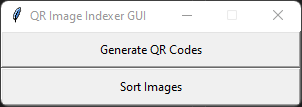
From here you can open either the window for generating the QR codes or for sorting the resultant images.
Generate QR Codes
This window allows the user to generate QR codes. It also provides a preview of what the output PDF will look like:
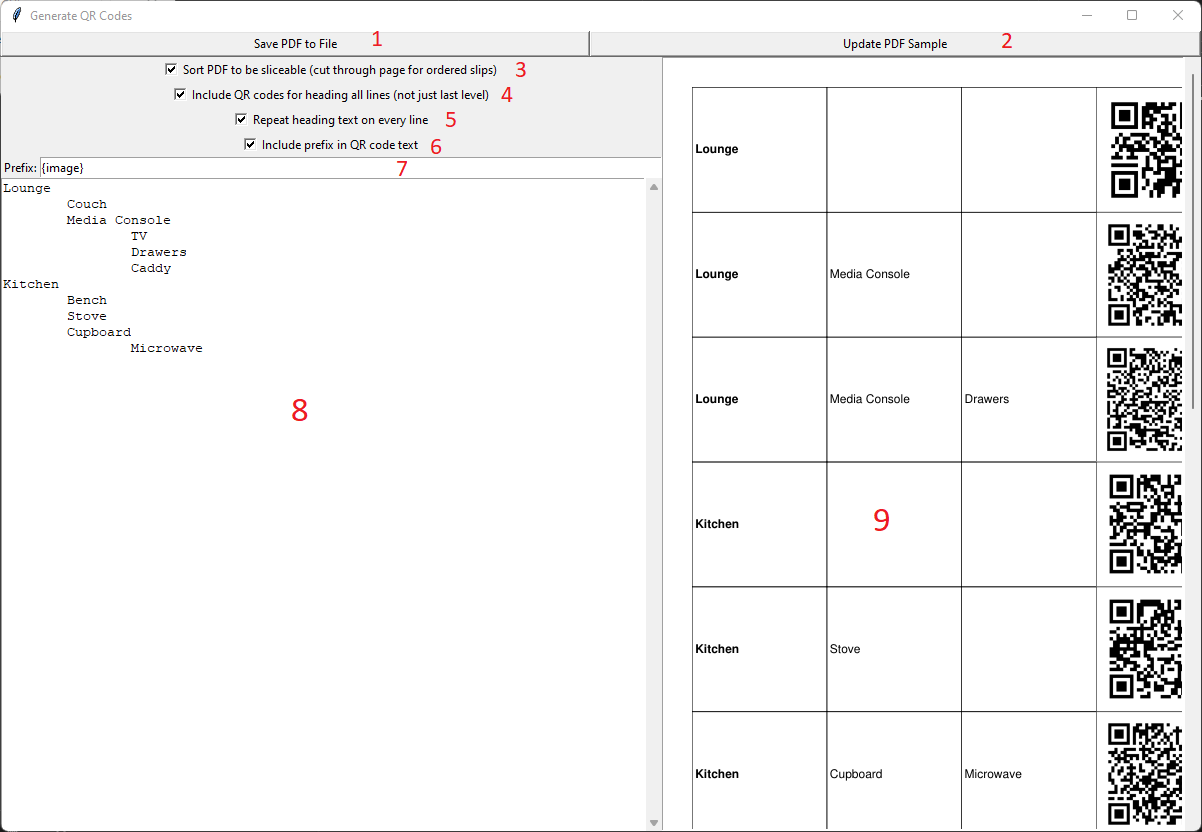
The available controls are listed below:
- Save PDF generated based on the listed inputs to file;
- Update sample PDF based on the listed inputs;
- Toggle sorting of PDF for slicing or down the page;
- Toggle generating QR codes for heading lines;
- Toggle reapeating of parent headings on every line of the PDF;
- Toggle inclusion of a prefix in the QR code;
- Configure prefix to include;
- Tab-delineated item input;
- Sample PDF display.
The recommended settings are set by default. In most situations the user should just enter their own text in the text entry field (8).
Sort Images
This window allows the user to sort photos that have been taken with QR codes in them. The interface will look similar to the below.
Note that the provided screenshot is shown after having scanned a folder of images for demonstration. It will be blank prior to this:
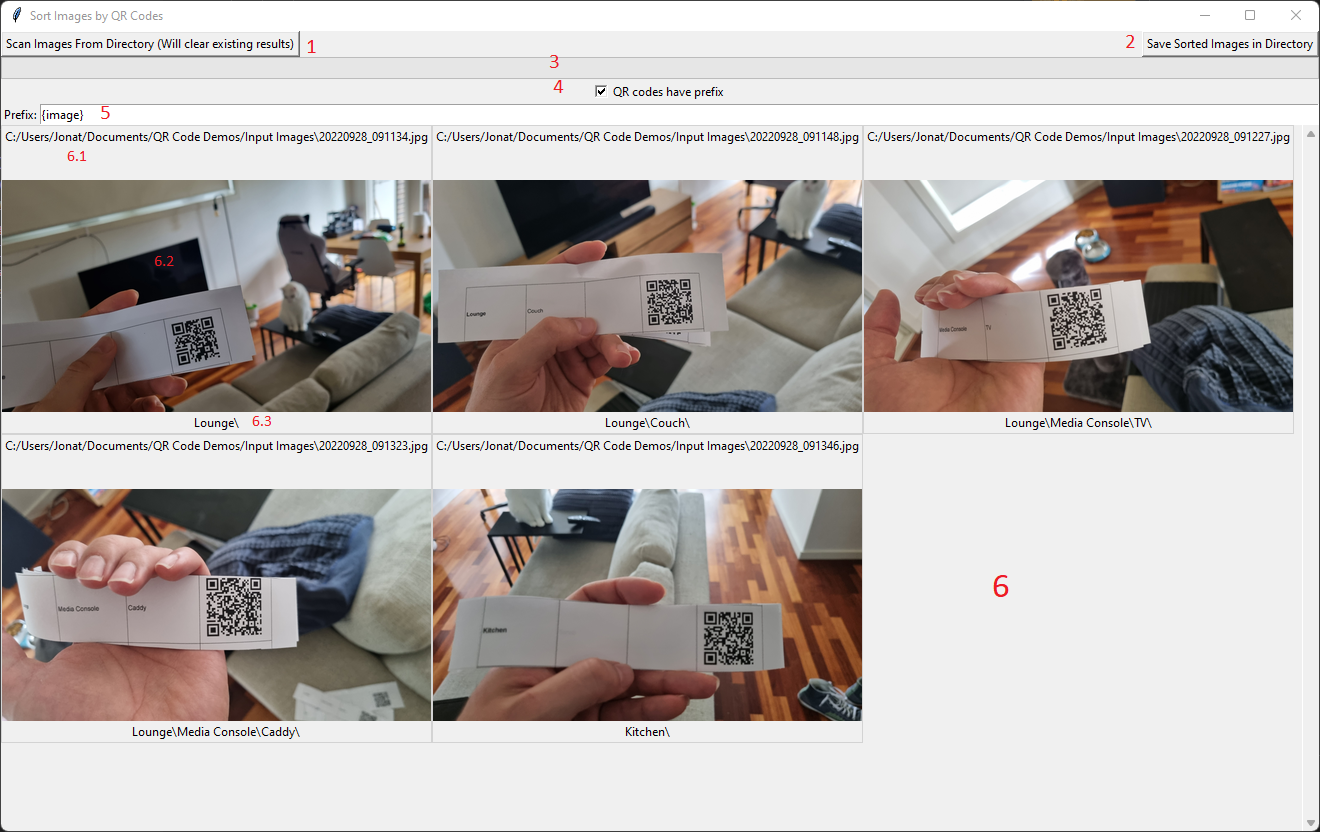
The available controls are listed below:
-
Scan images from a selected directory. This will open a prompt asking the user to select a directory;
-
Save sorted images in a directory. This will save the images in the folder structure dictaged by the detected QR codes;
-
Progress bar to indicate image scanning progress;
-
Indicate whether QR codes have a prefix attached;
-
Specify QR code prefix if used;
-
Display images where QR codes are detected;
6.1. Path to specified image;
6.2. Thumbnail of image;
6.3. Path detected in QR code.
Not Shown: New Feature - Quick Sort
There is now a quick sort button. This button will combine the scanning and saving process. You will be prompted for 2 directories, first the input and then the output. Images will be scanned then when scanning is complete they will be saved directly to the output directory without displaying the images in the window.
This will improve performance where large numbers of images loading into the viewing window was reducing the processing speed.
Note on future feature
It is intended that a feature will be added to allow users to manually add images as key images where they are not detected with a QR code. This will allow users to images where the QR code may not have been detected or where it was forgotten. That is the primary purpose of the intermediate preview window but this feature is not implemented yet.
1 maintainer

Metadata
1 maintainer
Release files for qrImageIndexerGUI 0.3.4
For a detailed explanation of source distributions (sdists) and built distributions (wheels), please see the package formats documentation.
Source distribution (sdist)
| File | Size | Uploaded | |
|---|---|---|---|
| qrimageindexergui-0.3.4.tar.gz | 15.4 kB | Details |
Built distribution (wheel)
| File | Interpreter | ABI | Platform | Reset |
|---|---|---|---|---|
| qrimageindexergui-0.3.4-py3-none-any.whl | Python 3 | none | any | Details |
Total release size: 28.3 kB
Release files / qrimageindexergui-0.3.4.tar.gz
| Download URL | qrimageindexergui-0.3.4.tar.gz |
|---|---|
| Size | 15.4 kB |
| Tags | Source |
|
SHA-256 checksum How to use checksums |
31d17a71c88ab99a5f576c9243e9cf2a7879020a3fda60912e3eab0d89ebbb3e
|
|
BLAKE2b-256 checksum How to use checksums |
56da72b5fa499f970e62e81c77a37c72e3f0b7c6b0796ab5c461dd98e6d20a85
|
| Upload date | |
|
Uploaded using Trusted Publishing? What is trusted publishing? |
No |
| Uploaded via |
twine/6.2.0 CPython/3.9.23
|
Release files / qrimageindexergui-0.3.4-py3-none-any.whl
| Download URL | qrimageindexergui-0.3.4-py3-none-any.whl |
|---|---|
| Size | 12.9 kB |
| Tags | Python 3 |
|
SHA-256 checksum How to use checksums |
2d52b666e2c5e166544503a70e9b229b4fe62c5929a44d03ba35eabc596497c3
|
|
BLAKE2b-256 checksum How to use checksums |
f5384e7cdaa32ceab91b464aeb44dc9fd7fccfed10f0c173d1abe0f3a230a666
|
| Upload date | |
|
Uploaded using Trusted Publishing? What is trusted publishing? |
No |
| Uploaded via |
twine/6.2.0 CPython/3.9.23
|














