
AI-powered SDK featuring algorithmic trading, backtesting, deployment on 100+ exchanges, and multiple optimization engines.
Verified details
These details have been verified by PyPIProject links
GitHub Statistics
Maintainers

Project description
🚀 QTradeX Core — Build, Backtest & Optimize AI-Powered Crypto Trading Bots







📸 See screenshots.md for more visuals
📚 Read the core docs on QTradeX SDK DeepWiki
🤖 Explore the bots at QTradeX AI Agents DeepWiki
💬 Join our Telegram Group for discussion & support
TL;DR
QTradeX is a lightning-fast Python framework for designing, backtesting, and deploying algorithmic trading bots, built for crypto markets with support for 100+ exchanges, AI-driven optimization, and blazing-fast vectorized execution.
Like what we're doing? Give us a ⭐!
Why QTradeX?
Whether you're exploring a simple EMA crossover or engineering a strategy with 20+ indicators and genetic optimization, QTradeX gives you:
- Modular, non-locked architecture - want to use QTradeX's data fetching with a custom backtest engine? Go for it!
- Tulip + CCXT Integration
- Custom Bot Classes
- Fast, Disk-Cached Market Data
- Ultra Fast Backtests (even on a Raspberry Pi!)
🔍 Features at a Glance
- Bot Development: Extend
BaseBotto craft custom strategies - Backtesting: Easy-to-navigate CLI & live-coding based testing platform (Just select
Autobacktest) - Optimization: Use QPSO, LSGA, or others to fine-tune parameters
- Indicators: Wrapped Tulip indicators for blazing performance
- Data Sources: Pull candles from 100+ CEXs/DEXs with CCXT
- Performance Metrics: Evaluate bots with ROI, Sortino, Win Rate, and dozens more
- Speed: 200+ backtests per second for 3 years of daily candles on a Ryzen 5600x
Project Structure
qtradex/
├── core/             # Bot logic and backtesting
├── indicators/       # Technical indicators
├── optimizers/       # QPSO, LSGA, other optimizers, and common utilities
├── plot/             # Trade/metric visualization
├── private/          # Execution & paper wallets
├── public/           # Data feeds and utils
└── common/           # JSON RPC, BitShares nodes, and data caching
Quickstart
Install
pip install qtradex
Or, if you want the latest updates:
git clone https://github.com/squidKid-deluxe/QTradeX-Algo-Trading-SDK.git QTradeX
cd QTradeX
pip install -e .
Example Bot: EMA Crossover
import qtradex as qx
import numpy as np


class EMACrossBot(qx.BaseBot):
    def __init__(self):
        # Notes:
        # - If you make the tune values integers, the optimizers
        #   will quantize them to the nearest integer.
        # - By putting `_period` at the end of a tune value,
        #   QTradeX core will assume they are periods in days and will scale them
        #   to different candle sizes if the data given isn't daily
        self.tune = {
            "fast_ema_period": 10.0,
            "slow_ema_period": 50.0
        }
        self.clamps = {
            "fast_ema_period": [5, 10, 50, 1],
            "slow_ema_period": [20, 50, 100, 1],
        }

    def indicators(self, data):
        return {
            "fast_ema": qx.ti.ema(data["close"], self.tune["fast_ema"]),
            "slow_ema": qx.ti.ema(data["close"], self.tune["slow_ema"]),
        }

    def strategy(self, tick_info, indicators):
        fast = indicators["fast_ema"]
        slow = indicators["slow_ema"]
        if fast > slow:
            return qx.Buy()
        elif fast < slow:
            return qx.Sell()
        return qx.Thresholds(buying=fast * 0.8, selling=fast * 1.2)

    def plot(self, *args):
        qx.plot(
            self.info,
            *args,
            (
                # key name    label    color   axis idx   axis name
                ("fast_ema", "EMA 1", "white", 0,        "EMA Cross"),
                ("slow_ema", "EMA 2", "cyan",  0,        "EMA Cross"),
            )
        )


# Load data and run
data = qx.Data(
    exchange="kucoin",
    asset="BTC",
    currency="USDT",
    begin="2020-01-01",
    end="2023-01-01"
)
bot = EMACrossBot()
qx.dispatch(bot, data)
See more bots in QTradeX AI Agents
Usage Guide
| Step | What to Do |
|---|---|
| 1️⃣ | Build a bot with custom logic by subclassing BaseBot |
| 2️⃣ | Backtest using qx.dispatch + historical data |
| 3️⃣ | Optimize with any algorithm you like (optimized tunes stored per-bot in tunes/) |
| 4️⃣ | Deploy live |
Roadmap
- More indicators (non-Tulip sources)
- GPU Acceleration for indicators
- Improved multi-core support for optimization
- Windows/Mac support
- TradFi Connectors: Stocks, Forex, and Comex support
Want to help out? Check out the Issues list for forseeable improvements and bugs.
Resources
📜 License
WTFPL — Do what you want. Just be awesome about it 😎
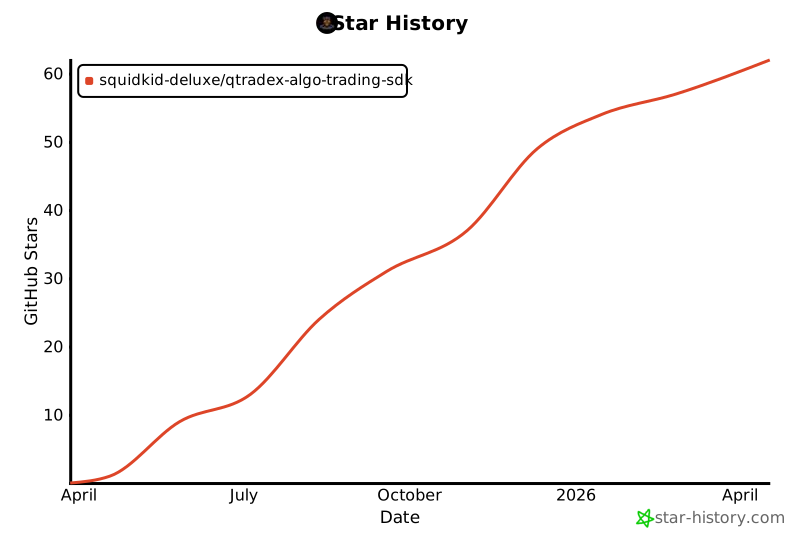
⭐ Star History
✨ Ready to start? Clone the repo, run your first bot, and tune away. Once tuned - LET THE EXECUTIONS BEGIN!
Project details
Verified details
These details have been verified by PyPIProject links
GitHub Statistics
Maintainers


Download files
Download the file for your platform. If you're not sure which to choose, learn more about installing packages.
Source Distributions
Built Distribution
Filter files by name, interpreter, ABI, and platform.
If you're not sure about the file name format, learn more about wheel file names.
Copy a direct link to the current filters
File details
Details for the file qtradex-1.4.0-py3-none-any.whl.
File metadata
- Download URL: qtradex-1.4.0-py3-none-any.whl
- Upload date:
- Size: 157.7 kB
- Tags: Python 3
- Uploaded using Trusted Publishing? Yes
- Uploaded via: twine/6.1.0 CPython/3.13.12
File hashes
| Algorithm | Hash digest | |
|---|---|---|
| SHA256 |
5db94b451473a70775c1e8102180d92b01de6195452eef3555b08655f9da1f7b
|
|
| MD5 |
8808d6cb08cc135c4c282ec32b5413c8
|
|
| BLAKE2b-256 |
d58f4b1c6f898350ca3f5ca134c414ad71684539d1c8abf601eab909a6d81474
|
Provenance
The following attestation bundles were made for qtradex-1.4.0-py3-none-any.whl:
Publisher:
publish.yml on squidKid-deluxe/QTradeX-Algo-Trading-SDK
-
Statement:
-
Statement type:
https://in-toto.io/Statement/v1 -
Predicate type:
https://docs.pypi.org/attestations/publish/v1 -
Subject name:
qtradex-1.4.0-py3-none-any.whl -
Subject digest:
5db94b451473a70775c1e8102180d92b01de6195452eef3555b08655f9da1f7b - Sigstore transparency entry: 1630215240
- Sigstore integration time:
-
Permalink:
squidKid-deluxe/QTradeX-Algo-Trading-SDK@802b6dba34b4311f8391d05ce00e9498ca87de79 -
Branch / Tag:
refs/tags/1.4.0 - Owner: https://github.com/squidKid-deluxe
-
Access:
public
-
Token Issuer:
https://token.actions.githubusercontent.com -
Runner Environment:
github-hosted -
Publication workflow:
publish.yml@802b6dba34b4311f8391d05ce00e9498ca87de79 -
Trigger Event:
release
-
Statement type:






